- •SKY staking requires a Web3 wallet, Ethereum network access, and ETH for gas fees.
- •SKY staking rewards are paid in SKY and decided through Sky Ecosystem Governance.
- •Sky also offers USDS savings through SSR for users who prefer stablecoin-focused earning.
Bull or bear markets, one of the biggest advantages of DeFi platforms is that they can continue to reward users through different earning options. SKY, being part of one of the top DeFi ecosystems, often comes up when users talk about earning yield through staking while staying invested in the market.
Since Sky is a Web3 platform, the process involves networks, gas fees, and Web3 wallets, which can feel a little overwhelming for new users. This guide keeps SKY staking simple by explaining the basic technical details and showing you the step-by-step process to stake SKY tokens on the Sky app.
How SKY Staking Works
The SKY platform can feel a little confusing for someone who is accessing it for the first time, especially if they are also new to DeFi. So, before we move to the staking steps, let’s quickly understand what you need.
- Web3 Wallet
First, you need a Web3 wallet to access the SKY platform. If you have bought SKY tokens but they are still sitting on Bybit or any other centralized exchange, you will not be able to stake them directly from there. You need to move your SKY tokens to a Web3 wallet first.
MetaMask is a solid choice here because it is user-friendly and supports multiple networks. So, start by setting up a Web3 wallet and transferring your SKY tokens to it. You can also refer to our guide on how to buy and transfer SKY tokens if you need help getting started.
- Supported Network
Another thing to understand is network support. While using the SKY platform, you may notice that Sky supports multiple networks, including Ethereum, Base, Optimism, and other layer-2 solutions. If you are not very familiar with networks, just keep one thing in mind: Ethereum is usually more expensive than layer-2 networks because of higher gas fees.
However, for SKY staking, the Stake & Borrow feature is currently available only on Ethereum. This means you should keep some ETH in your wallet to pay gas fees before you try to stake your SKY tokens.
How to Stake SKY Tokens: Step-by-Step Guide
Once your Web3 wallet is ready and your SKY tokens are available on Ethereum, you can stake your SKY tokens and start earning staking rewards on the platform. Here is how it works:
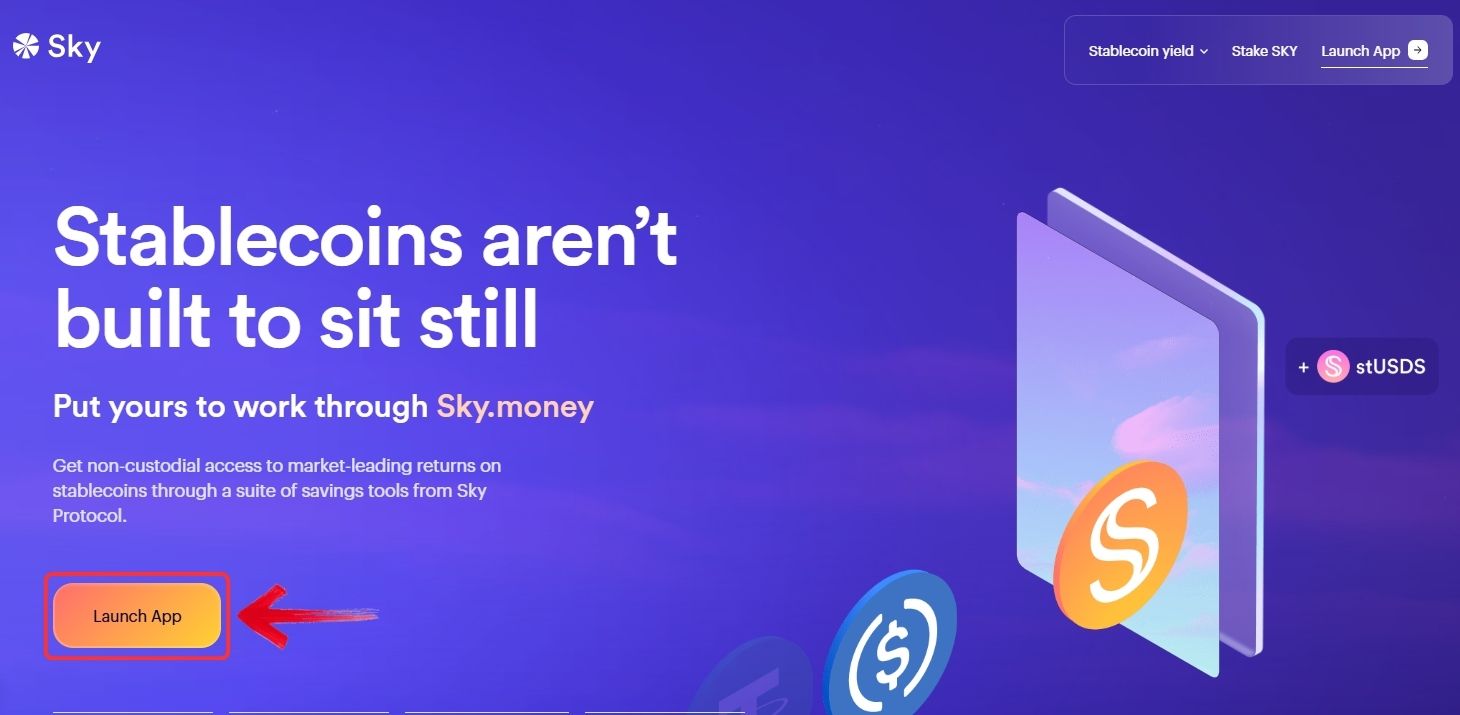
Step 1: Open your browser and go to the Sky website. Click on the “Launch App” button to open the Sky.money app.
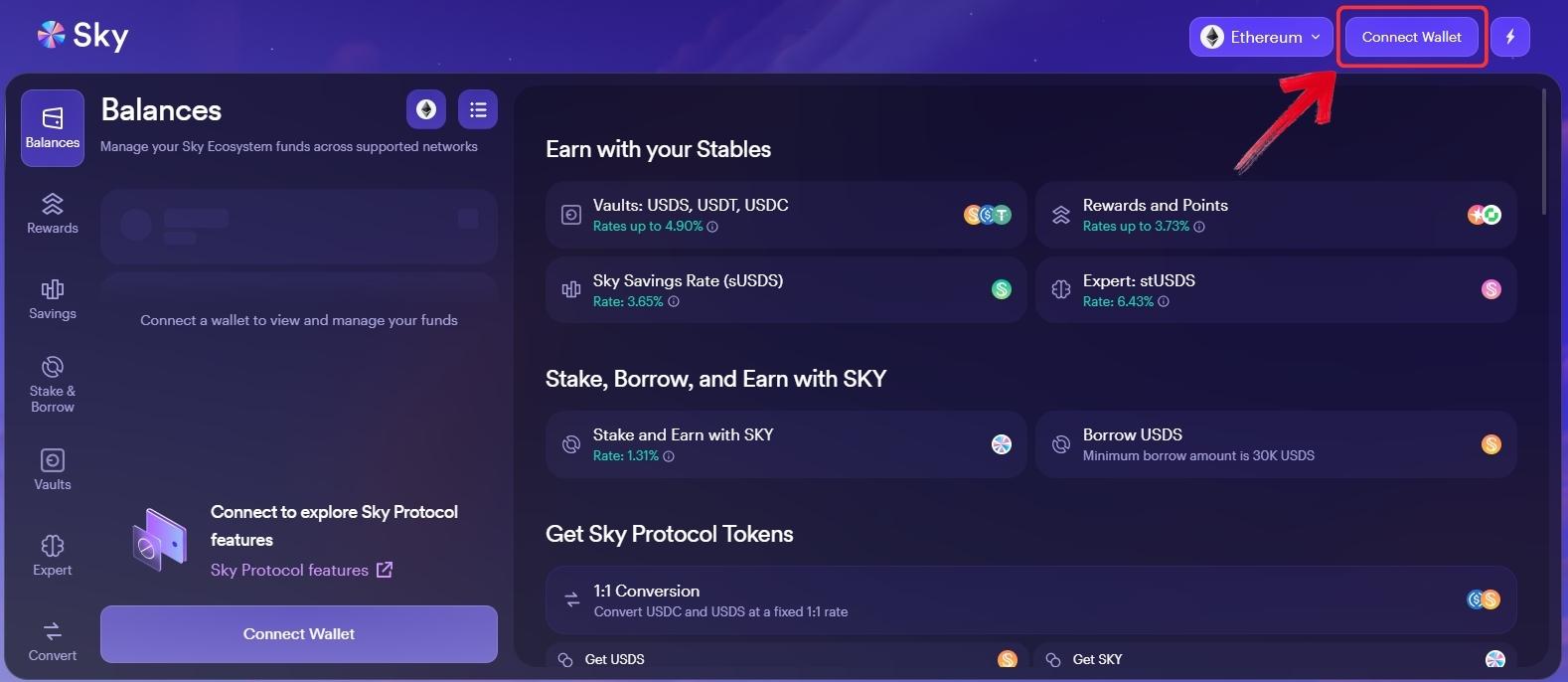
Step 2: Once you are inside the Sky.money app, connect your Web3 wallet. Click on “Connect Wallet” and approve the connection request from your wallet.
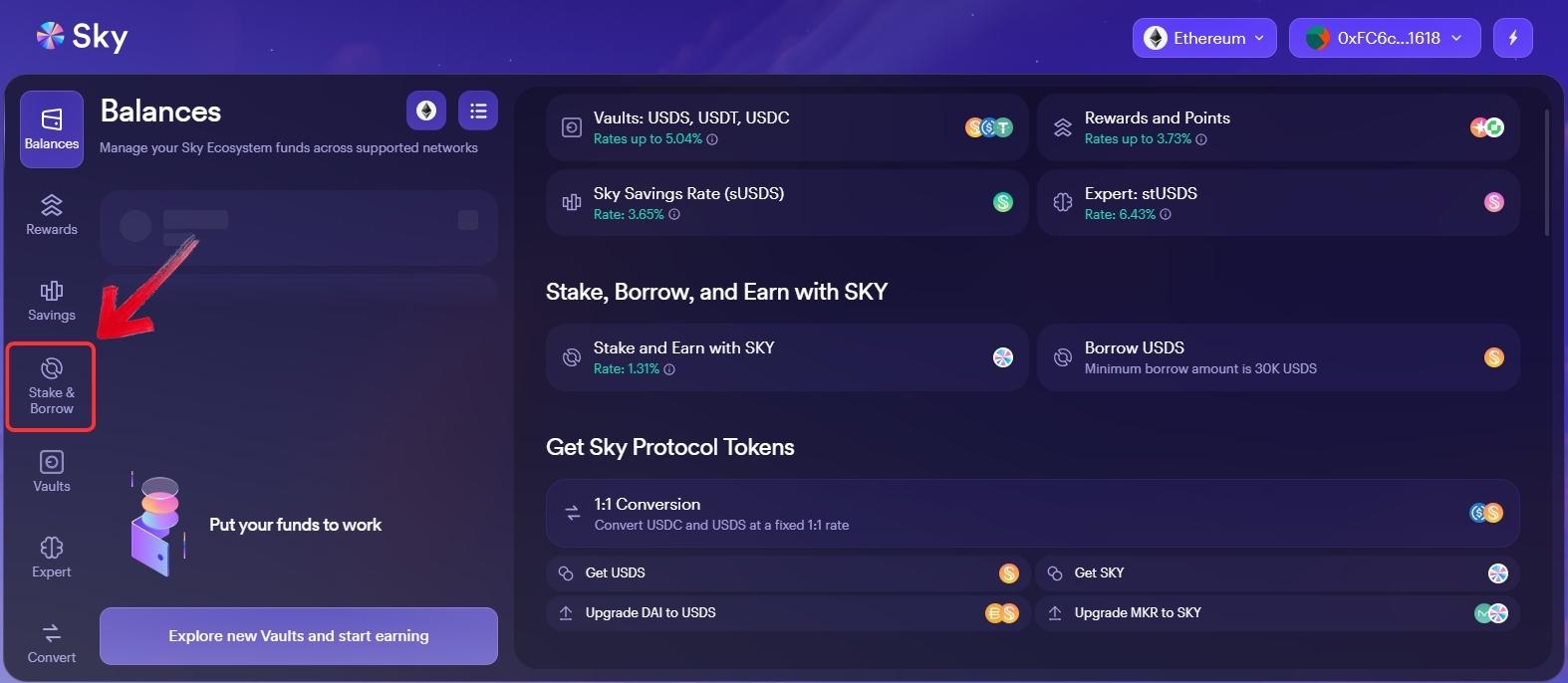
Step 3: After your wallet is connected, you will see the main Sky features listed in the left-side menu. Click on “Stake & Borrow”.
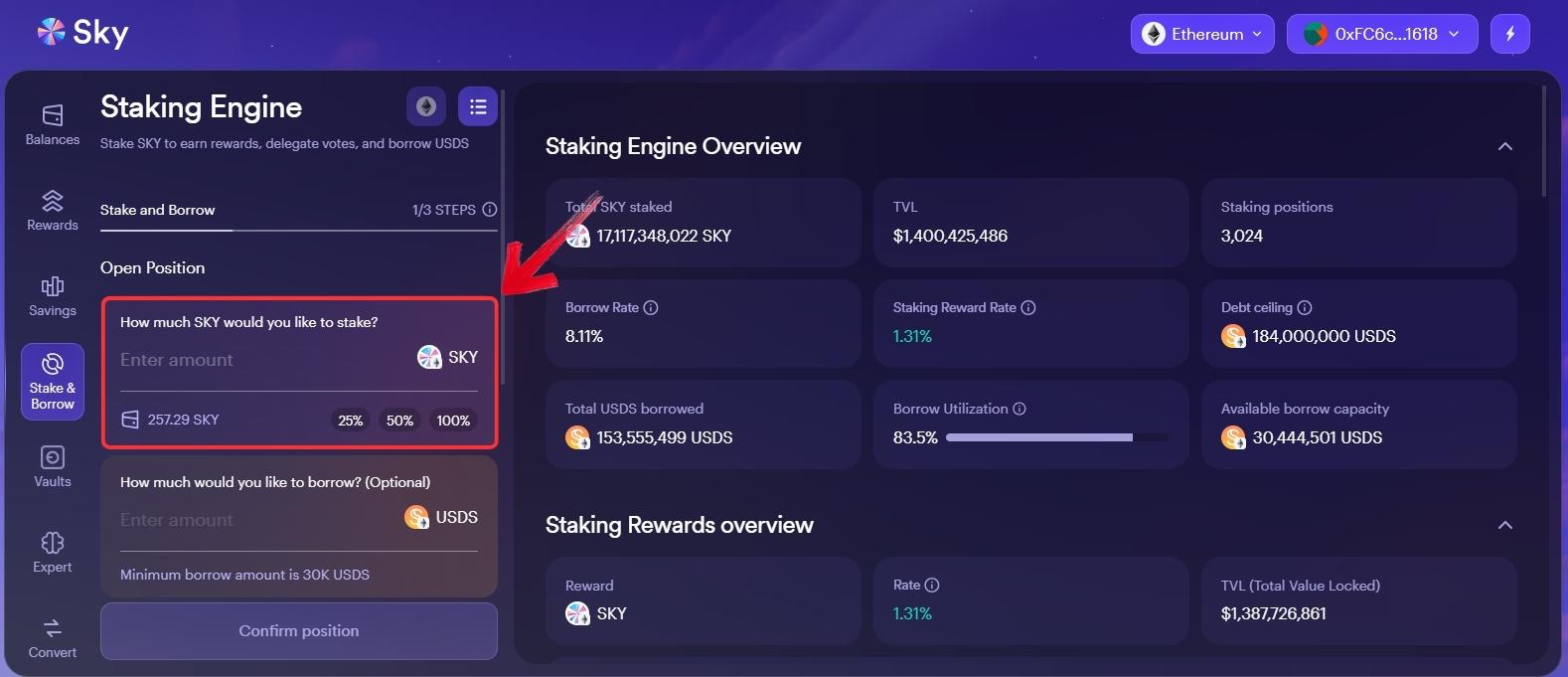
Step 4: Find the “Open Position” field and enter the amount of SKY tokens you want to stake on the platform.
Step 5: Scroll down and review the transaction details. Once everything looks correct, click on “Confirm Position”.
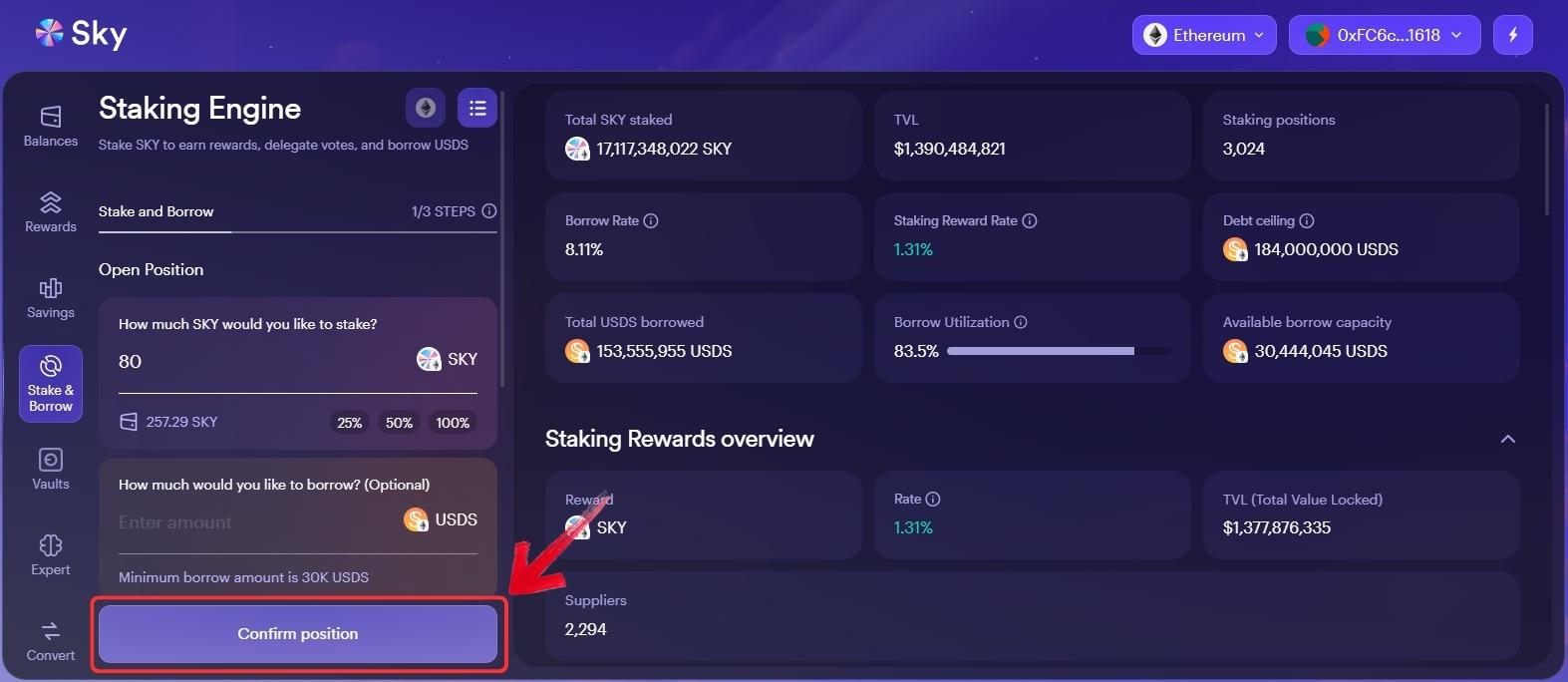
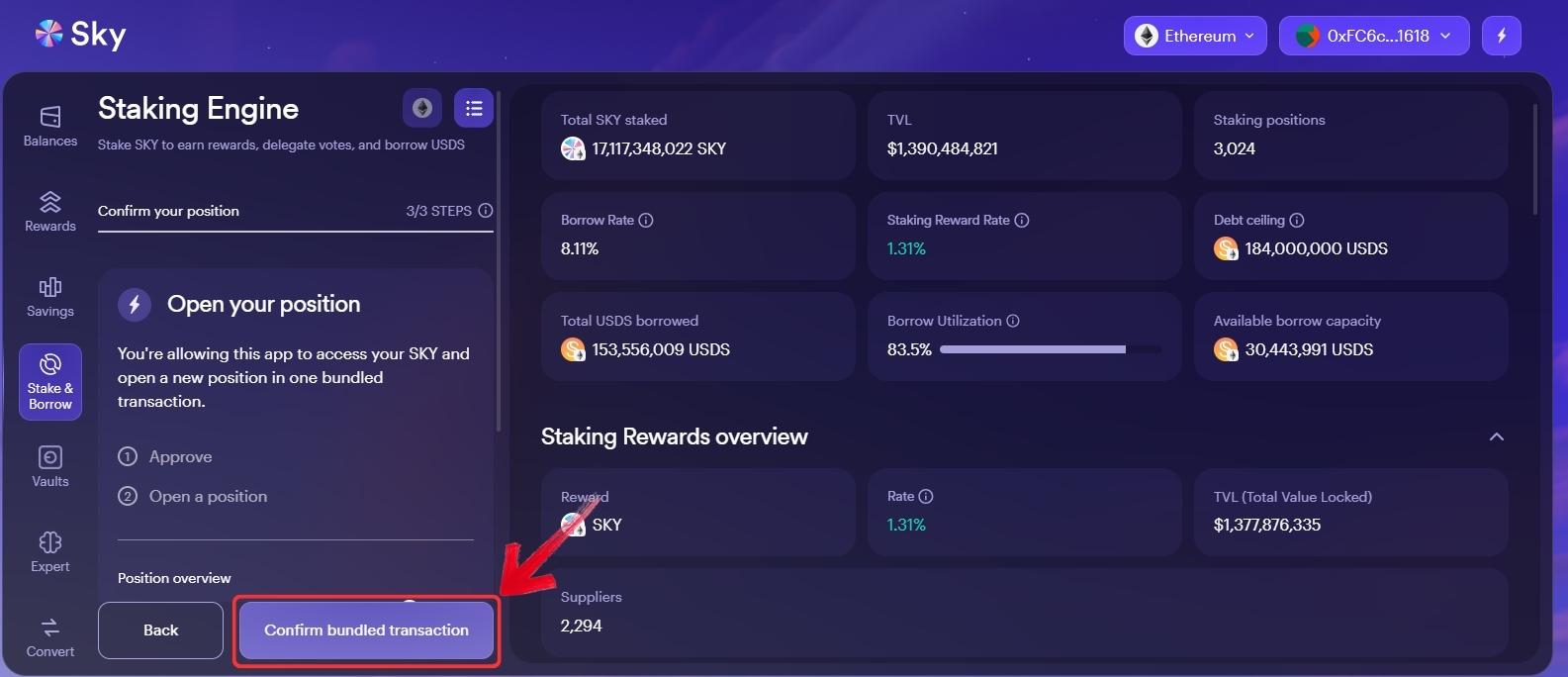
Step 6: Sky will show you an overview of your position and ask you to approve the transaction through your Web3 wallet. Click on “Confirm Bundled Transaction”.
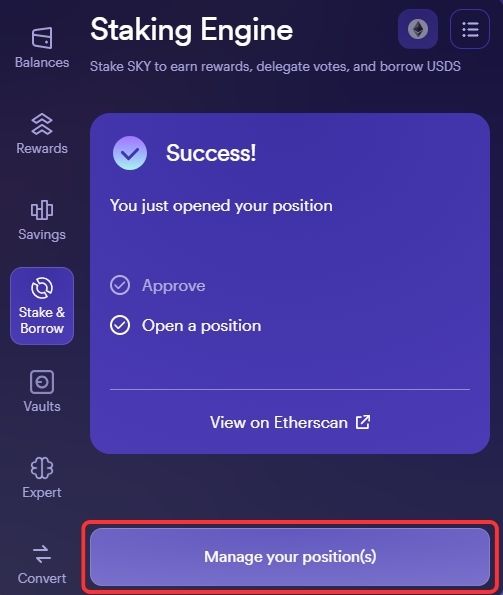
Step 7: Once the transaction is successful, click on “Manage Your Positions”. From there, you can view your staked SKY position, staking rewards, staking reward rate, and other position details.
What Is SKY Staking?
SKY staking allows users to supply SKY tokens to the Staking Engine of the decentralized Sky Protocol and earn rewards in SKY tokens. The process is non-custodial, meaning your SKY and accumulated rewards stay inside a smart contract without any intermediary taking custody of your tokens.
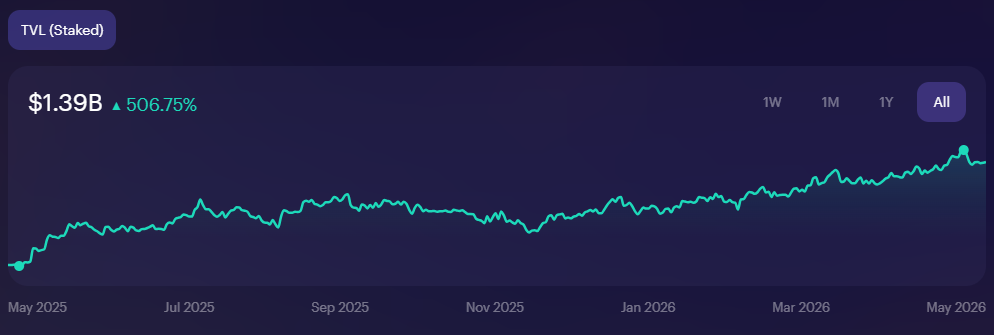
The staking reward rate is determined by Sky Ecosystem Governance through decentralized onchain voting, so it can change over time. The current staking reward rate is 1.31%, with 17,117,244,038 SKY staked, $1,390,476,375 in TVL, and 3,023 staking positions. There is also no minimum SKY requirement to access staking rewards.
Token Symbol
SKY
Current Price
Loading...
Daily Change
Loading...
All-Time High
Loading...
Daily Low
Loading...
Daily High
Loading...
24h Volume
Loading...
Market Cap
Loading...
FDV
Loading...
Total Supply
Loading...
Max Supply
Loading...
SKY Staking vs Sky Savings Rate
SKY staking and the Sky Savings Rate are both reward options inside the Sky ecosystem, but they are not the same. SKY staking is for users who hold SKY tokens and want to earn rewards in SKY. Your returns depend on the staking reward rate, which is set through Sky Ecosystem Governance.
The Sky Savings Rate, on the other hand, is for users who hold USDS or want to convert eligible assets into USDS and earn through SSR. It is more stablecoin-focused, so it may suit users who want less exposure to SKY price movement.
In simple terms, SKY staking is for token holders, while SSR is for users who prefer earning through USDS.
How to Stake USDS to Earn Through SSR
USDS is the rebranded version of DAI, which has been in the market since 2017. The rebrand was done to support MakerDAO’s long-term vision under the Sky ecosystem. If you want to earn through the Sky Savings Rate, you need USDS in your Web3 wallet first.
There are a few ways to get USDS. You can convert your SKY tokens to USDS on the Sky platform, borrow USDS by staking SKY tokens, or take the simpler route by buying USDS through a centralized exchange like Bybit and transferring it to your Web3 wallet.
Once you have USDS in your Web3 wallet, follow these steps to stake it on the Sky platform:
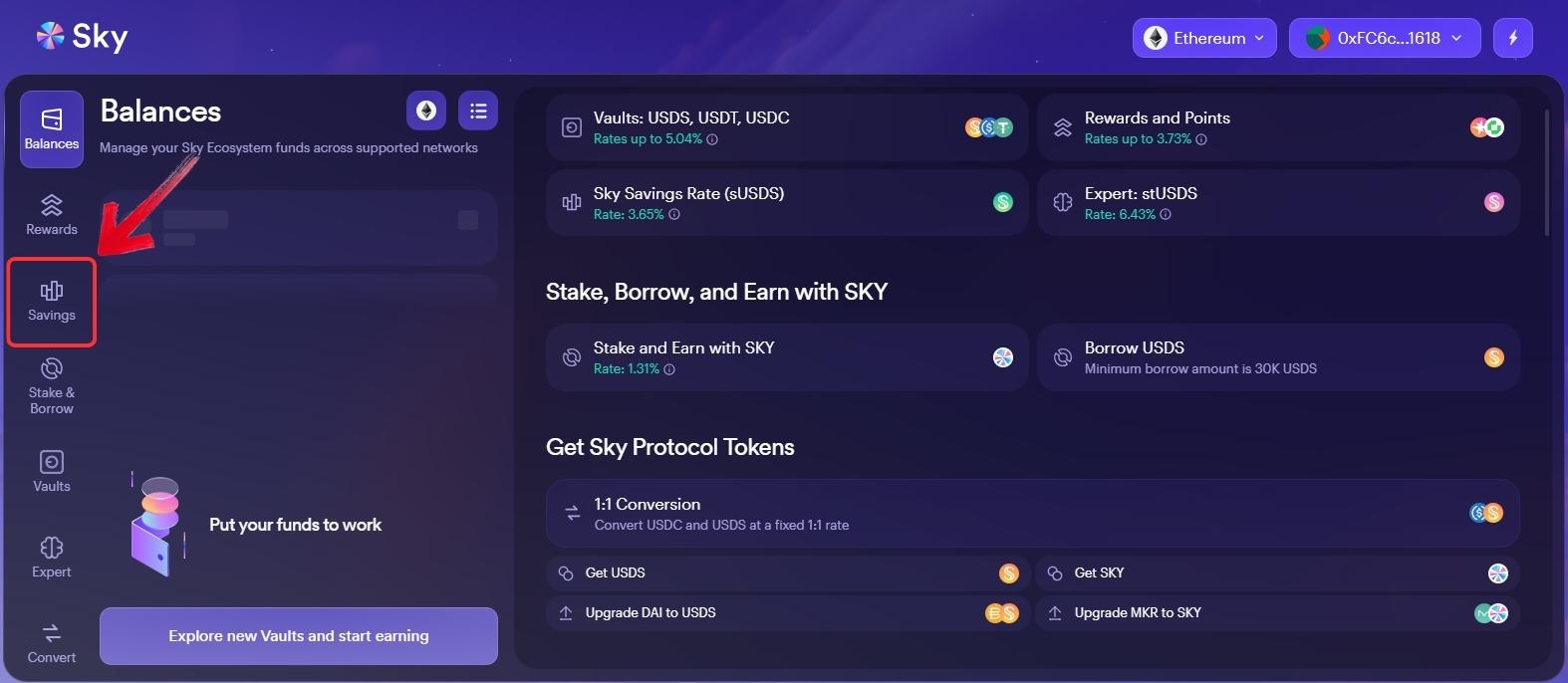
Step 1: On the Sky.money app, click on the “Savings” tab in the left pane. Make sure your Web3 wallet is connected to the Sky app.
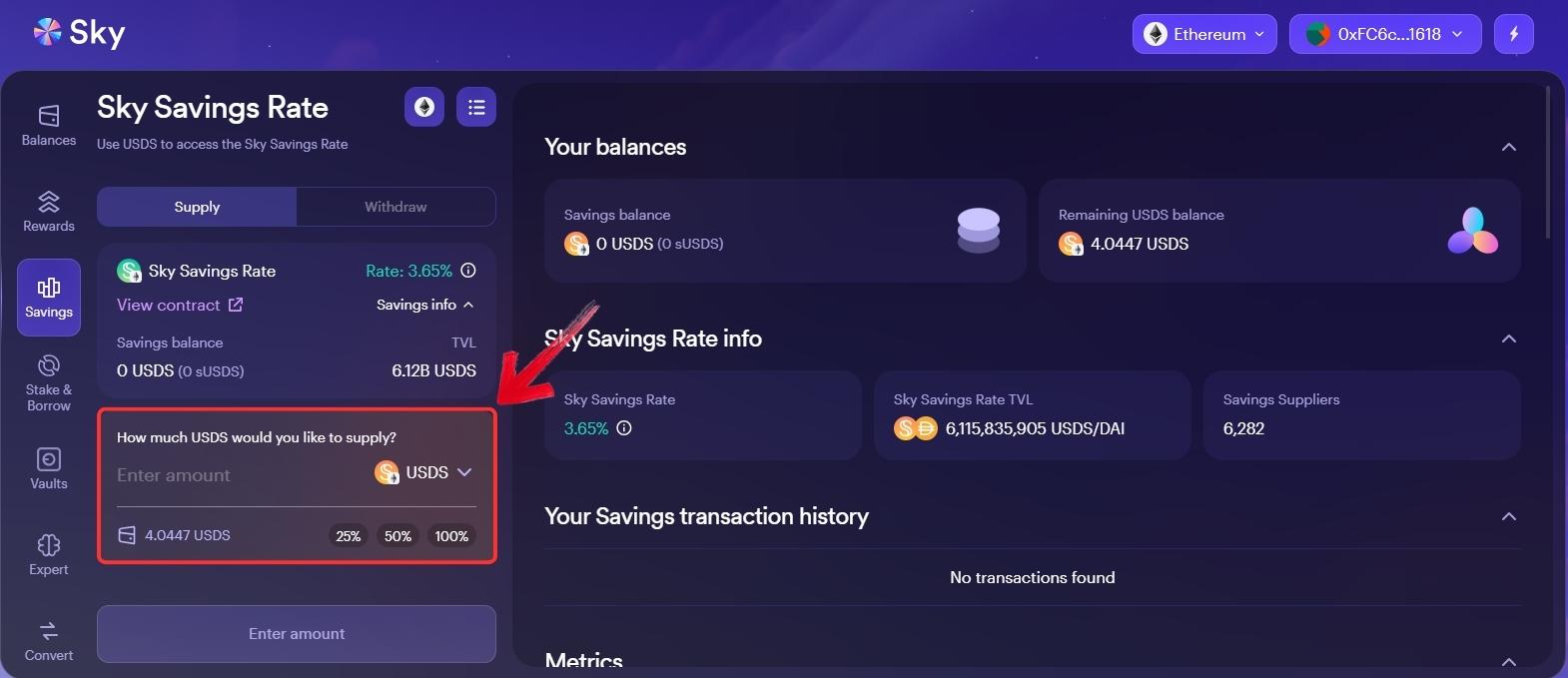
Step 2: In the USDS supply field, enter the amount of USDS you want to stake on the platform.
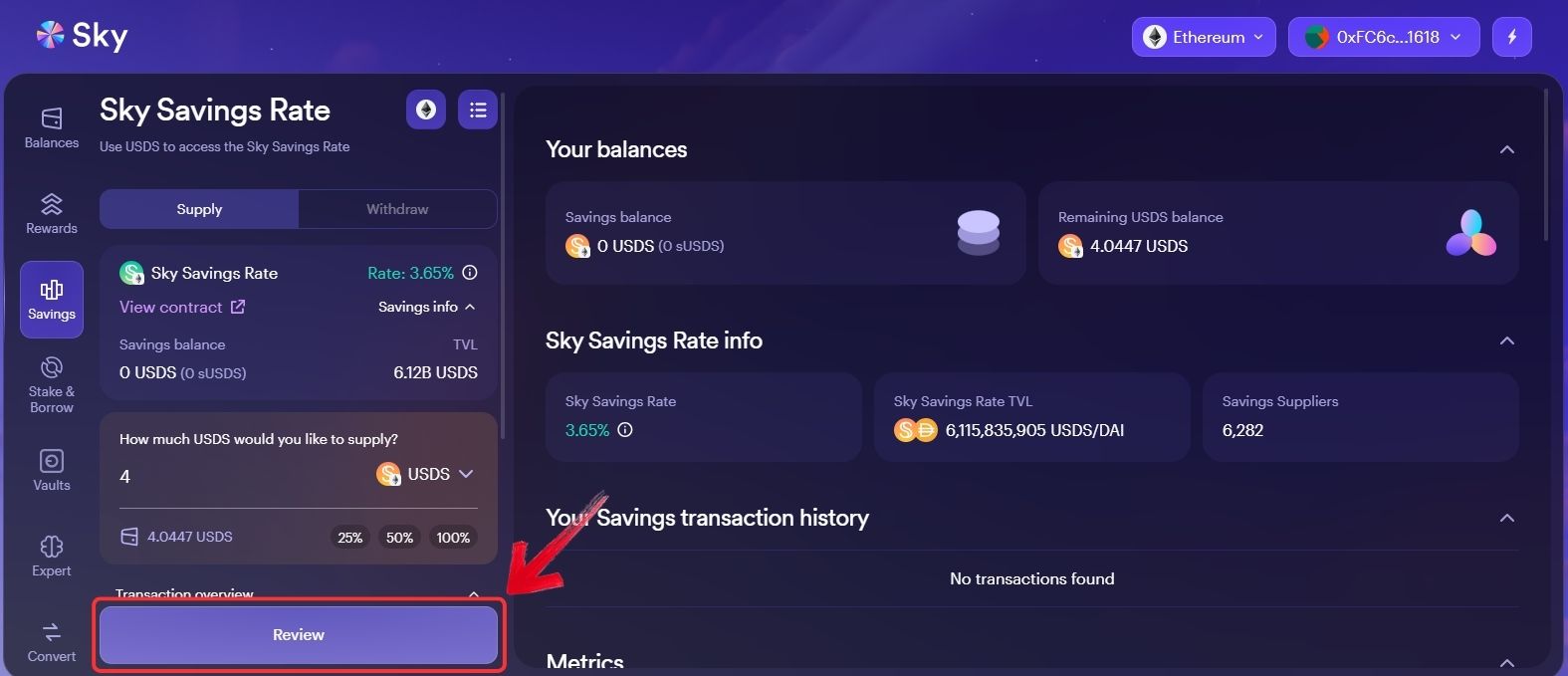
Step 3: Review your transaction details and click on the “Review” button to proceed.
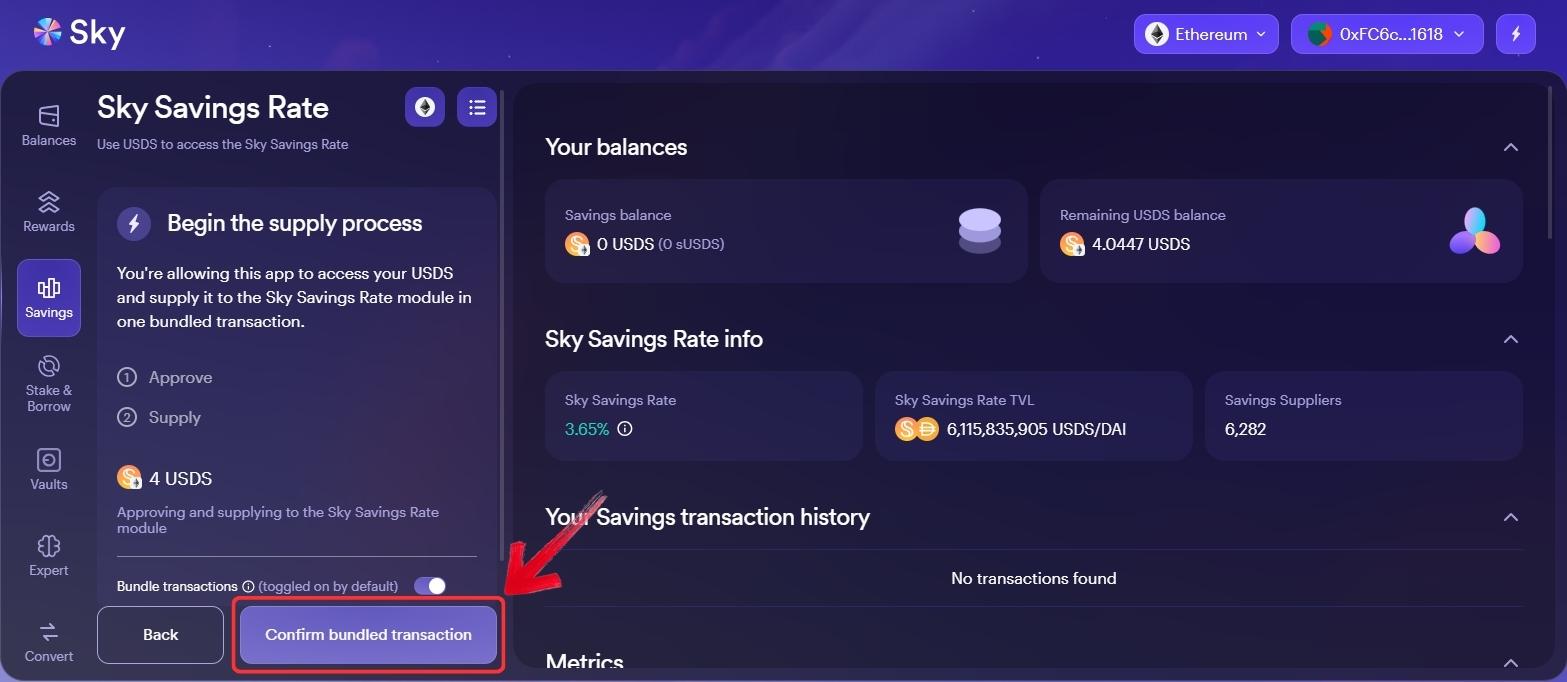
Step 4: On the next screen, click on the “Confirm Bundled Transaction” button and approve the request from your Web3 wallet.
Step 5: Once your USDS is staked, you will receive a transaction success notification. From there, you can monitor your staked USDS amount and accumulated rewards through the dashboard.
Final Verdict
Sky is among the major DeFi projects, with a long operational history and a consistent presence in the crypto market. It gives users more than one way to earn, including SKY token staking through the Staking Engine and a more stablecoin-focused option through USDS and the Sky Savings Rate.
But Web3 can be a little confusing for new users, so staking SKY directly may feel slightly complicated, especially if they are not used to Web3 wallets, gas fees, and network selection. For users who simply want to hold crypto and earn from it, centralized exchanges like Binance offer simpler earn options through one account, giving users access to 100+ earn products, including liquid staking. You can read our Binance Earn guide if you need help getting started.
FAQs
1. Does Sky Token have a future?
Sky Token may have a future if the protocol keeps growing across staking, USDS, and DeFi lending. Still, its long-term value depends on adoption, governance, and market demand, as explained in our SKY price prediction.
2. Is Sky a stable coin?
No, SKY is not a stablecoin. SKY is the governance and staking token of the Sky ecosystem, while USDS is the stablecoin used for savings and other DeFi features.
3. Can I stake SKY tokens?
Yes, SKY tokens can be staked through the Sky app using the Stake & Borrow feature, which is currently available on the Ethereum network.
4. Do I need ETH to stake SKY?
Yes, you need ETH in your Web3 wallet to pay gas fees when staking SKY tokens on Ethereum.
5. Is SKY staking the same as SSR?
No, SKY staking is for SKY token holders, while SSR is for users who want to earn through USDS, a stablecoin-focused option.