


- •Trezor Model One launched in 2014 as the first crypto hardware wallet.
- •Trezor ended official sales January 8, 2026, but security updates continue until 2036.
- •It supports Bitcoin and Ethereum but not Solana, XRP, Cardano, or Monero.
- •The wallet lacks a Secure Element and Shamir Backup.
- •Remaining stock should come from an authorized reseller.
The Trezor Model One was the wallet that brought the idea of hardware wallets into practical use for everyday crypto holders. For more than a decade, it has helped users keep their private keys offline rather than relying entirely on exchanges or software wallets.
But hardware wallets have changed a lot since the Model One first arrived. There are now devices with touchscreens, secure elements, mobile connectivity, and more refined designs, which can make this older wallet feel outdated. In this Trezor Model One review, we look at whether that is actually the case, what it still does well, and where its limitations matter today.
| Stats | Trezor Model One |
|---|---|
| 🗝️ Type | Hardware Wallet |
| 🖥️ Screen | 0.96" Monochrome OLED |
| 🪙 Supported Tokens | 1,000+ |
| 🌐 Supported Networks | 40+ EVM and UTXO Networks |
| 🖼️ NFT Support | Yes, Through Third-Party Wallets |
| 🔗 Connection | Micro-USB |
| 🔋 Wireless Charging | No |
| 🛡️ Security | PIN, Passphrase, Offline Signing |
| 📱 Mobile App | Android Only |
| 💻 Desktop App | Windows, macOS, Linux |
| 📲 Main App | Trezor Suite |
| 🔌 Wallet Support | 40+ |
| ⭐ Best For | Basic Cold Storage |
Trezor has stopped selling the Model T through its official store, although some authorized retailers may still have remaining stock. Trezor states that maintenance support will continue until 2031, while critical security updates are planned until at least 2036. Only purchase a sealed device from an authorized seller, since a wallet bought through an unofficial source could have been altered before delivery. For newer devices, you can also compare our other hardware wallet reviews.
Trezor Model One Overview
The Trezor Model One is probably the most recognizable crypto hardware wallet ever made. It entered the market in 2014 as the world’s first hardware wallet, at a time when people primarily stored their private keys on computers that could be exposed to malware, keyloggers, and phishing attacks. The Model One introduced a practical way for everyday users to keep their private keys offline without requiring extensive technical knowledge.
Simplicity was central to its design. Trezor’s half-serious goal was to “make something even our parents could use,” which explains why the wallet has only a small monochrome OLED screen and two physical buttons. There is no touchscreen, battery, Bluetooth, or WiFi. You connect it to a Windows, macOS, Linux, or compatible Android device through a Micro-USB cable, and it turns off immediately when disconnected.
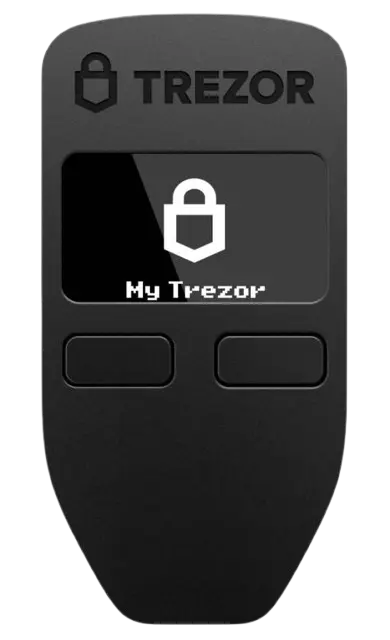
The device measures 60 × 30 × 6 mm and weighs only 12 grams. Its impact-resistant ABS plastic casing is joined through ultrasonic welding, without screws or glue. On the front, the 128 × 64-pixel OLED screen can display up to 6 lines of text, while the two tactile buttons below it are used for navigation and transaction confirmation. Internally, it uses a 120 MHz ARM Cortex-M3 processor running Trezor’s custom firmware, with private keys stored on the device rather than the connected computer.
Both the Model One firmware and Trezor Suite are open-source, allowing developers and security researchers to inspect their code for weaknesses. New devices also ship without operational firmware, so the official firmware is installed through Trezor Suite during setup. Users can protect the wallet with a PIN and create an additional hidden wallet using a passphrase that is not stored on the device.
Its simplicity made the Model One one of the most affordable hardware wallets, priced at around $69. However, that simplicity also makes its age fairly apparent. The wallet uses an outdated Micro-USB connection, has no touch input, and lacks the Secure Element found in the newer Trezor Safe models. Some long-term users have also reported that the monochrome OLED screen can gradually dim after years of regular use.
Asset support is another limitation. The Model One supports Bitcoin, Ethereum, ERC-20 tokens, BEP-20 tokens, and several UTXO-based assets, including Litecoin and Bitcoin Cash. However, it does not support several major cryptocurrencies, including XRP, Solana, Cardano, and Monero.
Trezor removed the Model One from its official store on January 8, 2026, as the company shifted its attention toward the newer Trezor Safe lineup. Secure Elements, mobile access, and post-quantum readiness had become important hardware priorities that the older model could not fully address. However, existing devices remain functional, with critical security updates promised until at least 2036 and basic maintenance until at least 2031. The classic still does its job, but its limited coin support, older connection, and lack of stronger physical protection clearly show its age.
Trezor Model One Pros & Cons
| 👍 Trezor Model One Pros | 👎 Trezor Model One Cons |
|---|---|
| ✅ Decade-long security track record | ❌ No Secure Element |
| ✅ Fully open-source firmware | ❌ No Shamir Backup |
| ✅ Simple two-button controls | ❌ Limited network support |
| ✅ Compact, lightweight design | ❌ Outdated Micro-USB connection |
| ✅ Passphrase-protected hidden wallets | ❌ No iOS transaction support |
| ✅ Standard BIP39 wallet backup | ❌ Official sales discontinued |
| ✅ Security updates until 2036 |
How Trezor Model One Works
The Trezor Model One keeps your private keys offline while Trezor Suite acts as the interface for managing your crypto. Since the wallet has no battery, it turns on when connected to a computer or compatible Android phone through a Micro-USB cable.
When you send crypto, Trezor Suite prepares the transaction and transfers its details to the wallet. The Model One displays the receiving address and amount on its OLED screen, allowing you to verify them before confirming with its two buttons. The device then signs the transaction internally without exposing your private keys to the connected computer. Once signed, the transaction returns to Trezor Suite and is broadcast to the blockchain.
Trezor Model One Key Features
Its hardware may now feel dated, but the Model One still provides the essential controls needed to manage crypto independently without exposing your private keys online. Let’s take a closer look at its feature set.
Compact Two-Button Design
The Trezor Model One has a 128 × 64-pixel monochrome OLED screen with two physical buttons for navigation and confirmation. Its interface is simple, but entering information and reviewing longer addresses can feel slow compared with a touchscreen wallet.
The device weighs only 12 grams and is easy to carry, although its ABS plastic construction feels less substantial than newer metal-bodied wallets. It has no battery and operates only when connected through Micro-USB, with no Bluetooth, WiFi, or wireless mobile connection.
Offline Signing and Verification
The Model One generates and stores your private keys inside the device, keeping them separate from the internet-connected computer or phone. Transactions are prepared in Trezor Suite but must be checked on the wallet’s screen and approved with its physical buttons. This prevents malware from completing a transaction without physical confirmation.
However, you must carefully verify the address and amount shown on the device because malware could replace the address displayed in Trezor Suite. The small screen can also make longer transaction details harder to review.
PIN, Passphrase, and Backup
The wallet uses a randomized PIN matrix, with the numbers displayed on the device and a corresponding blank grid in Trezor Suite. This prevents keyloggers from directly recording your PIN. During setup, it also generates a recovery phrase that can restore the wallet if the device is lost or damaged.
You can add a passphrase to create a separate hidden wallet, but forgetting it permanently blocks access to that wallet. Unlike newer Trezor devices, the Model One requires you to enter the passphrase through the connected computer or phone.
Open-Source Software
The firmware running on the Model One and the Trezor Suite application are open-source. Their code can be inspected by independent developers and security researchers, making it possible to identify vulnerabilities and verify how the wallet handles private keys and transactions. The device also ships without firmware, which you install through Trezor Suite during the initial setup.
Open-source code improves transparency, but it does not remove every security risk. The Model One lacks a Secure Element, leaving it less protected against advanced physical extraction attacks than newer Trezor Safe devices.
Trezor Model One Unboxing
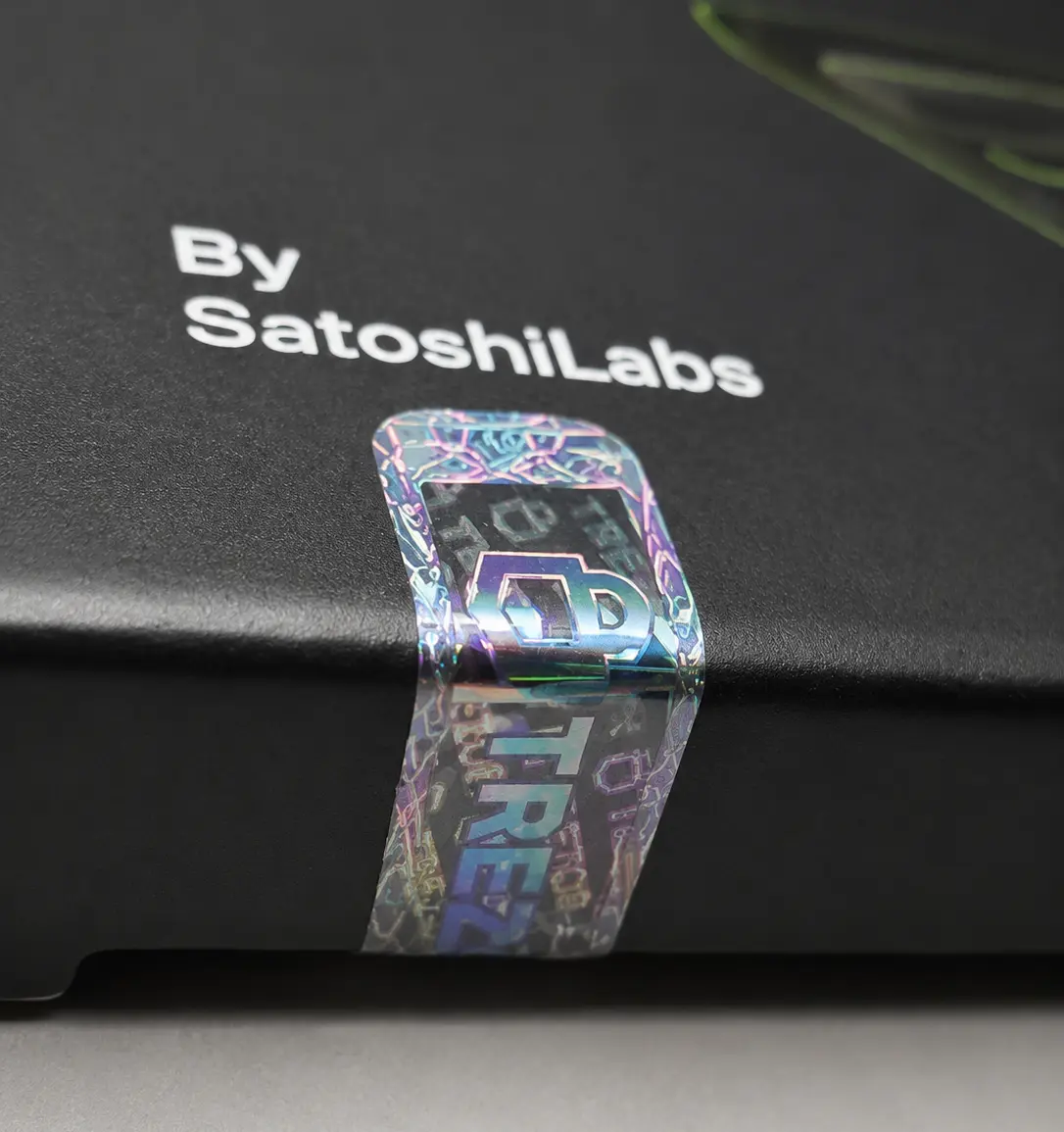
The first thing to check before opening the Model One box is its two holographic seals. They should be intact and show a reflective hologram effect when viewed from different angles. If either seal appears torn, removed, or reapplied, do not use the device. Contact the reseller you purchased it from and ask for a replacement.
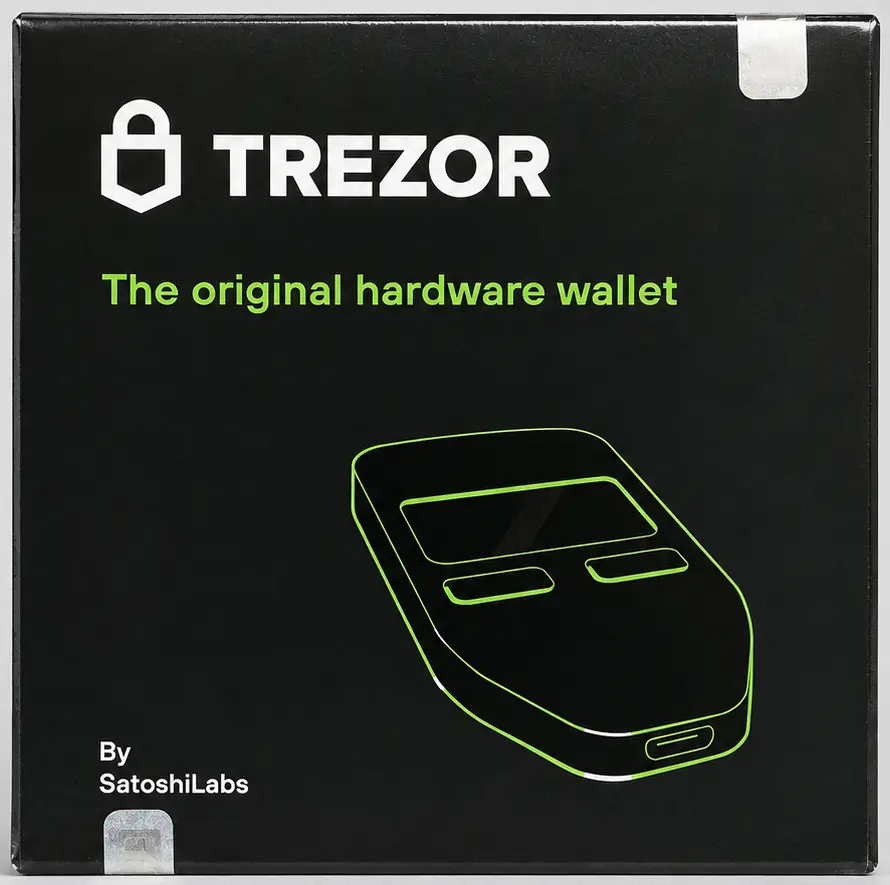
Inside the box, you get:
- Trezor Model One
- Micro-USB to USB-A cable
- Two 24-word recovery cards
- Getting started card
- 4 Trezor stickers
- Safety and certification information
The package is fairly basic, but it includes everything required to set up and use the wallet. One thing you will notice after connecting the Model One is that it does not come with firmware installed. You must first install the firmware through Trezor Suite and complete the wallet setup. If a new device already has firmware installed or includes a prepared recovery phrase, that is a warning sign, and you should not use it.
Trezor Model One Setup
As mentioned earlier, you must complete the entire setup before using the Trezor Model One because Trezor ships its devices without preinstalled firmware as a security measure. To prepare the wallet for day-to-day use, follow the steps below:
Step 1: Download and install Trezor website from the official Trezor website.
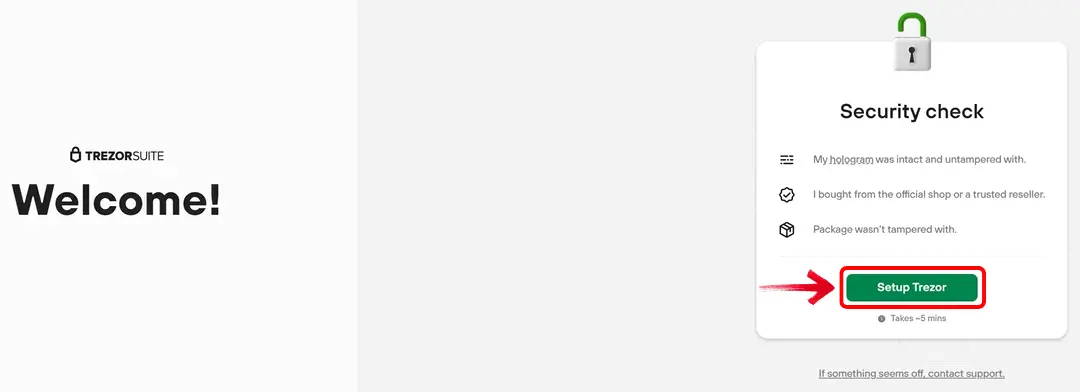
Step 2: Open Trezor Suite and connect the Model One using its Micro-USB cable.
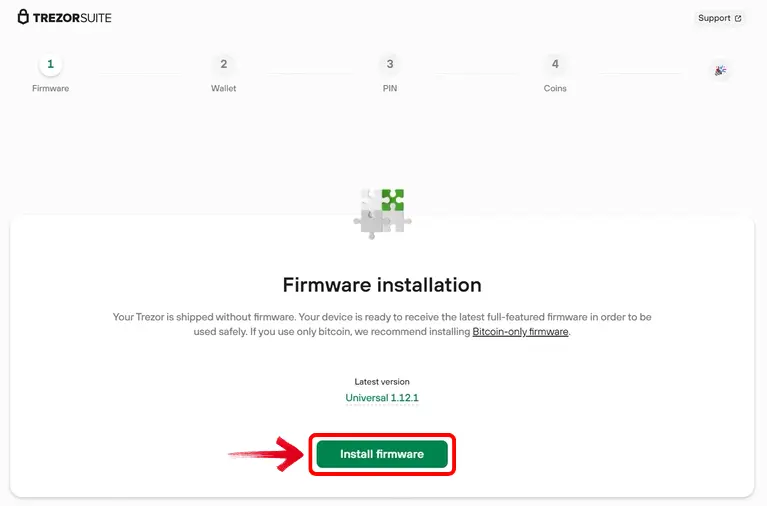
Step 3: Select and install the official firmware by clicking on the “Install firmware” button, then wait for the device to restart.
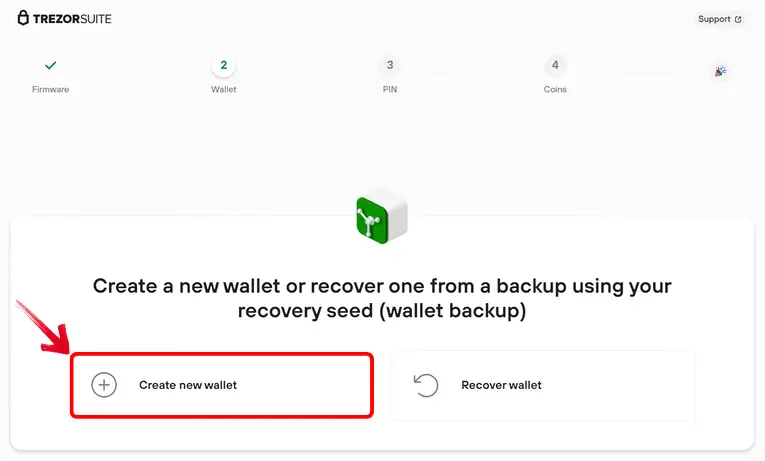
Step 4: Choose “Create new wallet”, or restore an existing wallet using its recovery phrase.
Step 5: Continue to the wallet backup and confirm the request using the device buttons.
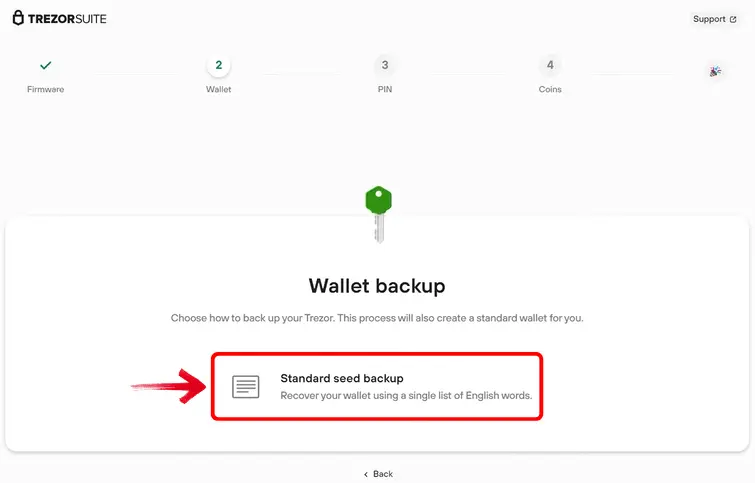
Step 6: Write down the 24 recovery words displayed on the Model One in their correct order. The device will show them twice so you can check your copy.
Step 7: Create a PIN using the randomized number grid displayed across the device and Trezor Suite.
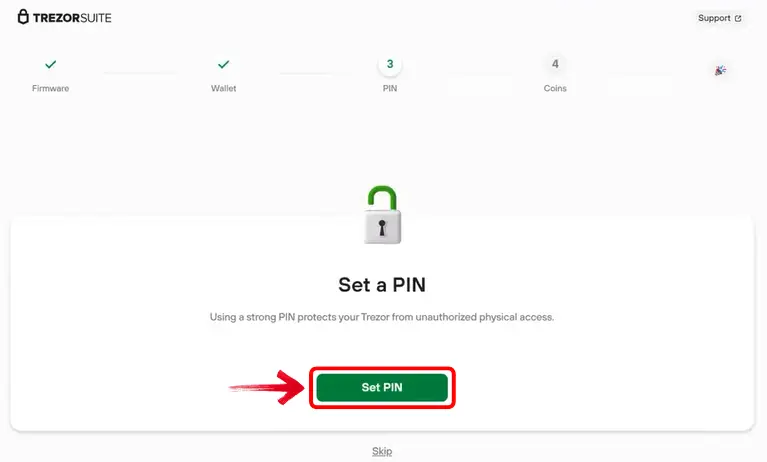
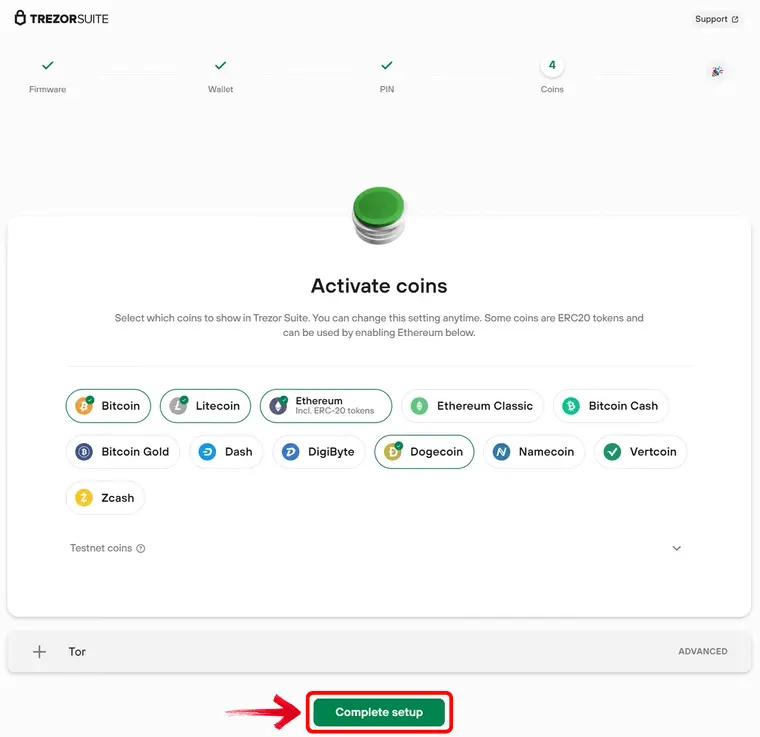
Step 8: Activate the cryptocurrencies you want to manage and complete the setup.
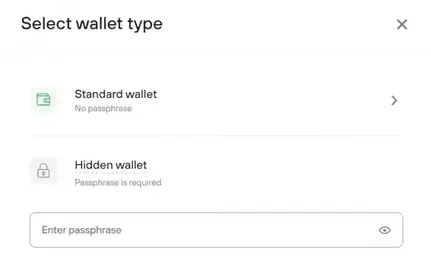
Step 9: Enter your standard wallet, or create a hidden wallet using an additional passphrase.
Trezor Model One Pricing & Fees
Price was once one of the strongest reasons to choose the Trezor Model One, which originally sold for around $69. However, Trezor no longer sells it directly, so the price now depends on the remaining stock held by retailers. Some stores have listed it for around $49 during clearance sales, while others may continue charging close to its former retail price.
Before purchasing, confirm that the seller appears on Trezor’s authorized reseller list. A low marketplace price may look appealing, but saving a few dollars is difficult to justify when the device will protect considerably more valuable assets.
There are no subscription or account fees after purchasing the wallet. You still pay the relevant blockchain fee when sending crypto. Buying, selling, or swapping through Trezor Suite involves external providers, whose processing and trading charges are shown before you confirm the order.
Trezor Model One Supported Assets and Networks
The Model One supports Bitcoin, Ethereum, Litecoin, Bitcoin Cash, Dogecoin, Zcash, Ethereum Classic, and tokens issued on compatible networks. ERC-20 tokens can be managed through an Ethereum account, while MetaMask, Rabby, and other compatible wallets let you connect the device to EVM networks such as BNB Smart Chain, Polygon, Arbitrum, Optimism, and Avalanche C-Chain.
This creates support for thousands of tokens, but that figure does not mean the wallet supports every major blockchain. The Model One cannot manage native XRP, Solana, Cardano, or Monero, even through a third-party wallet, because its firmware does not support these networks. This limitation matters more than the total token count if your portfolio contains newer layer-one assets.
It is worth checking the official Trezor asset list for both the asset and its network before transferring anything.
Trezor Customer Support
Discontinuing the Model One did not end customer support for it. Trezor has committed to basic maintenance until at least 2031 and critical security updates until at least 2036, so existing owners can still receive firmware fixes and technical assistance.
Most issues can be researched through Trezor’s online Help Center. If the available articles do not answer your question, the Hal chatbot can collect the relevant details and create a support ticket. A team member then continues the conversation by email. The Trezor Forum is another useful place to check device-specific problems, particularly when you want to see whether other Model One users have encountered the same issue.
There is no conventional telephone support. Anyone calling unexpectedly and claiming to represent Trezor should be treated as suspicious, particularly if they request your recovery phrase or remote access to your computer.
Trezor Model One Security and Self-Custody
The Model One keeps your private keys offline and signs transactions inside the device, so the connected computer never needs direct access to them. You still need to check the address and amount on its display before approving a transaction with the physical buttons. This arrangement removes the exchange or wallet provider from custody, but it also makes the 24-word recovery phrase your responsibility. Anyone who obtains that phrase can restore the wallet elsewhere without needing the Model One or its PIN.
The PIN protects the physical device through a randomized matrix. Numbers appear in a different arrangement on the Model One each time, while Trezor Suite displays a corresponding blank grid. You click the positions that match your chosen digits, so a keylogger or screen recording on the computer cannot directly capture the PIN. The device also wipes its stored wallet data after 16 incorrect attempts, although your assets remain recoverable with the recovery phrase.
For additional protection, you can create a hidden wallet using a passphrase. This is not simply another password for the standard wallet. Every exact passphrase generates a separate wallet with different addresses and balances, and the passphrase is not stored on the device or included in the recovery phrase. This can protect your assets even if someone extracts the recovery phrase from the Model One. However, the passphrase must be entered through the connected computer, and forgetting or mistyping it can permanently prevent you from finding the correct hidden wallet.
Within Trezor’s own lineup, the Model One now has a comparatively limited security setup. It uses a single 24-word backup and cannot create a multi-share Shamir Backup. More importantly, it lacks the Secure Element included in newer Trezor Safe devices. Its general-purpose processor is less resistant to advanced physical extraction attacks if someone gains prolonged access to the wallet. A long PIN and passphrase can reduce this risk, but they also place more responsibility on you.
However, device security is only one part of the picture. Trezor has also experienced a recent customer data breach, following similar incidents in the past. These breaches do not directly affect assets secured by the Model One, but exposed personal information can lead to targeted phishing emails, fraudulent calls, letters, and more serious personal-security risks.
Should You Buy a Discontinued Trezor Model One?
For most new buyers, the Model One no longer makes much sense unless an authorized reseller is offering unopened stock at a substantial discount. Its two-button interface still works, and it can handle Bitcoin, Ethereum, and many EVM tokens, but you are buying hardware with Micro-USB, limited network support, and no Secure Element.
This does not mean existing owners must stop using it. Trezor continues to classify the Model One as safe, with maintenance promised until at least 2031 and critical security updates until at least 2036. Continuing to use a device you already own is therefore a different decision from purchasing one today.
If you do buy remaining stock, use an authorized reseller and inspect both holographic seals before opening the box. A new Model One should contain no installed firmware or prepared recovery phrase. Any sign that the package or device was previously configured should be enough to return it. For a first hardware wallet purchase, newer models offer more current hardware without inheriting these limitations.
Trezor Model One Alternatives
The Model One’s compact design and straightforward controls were central to its appeal, but buying discontinued hardware is harder to justify when current wallets offer stronger physical protection and support more networks. Your choice mainly comes down to whether you want to retain that pocket-sized format or move to an air-gapped touchscreen.
1. Ledger Nano X: If you want another small and portable wallet, the Ledger Nano X keeps the familiar screen-and-buttons format while adding a Secure Element, USB-C, Bluetooth, and support for more networks. It is a clear hardware upgrade, although Ledger’s firmware is not fully open-source.
2. ELLIPAL Titan: If you prefer complete separation from connected devices, the ELLIPAL Titan signs transactions through QR codes without USB, Bluetooth, WiFi, or NFC. It also includes a Secure Element and large touchscreen, but its larger body and mobile-led workflow are very different from the Model One.
| Feature | Trezor Model One | Ledger Nano X | ELLIPAL Titan |
|---|---|---|---|
| Price | $69 | $149 | $149 |
| Screen | 0.96″ monochrome OLED | 1.1″ monochrome OLED | 4″ color touchscreen |
| Connection | Micro-USB | Bluetooth and USB-C | Air-gapped QR codes |
| Main Feature | Open-source firmware and simple controls | Secure Element and mobile connectivity | Air-gapped signing and Secure Element |
| Best For | Basic Cold Storage | Compact security and mobile use | Air-gapped mobile asset management |
| Buy | Check Resellers | Buy Now | Buy Now |
Bottom Line
If you are considering the Trezor Model One today, the decision is less about whether the wallet still works and more about where it comes from. Since Trezor no longer sells it directly, the reseller becomes part of the trust equation. Authorized stock, intact holographic seals, and a device arriving without firmware reduce the uncertainty, but the price still matters. A clearance discount may explain its appeal, while pricing close to newer wallets changes the trade-off entirely. Existing owners face a different question, as continued security updates mean discontinuation alone does not make the Model One unsafe.
FAQs
1. Is Trezor Model One still safe?
Yes. Trezor continues to provide basic maintenance until at least 2031 and critical security updates until at least 2036. However, it lacks the Secure Element included in newer Trezor devices.
2. Why was Trezor Model One discontinued?
Trezor ended official sales as user expectations shifted toward Secure Elements, mobile connectivity, and newer hardware. Its limited processing power may also restrict support for future post-quantum standards.
3. Can you still buy Model One?
Remaining stock may be available through authorized resellers. Availability and pricing now depend on the retailer because Trezor no longer sells the device directly.