

- •NGRAVE ZERO is a premium hardware wallet built for offline crypto storage.
- •Signs transactions offline through QR codes, without Bluetooth or Wi-Fi connections.
- •Fingerprint authentication, a secure element, and tamper detection help protect device access.
- •EAL7 certification covers the secure OS component, rather than the complete wallet.
- •Closed-source firmware and delayed open-source promises leave concerns about independent verification.
- •MetaMask and Rabby extend asset access beyond ZERO’s native blockchain support.
- •Firmware updates and new coin support have been sluggish despite ongoing development promises.
Self-custody is one of the most important parts of crypto, and the saying “not your keys, not your crypto” has been around for quite some time. The NGRAVE ZERO is built around that principle, with a design that gives you plenty to appreciate before you even turn it on.
Its appearance and build quality are part of its appeal, while the camera-based transaction process adds to the experience of using it. Still, a good-looking wallet needs to offer more than appearances, especially when it sits at the premium end of the market. From unboxing to setup and everyday use, there are strengths to appreciate and claims that deserve closer attention. If you’re considering it for your crypto, this NGRAVE ZERO review should give you a clearer idea of what that €398 gets you.
| Stats | NGRAVE ZERO |
|---|---|
| 🗝️ Type | Hardware Wallet |
| 🖥️ Screen | 4" Touchscreen |
| 🪙 Supported Tokens | All ERC20 & ESDT Tokens |
| 🌐 Supported Networks | 15+ |
| 🖼️ NFT Support | Ethereum NFTs only |
| 🔗 Connection | QR Codes; USB-C for Charging & Updates |
| 🔋 Wireless Charging | No |
| 🛡️ Security | EAL7-Certified Secure OS, Secure Element, PIN & Fingerprint |
| 📱 Mobile App | Android & iOS |
| 💻 Desktop App | No Native Desktop App |
| 📲 Main App | NGRAVE LIQUID |
| 🔌 Wallet Support | MetaMask & Rabby |
| ⭐ Best For | Long-Term Cold Storage |
NGRAVE ZERO Overview
NGRAVE ZERO is a premium hardware wallet built around keeping your private keys offline, from generation to transaction signing. NGRAVE was founded in Brussels in 2018, with Ruben Merre among its co-founders. The team wanted to address what it saw as shortcomings in existing wallets, including connected transaction signing, key generation, paper backups, and usability.
That thinking explains ZERO’s air-gapped design. There is no Wi-Fi, Bluetooth, NFC, or 4G, and it does not use USB for key generation or transaction signing. Instead, you scan QR codes to exchange transaction information with the LIQUID mobile app. The USB-C port is reserved for charging and secure firmware updates.
Security is a central part of NGRAVE’s positioning, particularly its use of an EAL7-certified secure operating system. That certification applies to the secure OS component and should not be read as certification of the complete wallet. ZERO also incorporates a secure element and several layers of tamper protection, including sensors designed to wipe sensitive information if the casing is opened.
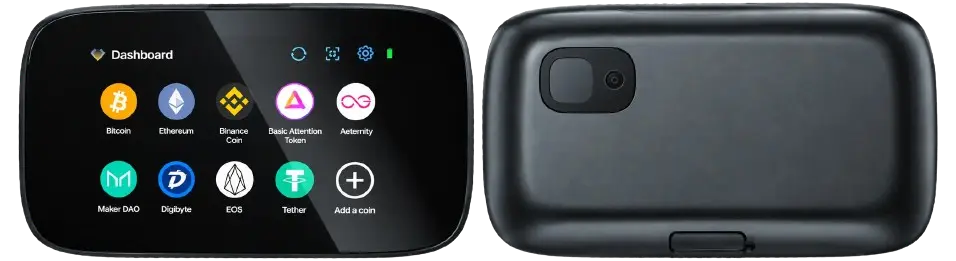
The fingerprint sensor serves several purposes: authentication, transaction approval, and contributing entropy during key generation. In simpler terms, it adds another input to the randomness used to create your wallet. The custom metal-alloy body provides physical protection, while IP55 certification means resistance to water and dust. A 4-inch color capacitive touchscreen gives you room to read transaction details before approving them.
For everyday management, LIQUID lets you check balances, receive crypto, and prepare outgoing transactions on your phone. ZERO signs those transactions offline, and the app broadcasts them after scanning the signed QR code. There is no native desktop companion app, although supported browser-wallet integrations provide another way to use the device.
Native support covers 15 blockchains, with BTC, ETH, BNB, ZEC, XRP, DOGE, DASH, EGLD, XTZ, LTC, BCH, AVAX, XLM, SOL, and POL listed. ZERO also supports all ERC20 and ESDT tokens, plus Ethereum NFTs. Through MetaMask and Rabby Wallet, you can access additional EVM networks, with Rabby supporting more than 112 chains.
LIQUID also offers purchases through Link by Stripe and swaps through Changelly. Bridging and staking are planned additions to LIQUID; compatible DeFi applications can already be accessed through MetaMask and Rabby.
As for open source, the ZERO firmware repository currently contains only a README promising a future release, with no firmware source code published there. CTO Xavier Hendrickx’s statement on open source describes plans to release parts of the code, excluding the secure element and certified secure OS. So, open sourcing remains a stated intention rather than a completed release of ZERO’s firmware.
NGRAVE ZERO Pros & Cons
| 👍 Pros | 👎 Cons |
|---|---|
| ✅ Fully air-gapped transaction signing | ❌ Unfulfilled open-source promises |
| ✅ Fingerprint authentication | ❌ Limited native blockchain support |
| ✅ Large 4-inch touchscreen | ❌ High purchase price |
| ✅ Durable metal alloy body | ❌ Bulkier than competitors |
| ✅ Multi-layer tamper protection | |
| ✅ Durable metal build | |
| ✅ Offline key generation |
How NGRAVE ZERO Works
NGRAVE ZERO and the LIQUID app handle different parts of managing your crypto. ZERO generates and stores your private keys and signs transactions offline. LIQUID runs on your phone, checks balances, prepares transactions, and broadcasts them to the blockchain. Your crypto remains on the blockchain; the wallet holds the keys needed to access it.
After setting up ZERO and recording your recovery backup, you sync it with LIQUID by scanning a QR code displayed on the device. This transfers public account information to the app, allowing it to track your portfolio without receiving your private keys.
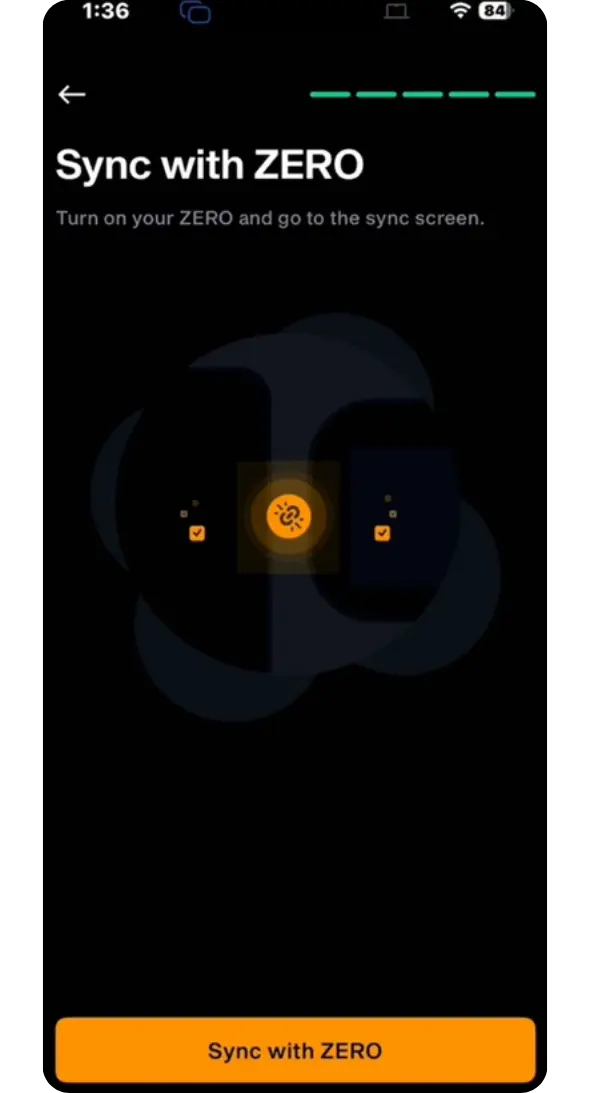
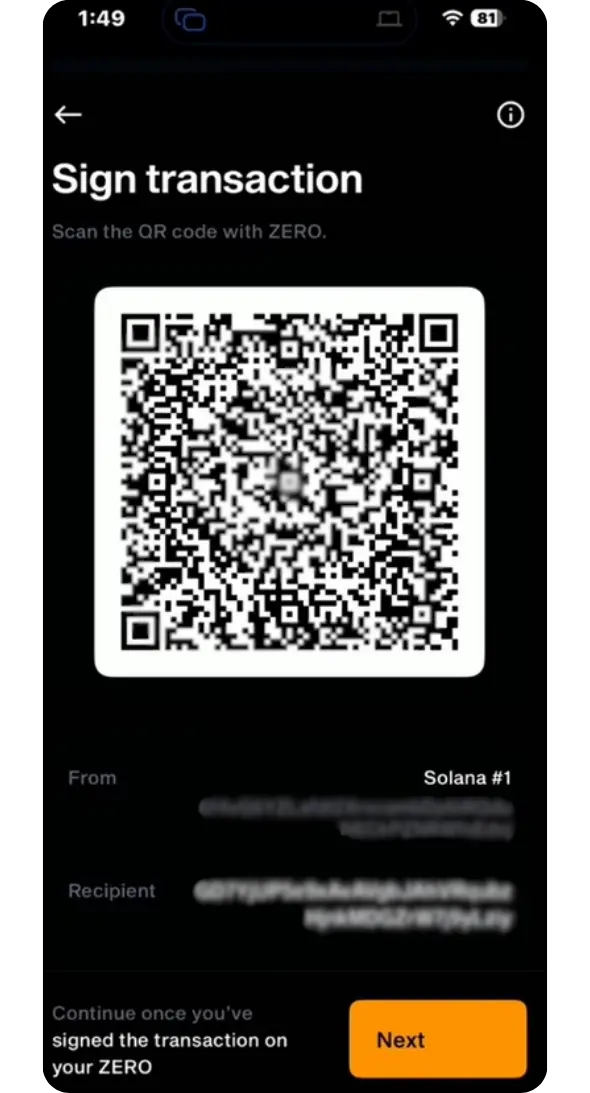
When sending crypto, you enter the recipient’s address and amount in LIQUID. The app creates a transaction QR code, which you scan with ZERO’s camera. You then review the details on ZERO’s screen and approve the transaction. ZERO displays another QR code containing the signed transaction, which your phone scans before LIQUID broadcasts it. There is no cable or wireless pairing involved in this process.
Receiving is simpler. You share the receiving address from LIQUID or display its QR code on ZERO. The device can remain switched off while funds arrive, since the transfer happens on the blockchain. LIQUID shows the updated balance when it connects.
The USB-C port has two jobs: charging the battery and installing firmware updates. For updates, you connect ZERO to a computer and follow NGRAVE’s official update instructions. The device must reboot into a separate update mode before USB data transfer becomes available.
According to NGRAVE, this mode isolates the USB connection from areas containing sensitive information, and ZERO checks that an update package is signed by NGRAVE before installing it. So, USB is used for device maintenance, while key generation and transaction signing remain offline through the wallet’s normal QR-based process.
NGRAVE ZERO Specs & Design
ZERO’s offline approach also shapes its hardware, from the camera on the back to the touchscreen you use to review and approve transactions.
| Specifications | Details |
|---|---|
| Dimensions | 124.97 × 68.58 × 13 mm |
| Weight | 214g |
| Screen | 4-inch color capacitive LCD touchscreen |
| Resolution | 480 × 800 pixels |
| Camera | 640 × 480 pixels, with built-in light sensor |
| Fingerprint Sensor | 12 × 12 mm |
| Battery | 1,200mAh |
| Body | Zinc, aluminum, magnesium, and copper alloy |
| Water and Dust Resistance | IP55 |
| Languages | English, Spanish, French, and Dutch |
NGRAVE ZERO has a clean, understated appearance, with the large touchscreen taking up most of the front. The custom metal-alloy casing gives it a substantial build, and at 214g, it has some weight to it. Its dimensions are closer to a compact phone, although the 13mm thickness makes it a fairly chunky device.
The power button sits on the side, with the USB-C port at the bottom. Around the back are the camera and fingerprint sensor, keeping the front clear for navigation and transaction details. The camera scans QR codes, while its light sensor also contributes input during key generation. Fingerprint authentication is handled through the separate sensor.
The casing forms part of ZERO’s multi-layer tamper protection. Its IP55 rating also provides resistance to dust and water jets, but it does not make the device suitable for submersion.
NGRAVE ZERO Features
Several of ZERO’s features work together, but each handles a different part of protecting your keys and approving transactions.
Fingerprint Authentication
For access and transaction approval, the fingerprint sensor adds an optional authentication step alongside your required PIN. You can configure it for opening the wallet, signing transactions, or both. During setup, fingerprint input also contributes to the randomness used in key generation.
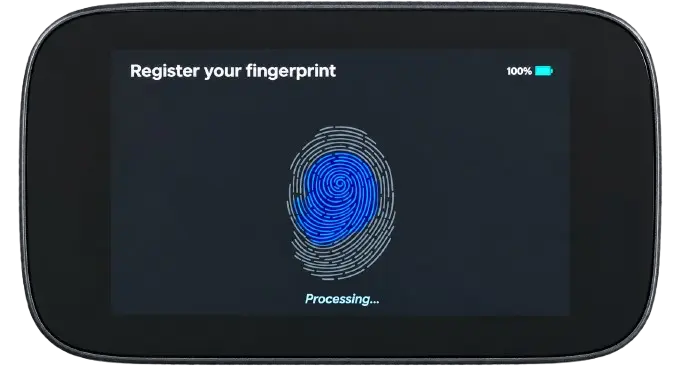
That gives the sensor a practical role, although recognition can require some patience. NGRAVE’s support instructions recommend registering the same finger multiple times if readings are inconsistent. If authentication continues to fail, recovery may involve wiping the device and importing your backup. It is useful additional protection, but it also introduces another dependency when accessing your wallet.
QR Codes & Camera
Moving transaction information between your phone and ZERO happens through QR codes, with the rear camera scanning requests and the touchscreen displaying signed responses. This keeps USB and wireless connections out of the signing process. The camera’s light sensor also contributes additional randomness during key generation.
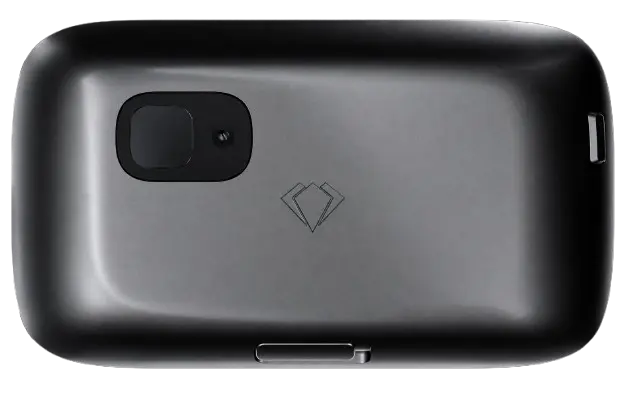
Firmware 1.8 introduces an open Universal QR Protocol, allowing developers to inspect the communication format and build compatible software. That improves transparency around the messages being exchanged, although it does not make the wallet’s firmware open source. You also still need to check transaction details: an offline wallet can sign a harmful transaction if you approve it.
Custom Operating System
Navigating accounts and approving transfers happens through ZERO’s custom operating system, using taps and swipes on the four-inch touchscreen. Wallet creation, backup confirmation, QR scanning, and transaction review are handled on the device, while LIQUID takes care of online portfolio management and broadcasting.
The interface gives you space to read addresses and amounts before signing, but a polished display tells you little about the software underneath. The firmware repository currently contains only a README promising a future release. Without published firmware source code, independent reviewers cannot fully check how the implementation matches NGRAVE’s descriptions. The open QR protocol provides some transparency, but firmware transparency remains a separate issue.
EAL7 Certification
Much of NGRAVE’s security positioning rests on EAL7 certification, the highest evaluation assurance level defined under Common Criteria. ZERO incorporates ProvenCore, a secure operating system component developed by ProvenRun that received this certification. It represents a rigorous evaluation of that component within its stated scope.
The important detail is what was evaluated. Using a certified secure OS does not automatically give the complete wallet, its applications, or its hardware integration the same certification. It also does not establish that ZERO is universally safer than every competing wallet. The certification is meaningful, but readers should understand it as evidence about a specific security component.
Tamper Protection
Against physical interference, ZERO’s tamper protection combines its metal casing and sealing with internal detection mechanisms. NGRAVE describes four cumulative protection layers, including a response designed to wipe sensitive information when an intrusion is detected. The aim is to make extracting keys from the device more difficult.
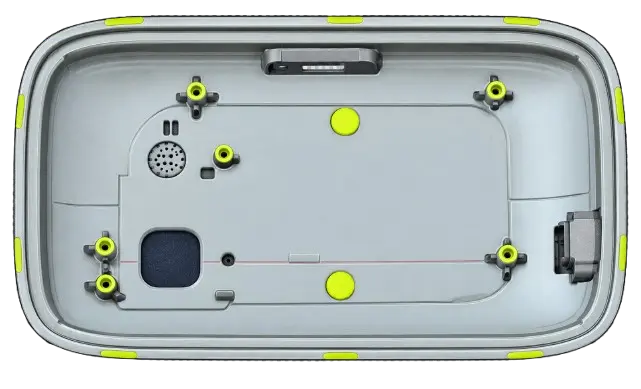
These are manufacturer-described protections, rather than proof that every physical attack will fail. A wipe also removes the keys from that device, making your recovery backup essential. Separately, ZERO resets after ten incorrect PIN attempts. Neither mechanism protects funds if someone obtains your recovery backup, which can restore access without the original wallet.
NGRAVE ZERO Unboxing
NGRAVE ZERO arrives in a textured matte-black box with a magnetic clasp. When you open it, the wallet sits in a fitted compartment, with the accessories and paperwork arranged in separate layers underneath.
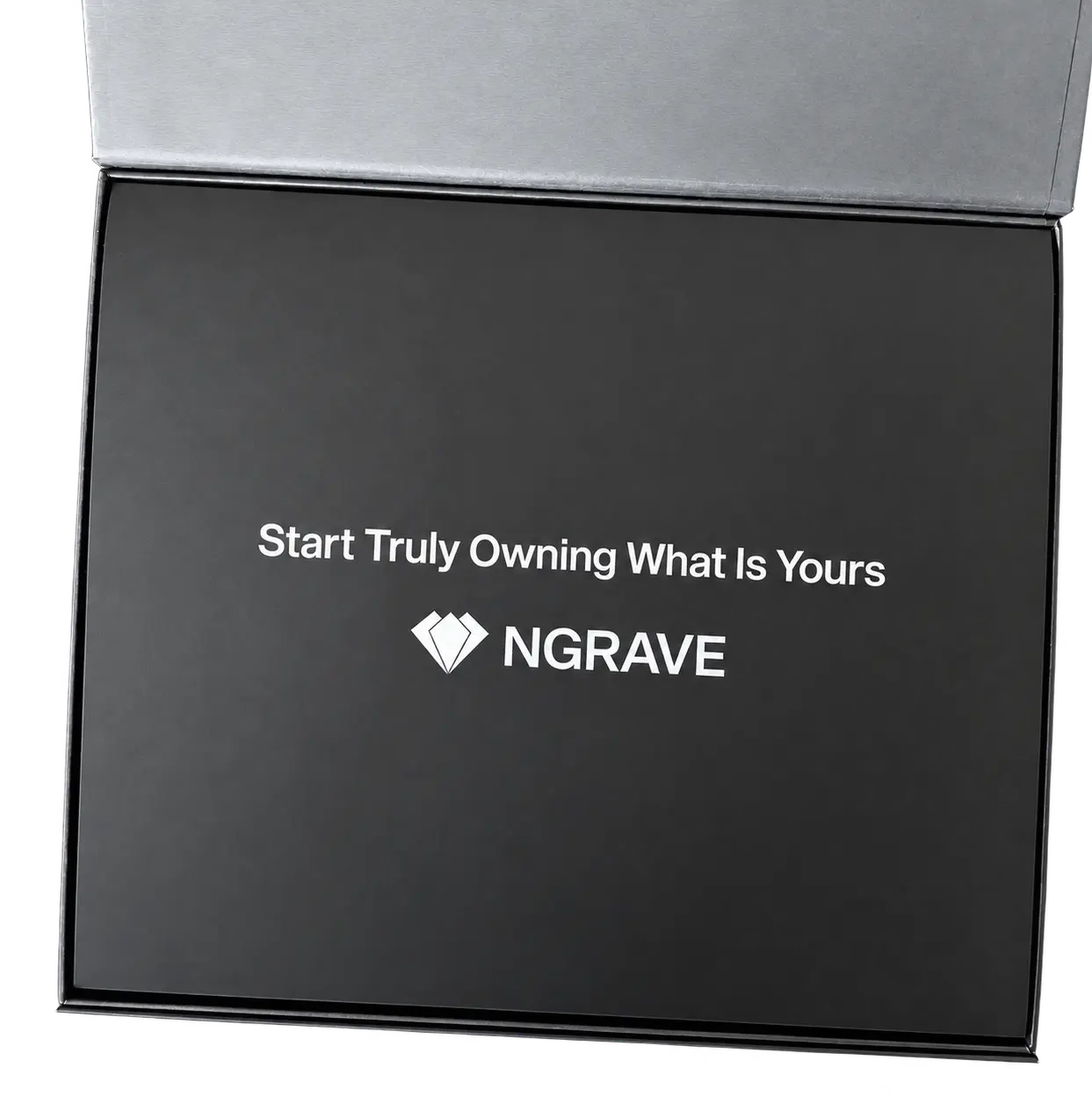
Once you lift ZERO out, its metal body and weight give it a substantial feel. The front is mostly touchscreen, while the camera and fingerprint sensor sit around the back. Beneath the device, you find the charging cable and documentation to help you get started.
The standard ZERO package includes:
- NGRAVE ZERO hardware wallet
- USB-A to USB-C cable
- Setup and LIQUID app documentation
- Paper recovery backup sheets
- NGRAVE logo sticker
NGRAVE ZERO Setup
Before you can start using ZERO, you’ll need to verify the device, create or import a wallet, and connect it to LIQUID.
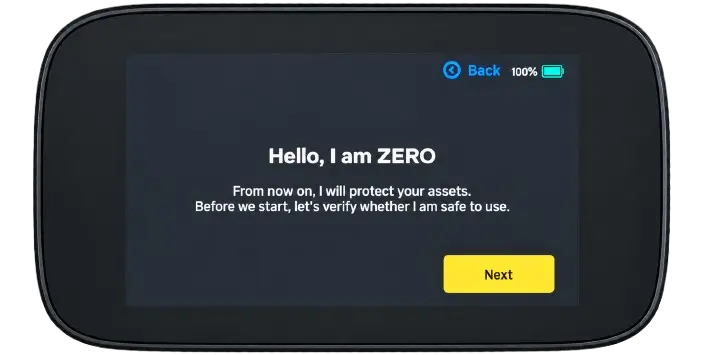
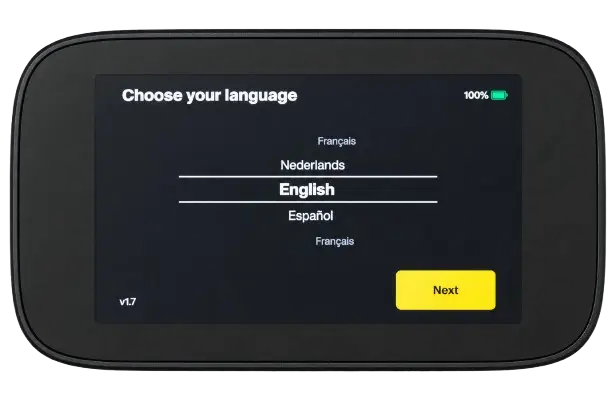
Step 1: You’ll start by pressing ZERO’s side power button, choosing your language, and accepting the software agreement.
Step 2: Next, you’ll open the NGRAVE verify page on your browser, scan its QR code with ZERO, and enter the device’s security code on the website.
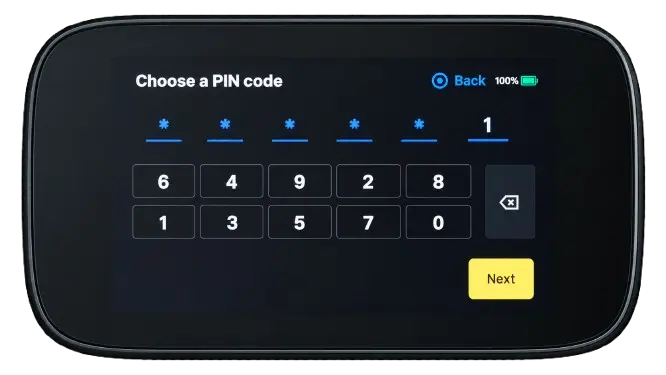
Step 3: You’ll then choose an 8-digit PIN and enter it again to confirm.
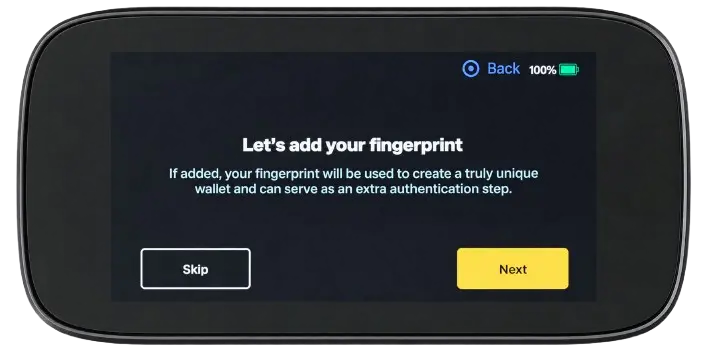
Step 4: When prompted to register your fingerprint, you’ll rest your finger on the rear sensor and follow the instructions.
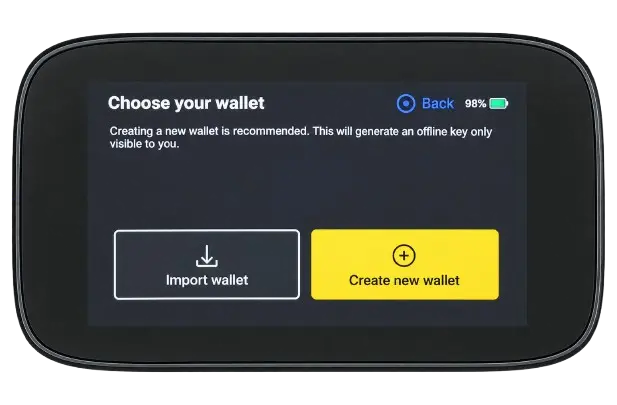
Step 5: With your fingerprint registered, you’ll choose “Create new wallet”. If you’re restoring an existing backup, select the import option instead.
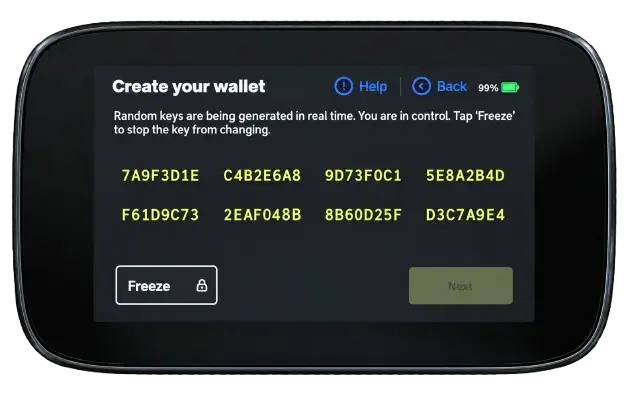
Step 6: You’ll see 8 groups of changing hexadecimal characters. Tap “Freeze” whenever you’re ready, then continue.
Step 7: Step 8: If you want, you can select character groups and tap “Shuffle” to change the values further.
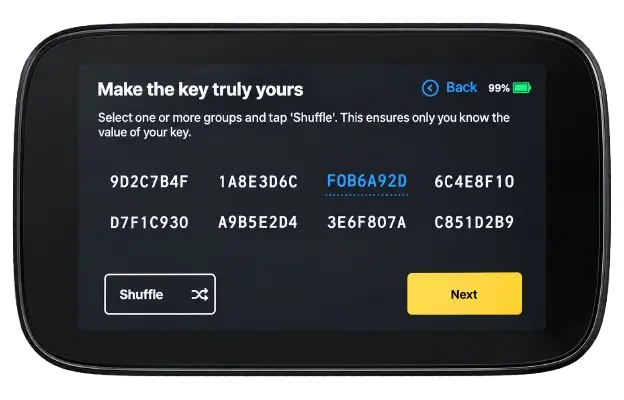
Step 8: Once you’re satisfied with your Perfect Key, you can tap “Confirm” to continue.
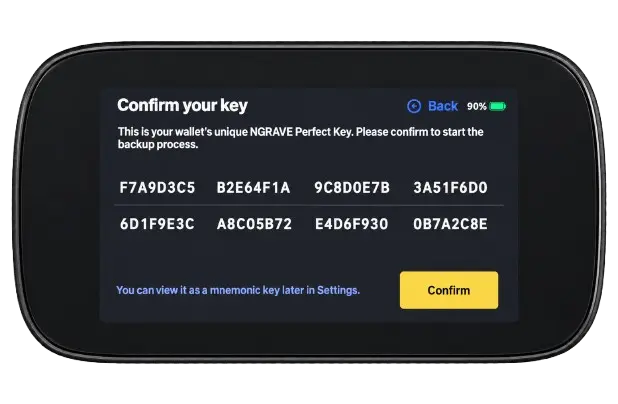
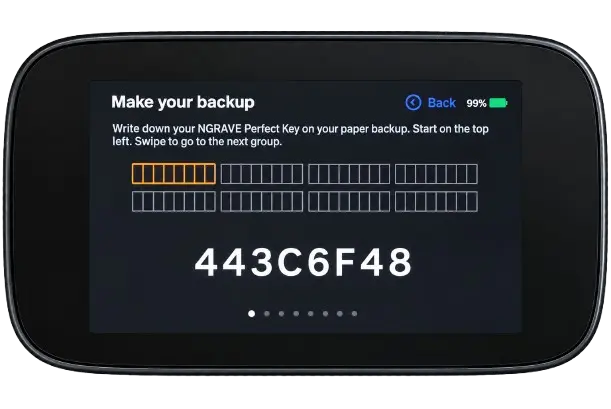
Step 9: You’ll then back up your Perfect Key using GRAPHENE or write it down somewhere safe, then confirm and follow the verification prompts.
Step 10: You can now set up your dashboard, keeping the accounts shown or tapping “Add a coin” for other supported assets.
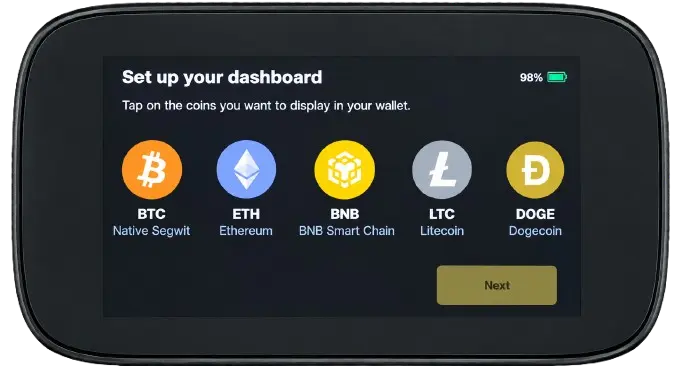
With your dashboard ready, your NGRAVE ZERO wallet is set up. You can download and sync LIQUID for mobile management, or connect ZERO with MetaMask or Rabby for additional functionality.
NGRAVE ZERO Pricing & Fees
NGRAVE ZERO costs €398, putting it at the premium end of the hardware wallet market. The standard package includes the device, USB cable, and supporting paperwork. If you want the GRAPHENE stainless-steel backup as well, the combo package costs €498, adding €100 to the purchase price. Depending on where you order from, customs duties or import taxes may increase your total.
Once purchased, you do not pay a subscription to keep your crypto in the wallet. The LIQUID app is free, and holding assets does not generate an ongoing storage charge. Sending crypto still involves the relevant blockchain’s network fee, which varies with the network and its activity.
NGRAVE ZERO Supported Chains and Assets
NGRAVE ZERO offers native support for 15 blockchains, with BTC, ETH, BNB, ZEC, XRP, DOGE, DASH, EGLD, XTZ, LTC, BCH, AVAX, XLM, SOL, and POL listed on its asset support page. It also supports ERC20 tokens on Ethereum, ESDT tokens on MultiversX, and Ethereum NFTs.
Through its MetaMask and Rabby integrations, ZERO supports more than 112 EVM chains, including Arbitrum, Optimism, Polygon, and BNB Smart Chain. This gives you access to additional assets and compatible DeFi applications while keeping transaction signing offline.
What changes is the app you use. Native accounts are managed through LIQUID, while additional EVM networks are accessed through MetaMask or Rabby. If you hold assets across several chains, compatibility therefore depends on both ZERO and the connected wallet, rather than LIQUID’s asset list alone.
NGRAVE ZERO Customer Support
NGRAVE has been around since 2018, and customer support has generally been reliable. However, some users have described responses to questions about its EAL7 certification as unprofessional, suggesting that the experience can vary depending on the issue raised.
You can contact the team by email or through Discord. Both channels offer help with setup, firmware updates, and everyday wallet issues, with responses generally arriving during business hours. Response times can vary, so this should not be treated as round-the-clock support.
NGRAVE ZERO Security and Self-Custody
You hold your own keys with ZERO, but you still have to trust the software generating and using them. This is where its security features and the questions around transparency need to be considered together.
Transactions are signed offline, with QR codes carrying information between ZERO and LIQUID. There is no Bluetooth, Wi-Fi, NFC, or 4G connection, while USB-C is reserved for charging and firmware updates. Fingerprint authentication can be enabled alongside the PIN, and NGRAVE says its anti-tamper sensors wipe sensitive information if someone opens the device. These measures address access to the wallet; they do not protect a recovery backup that has been exposed.
For key generation, NGRAVE describes a 256-bit entropy process using a hardware random number generator, supplemented by fingerprint input, light readings, and your physical interactions. The recent COLDCARD incident makes the importance of randomness clear. ZERO uses several inputs, but whether those inputs are handled correctly remains a software question. NGRAVE also recommends a strong passphrase, which can add protection if the seed alone is compromised. You need that passphrase for recovery, too.
Its EAL7 certification applies to the ProvenRun secure OS component. Support has cited ANSSI number 2019/15, but that does not establish EAL7+ certification of the complete wallet. The scope matters more than the certification label in the marketing.
The firmware is still not open source, which remains a concern for users who want to verify how the wallet works. Part of the frustration is NGRAVE’s repeated promise to publish the code when the time is right. With the company operating since 2018, it is reasonable to question how long users are expected to wait.
Is the NGRAVE ZERO Safe to Use?
Yes, its fully air-gapped design, fingerprint authentication, secure element, and tamper detection provide several layers of protection. You sign transactions offline and exchange information through QR codes, without Bluetooth or Wi-Fi.
However, the firmware remains closed source, so independent reviewers cannot fully verify its implementation. That does not automatically make ZERO unsafe, but the lack of transparency remains a reasonable concern. You also need to protect your recovery backup and check what you approve, since those responsibilities stay with you.
ELLIPAL Titan 2.0 vs. NGRAVE ZERO
If you want offline signing with a large touchscreen, both wallets offer that experience. Each uses QR codes and a mobile companion app, with closed-source firmware leaving similar questions around independent verification.
The differences become clearer when managing assets. ELLIPAL supports 45+ blockchains and 10,000+ tokens, with swaps, staking, and DApp access through its app. ZERO has fewer native chains, but MetaMask and Rabby extend its EVM support. ELLIPAL also supports Taproot Bitcoin addresses alongside Legacy and both SegWit formats; ZERO supports the latter three.
ZERO adds fingerprint authentication and an EAL7-certified secure OS component. ELLIPAL’s EAL5+ rating concerns its secure element, so the numbers are not a direct security ranking. Firmware updates also differ: ELLIPAL uses microSD, while ZERO requires USB-C and a computer. Your choice depends on the assets, app features, and authentication options you actually use.
NGRAVE ZERO Alternatives
If ZERO does not fit your needs, these alternatives address different priorities.
1. ELLIPAL Titan 2.0: For Taproot Bitcoin addresses and more native asset support, ELLIPAL Titan 2.0 offers another QR-based, air-gapped wallet.
2. Ledger Stax: For mobile and desktop use, Ledger Stax offers Bluetooth connectivity, a curved E Ink touchscreen, and wireless charging.
| Feature | NGRAVE ZERO | ELLIPAL Titan 2.0 | Ledger Stax |
|---|---|---|---|
| Price | €398 | $149 | $399 |
| Screen | 4″ color touchscreen | 4″ IPS touchscreen | 3.7″ curved E Ink touchscreen |
| Connection | QR codes; USB-C for charging and updates | QR codes; power-only charging | Bluetooth and USB-C; NFC for recovery and security keys |
| Main Feature | Offline signing with fingerprint authentication | Taproot and extensive native asset support | Curved touchscreen and wireless charging |
| Best For | Cold storage with biometric authentication | Multi-asset mobile management | Mobile and desktop self-custody |
| View Product | Buy Now | Buy Now | Buy Now |
Bottom Line
Priced at a premium, you would expect NGRAVE ZERO to deliver on both hardware and software. Its build, fully air-gapped signing, and fingerprint authentication have appeal, but updates and new coin support have been sluggish. Closed-source firmware and repeated promises of transparency leave questions about what you can independently verify.
Those limitations matter when choosing a wallet for long-term use. More wallet reviews can help you compare asset support, software transparency, and everyday usability to find something that better fits your needs.
FAQs
1. Is NGRAVE ZERO Fully Air-Gapped?
Yes. Transactions use QR codes, without Wi-Fi, Bluetooth, NFC, or 4G. USB-C is reserved for charging and firmware updates.
2. Is NGRAVE ZERO Open Source?
No. Its firmware remains closed source, despite promises to publish parts of the code.
3. Does the COLDCARD Entropy Issue Affect NGRAVE ZERO?
The reported vulnerability concerns COLDCARD firmware. NGRAVE describes a separate 256-bit entropy process combining hardware randomness with fingerprint, light, and user input. Multiple sources do not guarantee immunity to software flaws.
4. Can You Recover Crypto if ZERO Is Lost?
Yes, using your recovery backup on a compatible wallet. If you used a passphrase, you also need that exact passphrase.