


- •Ledger Stax pairs offline key storage with a 3.7-inch curved E-Ink touchscreen.
- •Ledger Wallet initiates transactions, while Stax requires on-device approval before funds move.
- •It supports 15,000+ assets and connects with MetaMask, Phantom, Rabby, and other wallets.
- •Clear Signing and Transaction Check help identify risky transactions before you approve them.
- •Its premium price mainly pays for usability, design, and wireless charging.
Crypto is decentralized, which sounds great on paper until you are the one responsible for safeguarding your net worth with a crypto wallet. Cold storage offers more security, but its designs are not always practical, or perhaps that is why Ledger launched its Stax model. With most cold wallets, it can feel like going back to the clunky mobile-phone era, where the only real purpose was communication, just as cold storage has traditionally focused only on secure asset storage. So, is Ledger Stax worth it? This Ledger Stax review looks at its design, price tag, and the upgrades it promises for everyday use, so you can decide whether it deserves a place on your wishlist.
| Stats | Ledger Stax |
|---|---|
| 🗝️ Type | Hardware Wallet |
| 🖥️ Screen | 3.7" Touchscreen |
| 🪙 Supported Tokens | 15,000+ |
| 🌐 Supported Networks | 100+ |
| 🖼️ NFT Support | Yes |
| 🔗 Connection | Bluetooth, USB-C, NFC |
| 🔋 Wireless Charging | Yes |
| 🛡️ Security | CC EAL5+ (ST33K1M5), PIN |
| 📱 Mobile App | Android & iOS |
| 💻 Desktop App | Windows, macOS, Linux |
| 📲 Main App | Ledger Wallet |
| 🔌 Wallet Support | 50+ |
| ⭐ Best For | Premium Self-Custody |
Ledger Stax Overview
Ledger Stax is a premium hardware wallet for people who want to manage their own crypto without dealing with the tiny screens and button controls found on older cold wallets. It uses a 3.7-inch curved E-Ink touchscreen, making it easier to enter your PIN, navigate the device, and check transaction details before approving them.
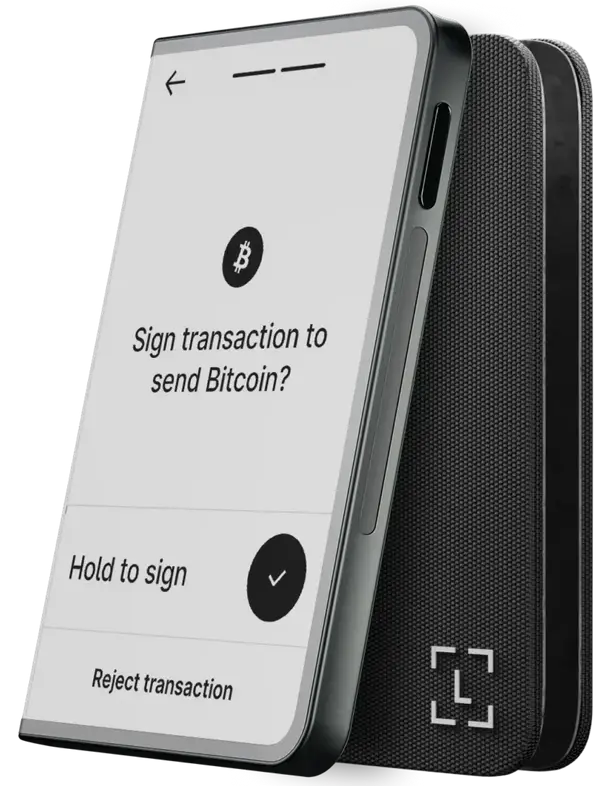
In many ways, Stax feels like a modern successor to the discontinued Ledger Blue, Ledger’s first touchscreen hardware wallet. However, it is much slimmer, more portable, and focused on making self-custody easier to handle in everyday use. Ledger developed Stax in collaboration with Tony Fadell, the creator of the iPod and founder of Nest. You can see that influence in its card-like shape, curved display, and more refined design.
The device has built-in magnets, allowing multiple Stax units to stack together. Its curved edge can display a custom name, while the lock screen can show an image or a supported NFT. Since it uses E-Ink technology, that image can remain visible even when the device is powered off.
You can choose between the Graphite and BTC Orange versions of Ledger Stax. Once you connect it to the Ledger Wallet app, formerly Ledger Live, through Bluetooth or USB-C, you can view your portfolio and initiate actions such as sending, swapping, buying, selling, or staking crypto. However, before any transaction goes through, you still need to review and approve it directly on your Stax device.
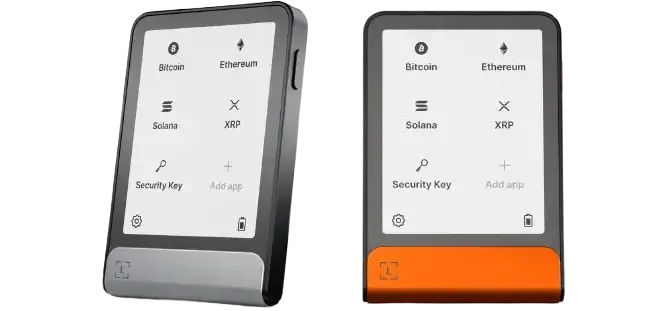
Ledger Stax supports more than 5,500+ coins and tokens across major networks, including Bitcoin, Ethereum, Solana, Cardano, XRP Ledger, Avalanche, and NEAR. It also works with EVM-compatible networks, letting you manage assets on chains such as Polygon, Arbitrum, Optimism, and BNB Chain through compatible wallet connections. If you use DeFi platforms, you can connect Stax to 3rd-party wallets such as MetaMask, MyEtherWallet, and Talisman, while keeping your private keys on the device.
Its rechargeable battery provides up to 10 hours of regular use, although the exact time depends on your settings and usage. The E-Ink display uses very little power, so your selected lock-screen image can remain visible for months when the device is off. You can recharge Stax using USB-C or place it on a Qi-compatible wireless charger.
Like other Ledger devices, Stax uses a Secure Element chip, Ledger’s BOLOS operating system, PIN protection, a recovery phrase, and Clear Signing capabilities. Its private keys remain on the device and never leave it.
Ledger Stax Pros & Cons
| 👍 Ledger Stax Pros | 👎 Ledger Stax Cons |
|---|---|
| ✅ Premium design and build | ❌ Expensive for most users |
| ✅ Clear Signing and Transaction Check | ❌ E-Ink screen lacks backlight |
| ✅ Supports 15,000+ crypto assets | ❌ Limited app storage for multichain users |
| ✅ Compatible with major wallet apps | ❌ Large screen is more fragile |
| ✅ Bluetooth, USB-C, and Qi charging | |
| ✅ Custom NFT lock screen |
Buy Ledger Stax Hardware Wallet
How Ledger Stax Works
Ledger Stax works alongside the Ledger Wallet app, formerly Ledger Live. The app is where you can view your portfolio, add accounts, and initiate actions such as sending, buying, swapping, or staking supported assets. Stax handles the sensitive part: approving the transaction with the private keys stored inside the device.
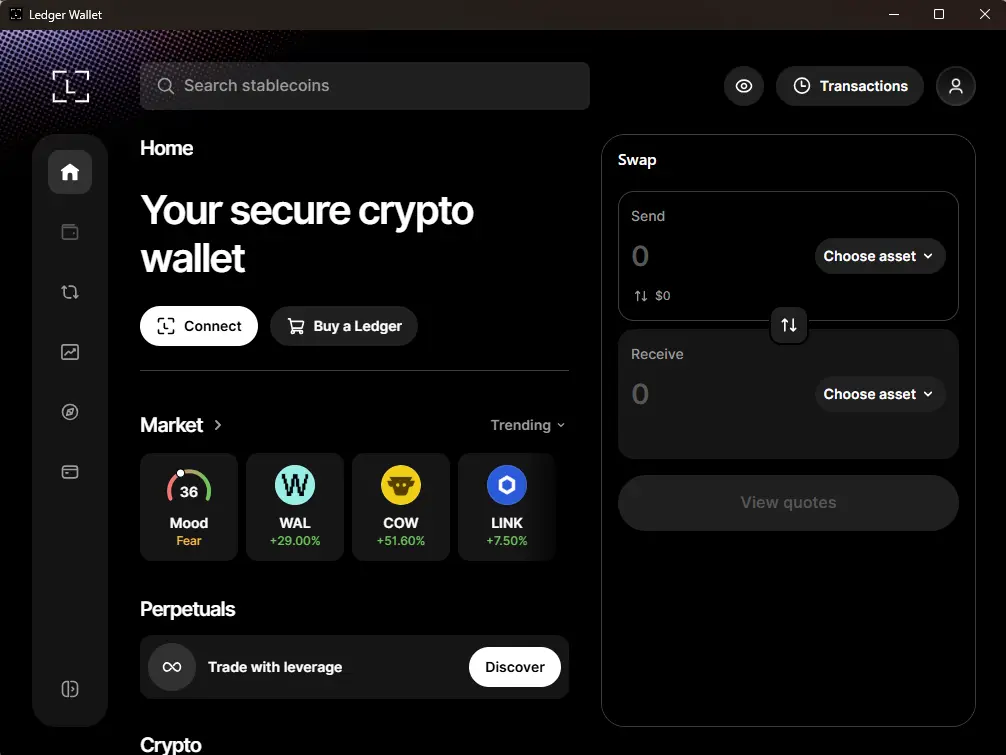
This is where the “online” and “offline” distinction can get confusing. Ledger Wallet needs an internet connection to display your balances, retrieve blockchain data, and broadcast completed transactions. Stax can connect to the app through Bluetooth or USB-C, but it does not send its private keys to your phone or computer. The connection only passes transaction requests to the device and returns the signed transaction once you approve it.
For example, if you want to send BTC or ETH, you first enter the recipient address and amount in Ledger Wallet. The request then appears on the Stax screen, where you can check the details and approve it by pressing and holding the touchscreen. Stax signs the transaction internally, then sends the signed version back to the app for broadcasting. The app can prepare a transaction, but it cannot complete it without your confirmation on Stax.
You can also receive crypto through the app. Stax can show a QR code for your wallet address, making it easier for another person or exchange to scan it before sending funds. If you hold NFTs, you can use Ledger Wallet to set a supported NFT or image as the Stax lock screen and adjust how it appears on the E-Ink display.
Put simply, Ledger Wallet is the online interface, while Stax is the offline signing device that keeps control of your private keys.
Buy Ledger Stax Hardware Wallet
Ledger Stax Key Features
Ledger Stax is primarily a hardware signing device, so its most important features are the ones that make storing keys and approving transactions easier. Buying, selling, swapping, and staking are accessed through Ledger Wallet, which we explain in the next section.
Curved E-Ink Display
Stax uses a 3.7-inch curved E-Ink touchscreen instead of the small displays and physical buttons found on Ledger Nano models. You can enter your PIN, navigate installed apps, and review transaction details directly on the screen.
The larger display is especially useful when checking wallet addresses, token amounts, and fees before approving a transaction. It is also easy to read in direct sunlight. However, since it is an E-Ink display, it has no backlight and can be harder to see in a dark room.
Clear Signing
Clear Signing shows transaction details in a readable format on the Stax screen before you approve them. For a basic transfer, you can verify the asset, amount, recipient address, and network fee directly on the device instead of relying only on your phone or computer.
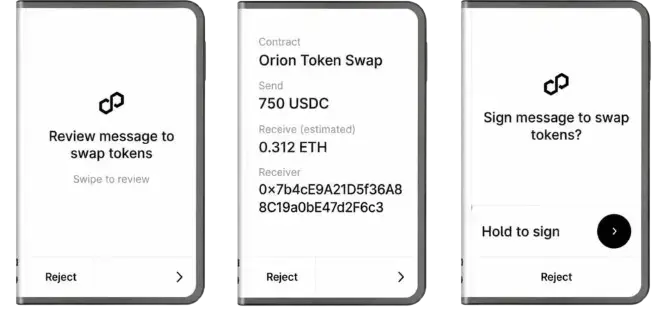
It is more useful when swapping tokens, staking, or interacting with smart contracts. However, Clear Signing does not make every dApp interaction safe, as some complex transactions may still require blind signing.
Design and Display
Ledger developed Stax with Tony Fadell, the creator of the iPod and founder of Nest. The device has a slim, card-like design, a curved screen that wraps around the edge, and built-in magnets that let multiple Stax devices stack together.
You can set a name that appears on the device’s spine, which is useful if you keep separate wallets for long-term storage, daily transactions, or NFTs. The lock screen can also display a custom image or supported NFT. It will appear only in black and white, but it still makes the device easier to recognize.
Magnetic Stacking Design
The magnets built into Stax let you stack multiple devices together, which is where the name comes from. This can be useful if you keep separate wallets for long-term holdings, NFTs, and everyday transactions. However, considering the price of each Stax, most users will probably never use this feature.
NFT Lock Screen
You can display a supported NFT or custom image on the Stax lock screen through Ledger Wallet. The image remains visible even when the device is in standby, while your chosen name appears along its curved edge. It is a thoughtful personalization option, although the E-Ink screen displays everything in black and white.
BOLOS Operating System
Stax runs on BOLOS, Ledger’s operating system built specifically for its hardware wallets. It keeps installed blockchain apps separated, so an issue with one app should not automatically affect the others. BOLOS also works with the Secure Element chip to keep private keys isolated and require physical confirmation for transactions.
Wireless Charging
Alongside USB-C charging, Stax supports Qi wireless charging. You can simply place it on a compatible charging pad instead of connecting a cable every time. It suits the device’s mobile-friendly design, but it is still a convenience feature. Removing it would not change how securely Stax stores keys or signs transactions.
Protection Mode
If Stax detects an event it interprets as a possible physical attack, it enters Protection Mode and temporarily prevents normal use while completing its security checks. This gives the device a way to respond to suspected tampering instead of continuing as usual. You may occasionally trigger it accidentally, but the device should return to normal once the check finishes.
Ledger Wallet App Integration
Ledger Stax connects with Ledger Wallet, formerly Ledger Live, through Bluetooth or USB-C. The app lets you view your portfolio, add accounts, send and receive crypto, and manage NFTs from your phone or computer. It also provides access to buying, selling, swapping, and staking through integrated third-party services.
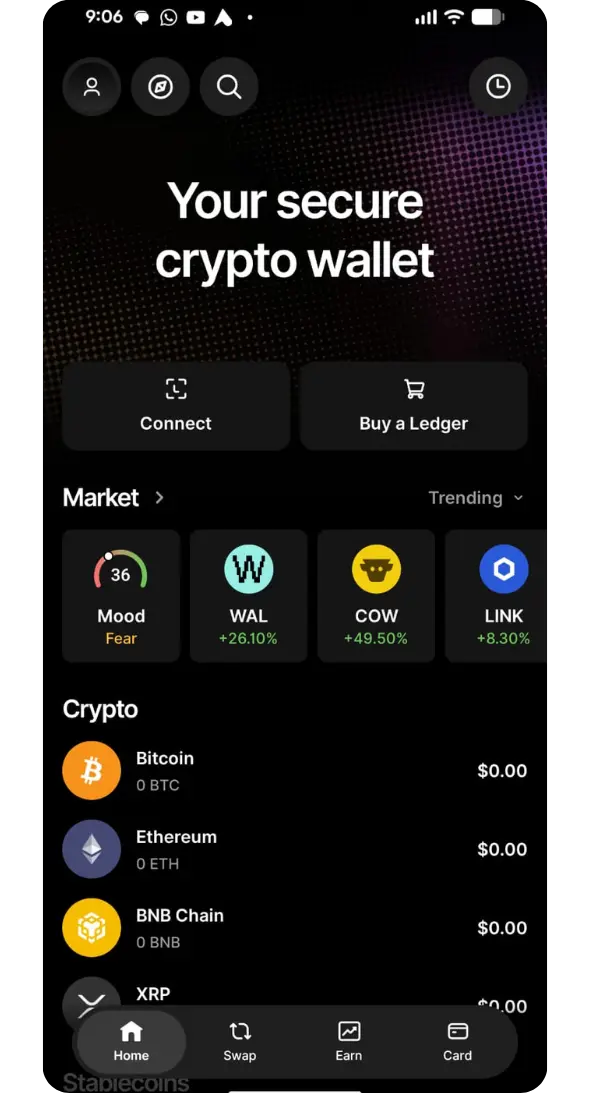
However, Stax remains separate from the app: Ledger Wallet prepares the transaction, while the device keeps your private keys offline and requires your physical approval before anything is completed.
Other Features
Stax has a rechargeable battery, USB-C charging, and Qi wireless charging support. You can enable or disable sounds for transaction reviews, confirmations, and battery alerts, although the volume cannot be adjusted. These additions do not change the device’s security, but they make it more convenient if you use your hardware wallet regularly.
Buy Ledger Stax Hardware Wallet
Ledger Stax Unboxing
As we opened the box, it was clear that Ledger wanted Stax to feel more like a premium consumer device than a basic hardware wallet. The packaging is clean and minimal, which fits the product’s design-focused positioning.
Inside the box, you get:
- 1 Ledger Stax
- 1 USB-C to USB-C cable
- 3 Recovery Sheets
- 1 Ledger Stax Magnet Shell – Midnight Black
- 1 Ledger Recovery Key
- Ledger Stax guide
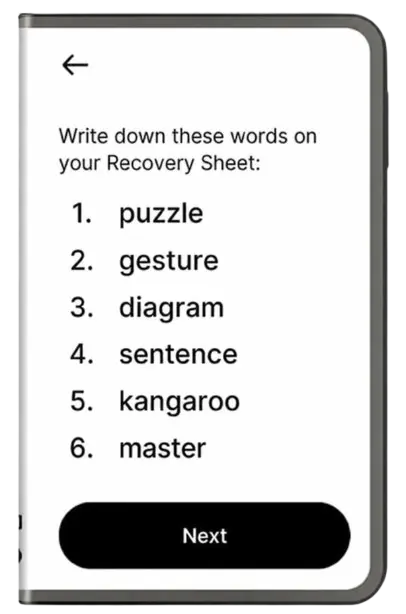
The recovery sheets are more important than they may look. During setup, Stax creates a 24-word recovery phrase that you need to write on one of these sheets and store safely offline. It is the backup for your wallet if the device is lost, damaged, or reset.
Ledger Stax Setup
Once you have unboxed Stax, the actual setup is quite simple. The device and Ledger Wallet app walk you through each part, but you still need to pay close attention when creating your PIN and recording the recovery phrase.
Step 1: You will need to start by turning on your Ledger Stax and selecting the option to set it up as a new device.
Step 2: Download the Ledger Wallet app on your phone or computer, then select Set Up Your Ledger.
Step 3: Pair your Stax with the app through Bluetooth or USB-C, then confirm the connection on the device screen.
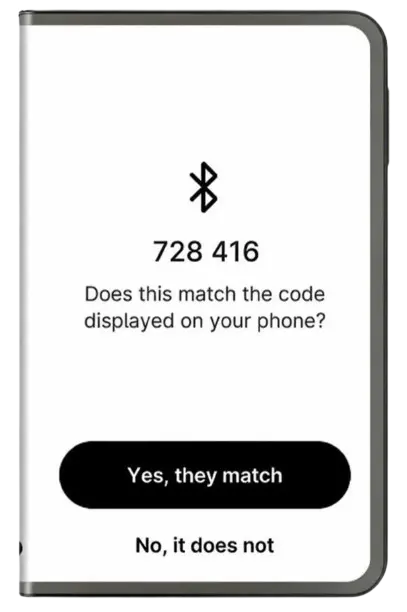
Step 4: Complete the Genuine Check, which confirms that your Stax is an authentic Ledger device and has not been tampered with.
Step 5: Install any available firmware update, then choose a name for your Stax that will appear on its curved spine.
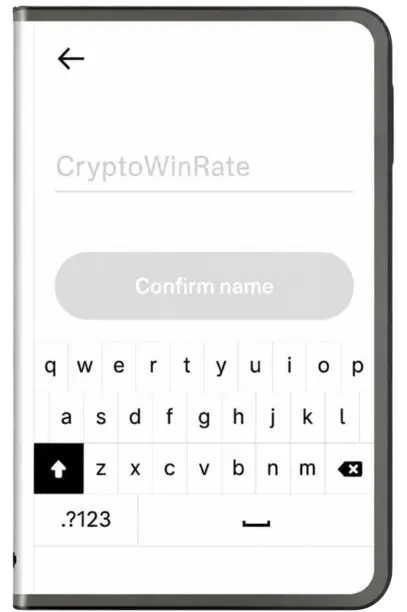
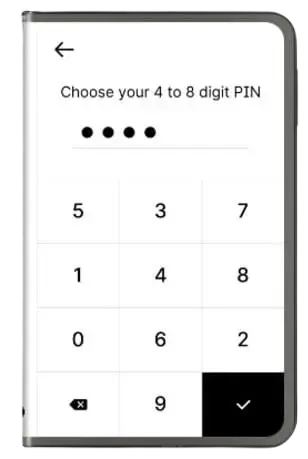
Step 6: Create a PIN on the touchscreen. Ledger supports a four to eight-digit PIN, although an eight-digit option gives you more combinations.
Step 7: Write down the 24-word recovery phrase exactly as it appears on the Stax screen. Never save it digitally or enter it into a website.
Step 8: Install the apps for the networks you use, such as Bitcoin, Ethereum, or Solana, then add the relevant accounts in Ledger Wallet.
Step 9: You can now customize the lock screen with an image or supported NFT, connect a compatible wallet such as MetaMask, or begin receiving crypto.
Once your accounts are added, you are ready to move crypto into Stax. You can either buy supported assets through Ledger Wallet’s integrated providers or send them from an exchange or another wallet to the receiving address shown in the app. Before sending a large amount, it is always worth testing the address with a small transaction first.
From there, you can use Ledger Wallet to track your holdings, stake eligible assets, or connect Stax to wallets such as MetaMask for DeFi. Just remember, whenever you send funds or approve a smart-contract request, check the details on the Stax screen before confirming it.
Ledger Stax Pricing & Fees
Ledger Stax is officially priced at €332.50, including shipping, and orders are generally dispatched within 24 hours. The device also comes with a free Magnetic Shell for basic protection.
Ledger sells additional accessories separately, including the Balenciaga Ledger Stax Holder, which is a luxury leather case rather than a necessary accessory. You can use Stax normally without buying any add-ons.
There are no ongoing fees for holding crypto on Stax. However, you will still pay blockchain network fees whenever you send assets. If you buy, sell, swap, or stake through Ledger Wallet, the relevant third-party provider may charge service fees or include a spread in its quoted price.
Ledger Stax Supported Assets and Networks
Ledger Stax can manage more than 15,000 coins and tokens, including major assets such as Bitcoin, Ethereum, XRP, Solana, Cardano, USDT, and USDC. It supports assets across a large number of networks, including EVM-compatible chains, so you can manage tokens on Ethereum, Polygon, Arbitrum, BNB Chain, Avalanche, and similar networks.
Stax has enough storage to install up to 100 blockchain apps. These are not separate wallets holding your funds. Each app lets the device interact with a specific network, such as Bitcoin or Ethereum. If you ever remove an app to free up space, your assets remain safe on the blockchain and can be accessed again once you reinstall it.
Buy Ledger Stax Hardware Wallet
Ledger Customer Support
Ledger’s support is for its full ecosystem, not just the Stax device. If you need help with your hardware wallet, Ledger Wallet app, account setup, or a transaction issue, the first place to check is Ledger’s support center. It has FAQs and troubleshooting articles for common problems, including pairing, firmware updates, recovery phrases, and connection errors.
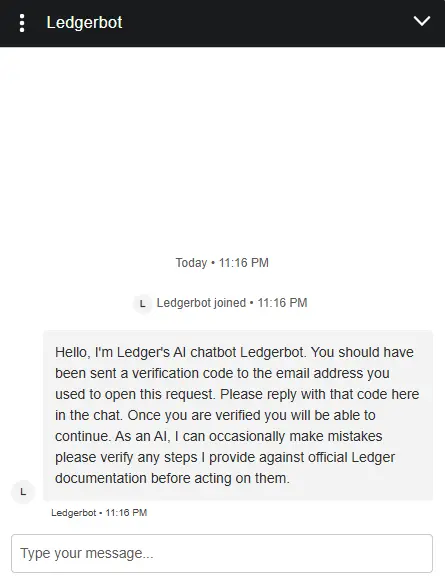
If the guides do not solve your issue, click the chat icon in the bottom-right corner of the support page. The chatbot can handle basic questions and direct you to relevant support articles. If you need further help, you can request to speak with a Ledger support agent during the conversation. Agents are available Monday to Friday during office hours. Ledger also provides email support and, when available, live chat.
One important safety point: Ledger will never call you unexpectedly or ask for your recovery phrase. Any call or message doing that is a scam.
Ledger Stax Security and Self-Custody
Ledger Stax keeps your private keys inside a CC EAL6+ certified Secure Element chip, where they remain separate from your phone, computer, and internet connection. The device is protected by a four to eight-digit PIN, and it resets after three incorrect attempts. Your 24-word recovery phrase remains the main backup, so losing Stax does not mean losing your crypto, provided that phrase is stored safely.
Before an outgoing transaction is completed, Stax requires you to review and approve it on its secure touchscreen. Clear Signing helps show details such as the amount, recipient, and network fee in readable language. However, no hardware wallet can protect you if you approve something malicious yourself.
Some complex dApp interactions may require blind signing, where the device cannot fully explain the transaction. This setting is disabled by default, and you should only enable it when you fully understand what you are approving.
Is the Ledger Stax Safe to Use?
Yes, Ledger Stax is safe to use when you follow basic self-custody practices. Your private keys stay on the device, while Ledger Wallet and connected dApps can remain online. Bluetooth or USB-C transfers transaction requests, not your private keys, and every outgoing action still needs approval on the Stax screen.
Ledger does more than simply give you a recovery phrase and leave you to figure things out. Clear Signing translates supported transactions into readable details before approval. For EVM interactions, Transaction Check simulates supported transactions and flags suspicious outcomes before you sign. Protection Mode can also lock the device when it detects an event it interprets as an attack.
However, these layers do not remove your responsibility. If a complex dApp requires blind signing, Stax may show raw data rather than readable details. Do not approve it unless you fully understand the action.
Buy Ledger Stax Hardware Wallet
Ledger Stax Alternatives
Alternatives are always worth considering. They help you compare what you are getting, but there may also be practical reasons why Ledger Stax is not right for you, whether that is its price, usability, or premium design. Here are two Ledger Stax alternatives that take a different approach:
1. Ledger Nano X: If you want to remain within Ledger’s ecosystem, Nano X provides Bluetooth connectivity and secure signing at a lower price.
2. NGRAVE ZERO: For air-gapped storage, NGRAVE ZERO uses QR codes, fingerprint authentication, and a large touchscreen, though it costs more than Stax.
| Feature | Ledger Stax | Ledger Nano X | NGRAVE ZERO |
|---|---|---|---|
| Price | €332.50 | €82.50 | €398 |
| Screen | 3.7″ curved E-Ink touchscreen | Small OLED with buttons | 4″ color touchscreen |
| Connection | Bluetooth, USB-C, NFC | Bluetooth and USB-C | Air-gapped QR codes |
| Main Feature | Premium display and Qi charging | Lower-cost Ledger option | EAL7 security and biometrics |
| Best For | Frequent users wanting usability | Ledger users on a budget | Users prioritizing offline security |
| Buy Now | Buy Now | Buy Now | Buy Now |
Bottom Line
Ledger Stax is really a choice about how you want to use self-custody. If you want a larger screen, a device you will not mind using regularly, and a more polished experience around transaction approvals, its price can make sense. If you only plan to store crypto and make occasional transfers, paying extra for the screen, design, and wireless charging may feel unnecessary.
There is no single hardware wallet that suits everyone. Your assets, the networks you use, and how often you transact should shape the decision. If Stax does not feel like the right fit, see our crypto wallet reviews for more options.
FAQs
1. Is Ledger still safe in 2026?
Ledger remains a widely used hardware-wallet provider. Its devices keep private keys offline and require on-device approval for transactions. However, safety still depends on how you use it. Never share your recovery phrase, verify each transaction on the Stax screen, and avoid approving smart-contract requests you do not understand.
2. Is Ledger Stax worth the money?
Stax is worth considering if you value a larger touchscreen, easier transaction verification, wireless charging, and a more refined design. If you only need secure long-term storage and make occasional transfers, Ledger Nano X or other lower-priced hardware wallets may offer better value.
3. Does Ledger Stax work with MetaMask?
Yes. You can connect Ledger Stax to MetaMask and use MetaMask as the interface for Ethereum and EVM-compatible networks. Your private keys remain on Stax, and you still need to approve every transaction directly on the device.
4. What happens if I lose my Ledger Stax?
Losing the device does not mean losing your crypto. You can restore access on another compatible wallet using your 24-word recovery phrase. However, anyone who gets that phrase can control your funds, so it must be stored privately and offline.