



- •Changing your Phantom wallet name is a personalization update.
- •The tweak doesn’t affect your funds, addresses, transaction history, or other on-chain data.
- •Renaming wallets is ideal for organization when managing multiple wallets.
Failing to recognize your accounts at a glance can be frustrating, especially if you manage multiple wallets across different chains in Phantom. To curb this issue, you can change Phantom Wallet name to make recognition easier and faster. This tweak is useful when separating accounts, making it easier to access the right wallet for savings, trades, sending/receiving crypto, and interacting with NFTs. This guide explains how to rename wallet in Phantom and provides tips for managing multiple wallets on the platform.
Things to Know Before Changing Your Phantom Wallet Name
Firstly, your Phantom name is a local label for each account in your wallet, making it easier to identify the account’s purpose, especially when you’re managing multiple accounts. It helps you organize and recognize wallet accounts, but it has no functional role beyond that.
Changing your Phantom wallet account name does not affect funds, transaction history, private keys, or wallet addresses. Also, the change is not visible on-chain and cannot be seen by other Phantom users.
Phantom wallet names can be changed at any time and as many times as you wish. Phantom does not limit the number of times you can change your wallet name or the characters you can use.
It is important to note that renaming Phantom wallet name is device-specific. If you use Phantom on multiple devices, the wallet name must be updated separately on each one. Lastly, renaming a wallet is different from registering a blockchain domain name, such as a .sol or .eth address.
Learn more: Phantom Wallet Review
How to Change Phantom Wallet Name on Browser Extension
Open your preferred browser, then follow the steps below to rename Phantom wallet safely:
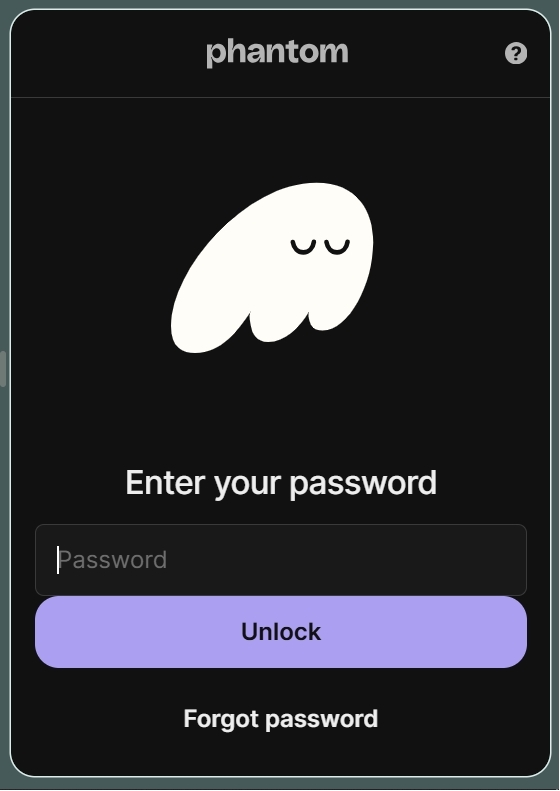
Step 1: Log in to your wallet on the Phantom browser extension.
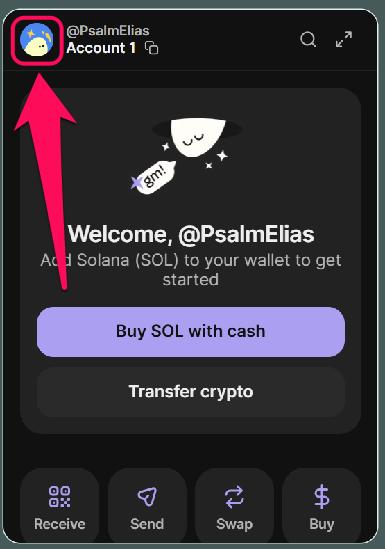
Step 2: Click your profile avatar in the upper-left corner.
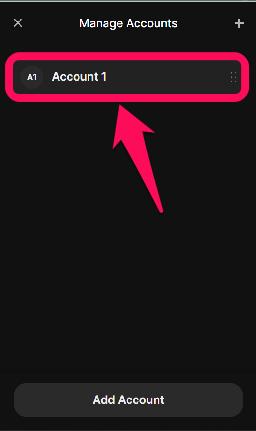
Step 3: Click on the pencil icon to view and manage all the accounts tied to the wallet.

Step 4: Select the account you want to rename from the displayed list of accounts.
Step 5: Click the Account Name field.
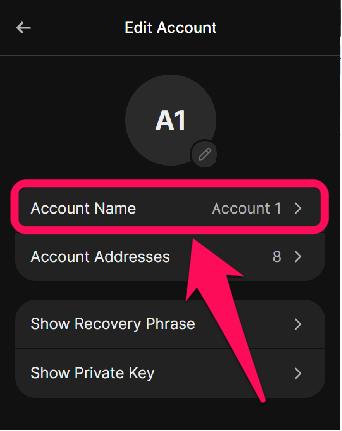
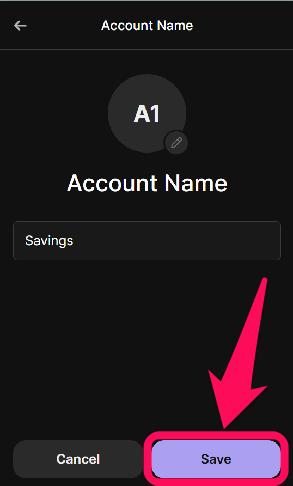
Step 6: Enter a new name, then click Save so the update appears automatically.
How to Change Phantom Wallet Name on Mobile App
The steps below will show you how to edit Phantom wallet name on your phone:
Step 1: Launch the Phantom wallet app and unlock your account.
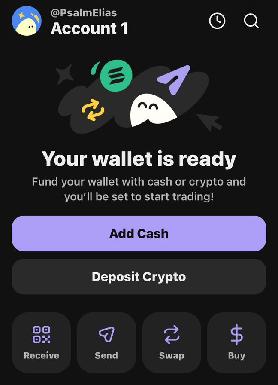
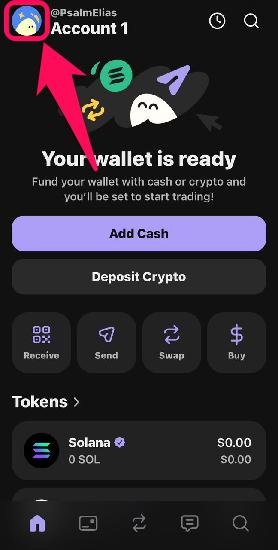
Step 2: In the upper-left corner of the app, tap your profile avatar.
Step 3: Browse the list of accounts displayed and click the Pencil icon next to the account you wish to rename.

Step 4: Next, tap Account Name.
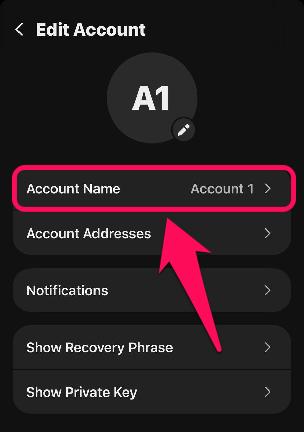
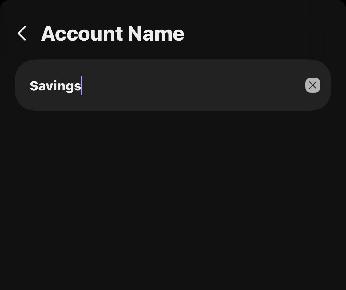
Step 5: Enter your new phantom wallet name in the box provided. The update saves automatically.
Managing Multiple Wallet Names in Phantom
As mentioned earlier, wallet names are helpful when using multiple accounts on Phantom Wallet. Clear, unique labels reduce confusion and make it easier to select the correct wallet when sending and receiving coins. The typical formula to use when you want to update Phantom wallet name is to focus on the account’s function.
This provides clear visual cues to identify the account that best suits specific transactions on specific chains. As your crypto experience grows, you will likely create more accounts, and simple updates like renaming are essential for improving wallet management.
Bottom Line
The best way to achieve the orderliness needed to leverage multiple crypto opportunities is to label your wallets accordingly. Using the steps above to change Phantom wallet name securely, you ensure wallet organization without affecting your funds or on-chain data. For users who want additional customization, Phantom also allows visual personalization, such as changing your Phantom wallet avatar. This personalization gives your wallet the exact look you need for an optimal crypto experience.
FAQs
1. Is Phantom Wallet Name also Phantom Username?
No, they are different. A Phantom Wallet name is a local nickname for your organization. It is visible only to you, unlike when you change Phantom username. A Phantom username is a unique, on-chain identifier (like an @handle) that allows others to send you funds without needing your long public address.
2. Does changing my Phantom Wallet name cost any gas fees?
No, updating your Phantom Wallet name is free, since it is a local display change rather than an on-chain transaction. You do not need any SOL in your wallet to update the nickname of your accounts.
3. Can I rename multiple wallets in Phantom?
Yes, each wallet you own can be renamed independently within the Phantom app.




