



- •Injective now runs a native EVM on its Layer 1, replacing the earlier inEVM setup for better integration with Ethereum-based wallets.
- •Injective does not appear in MetaMask by default, so you need to add it manually using the correct RPC, chain ID, and currency details.
- •Once added, you can connect your wallet to dApps, trade on perp DEXes, and interact with DeFi tools available on Injective.
A layer-one blockchain built for high-performance DeFi and financial applications, Injective Protocol saw a rise in activity in 2024 as developers began exploring its ecosystem. It initially introduced inEVM, an Orbit stack-based Layer 2 designed to give Ethereum developers access to Injective’s infrastructure. However, inEVM has since been deprecated, with Injective launching a native EVM directly on its Layer 1 mainnet in November 2025. As a result, users looking to interact with dApps on Injective now need to add Injective to MetaMask, and this guide walks you through the process.
Can You Use MetaMask with Injective Mainnet?
Yes, but with context. Injective supports EVM functionality through its EVM layer, which allows it to connect with MetaMask. This means you can manually add Injective Mainnet as a custom network using the correct RPC details and interact with supported applications through your wallet.
Can I Add Injective Mainnet to MetaMask?
Yes, you can connect Injective Mainnet to MetaMask, but there is an important detail to understand. Injective now offers native EVM support on its Layer 1, which allows it to work with wallets designed for Ethereum-based networks. Because of this compatibility, Injective can be added as a custom network using the correct RPC details.
Once configured, MetaMask can be used to manage assets, approve transactions, and interact with dApps available within the Injective ecosystem.
How to Add Injective Mainnet to MetaMask
To connect Injective Mainnet with MetaMask, you will need to add it manually using its RPC details. Similar to how users previously configured inEVM in MetaMask, Injective does not appear by default and must be added as a custom network.
This setup requires entering key details such as the network name, RPC URL, chain ID, and currency symbol. Below are the official Injective Mainnet RPC details:
Network name: Injective
New RPC URL: https://sentry.evm-rpc.injective.network/
Chain ID: 1776
Currency symbol: INJ
Block explorer URL (Optional): https://blockscout.injective.network/
Step 1: Open the MetaMask extension from your browser toolbar to access your wallet.
Step 2: For a better view, expand MetaMask into a full tab. Click the menu icon in the top right corner and choose “Expand view”.
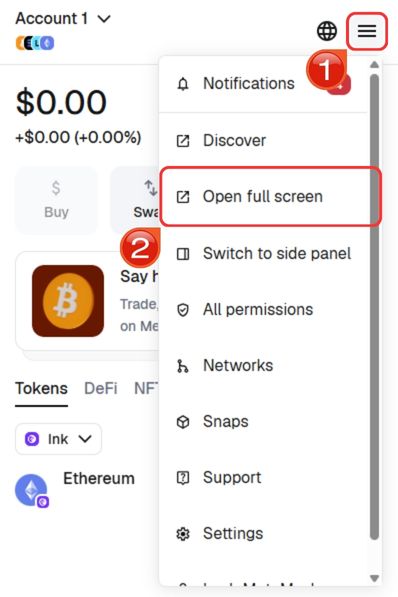
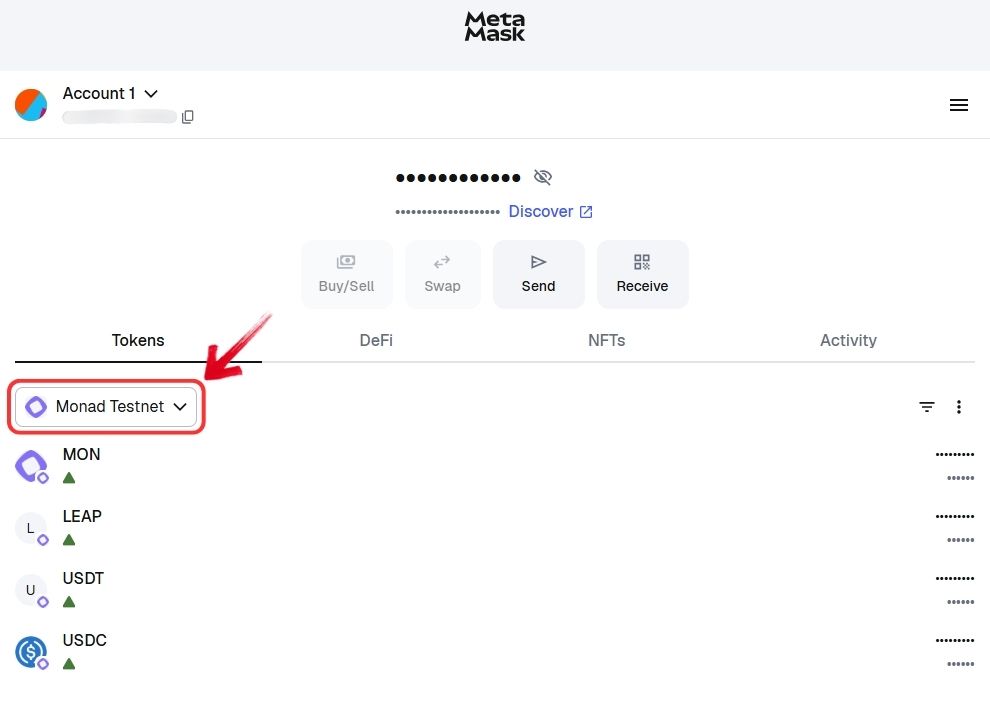
Step 3: Once in full view, locate and click the “Network” dropdown at the top of the interface.
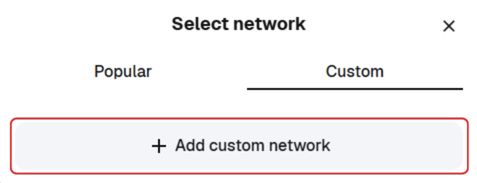
Step 4: From the available options, move to the “Custom” section and select “Add custom network”.
Step 5: Enter the RPC details for the Injective Mainnet in the required fields. Take a moment to verify each value before proceeding, then click “Save” to complete the setup.
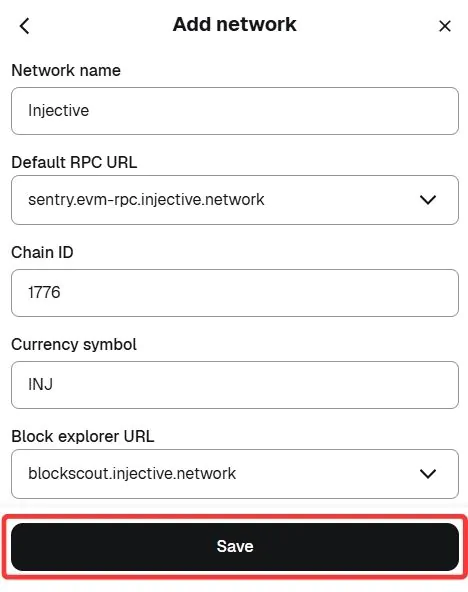
Step 6: After saving, MetaMask will switch to Injective Mainnet automatically. You can now start interacting with supported apps and assets on the network.
Using the manual method is the most reliable approach when adding Injective Mainnet to your MetaMask wallet, especially if you want to verify each network detail yourself. However, it is not the only option.
Since manually configuring MetaMask with Injective Mainnet can take a bit of time, you can also use a quicker alternative. By selecting the “Add Injective Mainnet to MetaMask” option, the wallet is automatically prompted with the correct RPC details. From there, you can complete the setup in just a couple of clicks without entering the information manually.
Download MetaMask for your device




About Injective
Injective Protocol is a layer-one blockchain designed specifically for financial applications. It addresses common limitations in DeFi, such as slow execution, high fees, and fragmented liquidity, by offering a fully on-chain orderbook, fast block times, and low transaction costs.
The network also supports cross-chain functionality across IBC networks and Ethereum, allowing assets and data to move more freely. Developers can build using modular components instead of starting from scratch, which simplifies development.
Injective previously introduced inEVM as its EVM-compatible layer for Ethereum integration, but this has now been deprecated as the protocol continues to refine its core architecture.




