



- •Rabby’s easy-to-understand instructions allow users to understand every action they take within the wallet.
- •Users can revoke approvals, whitelist addresses, or connect hardware wallets for layered security.
- •Avoid phishing and fake airdrop scams by verifying links and limiting wallet permissions.
Beginners and experts in crypto must have heard of one Web3 horror story or another. Sometimes a user clicks a wrong link or makes a careless approval, and their wallet gets drained within seconds; hacked! However, the problem isn’t always from the users’ side. Often, Web3 users find it challenging to understand the hex codes and “machine language” warnings that wallets display instead of clear, easy-to-understand language. Meanwhile, Rabby wallet translates complex blockchain actions into clear explanations, helping users know what will happen before they sign a transaction. Read this post to learn how to protect yourself, detect, and avoid scams with Rabby wallet.
Why Traditional Wallets Fail (The MetaMask Gap)
Traditional Web3 wallets often assume that most users are knowledgeable about crypto features and possibilities, including scams. So, when interacting with dApps, users often see unreadable data rather than meaningful details. Unfortunately, hackers attempt to replicate this setup, creating a “blind sign” problem that lures users into clicking on malicious links because they appear normal.
Additionally, due to manual network switching in traditional wallets, users often send funds on the wrong chain, and they are lost forever. Lastly, there is a significant translation gap, where users aren’t told exactly what they are sending, receiving, or approving.
Ways Rabby Wallet Detects Scams Automatically
Rabby wallet uses real-time simulation to detect scams and protect users from them. Before you approve any transaction, Rabby displays the transaction results (e.g., -100 USDT) before you click the confirmation button. The wallet also features built-in risk scanning for contracts, addresses, and other entities to identify and notify users about “honey pots” or other unverified, malicious contracts.
Furthermore, the wallet uses traffic-light color codes (red, yellow, and green) to distinguish high-risk from low-risk transactions. Essentially, the visual warnings make it easier to identify legit, low-risk transactions against high-risk ones.
How to Avoid Most Common “Coach-Targeted” Scams
The (arguably) most common scam technique is phishing through decentralized applications (dApps). Fake “mastermind” platforms often trick Web3 users into connecting their wallets and approving contracts. The result? Complete fund drain from such a wallet! To avoid becoming a phishing victim, always verify and avoid clicking wallet-related links from unverified messages.
Fans of crypto airdrops may also be at risk of huge crypto scams. Scammers may use random “free” tokens sent to your wallet as bait to gain access to it and steal funds. The safest approach is to ignore unknown tokens completely. Also, do not grant sites unlimited access (permissions) to your wallet immediately, as compromised platforms may later drain approved funds.
Proactive Security: Rabby’s Must-Use Features
Below are some of Rabby’s key features that can help safeguard your wallet from scams and other fraudulent attempts.
The “Revoke” Tab:
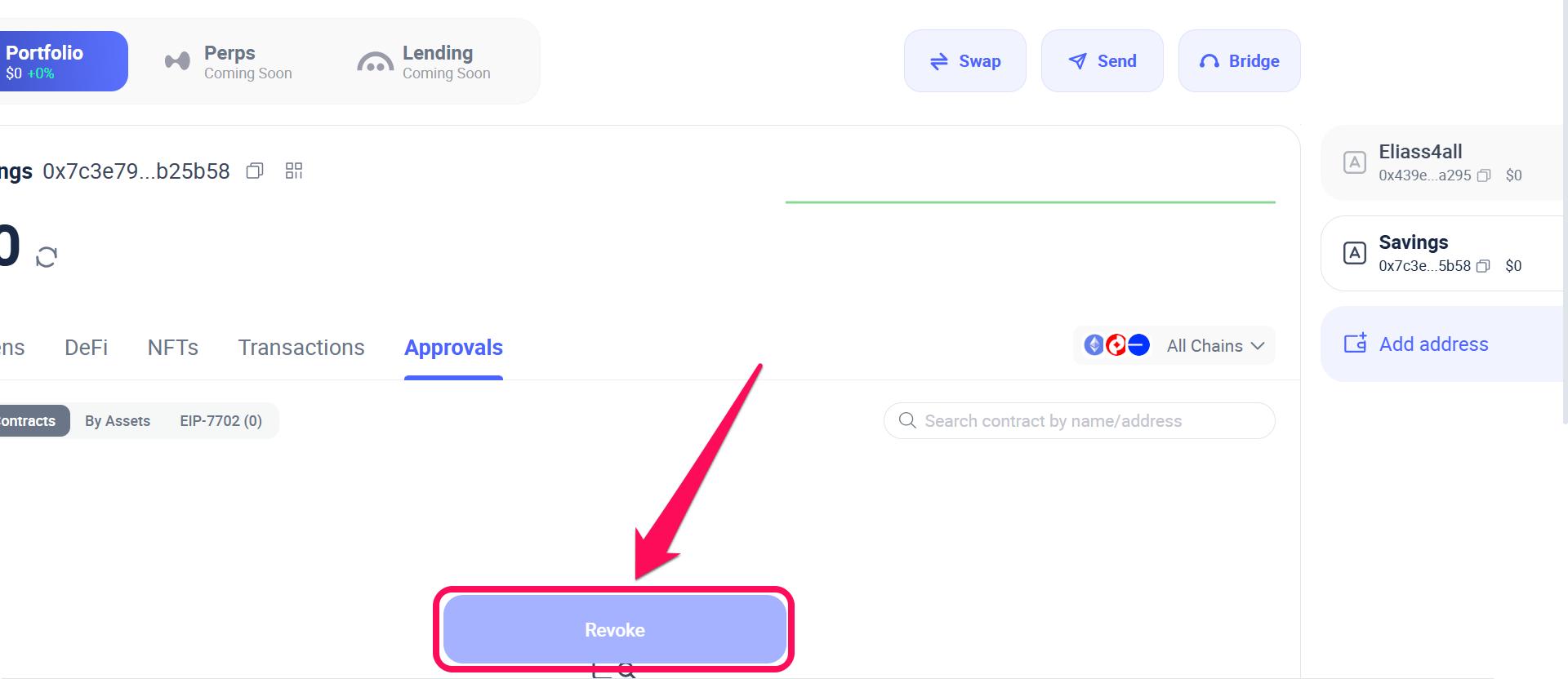
Rabby’s “Revoke” feature lets you review and revoke token permissions previously granted to dApps. Follow the steps below to use this feature:
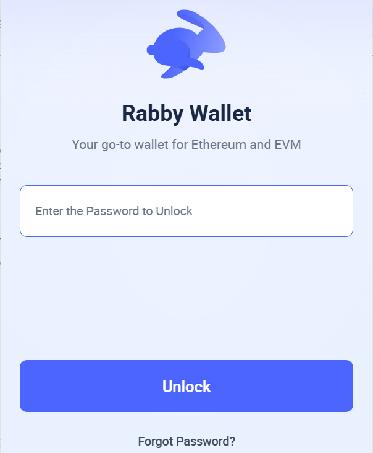
Step 1: Open your Rabby wallet app and log in to your account.
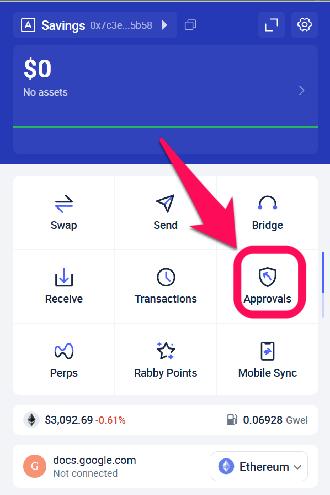
Step 2: Select Approvals from the list of options displayed on the homepage.
Step 3: Select the account having approvals you wish to revoke.
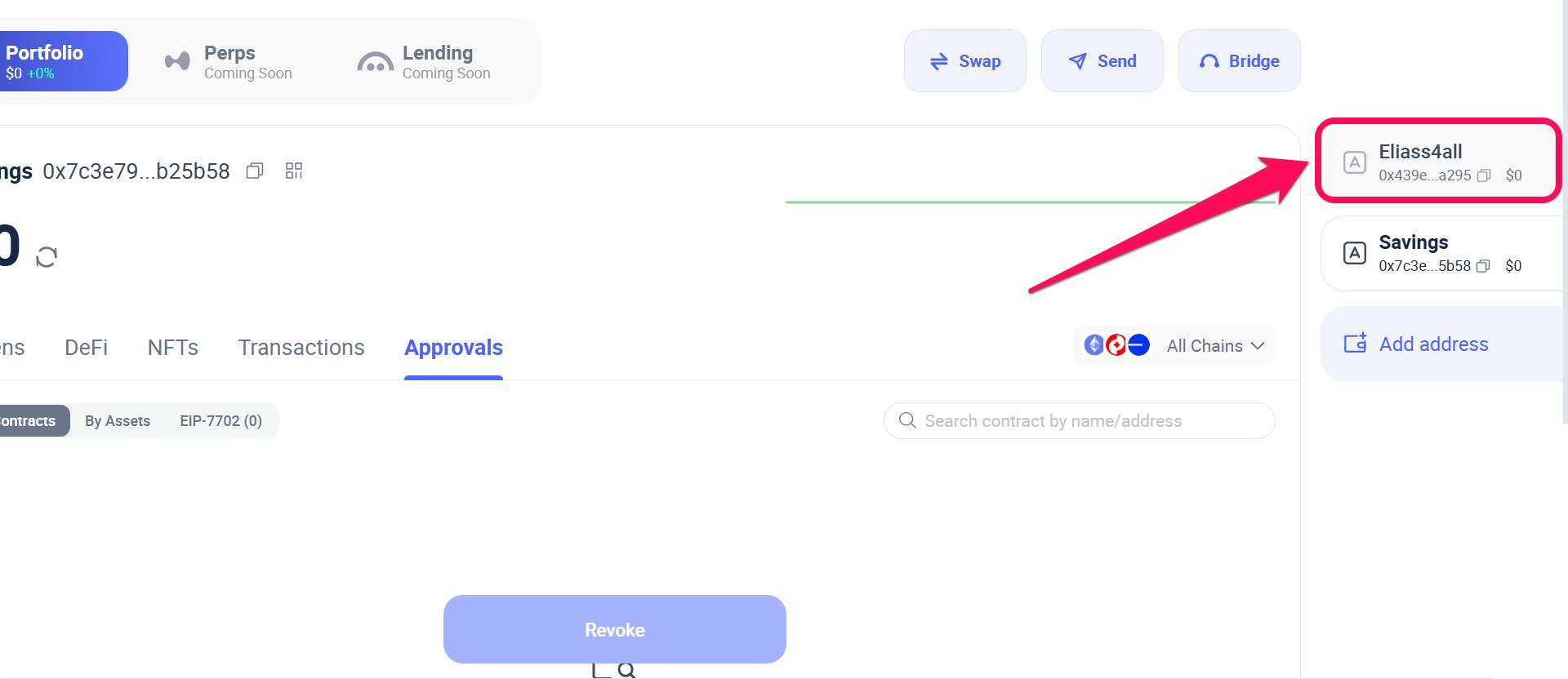
Step 4: Select the specific approvals you want to reverse, either by Contract or Asset.
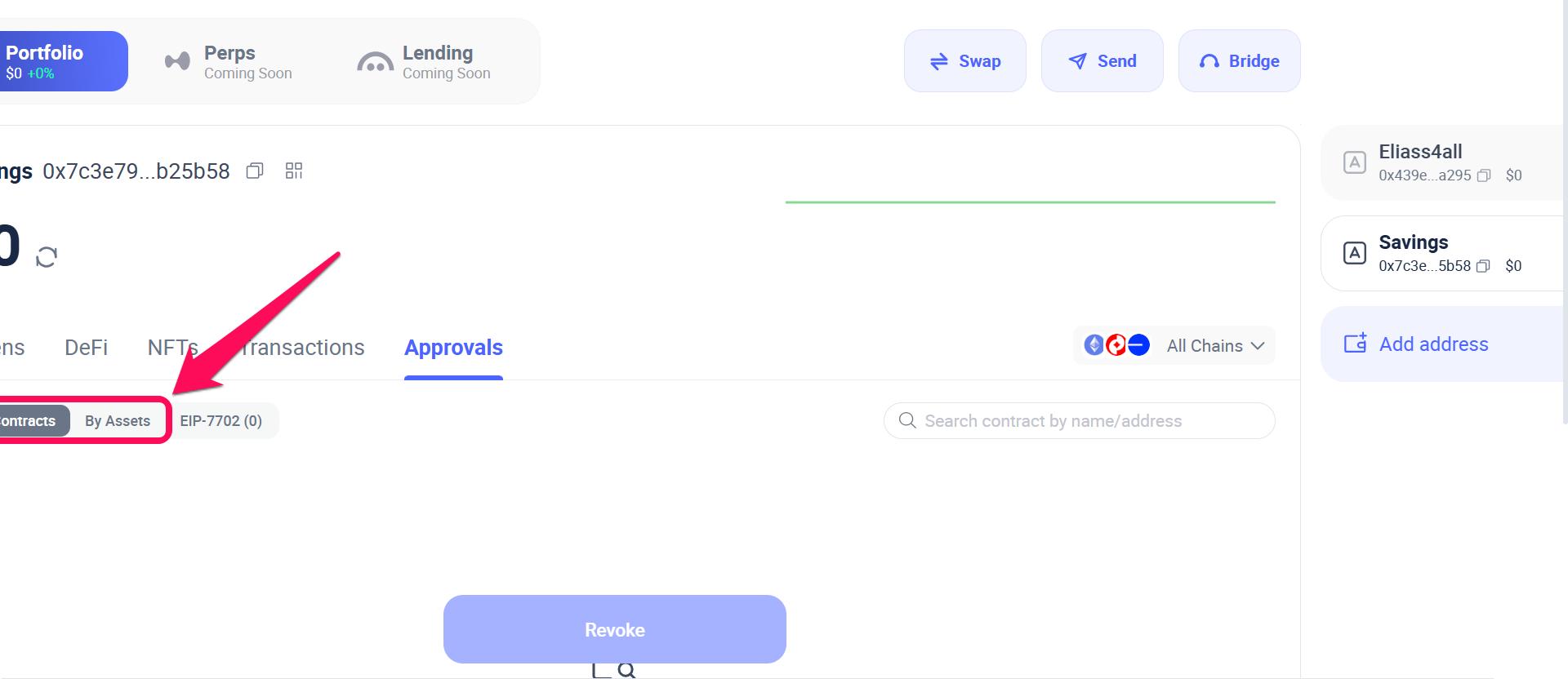
Step 5: Click “Revoke” to complete the action.
Address Whitelisting
This feature allows you to save trusted wallet addresses for future transfers. This way, you won’t ever send funds to the wrong addresses or fall victim to clipboard hijacking malware.
Hardware Integration
If you’re someone who uses hardware wallets more often for better security, Rabby provides you hardware integration options too. The wallet supports integration with hardware wallets like Ledger and Trezor, keeping private keys offline while Rabby safeguards your funds simultaneously.
Setup Guide: Switching to Rabby Wallet in 5 Minutes
Interestingly, you can begin to leverage Rabby’s security features within 5 minutes if you follow our guide on how to import existing wallets to Rabby. Getting started with Rabby, whether as a novice or experienced crypto user, is straightforward, with all the steps explained in our attached article. Once your account is created, ensure you set a secure Rabby wallet password to safeguard against unauthorized access.
Bottom Line
Successful crypto scams can result from user negligence or from wallet security flaws. Fortunately, the Rabby wallet is equipped with tools that make it less accommodating to scammers and malicious websites. Features like revocation and whitelisting provide users with clarity about the transactions they allow in the wallet.
Also, as a non-custodial wallet, Rabby wallet users fully control their private keys and store them offline. The option to back up Rabby wallet accounts is also readily available within the app, so check out the guide to do it the right way.
FAQs
1. How do I know if the Rabby app I’m downloading is legitimate?
Always download directly from rabby.io. Scammers often upload fake “Rabby” apps to the Apple App Store or Google Play with slightly different developer names. The official developer for the iOS app is DeBank Global Pte. Ltd., and for Android, it is DeBank. Never trust a search result ad.
2. What should I do if Rabby shows a “Red Forbidden” warning?
Stop immediately, as a red warning usually means Rabby has detected a known phishing URL or a “drainer” contract designed to empty your wallet. Unlike other wallets that let you click through, Rabby disables the “Sign” button by default here to prevent you from making a costly mistake.
3. Is it a scam when Rabby says a site has “Low Popularity”?
Not necessarily, but proceed with extreme caution. This warning means the site hasn’t been widely used by the community yet. It’s a common red flag for brand-new “honeypot” scams or fake airdrop sites created only hours ago to trap unsuspecting users before they get flagged globally.




