



- •Backing up your Rabby wallet is the best way to prevent account loss if your device is misplaced.
- •A strong password and biometric lock add an extra layer of security to your wallet.
- •Always download Rabby from the official website to avoid scams.
Most crypto wallet hacks can be traced back to compromised seed phrases or poor key management. Rabby wallet is no exception, as its user base continues to grow, cases of such human errors are seen to grow with it. If your wallet is not secured correctly, a single mistake, an incorrect link, or device loss can cost you everything. However, you won’t have to worry about your account getting compromised due to security breaches with the tips in this post. This guide explains how to secure and back up your Rabby wallet in simple, straightforward steps.
Download the Official Rabby Wallet App
Your security journey begins the moment you download the wallet. To properly protect your account, ensure you download the Rabby wallet app or browser extension from the official Rabby wallet website.
This one step protects you from fake apps and malicious extensions that are waiting to steal your funds or expose your secret phrase. Understand the Rabby wallet download process thoroughly to avoid mistakes and save valuable time.
How to Secure Your Rabby Wallet
Rabby is built for security, with its non-custodial setup and advanced features like batch-revoke and transaction previews. However, you can also add extra layers of security to your Rabby wallet to further guarantee its safety. Here is how to secure your Rabby wallet account:
Set a Strong Password
Your password protects your wallet on your current device. Ensure your password is hard to guess and impossible for others to access. Use at least 8-12 characters, combining uppercase and lowercase letters, numbers, and symbols. Follow the steps below to secure your Rabby wallet account:
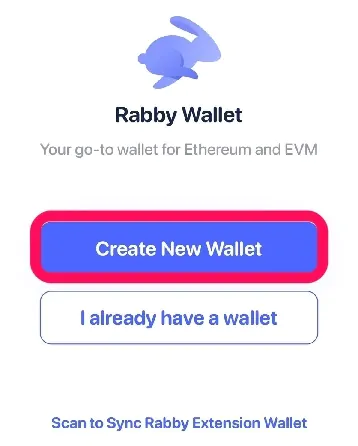
Step 1: Open the Rabby wallet app after installation. Click on Create new wallet or I already have a wallet to import.
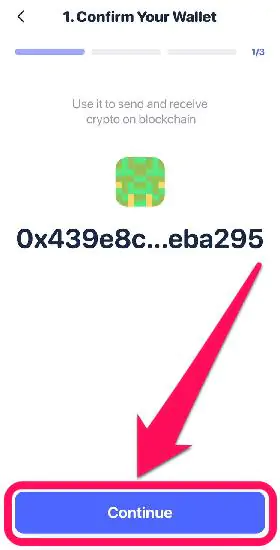
Step 2: The associated wallet address for your seed phrase is displayed. Tap on Continue to proceed.
Step 3: When prompted, create a unique password for your account. Ensure it is hard to guess, but memorable to you. Then, confirm the password and click Continue.
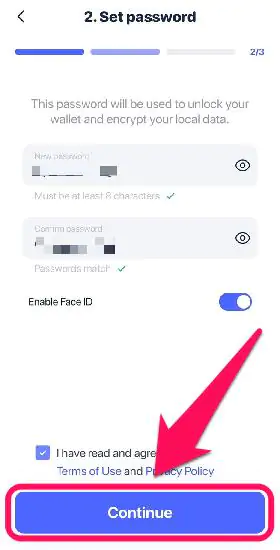
Step 4: Rabby automatically saves the password, and you will need it each time you try to access your account on that device.
Add Extra Security: Passcode With/Without Touch ID or Face ID
Although it’s optional, adding biometric passkeys to your account is a good way to prevent unauthorized access. We recommend choosing a password plus biometric/touch ID for easier access and added security. Follow the steps below to do this:
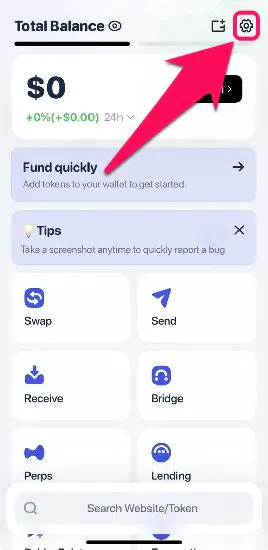
Step 1: Click the Settings icon in the top-right corner of the mobile app.
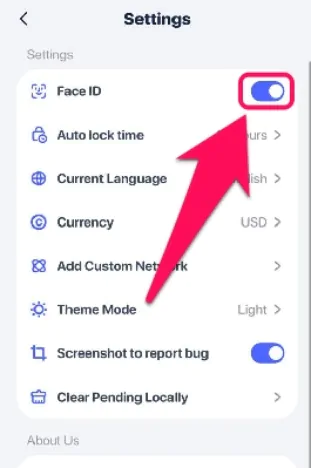
Step 2: Toggle on the “Face ID or Enable fingerprint“ feature to activate the biometric passkey.
How to Back Up Your Rabby Wallet
As with many self-custodial wallets, Rabby users have sole control over their seed phrases. Your seed phrase or secret recovery phrase (SRP) is the only way to access your wallet if you lose your device or forget the password. So, backing up your wallet’s seed phrase is essential.
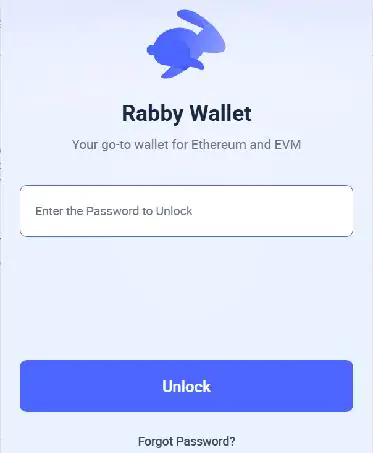
Step 1: Open the Rabby wallet app and log in to your account.
Step 2: Click the wallet selector icon and choose the account you want to back up.
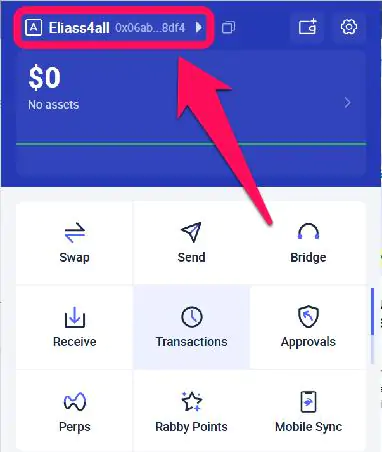
Step 3: Tap the arrow button next to the account address to access the account details.
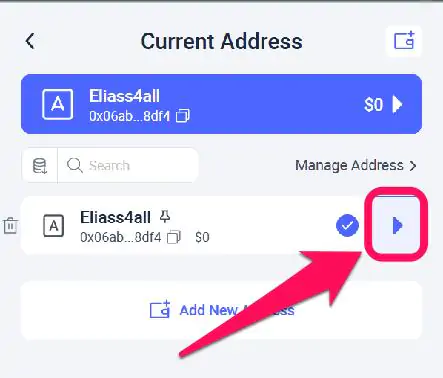
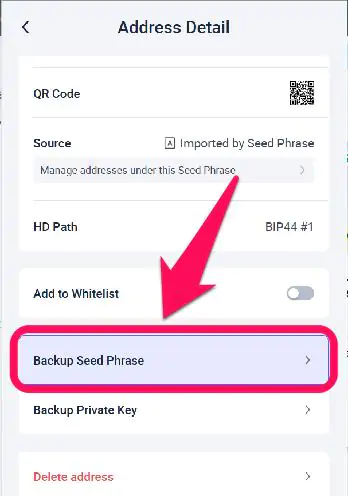
Step 4: Next, scroll down and select Backup seed phrase.
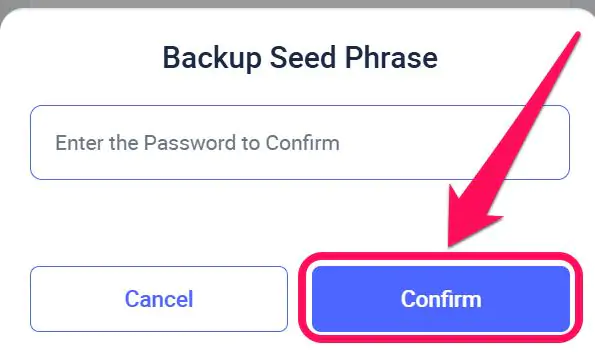
Step 4: Enter your password/passkey to reveal your SRP, then write it down offline and store it securely.
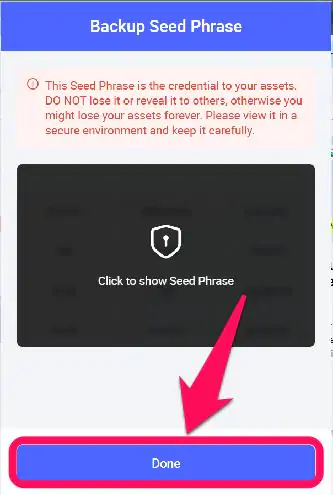
Step 5: Click on the blurry part to show your seed phrase, and click done after you’ve written it done.
Tips and Tricks
Securing and backing up your wallet is simple and guarantees utmost account protection. However, you can take it a step further by following these pro tips for the Rabby wallet:
Keep your seed phrase and private keys safe.
Your seed phrase and private keys are the most essential elements of your Rabby wallet account. Never share them with anyone for no reason whatsoever. Access to your SRP equals unhindered access to all wallets created using the phrase.
Avoid connecting to untrustworthy websites.
To prevent phishing and other forms of Web3 attacks, be cautious when connecting your wallet to links. Avoid connecting to shabby-looking and unofficial dApps that Rabby has already flagged.
Bottom Line
Rabby Wallet places the responsibility for safeguarding your account on you at all times. To secure and back up your Rabby wallet, set a memorable password to protect your device and store your SRP safely offline for easy account recovery. Once you forget your password and lose access, it’s lost for good unless you have your recovery phrase. We discussed all the necessary security measures, including reviewing your SRP for offline storage, in our guide on installing and setting up Rabby Wallet.
FAQs
1. Can I recover my Rabby Wallet without my recovery phrase?
No. If you lose your device and don’t have your recovery phrase, your wallet and funds are permanently lost.
2. Is Rabby Wallet safer than regular mobile wallets?
Rabby focuses heavily on transaction risk warnings and dApp security, making it safer for multichain DeFi interactions when used correctly.
3. How often should I back up my wallet?
You only need to back up your wallet once. Ensure the backup remains safe, readable, and accessible when needed.




