



- •You can bridge to MegaETH from 60+ EVM networks, and select non-EVM chains through supported third-party bridges.
- •Costs depend mainly on the source network, with Ethereum usually resulting in higher gas fees during congestion.
- •Always add the MegaETH network to your wallet and hold the correct native gas token before initiating a bridge transaction.
A high-performance Ethereum Layer 2 blockchain designed as the “first real-time blockchain” is the core promise MegaETH is looking to deliver. The idea, inspired by Vitalik Buterin’s posts and backed by figures like Vitalik himself alongside MetaMask founder Joseph Lubin, has positioned MegaETH as one of the more talked-about L2 launches recently.
With the MegaETH mainnet going live in February 2026, many users now want to experience the network firsthand. Although options are still limited, users can bridge to MegaETH network from other networks, and in this guide, we will explore those available options.
Can I Bridge to MegaETH Network?
Yes, you can bridge to the MegaETH network using supported cross-chain bridging protocols. Since MegaETH operates within the EVM ecosystem, users can transfer assets from compatible networks using official or third-party bridges. The process typically involves connecting a Web3 wallet, selecting the source chain, and confirming the transaction.
After completion, you can track your bridged assets and transaction status directly on the MegaETH mainnet explorer, which provides real-time confirmation and on-chain verification.
Key Things to Keep in Mind:
Before you bridge to MegaETH, there are a few basics you should sort out first. Skipping these usually leads to failed transactions or unnecessary delays.
1. Wallet:
You will need a Web3 wallet to perform any on-chain transaction, including bridging. For EVM-compatible networks, wallets such as MetaMask work smoothly and allow you to connect directly to supported bridges and dApps without additional setup.
If you are bridging from a non-EVM chain such as Solana or Tron, make sure you connect a wallet that supports that specific network. The wallet must match the source chain you are transferring from.
2. Gas Fees:
Always hold the native token of the source network to pay for gas. For example, bridging from Ethereum requires ETH for gas.
You may also need the native token of MegaETH to interact with applications after the bridge is complete. Without gas, the transaction will not go through.
3. Add Support to Wallet:
Most wallets do not include MegaETH by default. You will need to manually add the MegaETH network to your MetaMask wallet before using it.
Once added, your bridged tokens will appear correctly, and you will be able to interact with the MegaETH ecosystem without issues.
Download MetaMask for your device




How to Bridge to MegaETH Network?
Bridging to the MegaETH network is done through cross-chain bridging protocols. As MegaETH adoption continues to grow, more protocols are adding support and liquidity for the network, making transfers easier and more accessible across chains.
To bridge assets to MegaETH, we have identified three of the most reliable bridge options currently available:
Using MegaETH Bridge
MegaETH Bridge, also known as the canonical bridge, is the native protocol-level bridge built on the OP Stack architecture that MegaETH operates on. It is listed directly on the RabbitHole interface and serves as the official gateway for users who want to move assets into the MegaETH mainnet.
The bridge is powered by two routing providers, LiFi and Bungee. When initiating a transfer, users can choose either option based on route availability and quoted output. LiFi generally supports a larger number of networks, while Bungee supports slightly fewer chains. Both operate across EVM-compatible networks only.
Currently, the MegaETH Bridge supports 61+ EVM blockchains. Since it is EVM-based, you can transfer assets from supported Ethereum Virtual Machine networks directly into MegaETH without leaving the RabbitHole environment.
Here is how you can bridge assets to the MegaETH mainnet using the MegaETH Bridge.
Step 1: First, open your browser, go to the official MegaETH Bridge, and click on the “Connect Wallet” button.
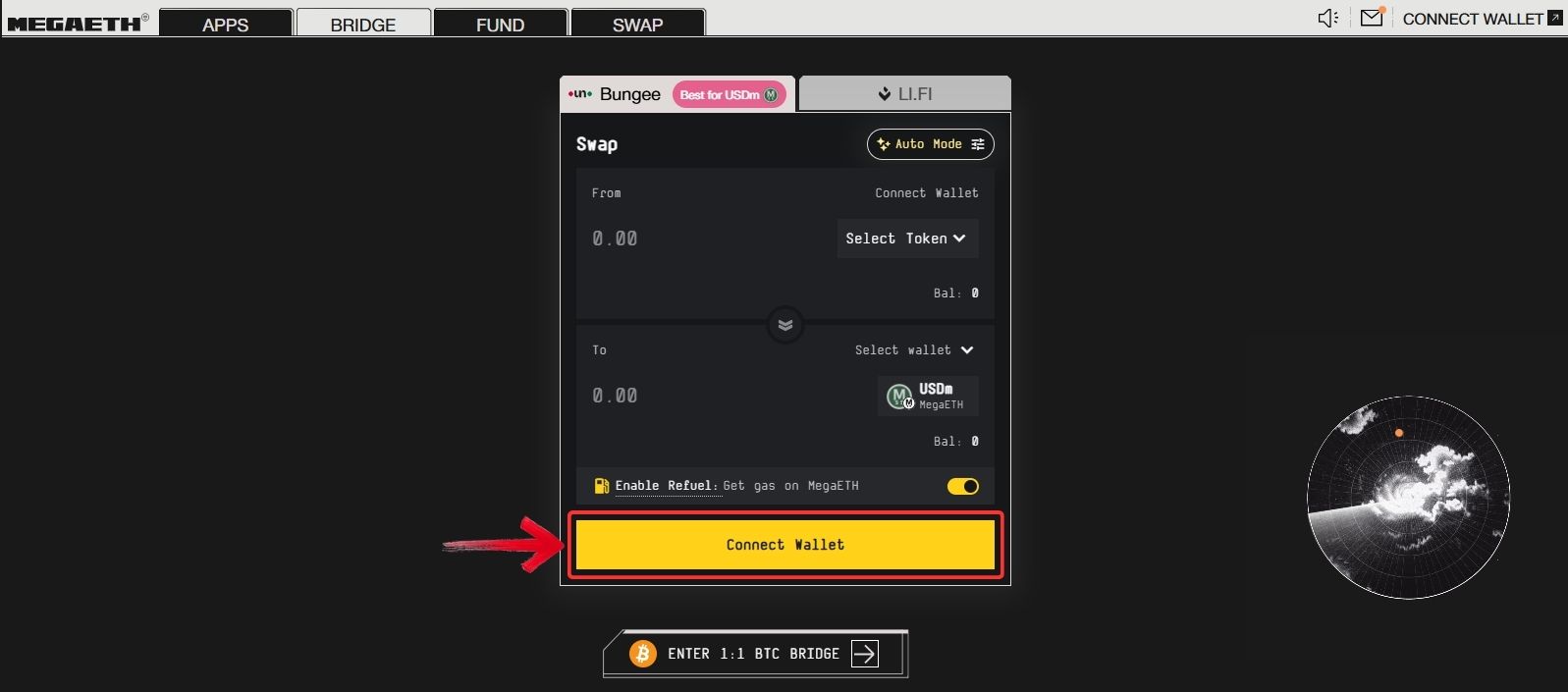
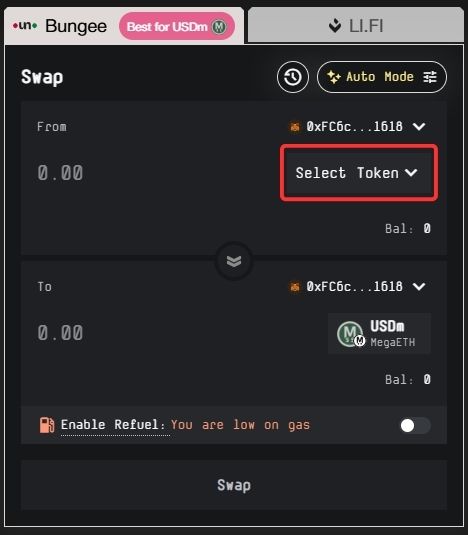
Step 2: Once your wallet is connected, click on the “Select Token” button in the From section to choose the network you want to bridge from and the token you want to transfer.
Step 3: In the To section, the MegaETH network will already be selected. By default, USDm is selected as the token you will receive after bridging, but you can change this if needed.
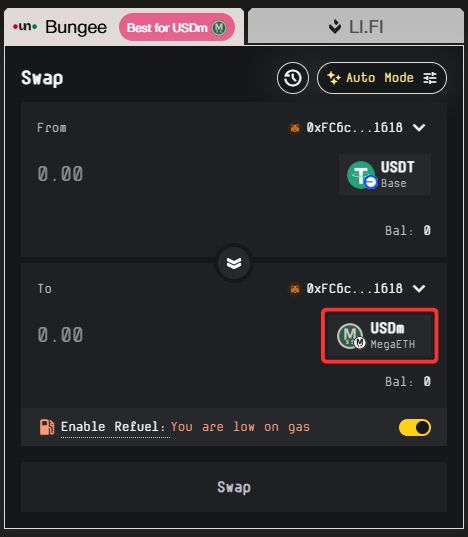
Step 4: In the From section, enter the amount of the selected token that you want to bridge to MegaETH.
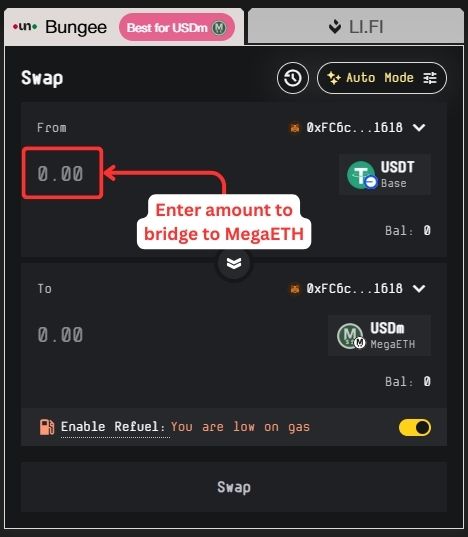
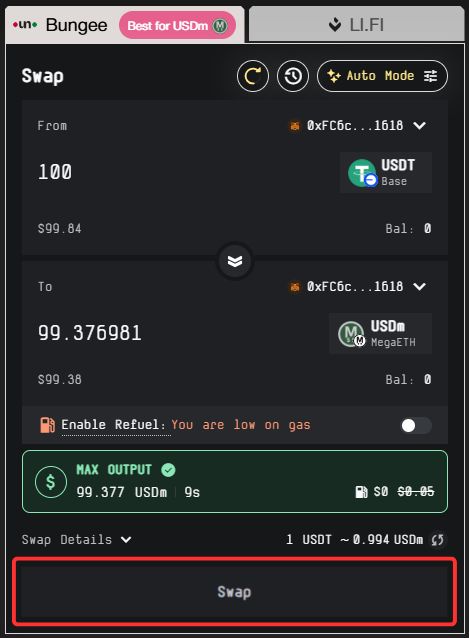
Step 5: The MegaETH Bridge will automatically search for the most optimal route to transfer your assets to MegaETH. Review the transaction details, then click on the “Swap” button to complete the bridging process.
One practical advantage of the RabbitHole interface is workflow continuity. After bridging, users can switch tabs to Swap, Fund, or directly access ecosystem applications without navigating away from the platform.
Using deBridge
Next on the list is deBridge, which allows users to move assets to MegaETH from 23+ networks. Most of these are EVM-compatible chains, but deBridge also supports bridging from Solana and Tron.
deBridge is a cross-chain interoperability protocol that enables the transfer of assets and data across different blockchains. Instead of following a traditional lock-and-mint bridge structure, it operates on a liquidity network model powered by validators and market makers. Within this liquidity network model, users also get execution flexibility similar to trading platforms, where they can choose between market orders, limit orders, or even P2P-style order placement depending on available routes and liquidity.
Here is how you can swap assets from other networks to MegaETH using deBridge:
Step 1: Open your browser, go to the official deBridge website, and click on the “Connect Wallet” button.
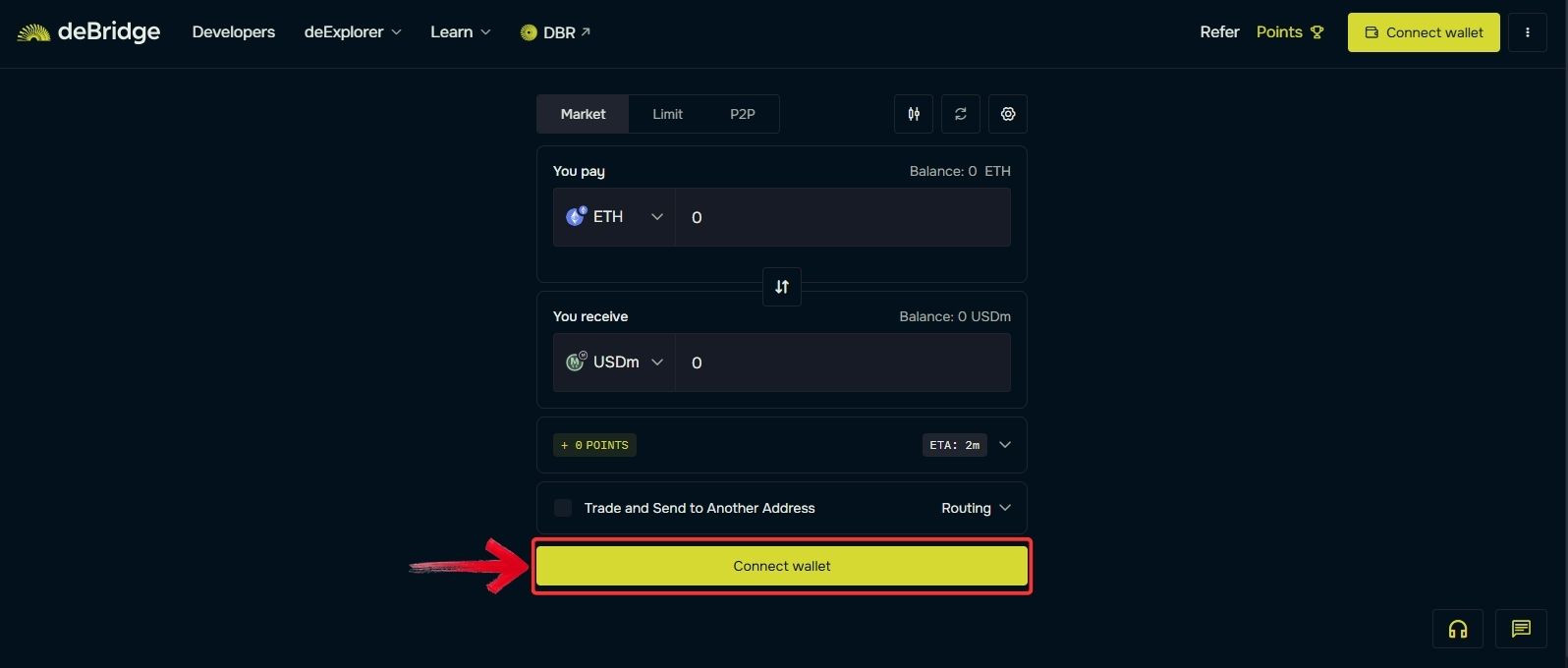
Step 2: Under the “You pay” field, click the drop-down menu to select the network you want to bridge from and choose the token you want to transfer to the MegaETH network.
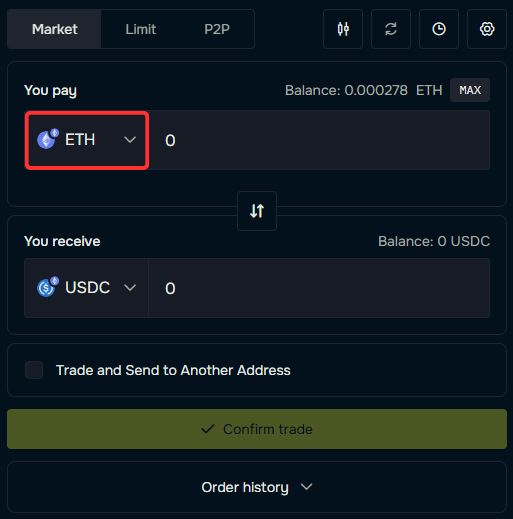
Step 3: In the “You receive” field, click the drop-down menu to select the MegaETH network, then choose the token you want to receive after the swap.
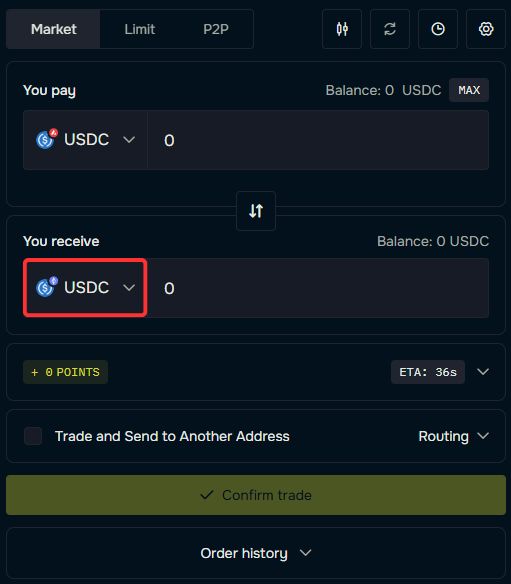
Step 4: Enter the amount of the token you want to receive on MegaETH.
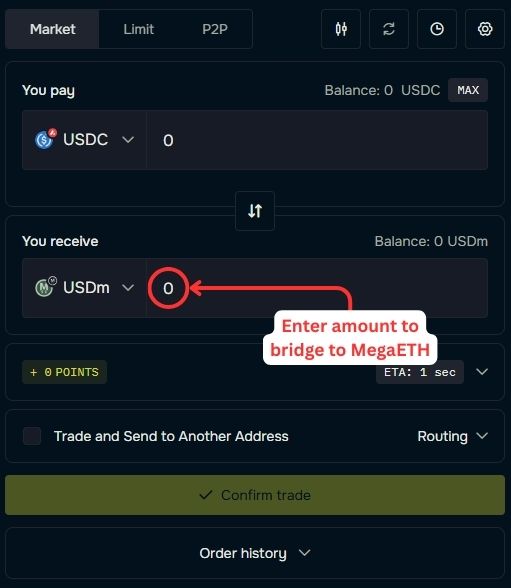
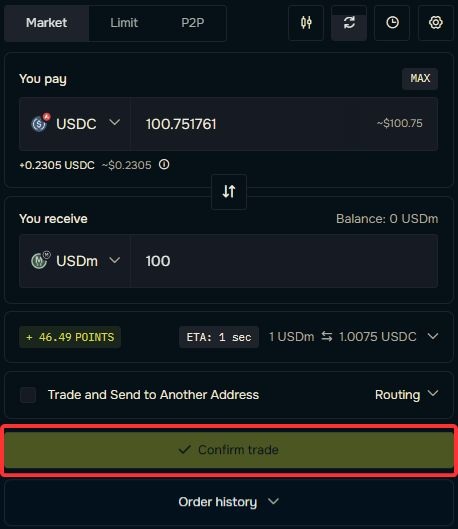
Step 5: Review the transaction details carefully. Once everything is confirmed, click on the “Confirm trade” button to bridge your desired assets to MegaETH using deBridge.
Using WheelX
The last method we will use to bridge assets to MegaETH is WheelX. WheelX supports MegaETH along with 54+ EVM networks. It is limited to EVM chains only, but compared to the official MegaETH bridge, it offers broader network coverage.
WheelX is an AI-powered multichain Bridge and Swap aggregator that optimizes cross-chain transfers by analyzing multiple routes across DEXs and bridges. It is non-custodial, supports cross-chain swaps and limit orders, and focuses on efficient, secure execution.
Here is how you can bridge assets to MegaETH using WheelX:
Step 1: Open your browser, go to the official WheelX website, and click on the “Connect Wallet” button to get started.
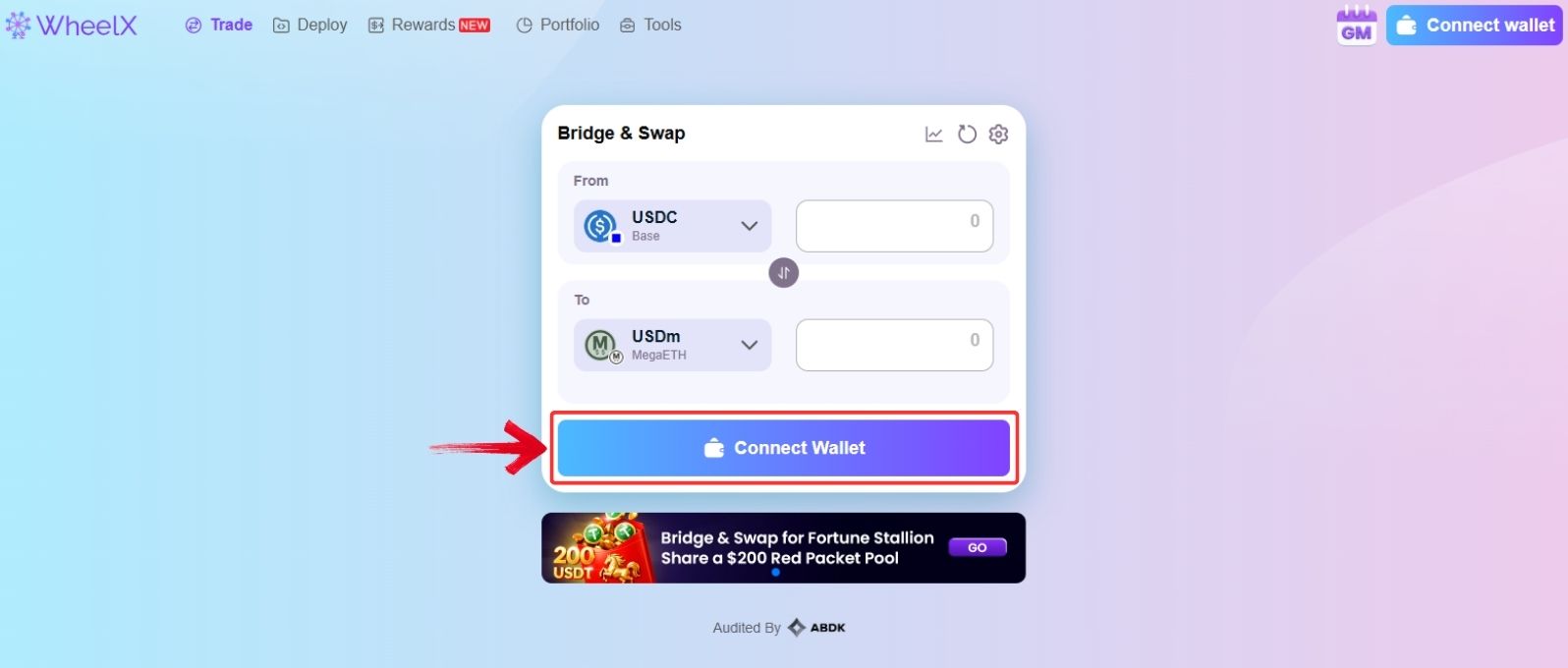
Step 2: Once your wallet is connected, in the “From” section select the network you want to move assets from and choose the token you want to swap for assets on MegaETH.
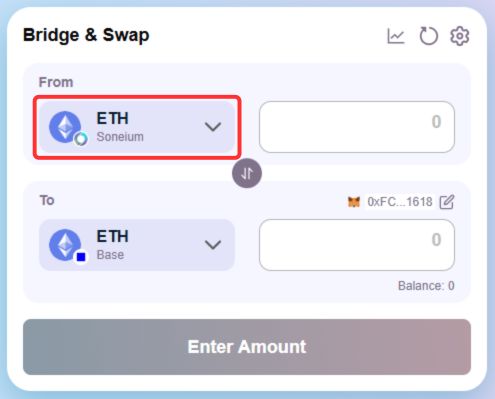
Step 3: In the “To” section, select the MegaETH network and choose the token you want to receive in your MegaETH wallet.
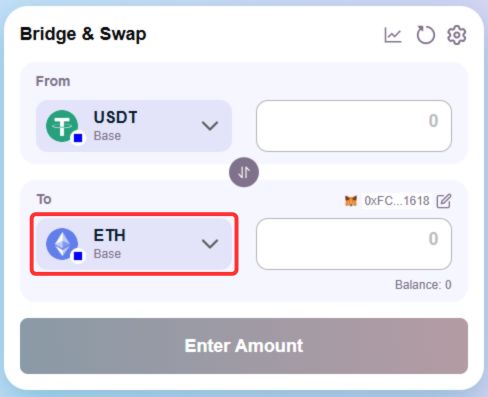
Step 4: Enter the amount of the token you want to bridge in the “From” section. The AI routing engine will automatically search for the most efficient route to transfer your assets to MegaETH.
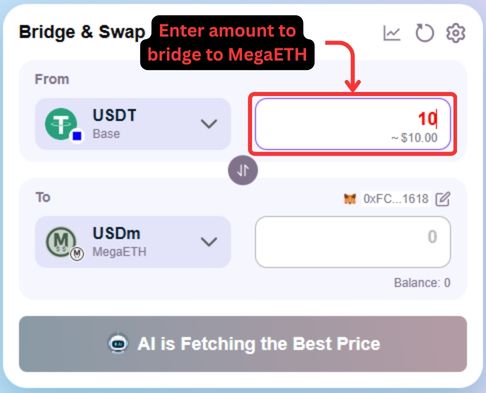
Step 5: Review the transaction details carefully, then click on the “Bridge Assets” button to move funds to the MegaETH network using WheelX.
MegaETH Network Bridging Fees
Bridging to MegaETH generally involves two main costs: network gas fees and bridge protocol fees. Gas fees depend on the source chain, especially if you are bridging from Ethereum, where congestion can push costs higher.
Most transfers typically range between $0.50 to $15, depending on network conditions, transfer size, and the source network. Bridging from Ethereum usually results in higher total costs due to Ethereum gas fees, especially during periods of congestion. In comparison, bridging from other EVM chains or alternative networks can be significantly cheaper.
If you use a bridge aggregator, additional routing or swap fees may apply, which can slightly increase the total cost. Always check live quotes before confirming, as fee structures change frequently and limited-time discounts are sometimes available.
MegaETH Bridge Options Compared
Now that we’ve covered the available bridging methods, let’s quickly compare them to help you decide which option might suit you best.
| Bridge | Networks Supported | Estimated Fees | Non-EVM Network Support |
|---|---|---|---|
| Official MegaETH Bridge | 61+ | High | ❌ |
| deBridge | 23+ | Low | ✅ |
| WheelX | 54+ | Low | ❌ |
While each option has its own strengths and limitations, one may suit certain users better than others depending on network preference, cost sensitivity, or speed requirements. Having multiple bridge options is always practical. If one bridge temporarily stops supporting MegaETH or a protocol faces downtime, you still have alternative routes available to move assets without disruption.
Bottom Line
MegaETH’s real-time Layer 2 vision has created strong interest following its mainnet launch. For users looking to bridge to MegaETH, the current infrastructure already provides practical and reliable pathways. Access depends largely on your source network, wallet setup, and fee tolerance.
As more liquidity and protocol integrations come online, the process to bridge to MegaETH will likely become even smoother. For now, the available options are stable, functional, and sufficient for users who want early access and on-chain exposure within the MegaETH ecosystem.
FAQs
1. Can I bridge to MegaETH from Solana?
Yes, but only through bridges that support non-EVM networks. Some third-party protocols allow transfers from Solana or Tron to MegaETH.
2. Do I need ETH to bridge to MegaETH?
If you are bridging from Ethereum, you will need ETH to pay for gas. For other networks, you must hold that network’s native token to cover transaction fees.
3. Is bridging to MegaETH safe?
Bridging is generally safe when using official or reputable protocols. Always verify the correct website URL and review transaction details before confirming.
4. What wallets are compatible with MegaETH?
MegaETH is an EVM-compatible network, which means it works with most Ethereum-based wallets. Wallets such as MetaMask, Rabby, and other EVM-supported Web3 wallets can connect to MegaETH once the network is added manually.




