



- •You can change your Phantom Wallet username once every 14 days.
- •Once a name is already claimed, you cannot use the same name even if you write it in all caps or lowercase.
- •Phantom Wallet username updates sync across connected devices automatically.
Phantom is replacing conventional long addresses, which can be difficult to remember during transactions, with usernames. Your Phantom username serves as your wallet’s unique label, allowing you to send and receive tokens and manage on-chain contacts. Interestingly, users can edit Phantom Wallet username whenever they want to, for improved personalization. This guide explains how to change your Phantom Wallet username, how syncing works, and how usernames improve wallet usability across devices.
Why a Phantom Username Matters
Phantom usernames are more important than the usual usernames in other wallets. Your username in Phantom is more than a cosmetic setting, as it helps convert conventional wallet addresses into a readable identity that you and other users can recognize easily.
Instead of sharing a long string of characters the usual way, you can share your Phantom username for other users to search, send, and receive crypto with. However, this works within the Phantom ecosystem. The username feature works and allows you to transact and connect with other users the same way you would share a social media handle.
Additionally, you can modify Phantom Wallet profile name at any time, but only once every 14 days. Doing this helps to personalize the wallet experience and simplify crypto transfers between frequent contacts in the address book.
Because usernames are unique, the name you select must be available before it can be registered. So, once you enter a new name, no other Phantom user can use that same character combination unless you change it. Lastly, your new username will sync across the browser extension, mobile app, and all devices where you’re signed in with this Phantom profile.
How to Set or Change Your Phantom Username (Browser Extension)
To update Phantom Wallet username on the browser extension platform, follow the steps below:
Step 1: Launch the Phantom Wallet extension on your browser app and log in.
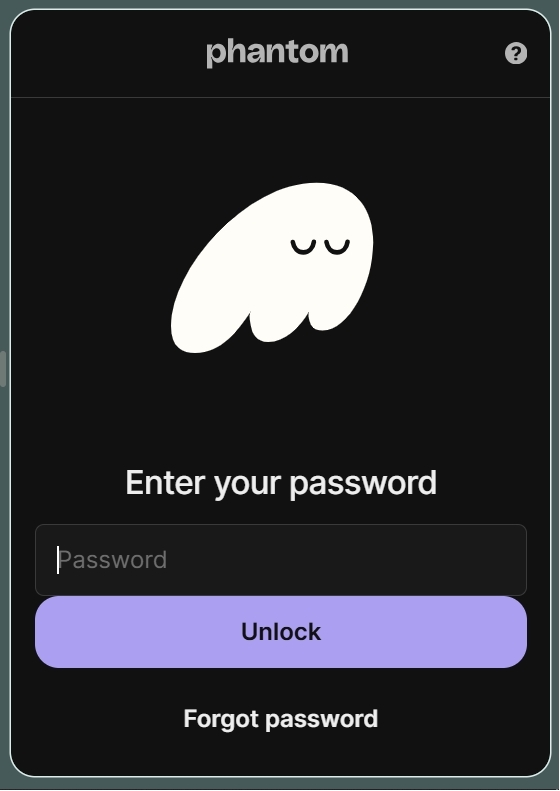
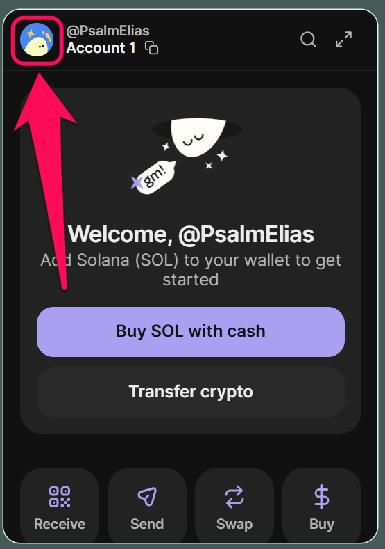
Step 2: Click your profile avatar in the upper left.
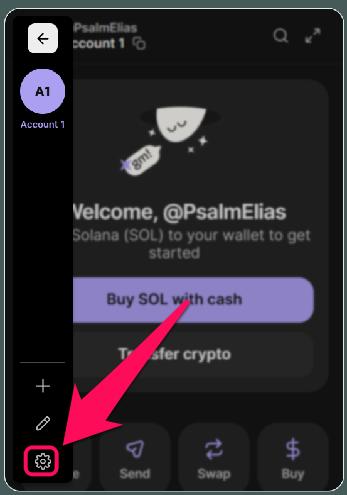
Step 3: Open the Settings page.
Step 4: Click on the username tab at the top of the settings page (it looks like @phantom).
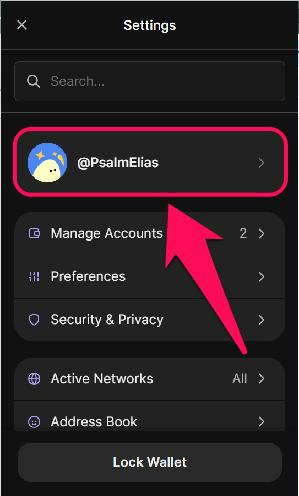
Step 5: Click on the Username field to edit it.
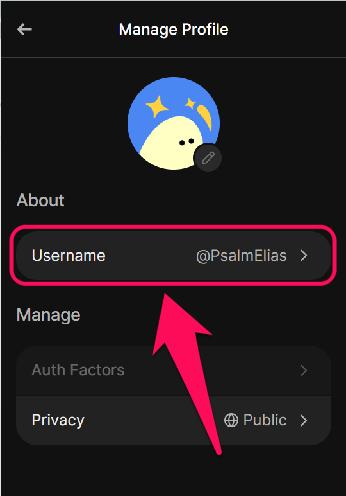
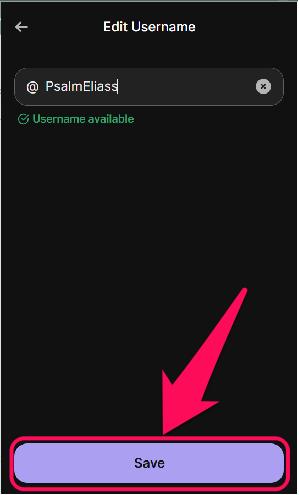
Step 6: Enter your new username, check availability, and Save.
How to Set or Change Your Phantom Username (Mobile App)
Follow the steps below to change your Phantom Wallet username on the Phantom mobile app:
Step 1: Open the Phantom app on your mobile phone, then unlock your wallet.
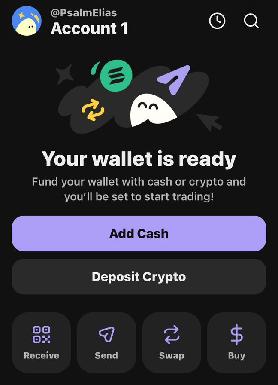
Step 2: Check your profile avatar in the upper left corner of the app and tap it.
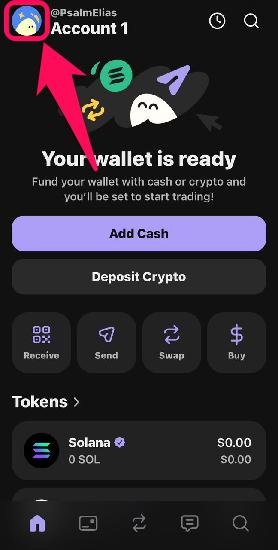
Step 3: Go to Settings.
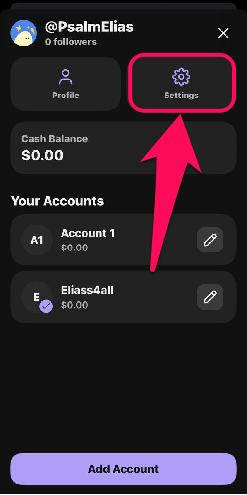
Step 4: Click your username at the top (it looks like @username if you have inputted a previous one).
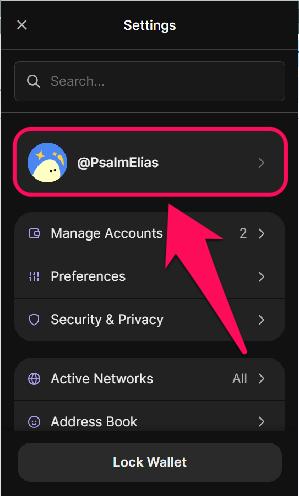
Step 5: Tap the Username field.
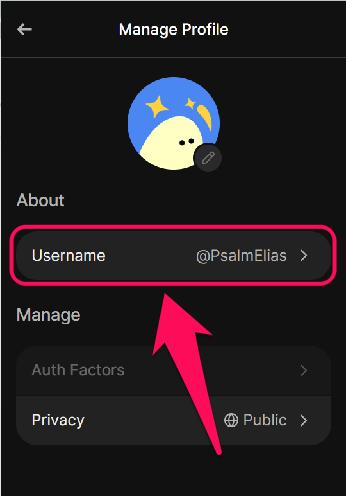
Step 6: Enter your new username, see if the character combination is available, and tap on Save.
What You Can Do With a Phantom Username
If you’ve set a Phantom Wallet username with a unique label for your account, you’re set to enjoy several practical benefits. The Phantom username feature helps you:
- Add contacts using usernames instead of full addresses.
- Replace complex wallet addresses with a custom readable name.
- Customize your wallet identity alongside avatars.
- Sync wallet identity across browser and mobile devices.
- Link a chosen public wallet address with your username.
- Send and receive crypto from other Phantom users.
- Follow other Phantom users in the Feed as they trade.
How Username Sync and Address Linking Work
Once you change Phantom Wallet display name, the update automatically syncs across supported devices that use the same wallet recovery phrase. The new name is applied immediately when you connect your device to the internet.
This ensures a consistent wallet identity whether you access Phantom through a mobile or a desktop browser extension. Additionally, you can select which public address is associated with the username.
Importantly, your username can be seen by other Phantom users who may try to connect with you (similar to the Follow option in social media platforms). However, linking a username to a wallet does not automatically expose other wallets stored within Phantom. Each address also remains independent unless specifically selected.
Bottom Line
The username feature in Phantom is set to reshape how on-chain transactions are done in the wallet. In addition, you can change your Phantom Wallet username for improved personalization and convenience when performing Phantom-to-Phantom transactions. Once completed, the sync happens automatically, and you can view your wallet’s new name across all devices where your account is logged in. Personalization in Phantom does not end with the username. Users can also rename individual wallet accounts for better organization, which makes managing multiple accounts much easier.
FAQs
1. Can I reserve a Phantom username for future use?
No, usernames cannot be reserved. They must be claimed at the time of creation, and availability depends on whether the name is already taken.
2. Does changing my Phantom username affect my previous transactions?
No, past transactions are recorded permanently on the blockchain, so a username change does not alter them.
3. Are Phantom Wallet usernames case-sensitive?
Phantom usernames are not case-sensitive. So, if another user already registered @Elias, for example, you cannot choose @ELIAS.




