



- •Cardano staking lets ADA holders delegate tokens to stake pools and earn rewards while supporting network validation.
- •Staking is non-custodial, meaning users keep full control of their ADA and can move funds at any time.
- •Using Typhon Wallet, ADA holders can delegate tokens to a pool directly from the wallet and begin earning epoch rewards.
Crypto markets move in cycles, with bull markets pushing prices higher and bear markets bringing extended periods of decline. With the introduction of Proof-of-Stake consensus, investors gained a way to hold their assets through these quieter phases while still earning rewards. Cardano played an important role in this shift during the 2017 market cycle, allowing ADA holders to participate in network validation by staking their tokens through stake pools. In return, users receive staking rewards, giving long-term holders an incentive to keep their tokens while the network continues to grow. In this guide, we will walk through how to stake Cardano using a crypto wallet and what you need to get started.
What is Cardano Staking?
Cardano staking is the process of delegating your ADA tokens to a stake pool to help secure the network and validate transactions. Cardano uses a Proof-of-Stake consensus mechanism called Ouroboros, where pools are selected to produce blocks based on the amount of ADA delegated to them. In return, participants earn staking rewards in ADA, usually around 2%-5% annually. The process is non-custodial, meaning users keep full control of their tokens and can move or spend their ADA at any time while still earning rewards.
What You Need Before Staking Cardano
Staking Cardano can feel like a complicated setup if you have never interacted with Web3 tools or used a crypto wallet before. Since the process happens directly on the blockchain, users need a few basic things in place before they can delegate their ADA to a stake pool.
1. Cardano Wallet: To stake Cardano in stake pools, you first need a Web3 wallet that supports the Cardano network. This is different from staking or earning products offered by centralized exchanges like Binance, where the exchange handles everything for you. If you want to stake ADA on-chain and participate in Cardano’s validation system, you need a Cardano-compatible wallet. In this guide, we will use Typhon Wallet because it includes a built-in staking feature, which makes the process easier for beginners. If you have not set up Typhon yet, our guide on getting started with Typhon Wallet will help.
2. Cardano Tokens: Before you can stake Cardano, you need to own ADA and transfer it to your Cardano-compatible wallet. Without ADA in your wallet, you will not be able to delegate to a stake pool. If you have not completed this step yet, you can follow our detailed guide on how to buy Cardano and transfer it to your Typhon Wallet, where we explain the full process step by step.
How to Stake Cardano on Typhon Wallet
If your Cardano wallet is set up and you already have ADA in your balance, you can now follow the steps below to stake your Cardano using Typhon Wallet.
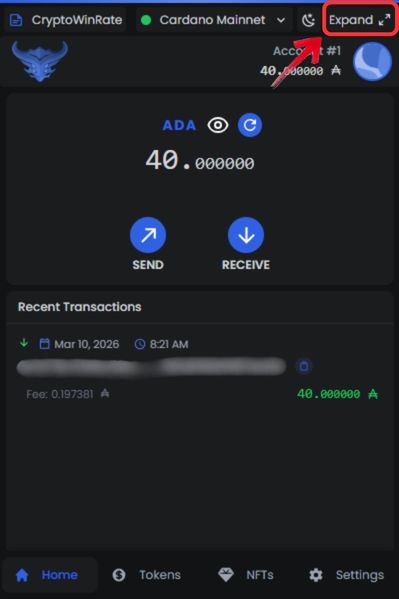
Step 1: Open the Typhon wallet extension and click the “Expand” option in the top right corner.
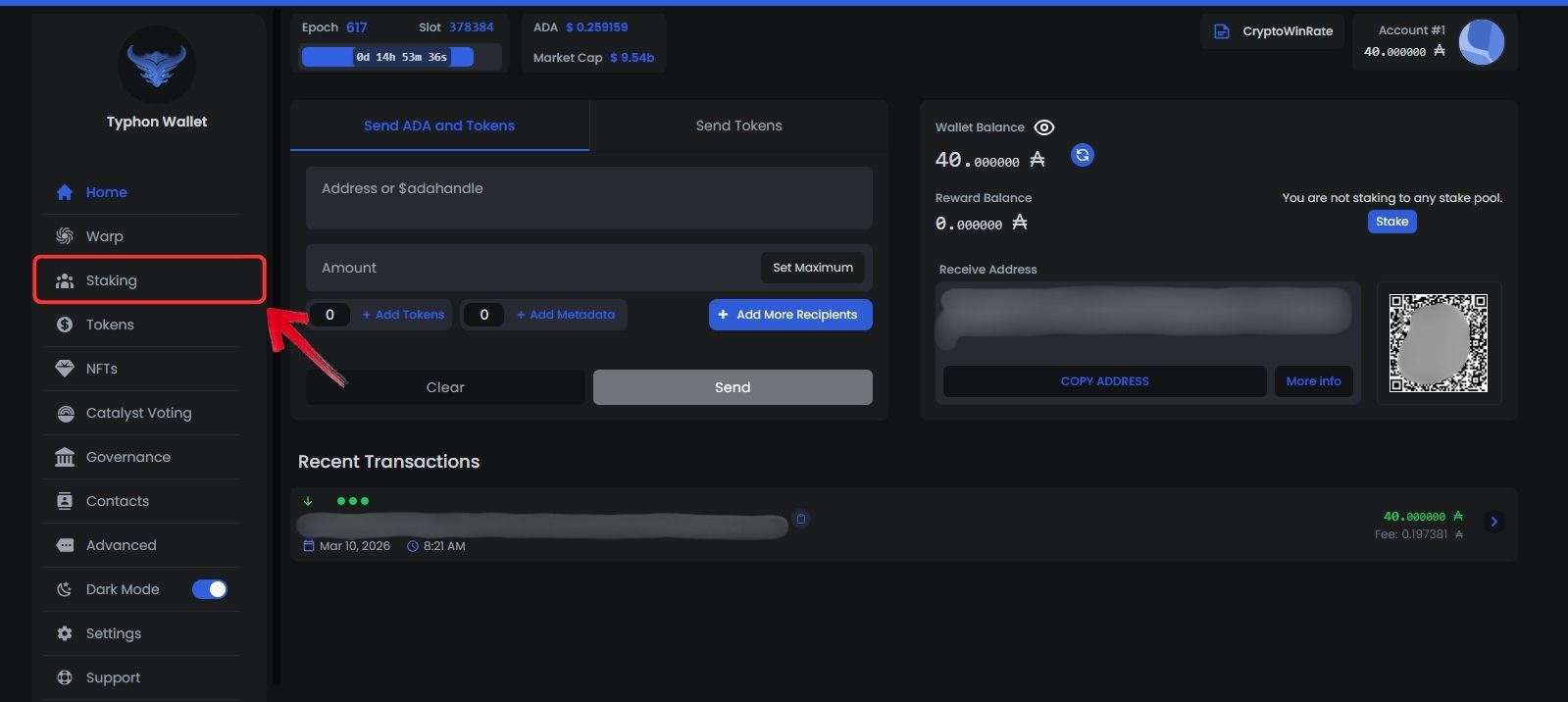
Step 2: Your Typhon wallet will now open in a new browser tab. From the left sidebar, click on the “Staking” tab.
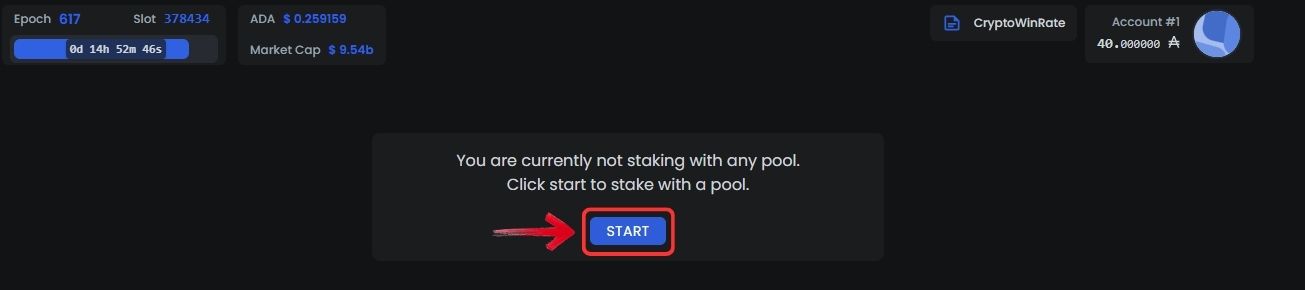
Step 3: Next, click the “Start” button to view the Cardano stake pools available for delegating your ADA.
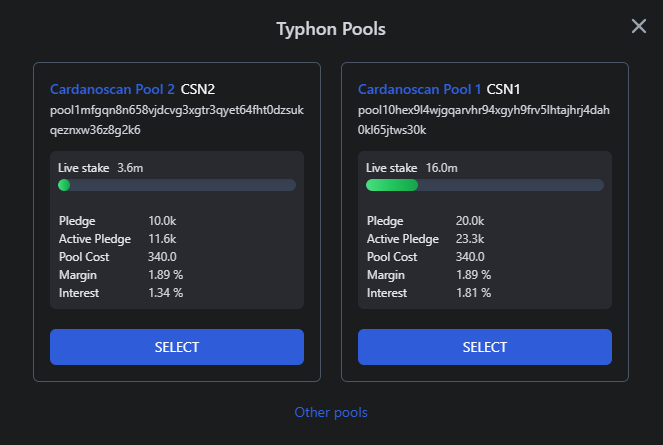
Step 4: Typhon usually lists two Cardano pools with similar expected returns. You can select either one, or click “Other pools” if you want to explore additional staking pools.
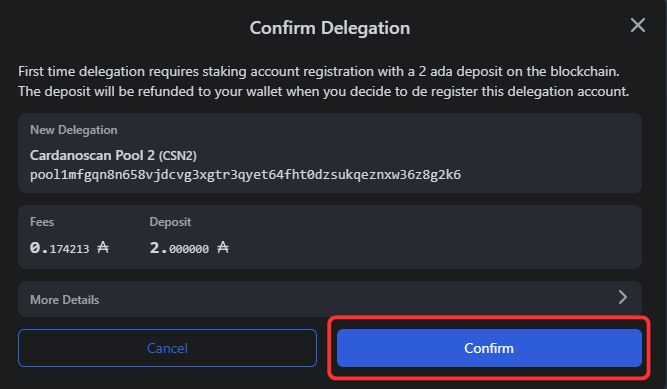
Step 5: First-time users must confirm delegation. A small amount of ADA is required for this step, including the refundable deposit of 2 ADA and a small transaction fee. Click “Confirm” to proceed with delegation.
Step 6: Enter your wallet password to approve the transaction. Once submitted, you will see a delegation confirmation notification.
Step 7: The network will process your delegation request. After approval, your staking dashboard will appear, showing your total ADA balance delegated to the selected pool.
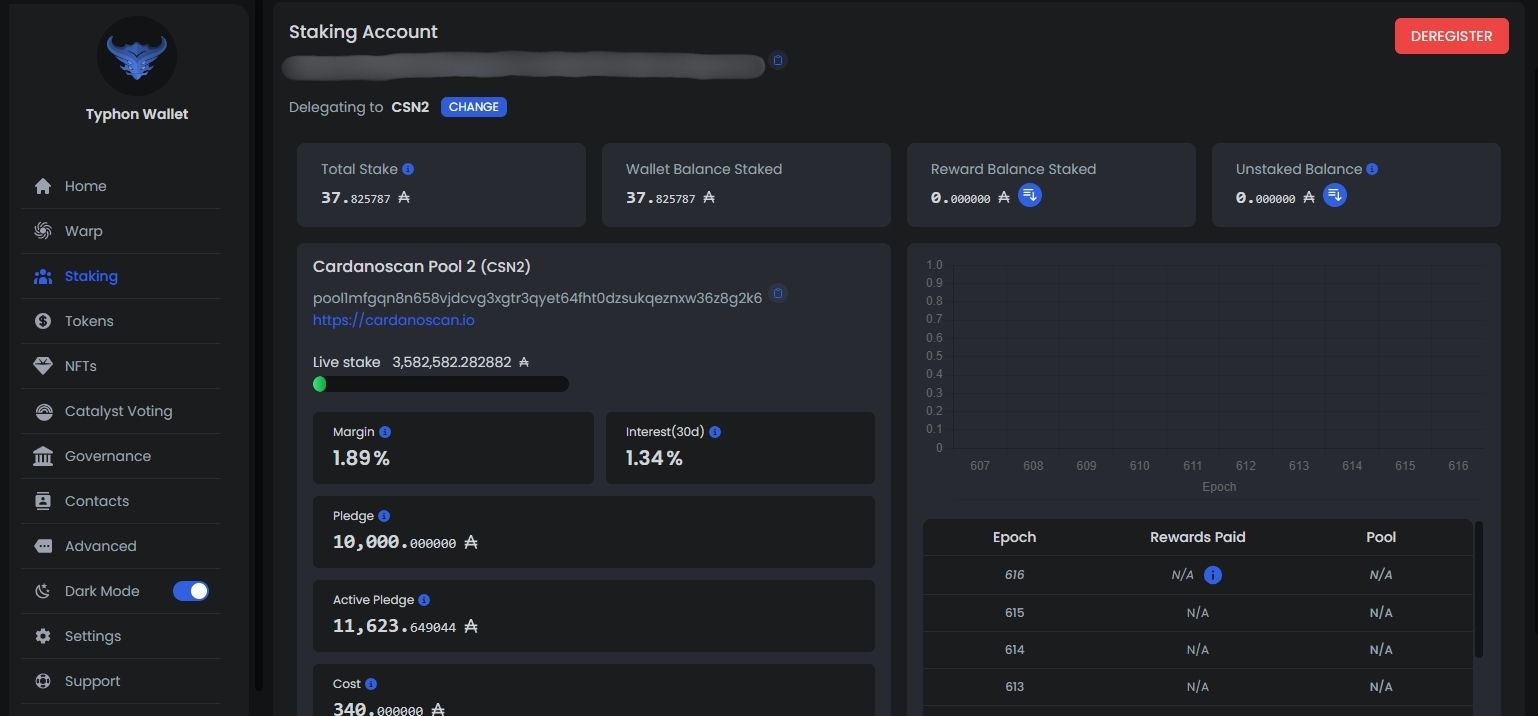
With this, your Cardano tokens are now staked through Typhon pools. You can return to the Staking tab anytime to track details such as your delegated balance, rewards earned, and overall staking performance.
How to Unstake Cardano in Typhon Wallet
If you ever want to stop staking your Cardano from the Typhon pool, you can do so directly from the wallet. Follow the steps below to deregister your stake and remove your delegation.
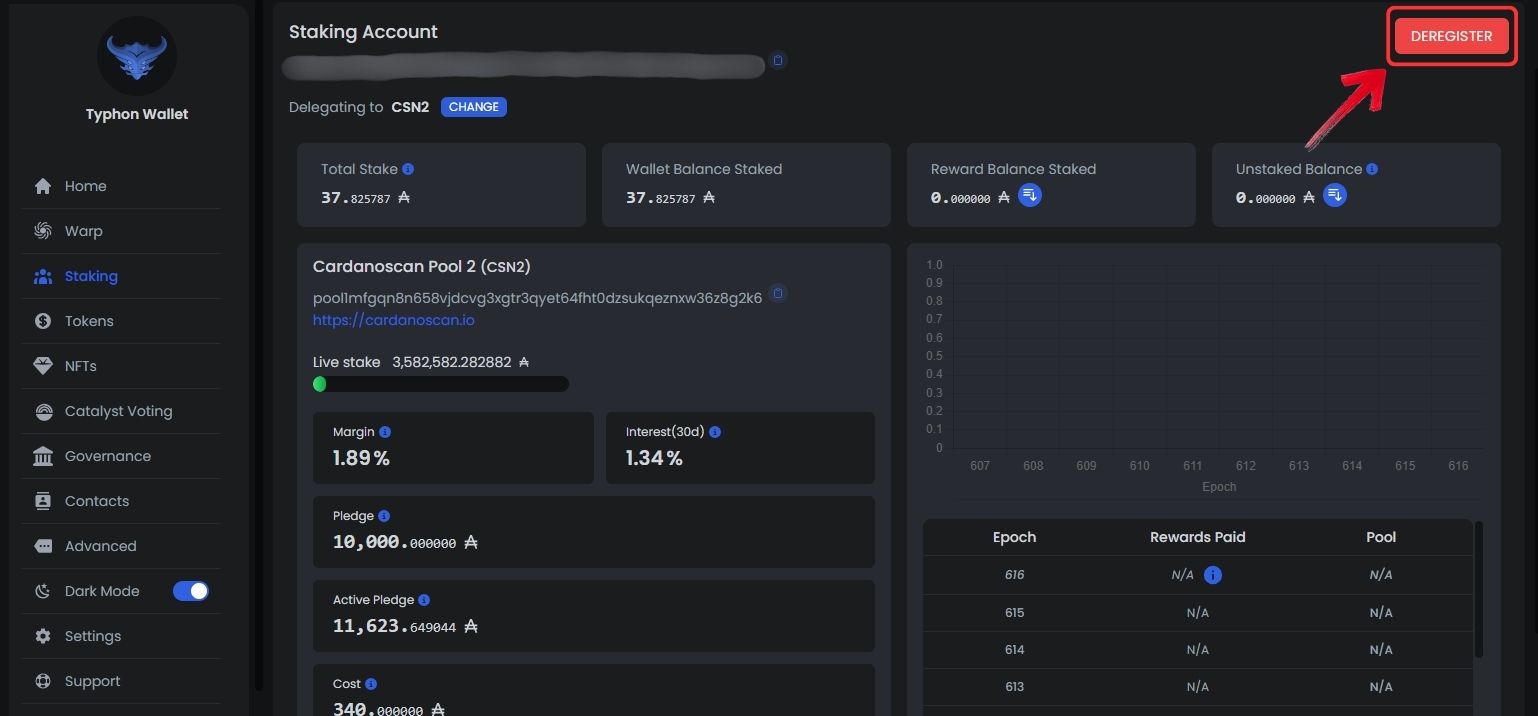
Step 1: Go back to the Staking tab in Typhon Wallet. This will open your Cardano staking dashboard.
Step 2: Click on the “DEREGISTER” button to begin the unstaking process.
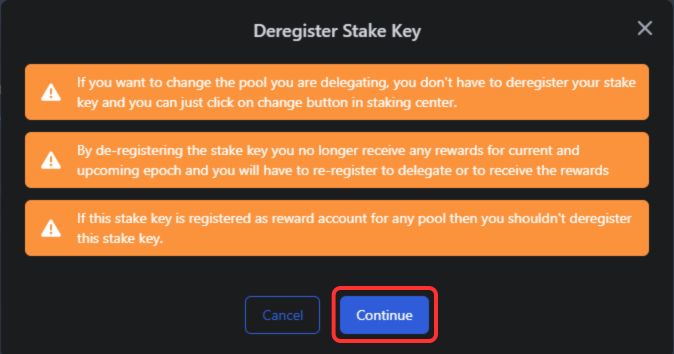
Step 3: A Deregister Stake Key pop-up will appear. Click “Continue” to proceed.
Step 4: Next, you will see the Confirm De-Registration window. Here, Typhon will show the details of the refund and any applicable network fees. Click “Confirm”, then enter your wallet password to submit the request.
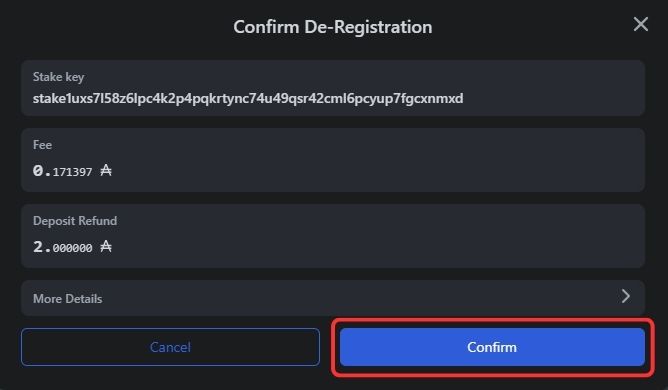
When you unstake, the 2 ADA deposit that was deducted during delegation will be returned to your wallet. This deposit acts as a security reserve during staking and is refunded once you deregister your stake key. A small network fee is still charged to process the transaction.
Bottom Line
For investors who believe in the long-term potential of Cardano, staking offers a practical way to keep their ADA working rather than sitting idle in a wallet. Market cycles often include extended bearish periods where prices remain under pressure, but staking allows holders to continue earning rewards while waiting for the next phase of growth. Since Cardano’s staking model lets users keep full control of their tokens, it becomes a straightforward option for those who want to support the network while gradually increasing their ADA balance over time.
FAQs
1. Do I need to lock my Cardano to stake it?
No, Cardano staking does not lock your ADA. You keep full control of your tokens and can move or spend them at any time, although doing so will affect the amount currently delegated to the stake pool.
2. How long does it take to receive Cardano staking rewards?
Cardano staking rewards are distributed every epoch, which lasts about five days. New delegations usually start receiving rewards after a few epochs once the network processes the delegation.
3. Can I change my Cardano stake pool later?
Yes, you can redelegate your ADA to a different stake pool at any time. This can be done directly from your wallet without needing to unstake first.
4. Is staking Cardano through a wallet safe?
Staking through a Cardano wallet is considered safe because the process is non-custodial. Your ADA remains in your wallet, and the stake pool never gains control over your funds.




