- •Stake ALGO without lockups or slashing, while keeping full control of your tokens in your wallet.
- •Liquid staking via Folks Finance lets you earn rewards while using xALGO across DeFi.
- •Keep extra ALGO in your wallet to meet minimum balance requirements and avoid failed transactions.
The trend around Algorand is picking up again as discussions around quantum threats become more immediate, with many expecting them to arrive sooner rather than later. Institutions are beginning to factor in these risks, and with Algorand being one of the few projects focused on quantum-resistant infrastructure, combined with its strong uptime record and recent regulatory developments, the project has started to see renewed demand. Algorand staking has become a practical option for investors who plan to hold ALGO long term, grow their holdings, and take part in governance. In this guide, we’ll explore the staking options available and then walk through how to stake ALGO step by step.
What is Algorand Staking
Algorand staking is built on Pure Proof-of-Stake (PPoS), where your ALGO helps secure the network and participate in block validation. Unlike many networks, there’s no lockup period and no slashing risk on Algorand. Your tokens stay in your wallet, fully under your control.
Rewards are earned when your stake contributes to proposing or validating blocks. These rewards come from transaction fees and ecosystem incentives, making participation both functional and rewarding.
There are multiple ways to stake depending on your setup and capital:
| Method | Requirement | Control | Best For |
|---|---|---|---|
| Solo Staking | ~30,000 ALGO | Full | Advanced users running nodes |
| Delegation | ~30,000 ALGO | Medium | Hands-off with validator support |
| Staking Pools | Low | Low | Smaller holders pooling funds |
| Liquid Staking | ~10 ALGO | Flexible | Users who want liquidity + DeFi use |
This flexibility is what makes Algorand staking accessible. Whether you’re running a node or using platforms like Tinyman, you can participate without giving up control of your assets.
How to Get Started With Algorand Staking
Start by buying ALGO from a supported exchange and transferring it to a wallet like Pera Wallet. Pera Wallet is a strong choice because staking feels like a built-in feature, with direct access to governance, pools, and liquid staking options in one place, all within a simple interface. Once your funds are in your wallet, you can choose a staking method depending on how involved you want to be.
One important thing to keep in mind is Algorand’s minimum balance rule. When you opt into assets or smart contracts, your wallet needs to hold a slightly higher minimum ALGO balance. If your balance drops too low, transactions can fail. Keeping a small extra buffer of ALGO in your wallet helps avoid this issue and ensures everything runs smoothly.
How to Stake Algorand (Step-by-Step Guide)
Now that your wallet is funded, you can proceed with liquid staking using Pera Wallet by following these steps.
Step 1: Open Pera Wallet on your mobile, and click on the “Stake” button to view the Algorand staking options available on Pera Wallet.
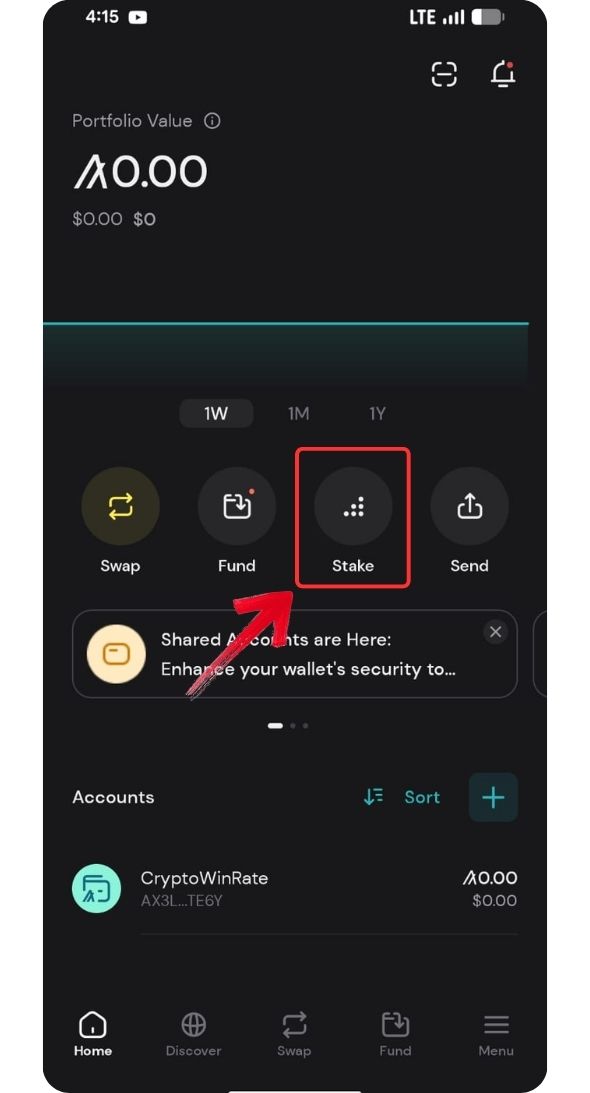
Step 2: From the options, tap on the Algorand staking option you prefer. We will be using the Folks Finance option since it is a liquid staking option with boosted rewards for now.
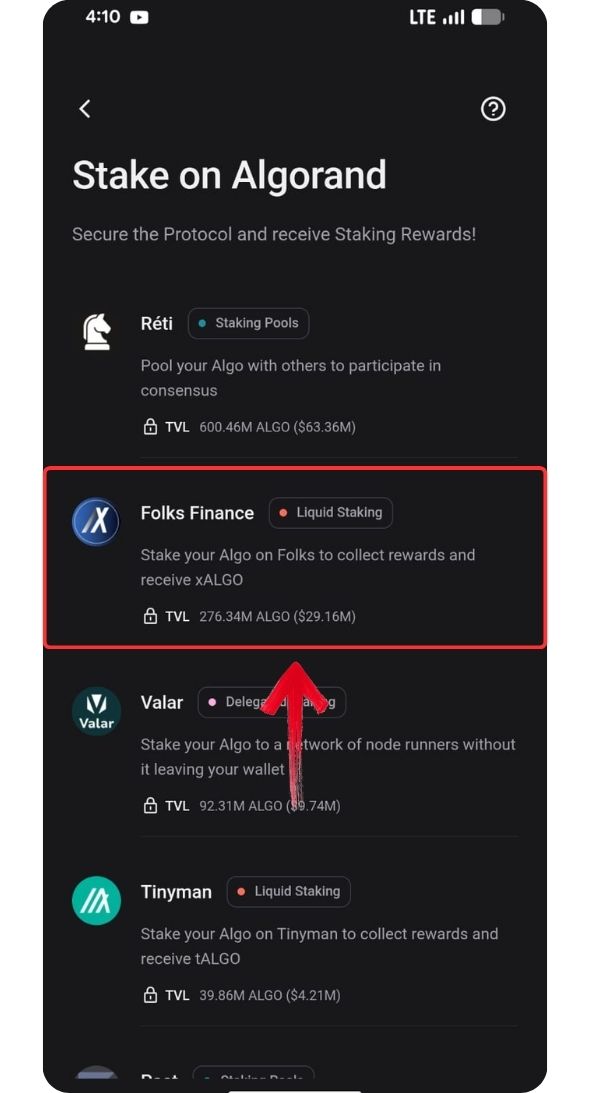
Step 3: Next, you will be redirected to the Folks Finance dApp. Here, make sure you’re on the “Stake” tab, and then enter the amount of ALGO you wish to stake.
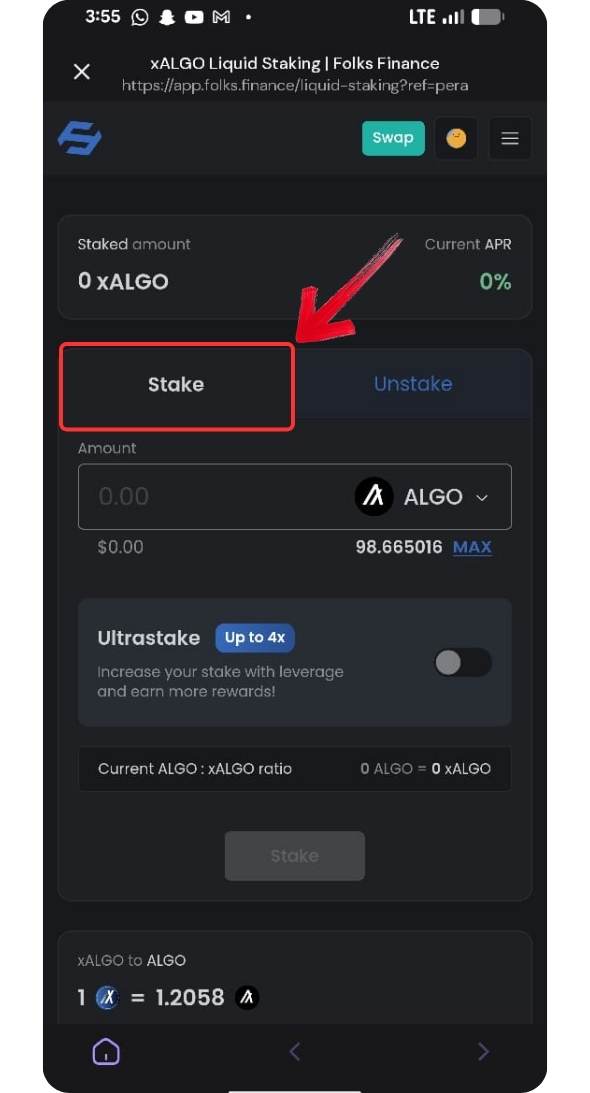
Step 4: Review the transaction details, including your staking amount, estimated APR, the amount of xALGO you will receive, and fees. Click on the “Stake” button to confirm.
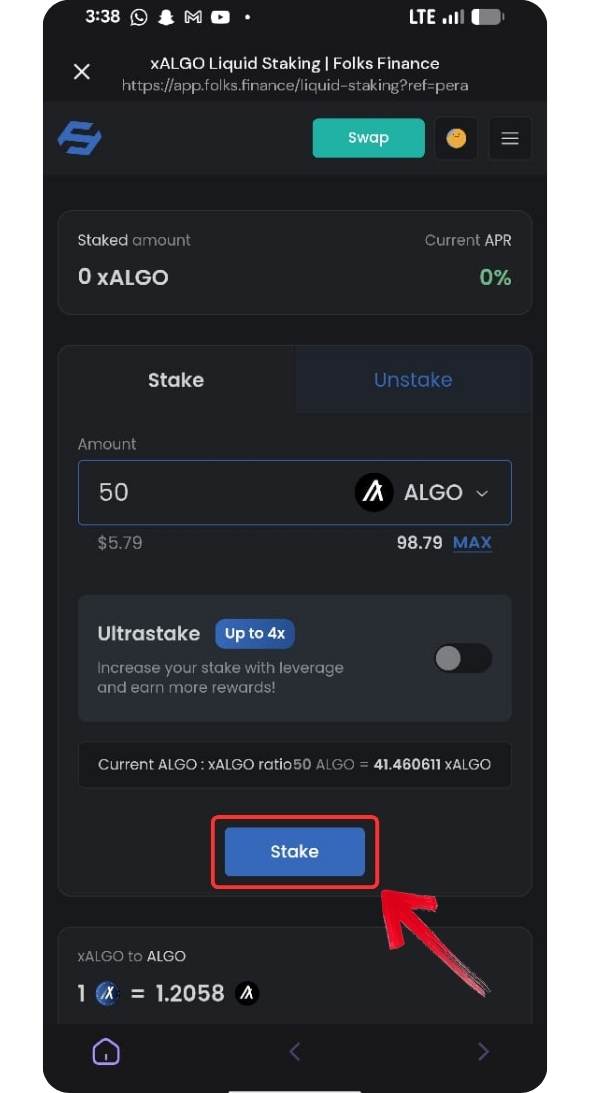
Step 5: Once you approve the transaction in your wallet, Pera Wallet will show a confirmation pop-up displaying the amount you staked and the amount of xALGO you received.
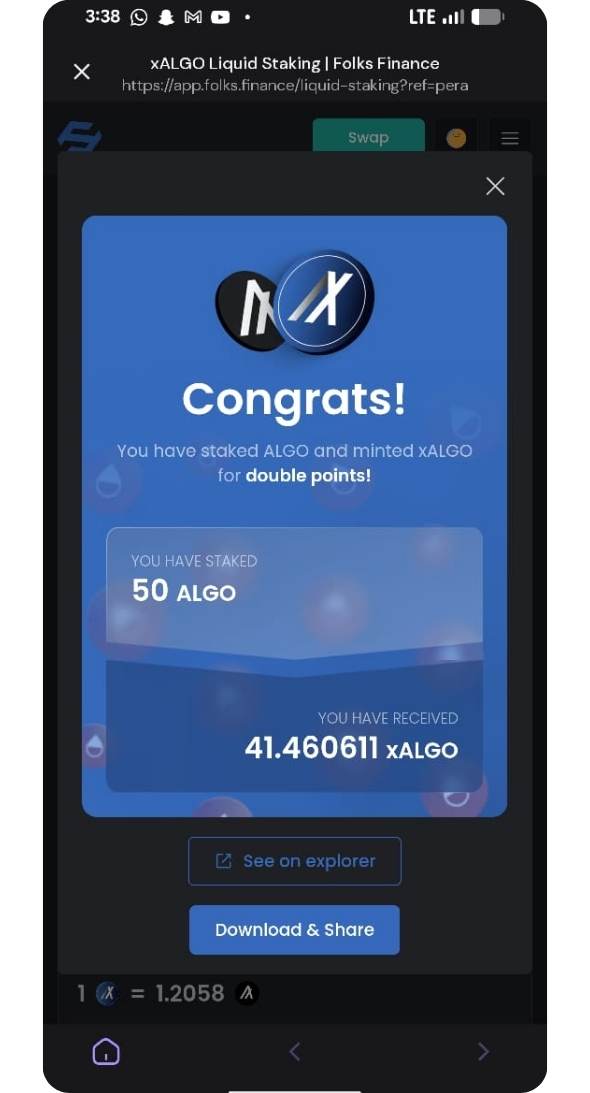
With your Algorand now staked, make sure you don’t lose access to your Pera Wallet, which you used to stake through Folks Finance. You can always open Folks Finance within Pera Wallet to track your rewards or unstake later whenever needed.
How to Unstake Algorand (Step-by-Step Guide)
Once you’re ready to exit your position or take profits, you can easily unstake your ALGO by reversing the same process.
Step 1: Head back to Folks Finance on your Pera Wallet mobile, and click on the “Unstake” tab.
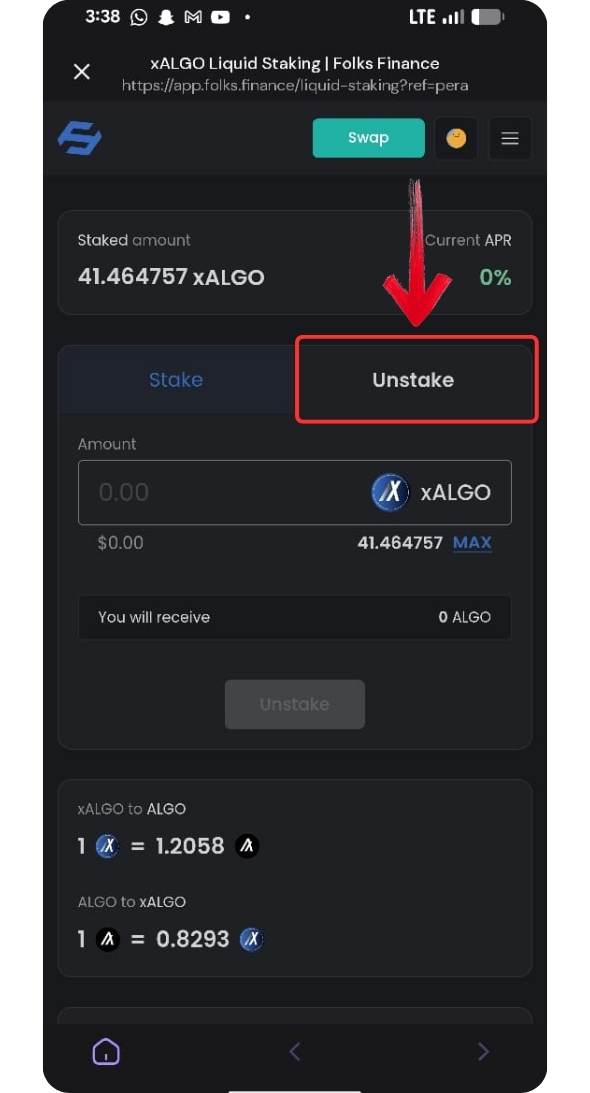
Step 2: Enter the amount of xALGO you wish to swap back for ALGO tokens.
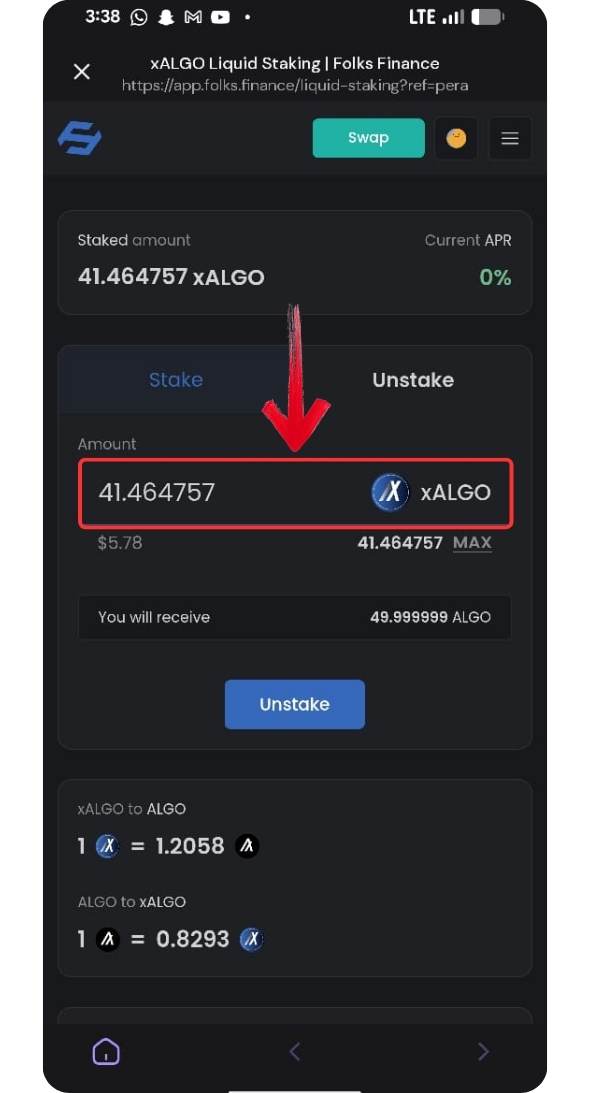
Step 3: Review the transaction, where you will see the ALGO tokens you will receive and the transaction fees. Click on the “Unstake” button to proceed.
Step 4: You’ll then receive an approval request in your Pera Wallet. Review the transaction details, then tap “Confirm” to unstake your ALGO tokens.
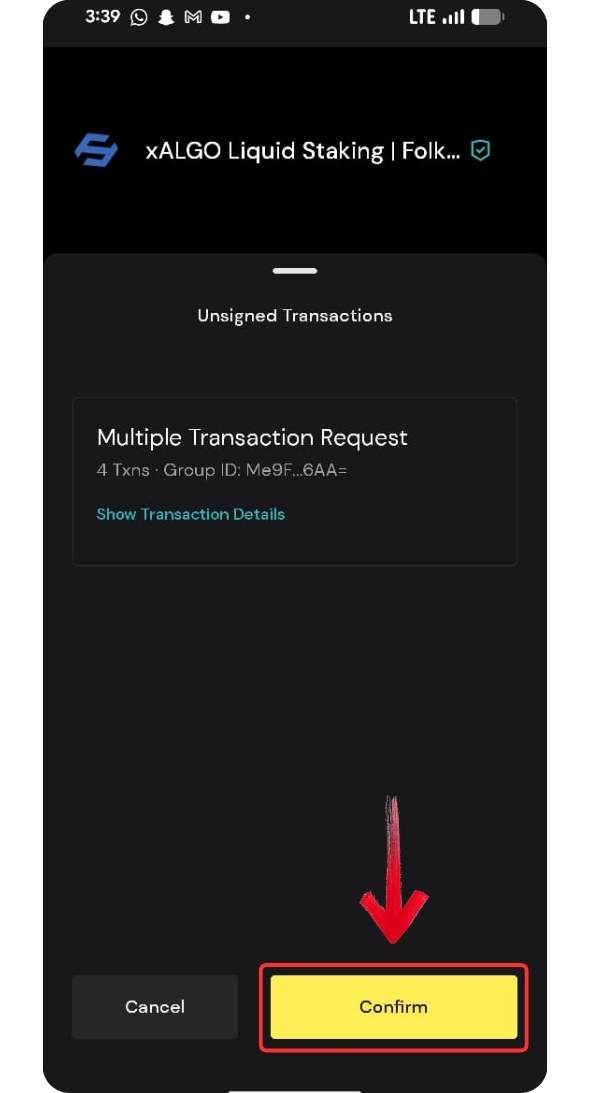
The transaction on the Algorand network usually takes around 5 seconds to complete. You can track your transaction using the transaction ID on Pera Explorer, and once confirmed, the ALGO will be reflected in your Pera Wallet.
What Happens After You Stake Algorand
Once you stake your ALGO through Folks Finance, your tokens are converted into xALGO, which represents your staked position. This token increases in value over time as rewards are earned through Algorand’s consensus.
Your ALGO is not locked in a strict sense, since you can unstake anytime by swapping xALGO back to ALGO. This gives you flexibility while still earning yield. You can track your position directly within Pera Wallet, including your balance and accrued rewards. Since this is liquid staking, xALGO may also be used across supported DeFi platforms.
It’s important to secure your Pera Wallet properly, as access to your wallet means access to your staked funds, so always keep your recovery phrase safe and never share it, while also keeping in mind that returns are variable and depend on network participation, making it important to monitor your position over time.
Bottom Line
For anyone looking to stake ALGO, the process is simple and flexible, especially compared to other networks. Rewards are earned without locking tokens, and users retain full control of their funds. Liquid staking through Folks Finance allows you to earn yield while still using xALGO across DeFi, adding more utility to your holdings. Other options like delegation exist, but higher requirements can limit access for smaller holders. As interest grows, many also factor in Algorand price predictions when deciding whether to stake and hold long term.
FAQs
1. Is Algorand staking free?
2. Do I need to lock my ALGO?
No. When you stake ALGO, especially through liquid staking, your tokens are not locked. You can unstake whenever you want.
3. How much can I earn from staking ALGO?
Rewards vary based on the platform and network conditions. Liquid staking typically offers a variable APR that changes over time.
4. Can I unstake anytime?
Yes. You can unstake anytime by converting your xALGO back to ALGO.
5. Is Pera Wallet safe to use?
Yes, as long as you secure your recovery phrase and avoid sharing it with anyone.
6. What happens if I don’t vote in governance?
If you’re using governance-based staking and don’t vote, you may lose your rewards for that period.