- •Phantom is non-custodial, so users must find and secure their own seed phrase.
- •You can find it anytime in the Phantom wallet settings, on mobile, and in the browser extension.
- •Losing the phrase means permanent loss of access to your wallet.
Just as we have master keys in modern housing facilities, the crypto space also has a key that can unlock all wallet doors. The secret recovery phrase (SRP) is the master key that controls all accounts created in the wallet and grants access to all funds in those accounts. Being a non-custodial wallet, Phantom does not save your SRP online; users can secure and back up their phrase however they want. Therefore, to protect your crypto funds, you must know how to find your secret recovery phrase in Phantom Wallet and learn how to secure it permanently.
What is A Secret Phrase in Phantom Wallet?
A secret recovery phrase, also known as a seed phrase, is a 12-word key generated when you first create your Phantom wallet. As its name implies, the recovery plan controls the entire wallet and is essential for regaining access to accounts tied to it if you ever lose your device.
Your funds in the Phantom wallet are not stored in the app; they are stored on the blockchain. So, the secret phrase proves ownership whenever you need to, allowing you to import your wallet on any device.
Phantom is a non-custodial wallet, so it does not store this phrase and cannot recover it for you if lost. So, protecting the secret phrase in Phantom Wallet is your sole responsibility. If lost, you lose access to your wallet, and your funds are gone permanently. This is why knowing where and how to find your secret recovery phrase in Phantom Wallet is essential.
How to Find Your Secret Phrase on Phantom (Mobile App)
If you have access to your Phantom wallet on mobile, you can view your secret recovery phrase from within the app. Follow the steps below to find Phantom Wallet recovery phrase on the mobile app:
Step 1: Launch the Phantom app on your phone and log in to your wallet.
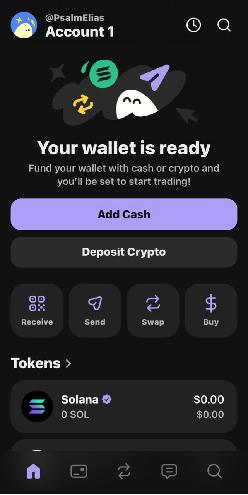
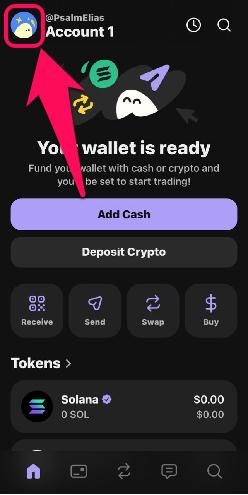
Step 2: Tap your profile avatar in the upper-left corner.
Step 3: Click the edit (pencil) icon next to the account.

Step 4: Click on Show Recovery Phrase button.
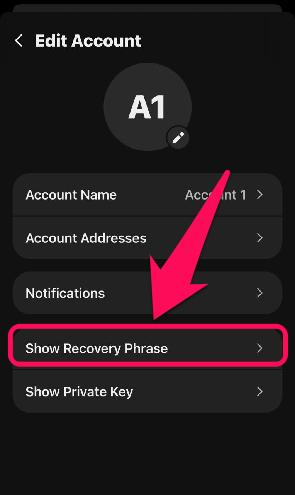
Step 5: Review and acknowledge the warning, then tap Continue.
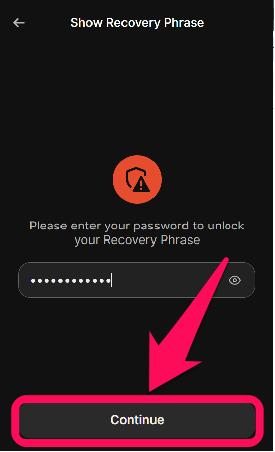
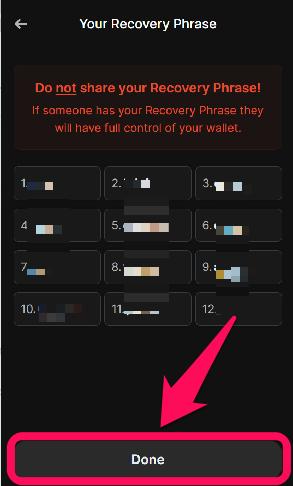
Step 6: View or copy your recovery phrase, store it securely offline, and click Done.
How to Find Your Secret Recovery Phrase in Phantom (Browser Extension)
Find your secret phrase in the Phantom browser extension using the steps below:
Step 1: Open the Phantom extension in your favorite browser.
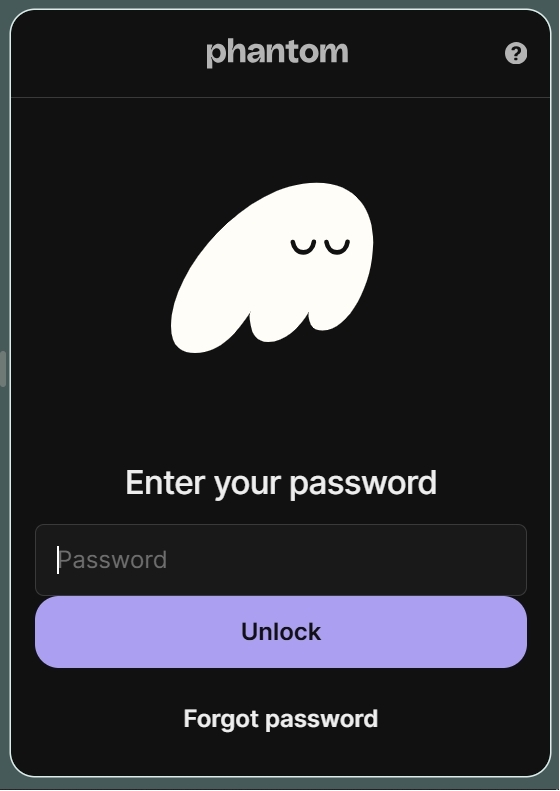
Step 2: Tap your profile avatar in the upper-left corner.
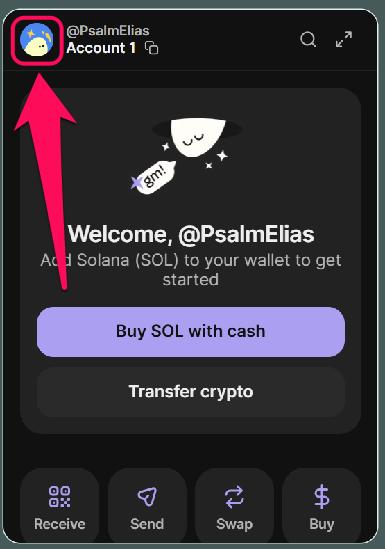
Step 3: Tap on the edit (pencil icon) button below the list of accounts tied to the wallet.

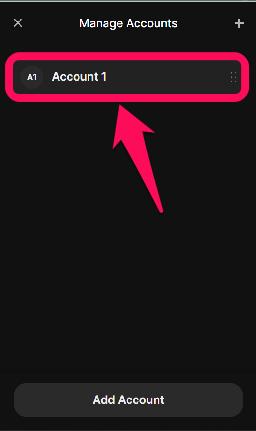
Step 4: Next, select an account from the list of accounts tied to the wallet.
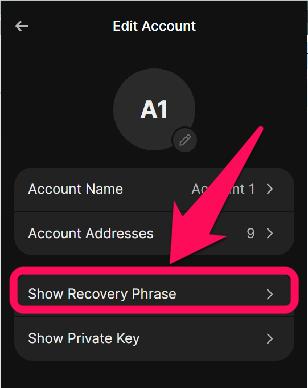
Step 5: Tap Show Recovery Phrase.
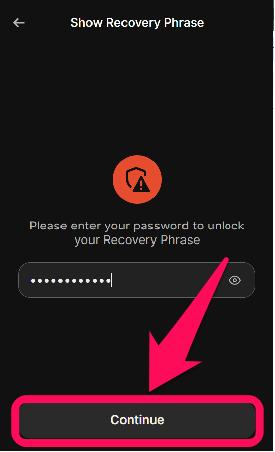
Step 6: Input your wallet’s password and click Continue to proceed.
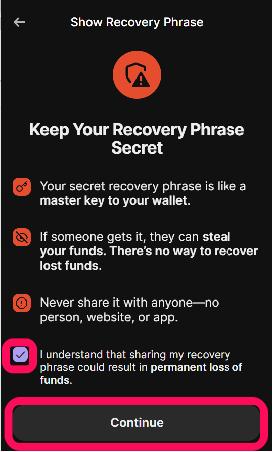
Step 7: Read through the warning, acknowledge it by checking the small box, then tap Continue.
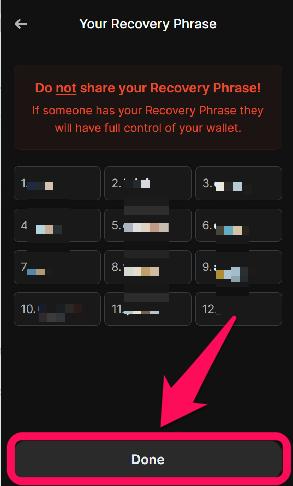
Step 8: Once your recovery phrase shows, write it down in a book or your diary and store it securely offline.
What to Do If You Lost or Forgot Your Recovery Phrase
If you still have access to your wallet but lost the phrase, use the steps in this post to find it and store it properly. Knowing how to find your Phantom Wallet seed phrase when you still can is your only saving grace if you ever lose access to your wallet on the same device.
However, if you no longer have access to the wallet and the secret recovery phrase is lost, the wallet cannot be restored. Phantom cannot regenerate a seed phrase for a lost wallet; thus, all your funds are lost. In this case, the only option is prevention for the future. Create a new account, find the Phantom wallet secret phrase, and back it up securely offline.
Bottom Line
Your secret phrase is as essential as every token you have in your wallet. It controls access to all your accounts and lets you recover your Phantom wallet anytime, even if you ever lose your primary device. The steps needed to find your secret recovery phrase in Phantom Wallet are simple, and thanks to the app’s intuitive design, you can never miss a beat. Once you’ve found your Phantom seed phrase, back it up safely offline for utmost security. Check out this guide for detailed instructions on securing and backing up your Phantom Wallet!
FAQs
1. Where is Phantom wallet recovery phrase stored?
It is stored locally and encrypted on your device (mobile and desktop). Phantom does not store it in its servers.
2. Is my seed phrase the same as Phantom Wallet private keys?
No, your seed phrase generates the private keys, which are account-specific. However, accounts created with a private key aren’t tied to your main wallet’s recovery phrase.
3. Can I change the Phantom wallet’s secret phrase?
No, secret phrases cannot be changed in Phantom Wallet. You will have to create a new wallet to get a new, unique seed phrase that controls the wallet and all accounts within it.