- •The Phantom mobile wallet app lets you store, swap, send, and receive tokens using your phone.
- •For optimal safety, download the Phantom mobile app from the official website.
- •The setup process is straightforward and similar on both Android and iOS devices.
For Solana users, quick access to the network is important as the decentralized web moves to mobile. Many people started with the Phantom browser extension, but now the wallet supports Solana, Ethereum, and Bitcoin, and is designed for your phone. This update makes it simple for Solana users to manage assets, stake tokens, and trade NFTs on the go, while keeping the same security and features as the desktop version. In this post, you’ll learn how to safely download the Phantom mobile wallet app and set it up on your device.
What is Phantom Wallet and Why Mobile Users Prefer It
Phantom is a non-custodial crypto wallet designed for the Solana network. With Phantom, you can store, swap, send, and receive crypto tokens and NFTs, and interact with dApps on Solana and other supported blockchains.
Since its launch, Phantom Wallet has grown into a popular tool in crypto thanks to features like its user-friendly interface, staking, built-in swaps, and more. Check out our Phantom wallet review to see how it compares to other wallets.
While the browser extension provides essential asset management, the Phantom Mobile app (version 25.46.0 and above) has evolved into a comprehensive trading hub by introducing exclusive features like perpetual futures (Perps) with up to 40x leverage and integrated prediction markets powered by Kalshi.
Mobile users often prefer Phantom Wallet because it is positioned closely around the Solana ecosystem. Features such as Solana Blinks, which are native to the Solana network, are available directly within Phantom, making it easier to interact with Solana-based actions, tokens, and dApps from a mobile device. The app is optimized for Solana’s fast confirmations and low fees, which shows in its smooth transaction flow and responsive interface.
At the same time, Phantom has started expanding its network coverage beyond Solana. While support for other chains is still limited, this gradual expansion signals Phantom’s intent to move beyond being seen only as a “Solana wallet” and toward a more multi-network crypto wallet over time.
How to Download Phantom Mobile Wallet App (Step-by-Step)
Downloading the Phantom mobile wallet app is easy, but you need to be vigilant and ensure you’re using the official platform. Follow the steps below to get the Phantom Wallet mobile app on your phone and get started.
Step 1: Open your phone’s browser and navigate to the official Phantom website.
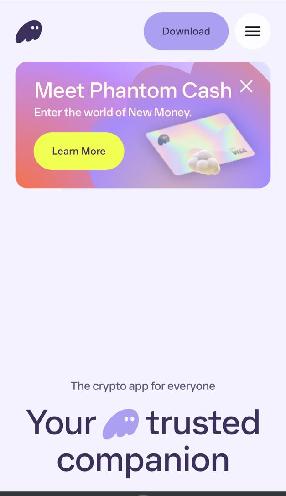
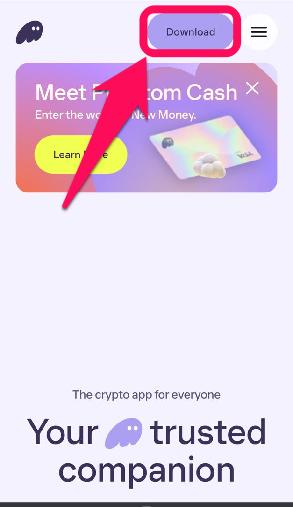
Step 2: Scroll down or click the Download button at the top right corner. You will be prompted to choose your device’s operating system for download compatibility.
Step 3: Select one of the options to download Phantom for iOS or Android, depending on your device’s operating system.
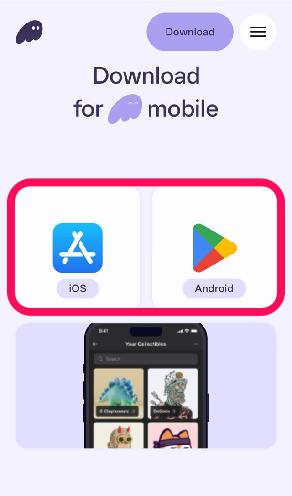
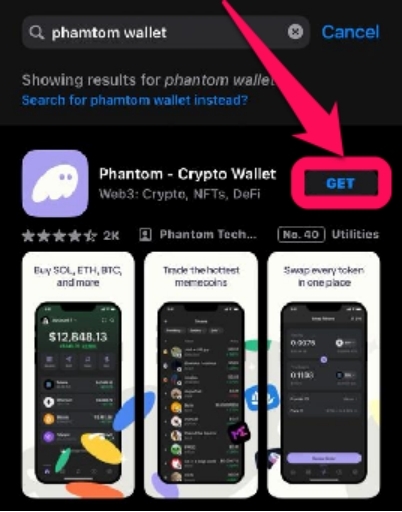
Step 4: Once redirected to your device’s app store, tap “Install” or “Get” to start the download.
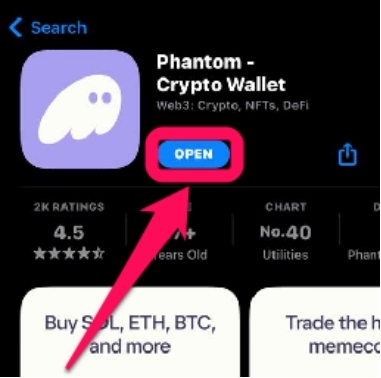
Step 5: Click Open to launch the app once the download is complete, and create or import your Phantom wallet on mobile.
Supported Devices and System Requirements
The Phantom mobile wallet is supported on all Android and iOS phones. There are no high-level specifications for the wallet itself; however, your phone should be running a recent operating system (iOS 16.0 or later and Android 9.0 or later) to ensure compatibility and receive security updates.
Additionally, Phantom is listed as one of the best crypto hot wallets. So you’ll need a stable internet connection to interact with blockchain and dApps to sync transactions on the app. Lastly, the app uses very little device storage, so you shouldn’t worry about freeing up space to install the Phantom app.
Bottom Line
Knowing how to download Phantom mobile wallet app is the first step to unlocking full crypto control without sacrificing convenience. The Phantom app allows you to monitor your assets in real time, move funds, and interact with dApps on the go. With the app, backing up your private keys is easier, with layered security that uses biometrics and password-protects your wallet against unauthorized access. Once you’re all set, explore Solana by interacting with the Solana testnet network on Phantom Wallet.
FAQs
1. Is Phantom Wallet free to download on mobile?
Yes, Phantom Wallet is completely free to download from the Google Play and Apple App Stores on Android and iOS phones.
2. Can I use Phantom Wallet on both Android and iPhone?
Yes, since Phantom Wallet supports both Android and iOS (iPhone) devices, you can install it on either platform and restore the same wallet using your recovery phrase.
3. Can I receive Bitcoin on Phantom?
Phantom wallets support sending and receiving Bitcoin (BTC) using addresses starting with bc1q (Native SegWit) and bc1p (Taproot). Newly created wallets default to a Native SegWit address, which is often used by apps like Magic Eden or Unisat as your payment address.