



- •You can change the display currency directly within Phantom settings at any time.
- •Display currency tweak only affects how portfolio value appears.
- •Phantom wallet currently supports 49 fiat currencies for users to choose from in their wallet display.
Understanding your wallet data can be frustrating when the portfolio value is shown in an unfamiliar currency. Hence, Phantom allows users to safely switch the display fiat currency with just a few clicks. This setting helps you track your assets and crypto portfolio value in a familiar currency without affecting the assets themselves. This guide shows how to find the settings and securely change display fiat currency in Phantom Wallet on the browser extension and mobile app.
Can You Change The Display Fiat Currency in Phantom?
Yes, you can edit Phantom Wallet currency settings directly from within the app to display asset values in your preferred currency. This adjustment only affects how your portfolio value and token prices are shown within the wallet interface.
Phantom Wallet fiat display change does not convert your assets, alter token balances, or affect transactions. It simply updates the reference currency used to estimate the total and individual value of assets you own in the wallet. Additionally, the Phantom Wallet balance display edit option is available on both the browser extension and mobile app.
Supported Fiat Currencies in Phantom
Phantom wallet supports several commonly used fiat currencies for balance and token value display. Currency availability varies depending on the version of Phantom wallet you are using.
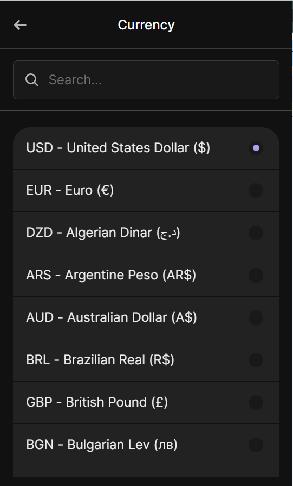
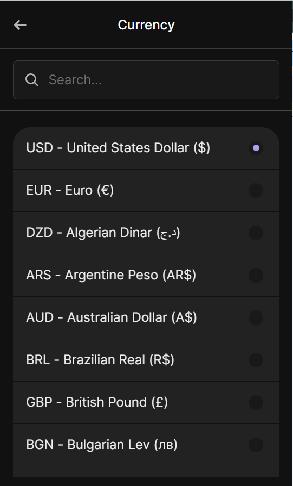
At the time of writing, Phantom Wallet supports 49 display fiat currencies, including USD, EUR, AUD, DZD, GBP, EGP, CAD, CNY, JPY, AED, NGN, MYR, KWD, PHP, and many more. You can switch between supported currencies at any time in Settings, using the steps in the next section.
How to Change Fiat Currency in Phantom (Browser Extension)
The step-by-step guide below explains how to change display fiat currency in Phantom Wallet on the browser extension:
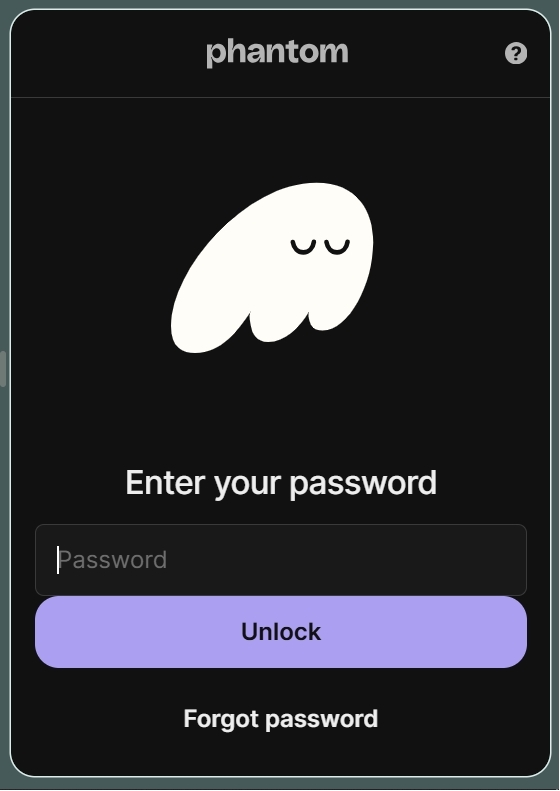
Step 1: Open the Phantom wallet browser extension.
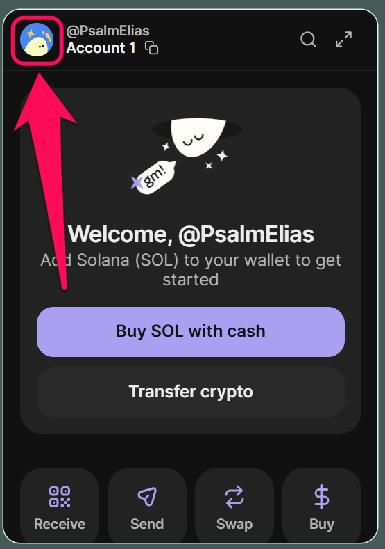
Step 2: Click your profile avatar in the upper-left corner for wallet options.
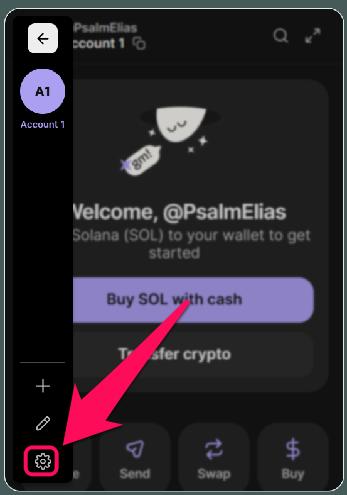
Step 3: Click on Settings to view all wallet adjustments.
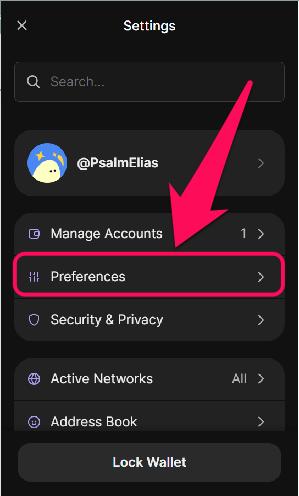
Step 4: Next, select Preferences from the list of options.
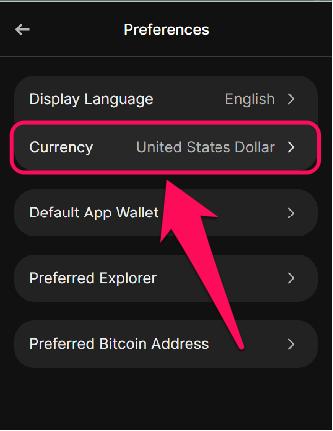
Step 5: Select Currency.
Step 6: Choose your preferred currency from the list.
How to Change Fiat Currency in Phantom Wallet (Mobile App)
Follow the steps below to update your Phantom mobile app display fiat currency safely:
Step 1: Launch the Phantom wallet mobile app and log in to your account.
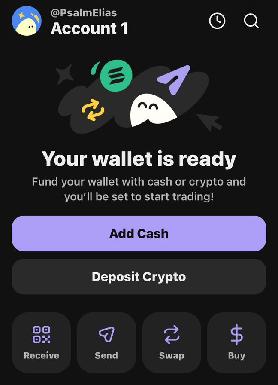
Step 2: Select your profile avatar in the upper-left corner.
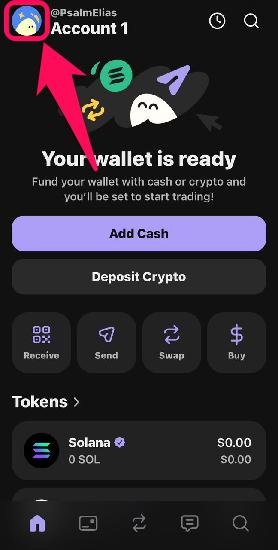
Step 3: Tap on the gear icon to go to Settings.
Step 4: Tap on Preferences.
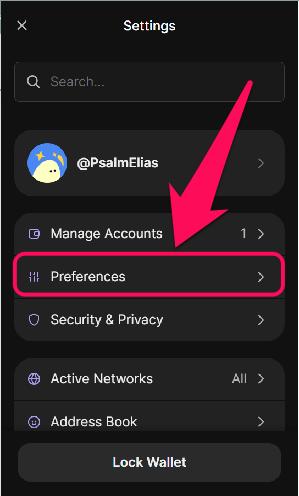
Step 5: Next, tap on the Currency option.
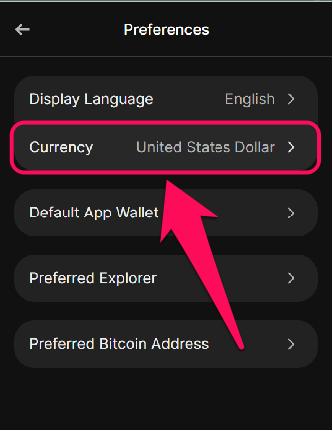
Step 6: Choose your preferred currency from the list of supported fiat currencies. Once selected, all balances and transactions in Phantom will appear in your chosen currency.
What Changes After You Switch the Fiat Currency?
Switching the display currency only changes your estimated portfolio value shown in the wallet. Your preference applies throughout the app, including the Home tab, asset detail view, Explore tab, and Swap/Bridge features.
However, token balances remain exactly as they were before the change, and transaction fees or blockchain activity are not affected. The selected currency can be changed at any time, allowing you to track your wallet using whichever fiat currency quote is most convenient.
Bottom Line
Deciding to change display fiat currency in Phantom Wallet is a clever way to track your portfolio value. The setting modifies your wallet’s price outlook and does not alter assets, initiate transactions, or affect wallet behavior. Let’s say you’re still configuring your wallet; the first step is to update your Phantom Wallet security settings. To do so, check out our guide on how to secure your Phantom wallet account to ensure your funds remain protected.
FAQs
1. Will my historical portfolio values automatically convert to the new currency after a change?
Yes, all displayed portfolio estimates update automatically based on the selected currency’s current market value.
2. Does Phantom wallet support fiat transactions?
Phantom Wallet has unveiled its new ‘Cash Account’ feature, enabling users to conduct instant fiat currency transactions without incurring gas or transaction fees when swapping with stablecoins.
3. Why does my portfolio value slightly change after switching currencies?
Phantom Wallet price display settings don’t change the value of your assets. Small changes can ONLY occur due to real-time exchange rate updates used to calculate the displayed fiat estimate.




