



- •KeepKey is an open-source hardware wallet developed to provide accessible offline cryptocurrency storage.
- •Its large OLED screen clearly displays wallet addresses, recovery words, and transaction details.
- •The wallet supports over 25 blockchains and thousands of tokens across EVM networks.
- •Scrambled PIN entry and on-device confirmations help protect access and prevent unauthorized transactions.
- •Built-in decentralized swaps let you trade supported assets without surrendering control of your private keys.
While hardware wallet brands continue to release new models and discontinue older ones, KeepKey has stuck with a single device since its launch in 2015, keeping it functional through regular firmware updates. Its large OLED display felt considerably advanced for a hardware wallet at the time, while the slim aluminum body gave it a sleek and premium appearance. More than a decade later, the same core design remains in use, supported by updated software, new wallet features, and expanded coin support. For this KeepKey review, we looked beyond its physical design, testing its security, supported assets, wallet features, setup process, and everyday performance to see what the wallet currently offers.
| Stats | KeepKey |
|---|---|
| 🗝️ Type | Hardware Wallet |
| 🖥️ Screen | 3.12" OLED Display |
| 🪙 Supported Tokens | 6,980+ |
| 🌐 Supported Networks | 11 Native Chains + EVM Networks |
| 🖼️ NFT Support | Yes |
| 🔗 Connection | Micro-USB |
| 🔋 Wireless Charging | No |
| 🛡️ Security | Open-Source Firmware, PIN, Scrambled Entry |
| 📱 Mobile App | Android & iOS |
| 💻 Desktop App | Windows, macOS, Linux |
| 📲 Main App | KeepKey Desktop |
| 🔌 Wallet Support | Browser Extension and Third-Party Wallets |
| ⭐ Best For | Affordable Open-Source Self-Custody |
KeepKey Overview
KeepKey was developed in 2014 by Darin Stanchfield and Ken Hodler, following the Mt. Gox collapse, and the first device launched in 2015. The idea was straightforward: users needed a practical way to hold their private keys themselves instead of leaving their crypto with exchanges and other online platforms. ShapeShift acquired KeepKey in 2017 and later added non-custodial swaps to its wallet software. Following ShapeShift’s transition into a DAO, KeepKey continued with a stronger focus on open-source development and self-custody.

While other hardware wallet companies regularly introduce new devices, KeepKey has continued updating its original model. The design does look somewhat old now, particularly because it still relies on a Micro-USB connection and commonly connects through USB-A rather than USB-C. Still, the large 3.12-inch OLED display remains practical. You can read complete wallet addresses, recovery words, and transaction information directly on the device without repeatedly scrolling through a tiny screen. There is only one physical button, so most actions are handled through the connected application and confirmed on the wallet.
KeepKey now supports more than 25 blockchains and over 8,800 tokens, including ERC-20 tokens and EVM-compatible networks through EIP-155. Unlike hardware wallets that require separate applications for each blockchain, KeepKey keeps supported chains available through the same firmware without imposing app-storage limits.
The KeepKey Desktop application is where you manage accounts, connect to supported dApps, and access decentralized swaps through protocols such as THORChain, ShapeShift, and ChainFlip. These swaps remain non-custodial, meaning you do not need to transfer your assets into a centralized exchange account first.
From a security perspective, private keys stay offline and transactions require confirmation on the device. KeepKey also uses randomized PIN placement, scrambled recovery entry, open-source firmware, and clear signing that decodes supported contract calls before approval. This gives you more information about what you are signing instead of displaying an unreadable string of transaction data.
KeepKey Pros & Cons
| 👍 KeepKey Pros | 👎 KeepKey Cons |
|---|---|
| ✅ Large, readable OLED screen | ❌ No secure element |
| ✅ Fully open-source design | ❌ Outdated Micro-USB connection |
| ✅ Affordable hardware wallet | ❌ USB power required |
| ✅ Free lifetime firmware updates | ❌ Limited advanced features |
| ✅ Simple one-button use | |
| ✅ Built-in decentralized swaps |
How KeepKey Works
The way KeepKey works has not changed in all these years. You connect the device to a computer or compatible phone, then manage your portfolio through KeepKey’s software. The desktop application, available for Windows, macOS, and Linux, handles setup, firmware updates, accounts, transfers, and decentralized swaps. A browser extension also connects KeepKey with dApps such as Uniswap, while the mobile app lets you view balances and manage transactions on the go.
When sending crypto or interacting with an application, transaction details appear on KeepKey’s OLED screen. You check the address, amount, and fee, then confirm using its physical button. The device signs the transaction offline, so your private keys and recovery phrase never leave KeepKey.
KeepKey Specs & Design
The specifications provide a closer look at KeepKey’s dimensions, construction, screen, controls, and wired connection before we consider how the device feels during regular use.
| Specification | Details |
|---|---|
| Dimensions | 93.5 × 38 × 12.2mm |
| Weight | 54g |
| Screen | 3.12-inch OLED |
| Resolution | 256 × 64 pixels |
| Controls | One physical button |
| Processor | ARM Cortex-M3 |
| Body | Polycarbonate and aluminum |
| Connection | Micro-USB |
| Battery | None |
| Color | Black |
KeepKey is larger than most USB-style hardware wallets, but its slim rectangular body remains easy to hold. The glossy polycarbonate front and anodized aluminum back give it a premium appearance, although the glass-like front quickly picks up fingerprints. It also feels like a device you would want to handle carefully rather than carry loosely with keys or other hard objects.
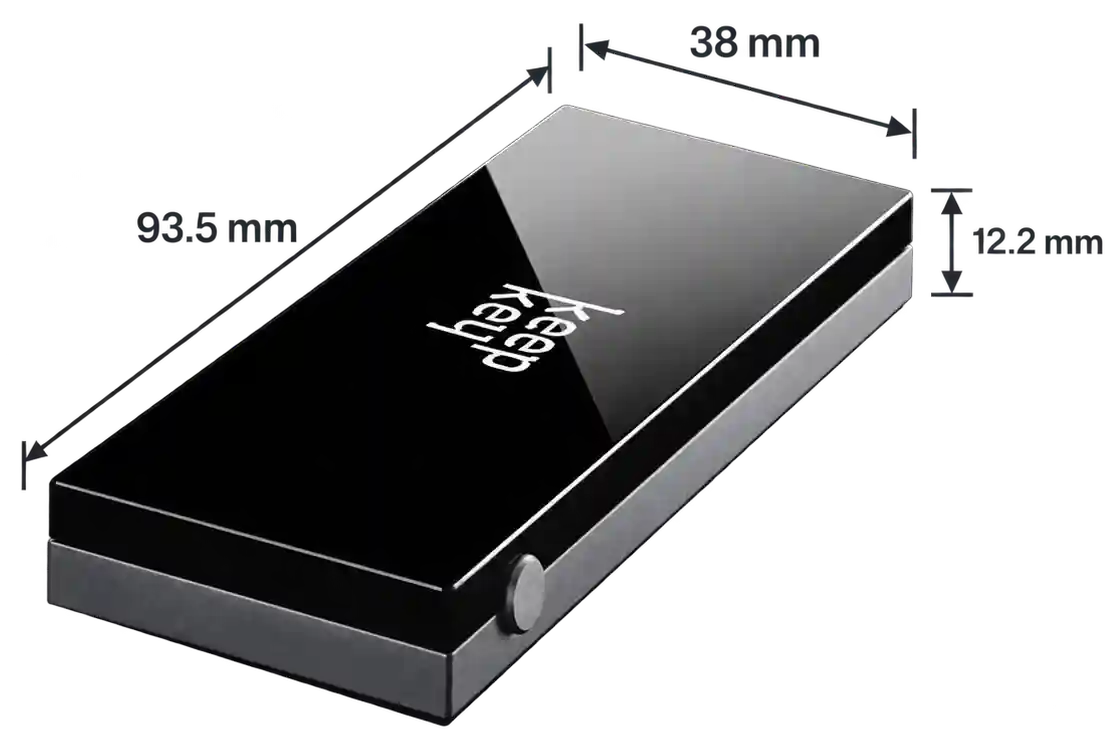
The front is dominated by a 3.12-inch monochrome OLED display. Its resolution is modest, but the screen is large enough to show full wallet addresses, transaction amounts, fees, PIN instructions, and recovery words clearly. This is particularly useful when confirming transactions, as you can check the important details without repeatedly moving through separate screens.
KeepKey uses just one physical button for confirmations, while navigation and transaction preparation take place through the connected application. There is no internal battery, so the wallet only powers on when connected to another device. Its Micro-USB port and supplied USB-A cable feel dated beside newer USB-C hardware, particularly if your laptop or phone no longer has a USB-A port. An adapter can solve that issue, but it adds another item to the setup. Despite its age, the display and single-button layout remain sufficient for the wallet’s main purpose: reviewing and approving transactions on the device.
KeepKey Features
KeepKey combines a simple physical design with several practical features for managing and protecting crypto.
OLED Screen
KeepKey uses a 3.12-inch OLED screen with a resolution of 256 × 64 pixels. It is not a touchscreen, but its larger size makes wallet addresses, transaction amounts, fees, and recovery words easier to read. When you send crypto, the complete recipient address appears on the device, giving you a separate place to confirm that it matches the address entered in KeepKey Desktop.
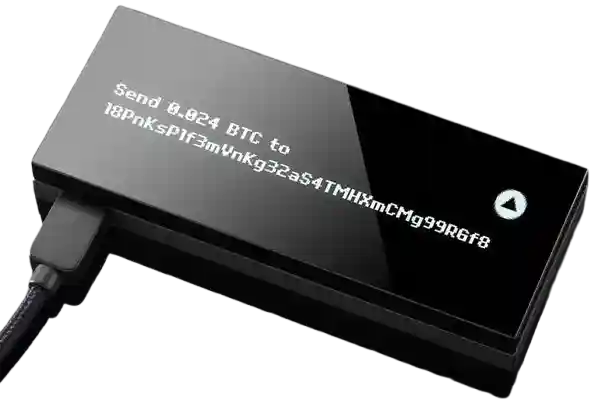
This can help identify clipboard malware that replaces copied addresses. The monochrome display looks dated next to modern color touchscreens, but it provides enough room for transaction verification, which is its most important purpose.
Open-Source Firmware
KeepKey’s firmware is fully open-source, meaning its code can be inspected, tested, and independently reviewed. The firmware is also reproducibly built, allowing technical users to confirm that a published release matches its available source code. This transparency is particularly important because KeepKey uses a general-purpose microcontroller instead of a proprietary Secure Element.
Its bootloader only accepts firmware carrying a valid KeepKey signature, preventing an unofficial application from silently installing modified firmware. You do not need to inspect the code yourself to benefit from this approach, as developers and security researchers can review it and publicly report any weaknesses they identify.
Scrambled PIN and Recovery
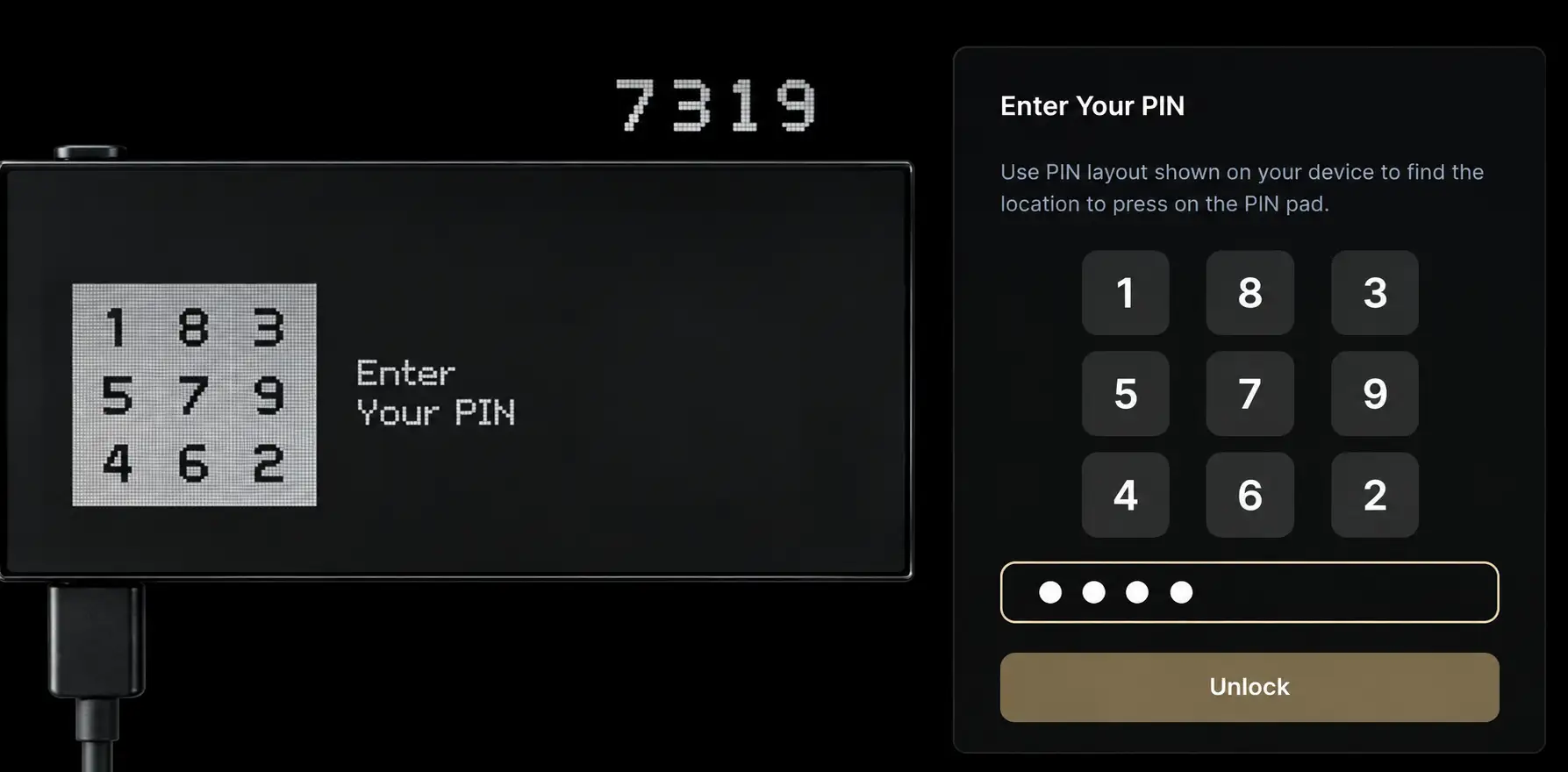
KeepKey protects device access with a PIN of up to nine digits. Instead of displaying the numbers normally on your computer, the device generates a randomized arrangement, while the application shows a blank grid. You enter the PIN by selecting the positions that match the numbers shown on KeepKey. Since the arrangement changes, keyloggers and screen-recording software cannot easily determine your PIN from the computer alone.
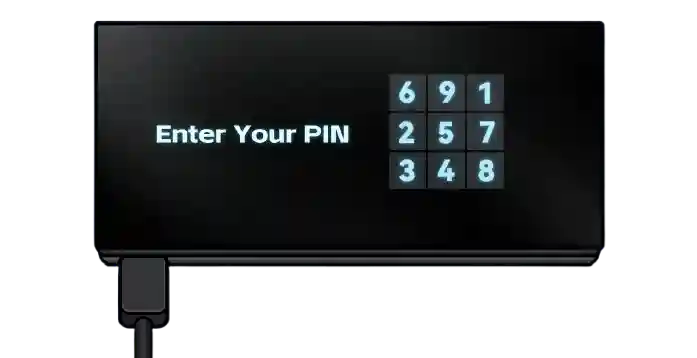
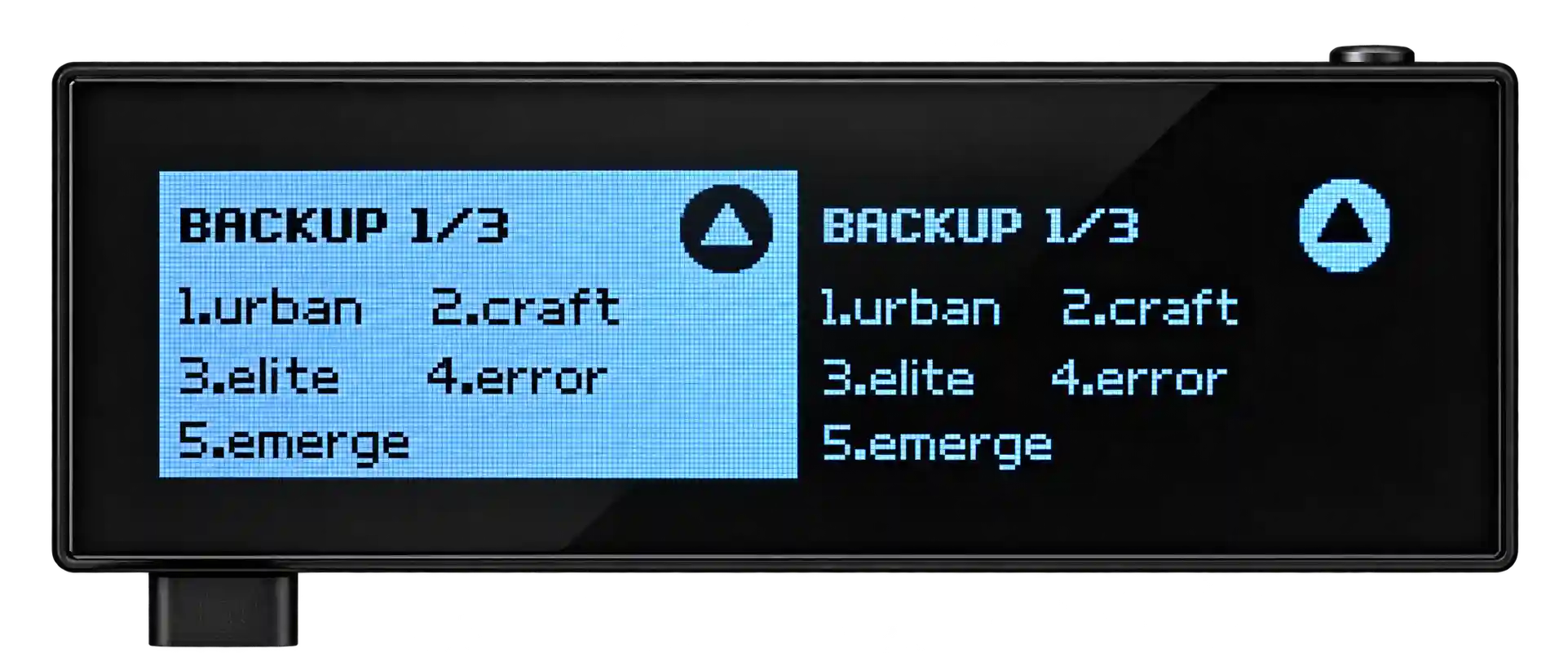
The same principle applies during wallet recovery. KeepKey uses a scrambled character layout when you enter your recovery phrase, preventing the connected computer from directly seeing the words. This makes restoring the wallet safer even if the computer is compromised.
Built-In Swaps
KeepKey lets you exchange supported cryptocurrencies from within its wallet software through decentralized protocols such as THORChain, ShapeShift, and ChainFlip. You select the assets and amount through KeepKey Desktop, review the quoted rate and applicable fees, then confirm the transaction on the hardware wallet.
The swap remains non-custodial, so you do not need to deposit funds into a centralized exchange account or hand over your private keys. Cross-chain availability depends on the selected assets, available liquidity, and the protocol providing the route. Network, liquidity provider, and affiliate fees may apply, so you should check the final amount shown before approving the transaction.
Lifetime Firmware Updates
KeepKey provides firmware updates without charging a subscription or ongoing maintenance fee. These updates can add blockchain support, introduce wallet functions, improve transaction handling, and patch previously identified security issues. Recent firmware releases have continued adding native networks and improving how contract interactions appear on the device.
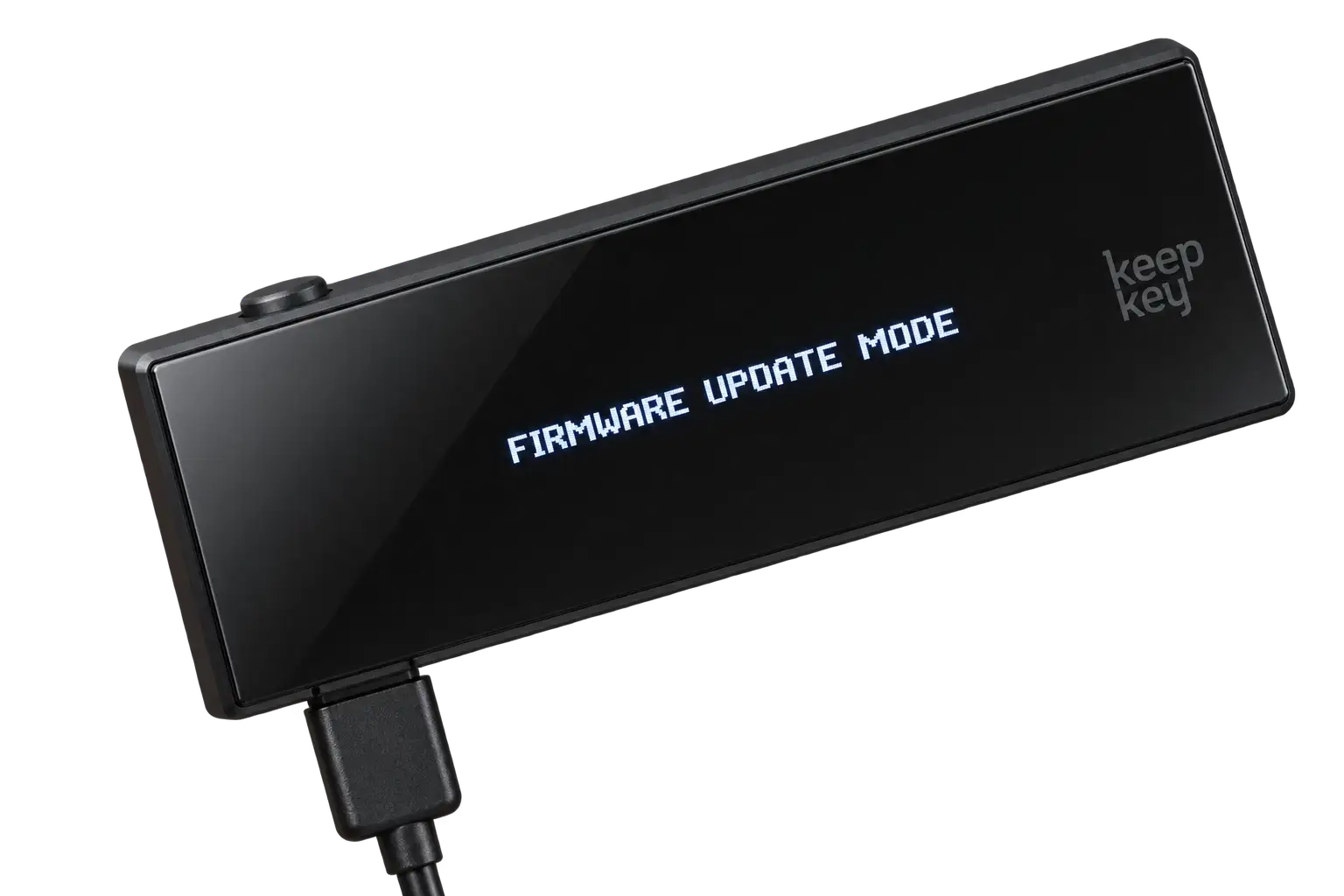
You can check for updates through KeepKey Desktop, which verifies the firmware before installation. The device’s bootloader also rejects firmware that is not properly signed by KeepKey. Installing updates remains your responsibility, and it is particularly important for an older hardware model because many of its protections have improved through software. Your wallet and recovery phrase continue working without a paid plan.
KeepKey Unboxing
KeepKey arrives in a compact box protected by a tamper-evident security seal. The seal is fairly strong, so opening the package takes a little more effort than simply lifting the lid. Once removed, the box opens through a magnetic flap, with the KeepKey device placed neatly inside. The presentation is simple, and the printed setup address directs you to the correct software without filling the package with unnecessary material.
The wallet itself makes a good first impression. Its aluminum back gives it some weight, while the large glossy front makes it feel more refined than many USB-style hardware wallets. A protective film covers the screen, although removing it can be slightly awkward. The display also starts collecting fingerprints quite quickly once the film comes off.
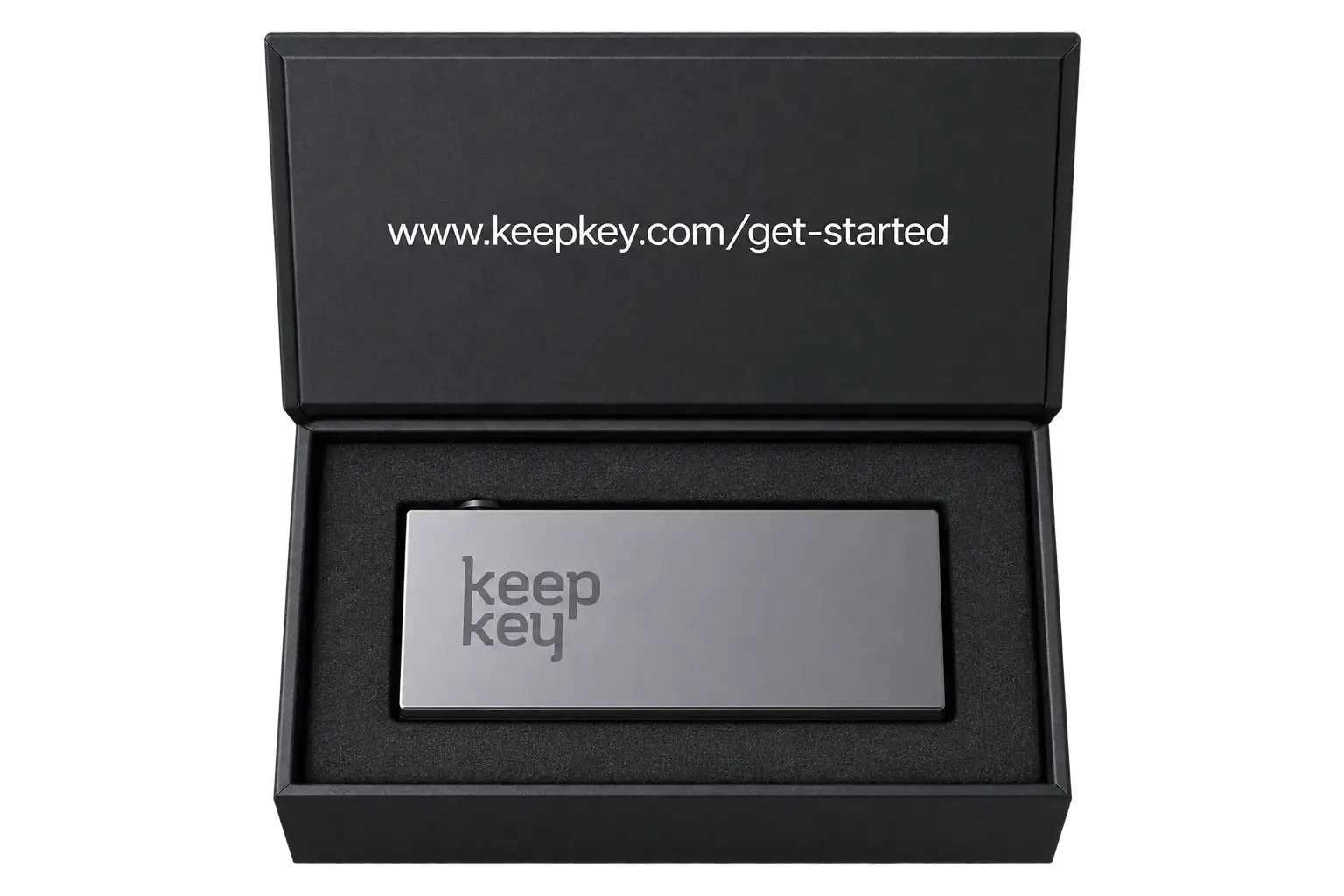
Inside the standard KeepKey package, you receive:
- KeepKey hardware wallet
- Micro-USB cable
- Two recovery cards
- Quick-start instructions
- Warranty information
Some promotional packages may also include stickers, but these are not necessarily part of every standard retail box. There is no carrying case or recovery phrase backup made from metal, so those would need to be purchased separately if required.
KeepKey Setup
Setting up KeepKey is straightforward, and the following steps explain how to prepare the device for secure self-custody.
Step 1: Download and install the KeepKey Vault Desktop app on your computer.
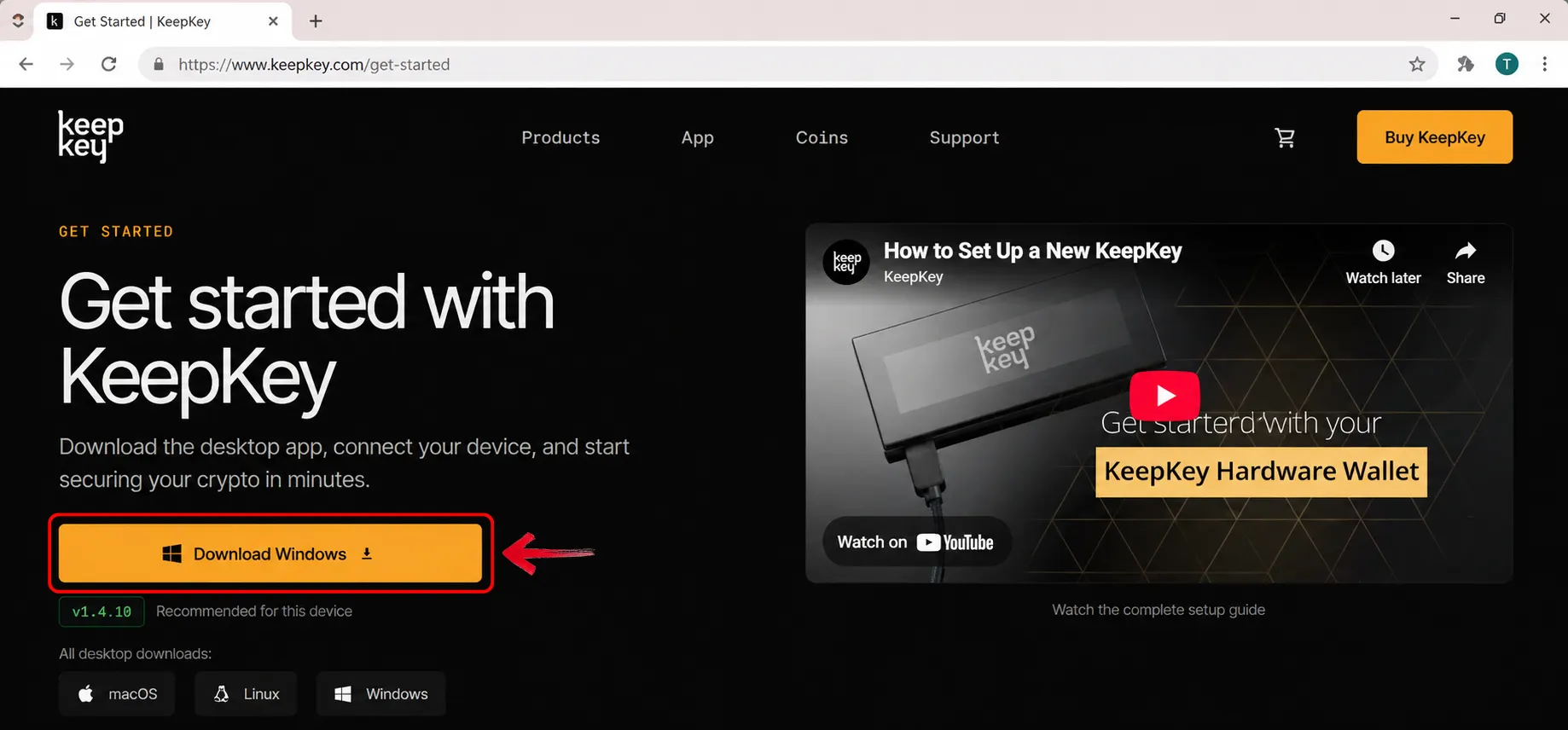
Step 2: Hold down the button on your KeepKey while connecting it to your computer to enter Updater Mode.
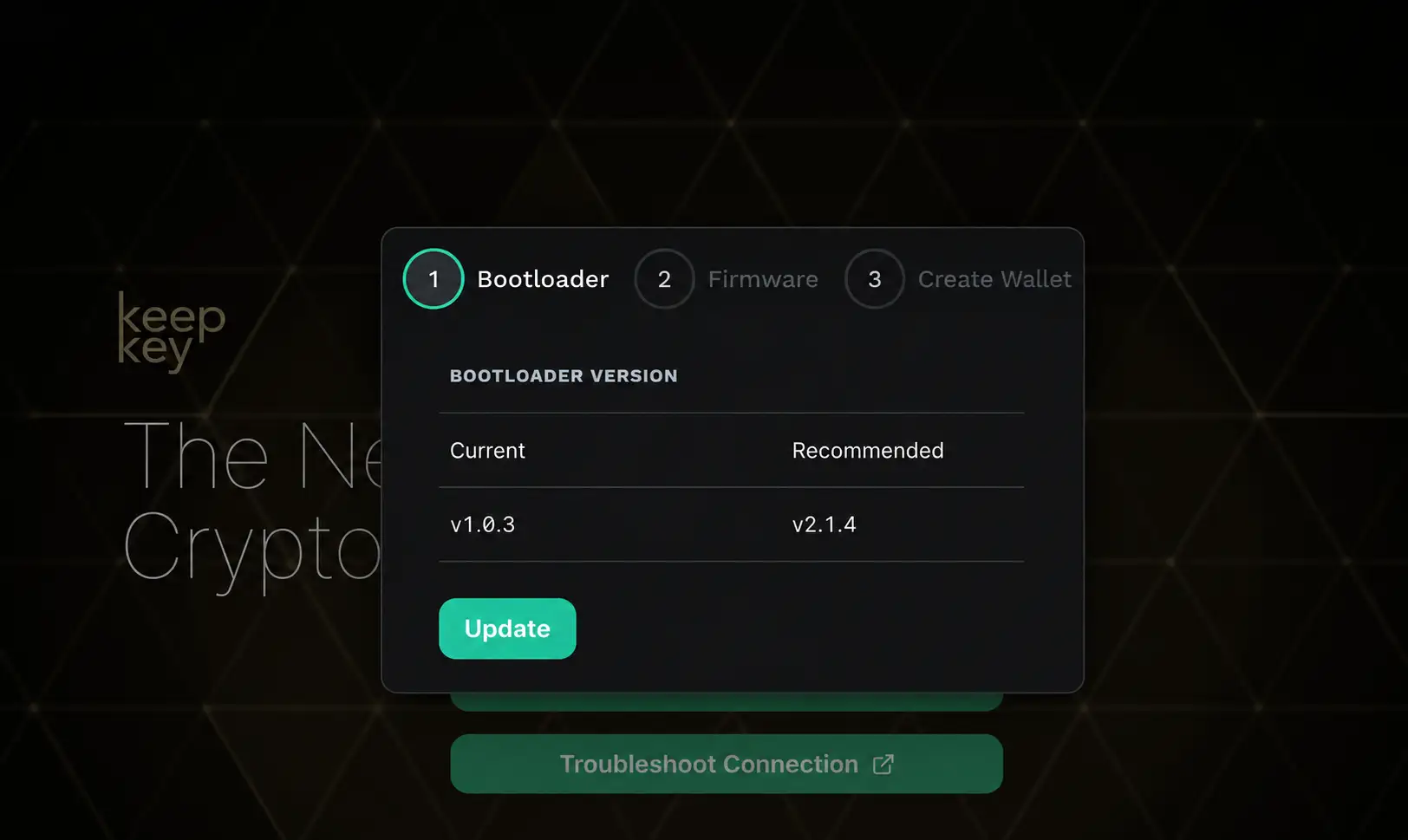
Step 3: Follow the prompts to update the bootloader and firmware. Only disconnect and reconnect the device when prompted.
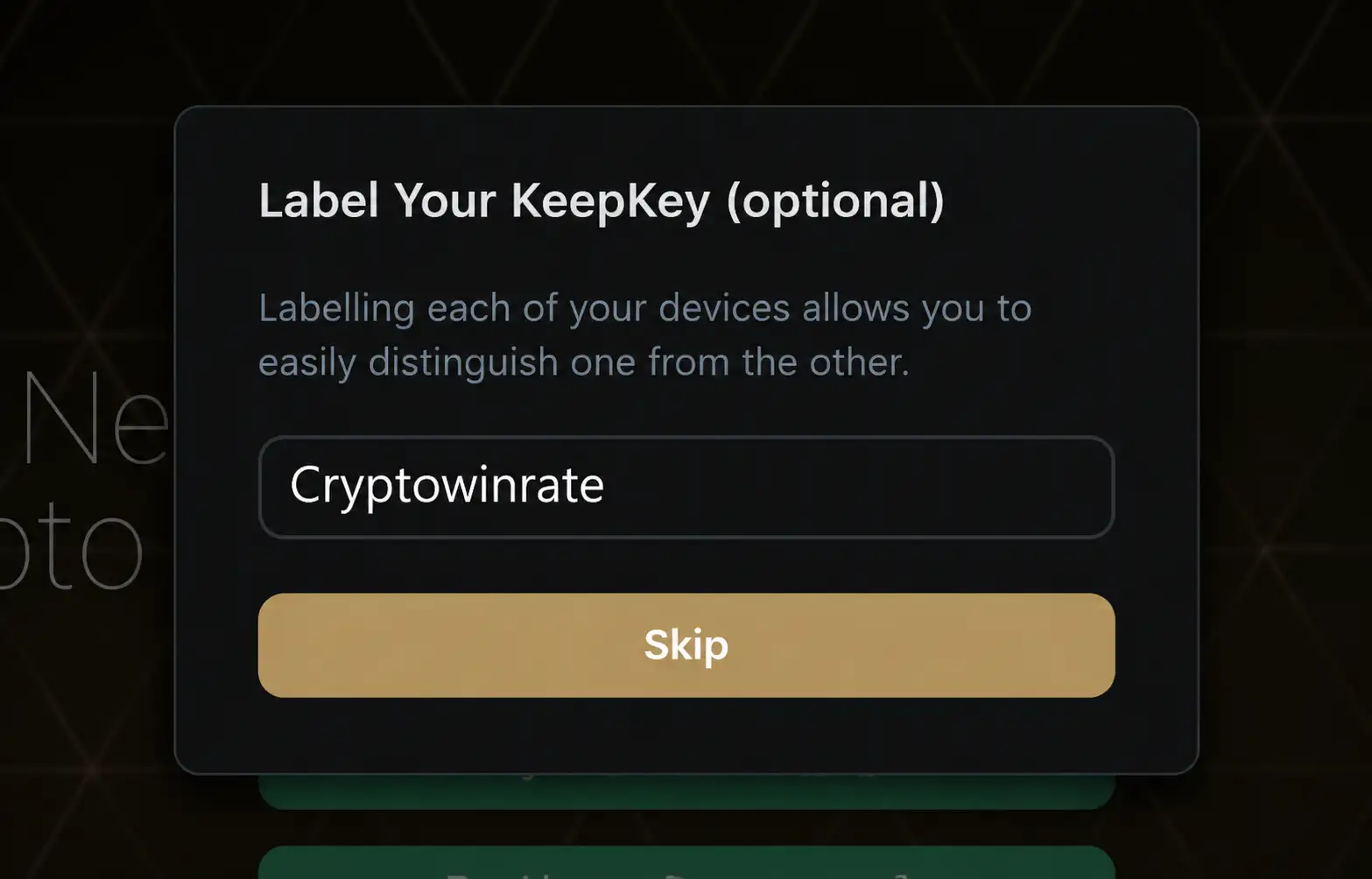
Step 4: Once updated, give your KeepKey a name to identify the device.
Step 5: Create your PIN using the number layout shown on your KeepKey and the corresponding squares on your computer. Enter it again to confirm.
Step 6: Your KeepKey will generate a secret recovery phrase. Write the words down in the correct order using the recovery card.
Step 7: Once your KeepKey is updated and your wallet is backed up, you can use the KeepKey Desktop app to view your balance and send or receive crypto.
Your KeepKey is now ready to store assets and sign transactions, but keep the recovery phrase offline and separate from the device.
KeepKey Pricing & Fees
KeepKey is priced at $59.95, making it one of the more affordable hardware wallets available. This is a one-time hardware purchase, with no subscription required to use the device, KeepKey Desktop, browser extension, or mobile application. Firmware updates are also provided free for the lifetime of the wallet, so keeping the device updated does not introduce any recurring cost.
KeepKey does not charge a fee for receiving crypto. When sending assets, you pay the applicable blockchain network fee, which goes to network validators or miners rather than KeepKey. Decentralized swaps completed through integrated providers may include network fees, liquidity provider fees, and a small affiliate fee. The applicable rate and estimated amount received are displayed before you confirm the swap on your device.
KeepKey Supported Chains and Assets
KeepKey supports major cryptocurrencies including Bitcoin, Ethereum, Bitcoin Cash, Litecoin, Dogecoin, XRP, Cardano, Solana, Cosmos, Polkadot, THORChain, TON, and TRON. It also works with EVM-compatible networks such as BNB Smart Chain, Polygon, Avalanche, Arbitrum, and Optimism, giving you access to thousands of tokens issued across these ecosystems.
The wallet does not require you to install and remove individual blockchain applications due to limited device storage. Supported chains remain available through the same firmware, while accounts and balances are managed through KeepKey Desktop or its connected applications.
KeepKey continues updating its supported asset list through firmware and software releases, so the exact number of available coins and networks can change. Before purchasing the wallet or transferring funds, you can check KeepKey’s official asset directory to confirm that the required coin, token, and network are currently supported.
KeepKey Customer Support
KeepKey provides customer support through its online Help Center, technical documentation, FAQs, and live chat. The Help Center includes setup instructions, firmware assistance, troubleshooting steps, and information about supported assets. If the available material does not resolve your issue, you can contact the support team through live chat or submit a request online.
There is no clearly advertised telephone support, so assistance is mainly handled digitally. The documentation is detailed, although beginners may still need help with connection or firmware issues.
KeepKey Security and Self-Custody
When you create a new wallet, KeepKey generates the private keys and recovery phrase inside the device. The private keys are not transferred to KeepKey Desktop, the browser extension, or the mobile app. The connected computer prepares the transaction and communicates with the blockchain, while KeepKey handles signing and final approval.
Unlike an air-gapped wallet, KeepKey connects directly through USB. This gives the computer a communication path to the device, but transactions cannot be completed without pressing the physical button. The recipient address, amount, and transaction fee appear on the OLED display, allowing you to check them independently before signing. This remains important because malware could alter the information shown on your computer.
KeepKey uses a general-purpose microcontroller rather than a dedicated Secure Element. This is a deliberate trade-off that allows its firmware and hardware design to remain open for public inspection, but it provides less resistance against advanced physical extraction attempts. KeepKey’s firmware is open-source, reproducibly built, and cryptographically signed. Its bootloader rejects firmware that does not carry a valid KeepKey signature.
Device access is protected by a PIN of up to nine digits. During entry, KeepKey displays a randomized number arrangement while you select the corresponding positions on your computer. The positions change between attempts, preventing screen-recording software or keyloggers from learning the actual PIN.
Recovery also uses scrambled cipher entry. If you restore the wallet through a computer, the randomized character layout prevents the connected system from seeing which recovery words you enter. KeepKey supports standard BIP39 recovery phrases and an optional passphrase, which creates a separate hidden wallet. Since the passphrase is not stored on the device, it can protect passphrase-based accounts even if someone physically extracts the original seed.
KeepKey has had publicly disclosed vulnerabilities, including attacks requiring physical possession of the device. Known firmware issues have been patched, so keeping the wallet updated is essential.
Is the KeepKey Safe to Use?
Yes, KeepKey is safe to use when purchased from an official source and kept updated. It stores private keys offline, requires physical confirmation, displays transaction details on its screen, and uses signed, open-source firmware.
However, it does not contain a Secure Element, making physical possession attacks a more relevant concern. A strong PIN and optional BIP39 passphrase improve protection, particularly against seed extraction. You must still verify every address and protect the recovery phrase, since KeepKey cannot recover stolen funds.
KeepKey vs. Ledger Nano X
KeepKey and the Ledger Nano X both keep private keys offline, but they take different approaches to hardware and daily use. KeepKey costs $59.95 and provides a much larger 3.12-inch OLED screen, making complete addresses and transaction details easier to read. However, it has no battery or Bluetooth and still uses Micro-USB, so you generally need a wired connection.
The Ledger Nano X costs around $149 and is more portable at 34g. Its rechargeable battery, Bluetooth, USB-C connection, and iOS and Android compatibility make it easier to use away from a computer. Ledger also supports more assets and third-party wallet integrations, although blockchain applications must be installed on the device.
Security is another major difference. Ledger uses a CC EAL5+ Secure Element with its proprietary operating system. KeepKey uses a general-purpose microcontroller without a Secure Element, but its firmware and hardware design are open-source and auditable. KeepKey suits users prioritizing price, transparency, and a larger display, while Ledger Nano X offers stronger physical protection and better mobile convenience.
KeepKey Alternatives
If KeepKey does not fit your needs, these alternatives address its main limitations, including the lack of a Secure Element, Micro-USB connectivity, and dependence on a wired connection.
1. Ledger Nano X: For easier mobile use and stronger resistance to physical attacks, the Nano X provides Bluetooth, USB-C, a rechargeable battery, and a CC EAL5+ Secure Element. Its smaller screen is less convenient for reading full transaction details.
2. ELLIPAL Titan 2.0:For fully air-gapped signing, the Titan 2.0 communicates through QR codes without Bluetooth, Wi-Fi, NFC, or USB data transfers. It also provides a sealed metal body, CC EAL5+ Secure Element, and 4-inch touchscreen.
| Feature | KeepKey | Ledger Nano X | ELLIPAL Titan 2.0 |
|---|---|---|---|
| Price | $59.95 | Around $149 | $149 |
| Screen | 3.12″ OLED | 1.09″ OLED | 4″ IPS touchscreen |
| Connection | Micro-USB | Bluetooth and USB-C | QR codes |
| Secure Element | None | CC EAL5+ | CC EAL5+ |
| Main Feature | Large verification screen | Portable mobile access | Air-gapped signing |
| Best For | Affordable open-source storage | Mobile crypto management | Isolated offline signing |
| View Product | Buy Now | Buy Now | Buy Now |
Bottom Line
Keeping your crypto secure starts with self-custody. KeepKey provides a simple route into hardware storage through a device that has remained active and supported for more than a decade. Its large OLED screen makes transaction details easier to verify, while open-source firmware, scrambled PIN entry, built-in swaps, and free updates add practical value to its $59.95 price.
However, the hardware is showing its age. There is no Secure Element, USB-C, Bluetooth, internal battery, or touchscreen, and the mobile app cannot sign transactions independently. KeepKey still handles the essential job of offline key storage, but users wanting stronger physical protection, air-gapped signing, or smoother mobile access can consider other hardware wallet options.
FAQs
1. Is KeepKey Still Supported?
Yes. KeepKey remains active, with firmware updates, new asset support, and maintained desktop software.
2. Does KeepKey Require ShapeShift?
No. You can store, send, and receive crypto without creating a ShapeShift account or completing KYC.
3. Can Updates Erase KeepKey?
Updates normally preserve your wallet, but you should always secure your recovery phrase before installing one.
4. Can I Recover KeepKey Elsewhere?
Yes. Its BIP39 recovery phrase works with compatible wallets when using the correct passphrase and derivation path.
5. Does KeepKey Work With Mobile?
Yes, but its mobile app is mainly for viewing balances and receiving crypto. It cannot sign transactions independently.