



- •Binance works well with trading bots because of its liquidity, fast execution, many pairs, and Spot, Margin, and Futures support.
- •Third-party bots usually offer more strategy options than Binance’s native bots, including DCA, grid, signals, copy trading, and custom automation.
- •The best crypto trading bot for Binance depends on your strategy, experience level, budget, and need for testing tools.
- •API permissions matter because bots should only read account data and place trades, while withdrawal access should stay disabled.
- •Trading bots can automate your strategy, but they still follow your rules, risk settings, and market setup.
Binance has become one of the main places for crypto trading because of its liquidity, trading volume, number of pairs, security setup, and fast execution. But with so many pairs available, traders cannot manually track every chart, price move, and setup all the time. This is why many traders hand over this part of the job to a bot, which can take trade setups on their behalf. However, if we look at Binance’s own trading bots, they are quite basic. That is why choosing a third-party trading bot, or customizing one on your own and integrating it with Binance, can prove to be a much better combination. In this article, we will discuss the best crypto trading bots for Binance, along with their features, pricing, security, supported strategies, and ideal users.
What Are Binance Trading Bots?
Binance trading bots are automated tools that connect with a Binance account and place trades based on preset rules. Instead of manually opening the chart, checking prices, and entering every order yourself, a bot can follow a strategy for you. This can include grid trading, DCA, arbitrage, copy trading, rebalancing, futures setups, and signal-based entries.
Most third-party Binance trading bots connect through Binance API keys. These keys allow the bot to read market data, check your balance, and place trades from your account, depending on the permissions you give. For safety, traders usually keep withdrawal access turned off, so the bot can trade but cannot move funds out of the account.
Binance also has its own native trading bots, including grid and DCA bots. These are useful for basic automation, especially for users who want everything inside the Binance platform. However, third-party bots usually offer more strategy types, stronger customization, backtesting, portfolio tools, alerts, copy trading options, and multi-exchange support. So, Binance’s native bots work for basic automation, while third-party bots give traders more room to shape strategies, test ideas, use signals, and manage trades with more control.
Best Crypto Trading Bots for Binance Reviewed
Before reviewing each Binance trading bot, we looked at the factors that actually matter when a tool is connected to a live trading account. Pricing was one part of the process, but not the only one. We also checked how each bot connects with Binance, what API permissions it needs, whether users can keep withdrawal access disabled, and how much control they get over trades, signals, and strategy settings.
Security was another important part of the review, especially because third-party bots work through Binance API keys. Along with that, we looked at supported strategies, ease of use, backtesting options, portfolio tools, exchange support, customer support, and whether the platform is suitable for beginners, active traders, or more advanced users.
After considering all of this, these are the best crypto trading bots for Binance that made our list.
- 3Commas - Best Overall Binance Trading Bot
- Bitsgap - Best for Grid and Multi-Pair Trading
- CryptoHopper - Best for Strategy Marketplace and AI Tools
- Coinrule - Best No-Code Binance Trading Bot
- HaasOnline - Best for Advanced Custom Strategies
- TradeSanta - Best for Simple Bot Automation
- GoodCryptoApp - Best Mobile Trading Bot for Binance
1. 3Commas
3Commas is one of the more popular cloud-based crypto trading automation platforms, with more than 2 million registered users and strong support for Binance. It connects to Binance through API keys, so users can run bots and manage trades without moving funds out of their Binance account. The platform supports Binance Spot, Futures, and Margin, although regional versions like Binance US and Binance TR may have more limited support, mainly around spot trading.
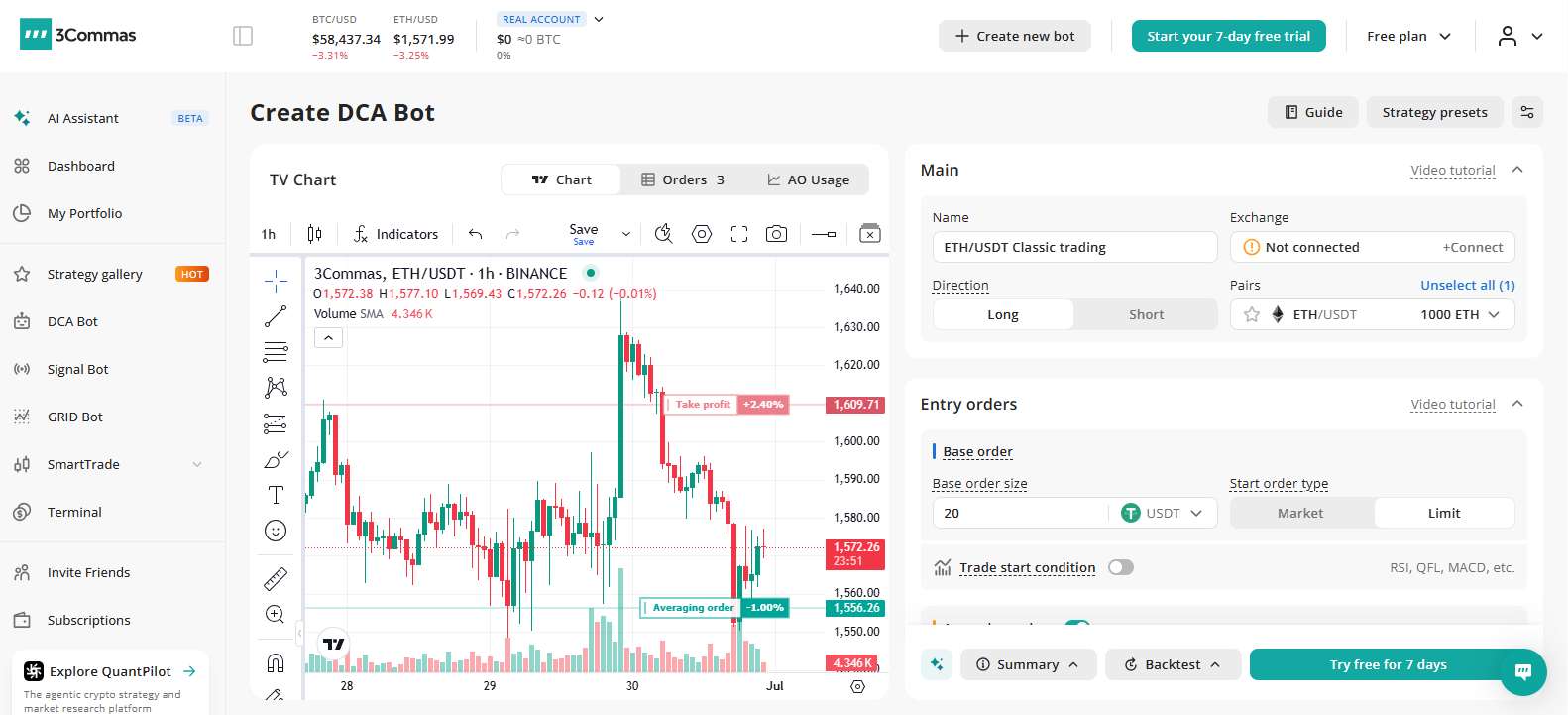
The main reason 3Commas works well with Binance is its mix of automation and manual trade control. Users get DCA bots, grid bots, futures bots, SmartTrade, TradingView signals, copy trading, and portfolio tracking across multiple exchanges. SmartTrade is especially useful for traders who still want to manage entries themselves but need better order tools, including multiple take-profit levels, stop-loss, trailing stop, and other risk controls.
3Commas is also beginner-friendly compared to many advanced bot platforms. It has a clean dashboard, mobile apps, bot setup wizards, and paper trading for testing strategies before using real funds. At the same time, more experienced traders can use backtesting, analytics, TradingView or Pine Script signals, and marketplace strategies. It also has some arbitrage tools, but traders mainly looking for arbitrage may still prefer a dedicated scanner.
| 👍 3Commas Pros | 👎 3Commas Cons |
|---|---|
| ✅ Supports Binance Spot, Futures, Margin | ❌ Regional support may vary |
| ✅ DCA, grid, futures bots | ❌ Not focused on arbitrage |
| ✅ SmartTrade adds order control | ❌ Free trial requires card |
| ✅ TradingView signals supported | |
| ✅ Paper trading available |
2. Bitsgap
➜ Pricing: $29/month for the Basic plan
➜ Binance Support: Spot and Futures
Bitsgap is a crypto trading automation platform built around bots, AI insights, portfolio tracking, and unified trade management across 17+ exchanges, including Binance. It is mainly useful for traders who want a more complete bot setup than Binance’s native tools, especially if they want to test different strategies from one dashboard.
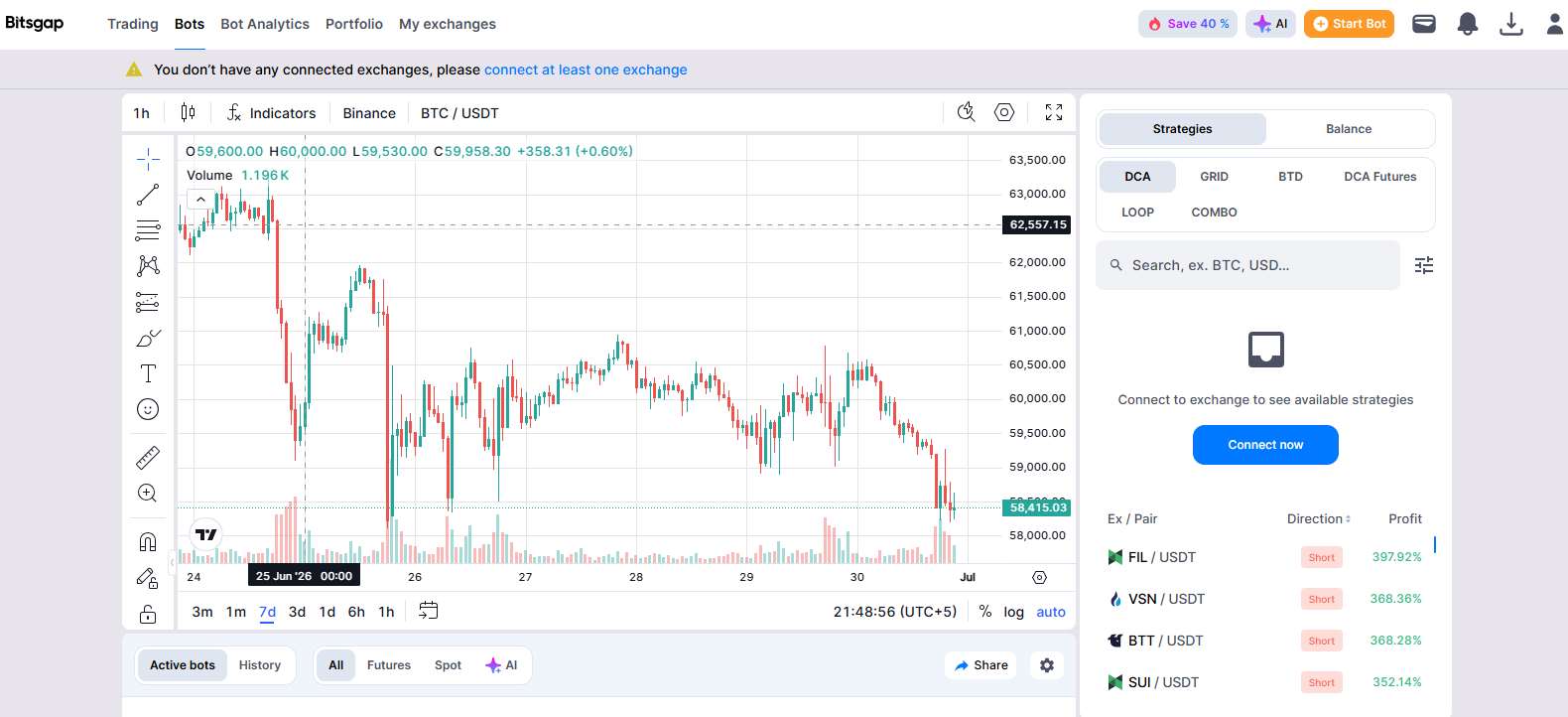
Its main strength is its bot collection. Bitsgap offers six crypto trading bots for beginners and advanced users, with strategies designed for sideways markets, uptrends, dip-buying setups, and longer-term multi-pair automation.
The Buy the Dip bot is useful for traders who want automated entries during pullbacks, while the COMBO trading bot combines grid and DCA-style automation in one pre-built setup. Bitsgap also supports automated multi-pair trading, which allows users to automate spot trading across multiple pairs instead of running one strategy at a time.
Bitsgap also has a demo mode and a 7-day free trial, which makes it easier to test the platform before using real funds. On the security side, it does not have access to funds held on the exchange and cannot withdraw them. The platform also says its servers are located close to popular exchanges to support stable and faster order execution. However, its Trustpilot rating is around 3.9, so user feedback is mixed and worth checking before relying on it fully.
| 👍 Bitsgap Pros | 👎 Bitsgap Cons |
|---|---|
| ✅ 6 bot types available | ❌ Mixed Trustpilot user feedback |
| ✅ Demo mode for testing | ❌ Advanced plans may cost more |
| ✅ COMBO bot available | |
| ✅ Multi-pair automation | |
| ✅ Demo mode for testing |
3. CryptoHopper
CryptoHopper is a cloud-based crypto trading bot platform that works with Binance Spot and Futures, along with several other exchanges. It also supports Binance.US, which makes it useful for users who want bot automation on Binance’s regional platform as well. The platform focuses more on customizable automation, which makes it suitable for traders who want to build their own strategies instead of only using fixed bot presets.
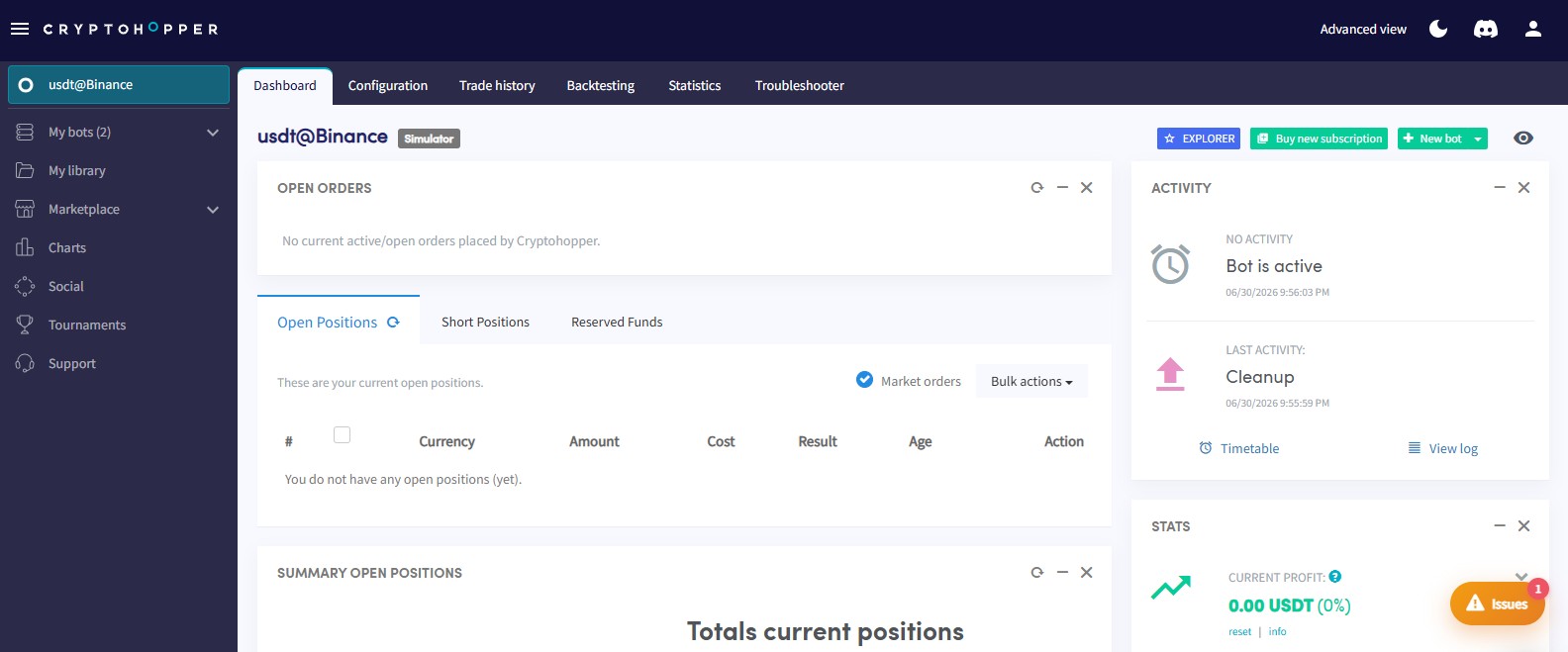
The platform gives users strategy templates, DCA tools, trailing stops, backtesting, paper trading, copy trading, and external signal support. One of its main strengths is the strategy marketplace, where users can browse, buy, or rent strategies created by other traders. This can save time for users who do not want to build everything from scratch, but the quality of marketplace strategies can vary, so results should not be taken at face value.
CryptoHopper also has AI tools, including an AI strategy builder, AI settings suggestions, and sentiment analysis features. Its visual editor is another useful part of the platform because traders can create and adjust bots through a drag-and-drop style interface without needing to code for basic setups.
The main drawback of having a large marketplace with templates is that CryptoHopper does not feel ideal for complete beginners, as there are many settings, marketplace strategies, signals, and bot paths to go through. Some premium strategies and signals also cost extra on top of the regular subscription. Also, while CryptoHopper supports a faster exchange connection flow in some cases, Binance and Binance.US still require manual API key setup.
| 👍 CryptoHopper Pros | 👎 CryptoHopper Cons |
|---|---|
| ✅ Supports Binance Spot and Futures | ❌ Can overwhelm complete beginners |
| ✅ Large strategy marketplace | ❌ Marketplace quality can vary |
| ✅ AI strategy tools available | ❌ Premium signals cost extra |
| ✅ Visual bot editor | ❌ Binance needs manual API setup |
| ✅ Backtesting and paper trading | |
| ✅ Copy trading supported |
4. Coinrule
Coinrule is a no-code Binance trading bot platform built around simple rule-based automation. It supports Binance Spot and Futures, and its one-click Binance connection makes the setup easier than platforms that require more manual configuration. The main idea is simple: users create rules using an “If This, Then That” structure, so they can automate trades without writing code.
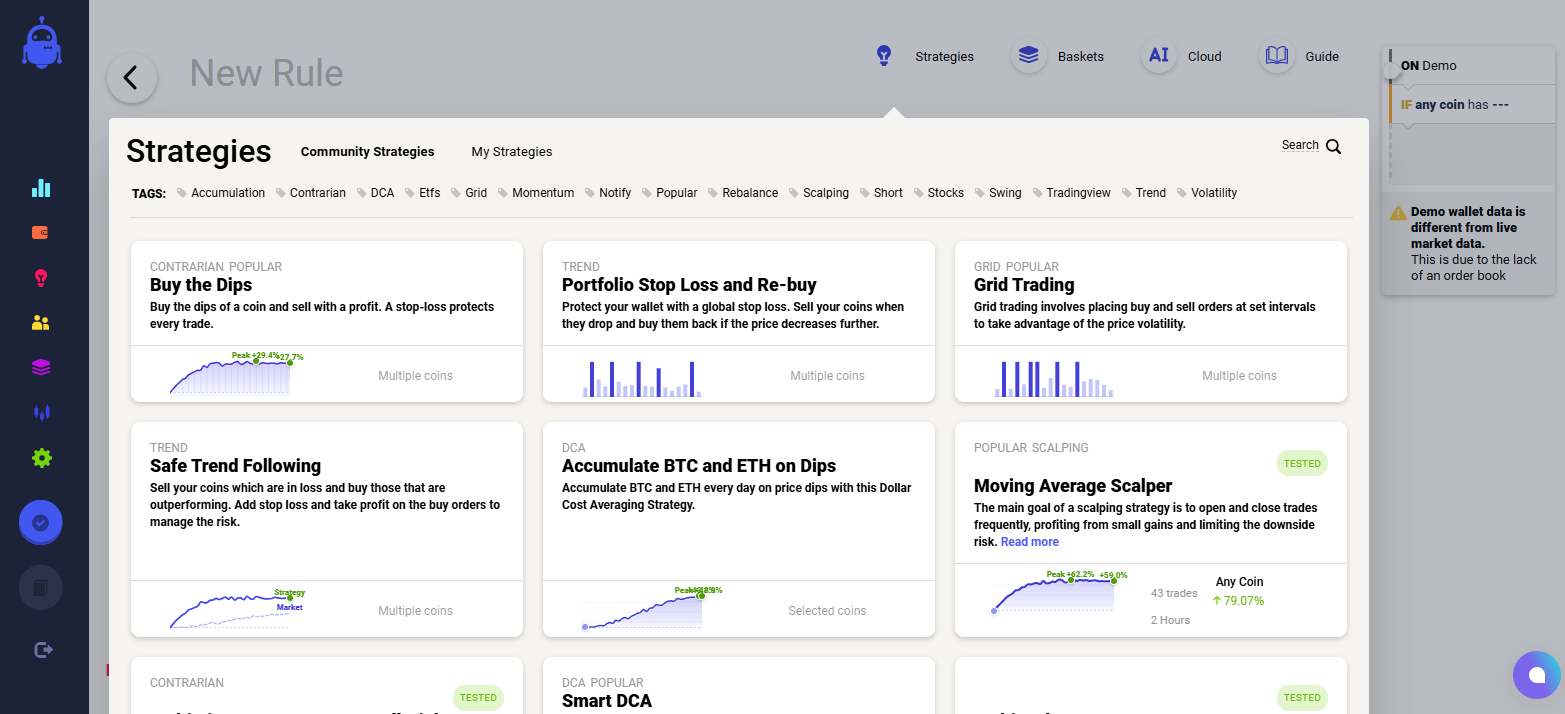
This makes Coinrule one of the easiest Binance bot options for beginners. The interface is clean, setup is quick, and users get access to more than 350 pre-built strategy templates. It also has a free plan, which makes it easier to test basic automation before moving to a paid setup.
The limitation is that Coinrule is not the strongest choice for complex strategies, high-frequency trading, or advanced futures setups. Some users may also find the interface laggy at times, with occasional execution delays during volatile market periods.
| 👍 Coinrule Pros | 👎 Coinrule Cons |
|---|---|
| ✅ One-click Binance connection | ❌ Limited for complex strategies |
| ✅ No-code rule builder | ❌ Not ideal for high-frequency trading |
| ✅ 350+ strategy templates | |
| ✅ Free plan available | |
| ✅ Very beginner-friendly setup |
5. HaasOnline
HaasOnline is one of the older non-custodial algorithmic trading software platforms in crypto, with support for Binance Spot and Futures. It is built more for advanced traders who want deep control over how their bots work, rather than users looking for simple plug-and-play automation.
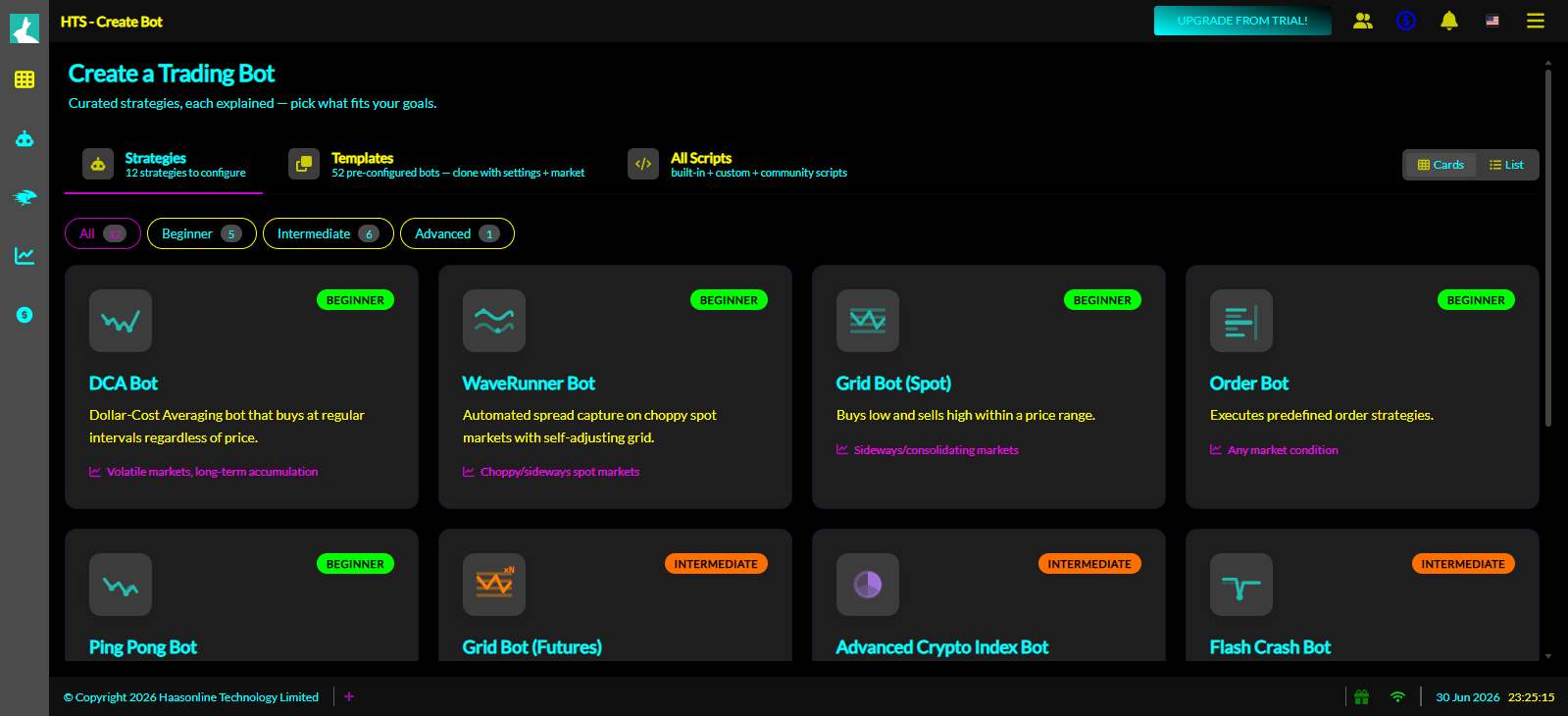
The main strength of HaasOnline is HaasScript, its scripting language for building complex strategies. Traders can create custom indicators, multi-step logic, and advanced automation that simpler bot platforms cannot handle. It can also be run on your own server, which gives users more control over setup, execution environment, and strategy management.
The trade-off is ease of use. HaasOnline is not beginner-friendly and takes time to understand, especially for users who want to use HaasScript properly. The interface can also feel more technical and dated compared to newer bot platforms. For basic DCA or grid trading, it may feel like too much tool for the job.
| 👍 HaasOnline Pros | 👎 HaasOnline Cons |
|---|---|
| ✅ Advanced strategy scripting | ❌ Not beginner-friendly |
| ✅ Custom indicators supported | ❌ HaasScript learning required |
| ✅ Self-hosting option available | ❌ Interface feels dated |
| ✅ Strong automation flexibility | ❌ Too advanced for basic bots |
6. TradeSanta
TradeSanta is a crypto trading bot platform with support for Binance Spot and Futures. It is built for users who want a simple setup without spending too much time learning advanced automation. The interface is clean, the connection is stable, and users can launch bots quickly for basic grid or DCA-style strategies.
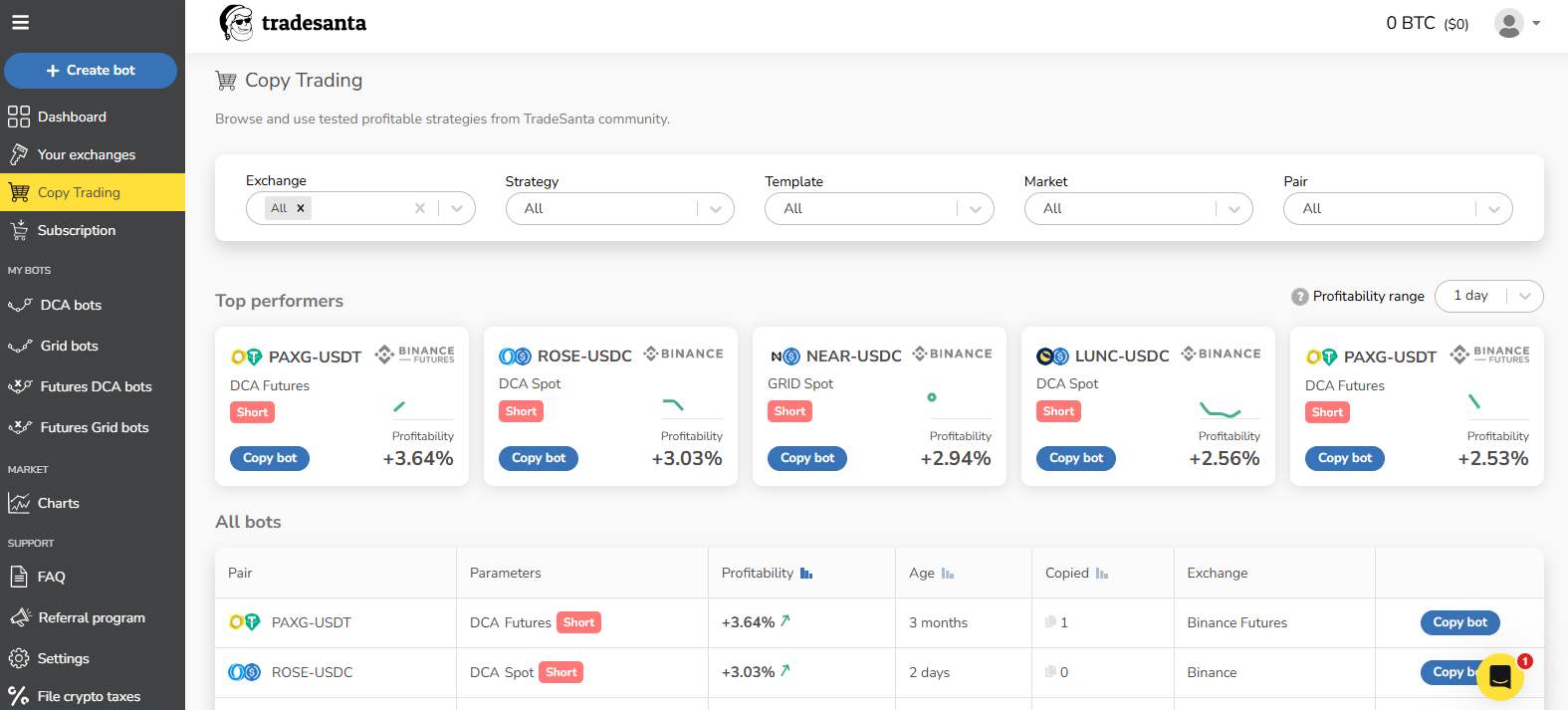
For risk control, TradeSanta includes stop-loss, trailing stop-loss, and safety settings. It also has mobile apps for both iOS and Android, which makes it easier to monitor bots without staying on desktop.
The limitation is that TradeSanta does not offer the same advanced tools as more technical bot platforms. Backtesting is also basic, and the $25/month starting plan can feel expensive considering the feature set.
| 👍 TradeSanta Pros | 👎 TradeSanta Cons |
|---|---|
| ✅ Simple, clean interface | ❌ Limited advanced features |
| ✅ Quick bot setup | ❌ Basic backtesting only |
| ✅ Built-in stop-loss tools | ❌ Too basic for advanced users |
| ✅ Trailing stop-loss supported | |
| ✅ iOS and Android apps |
7. GoodCryptoApp
GoodCryptoApp is a crypto trading and automation platform that stands out mainly because of its mobile experience. It is one of the better options for traders who manage positions from their phone, especially since it offers clean visualization, on-chart orders, smart orders, and easy bot monitoring.
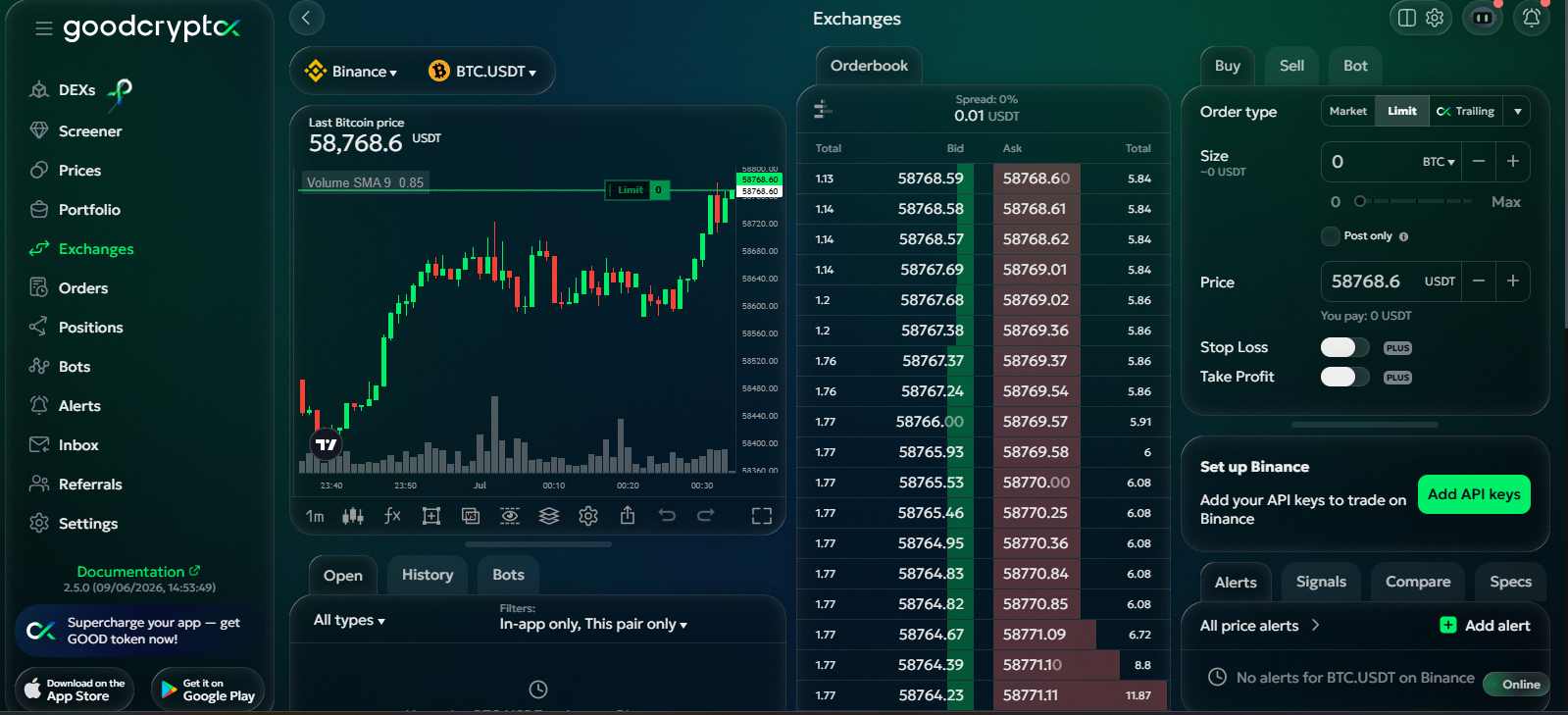
The platform supports Binance Spot and Futures, with tools such as Grid bots, DCA bots, Infinity Trailing, trailing stops, and other risk controls. It sits somewhere between simple rule-based platforms like Coinrule and more technical tools like HaasOnline, giving users no-code automation with some advanced order features.
The limitation is that GoodCryptoApp is not as feature-rich or battle-tested as 3Commas or Bitsgap. Backtesting is weaker, and some users report occasional delays on Binance Futures.
| 👍 GoodCryptoApp Pros | 👎 GoodCryptoApp Cons |
|---|---|
| ✅ Excellent mobile trading experience | ❌ Weaker backtesting tools |
| ✅ Infinity Trailing available | ❌ Not as feature-rich |
| ✅ Smart orders supported | ❌ Occasional Futures execution delays |
| ✅ Clean on-chart order views |
Why Use Trading Bots on Binance?
Trading bots are useful on Binance because they automate a strategy based on rules set by the trader. Crypto markets run 24/7, and a bot can keep following those rules, checking prices, placing orders, and adjusting entries even when the trader is offline. This helps reduce missed setups, emotional entries, panic exits, and fatigue-based decisions.
Binance also gives bots a strong trading environment because of its deep liquidity, high volume, and fast execution engine. When there is enough liquidity, orders are easier to fill, spreads are usually tighter, and the chances of heavy slippage or failed execution are lower compared to smaller exchanges. This matters more for grid, DCA, futures, and signal-based bots, where execution quality can directly affect results.
Still, bots do not remove trading risk. They only follow the strategy, settings, and risk controls the trader gives them.
Binance Trading Bot API Explained
A Binance Trading Bot API is used when a third-party trading bot is connected to a Binance account through API keys. The API lets the bot communicate with Binance and perform specific actions based on the permissions selected by the user. For trading bots, the main permissions usually include reading account data and placing trades on Spot, Margin, or Futures markets.
The important part is permission control. Users should never enable withdrawal access for a trading bot because the bot only needs trade access to open and manage positions. Binance also allows extra security settings such as IP restrictions, which can limit where the API key can be used from.
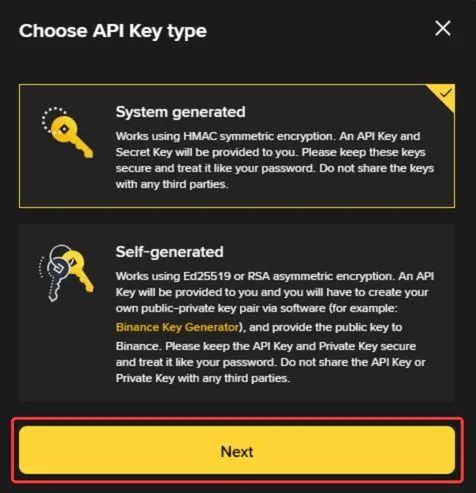
Binance also offers different API key types. System-generated API keys use HMAC symmetric encryption, where Binance provides both the API Key and Secret Key. Self-generated API keys use Ed25519 or RSA asymmetric encryption, where users create their own public-private key pair and provide the public key to Binance.
How to Create API Keys on Binance?
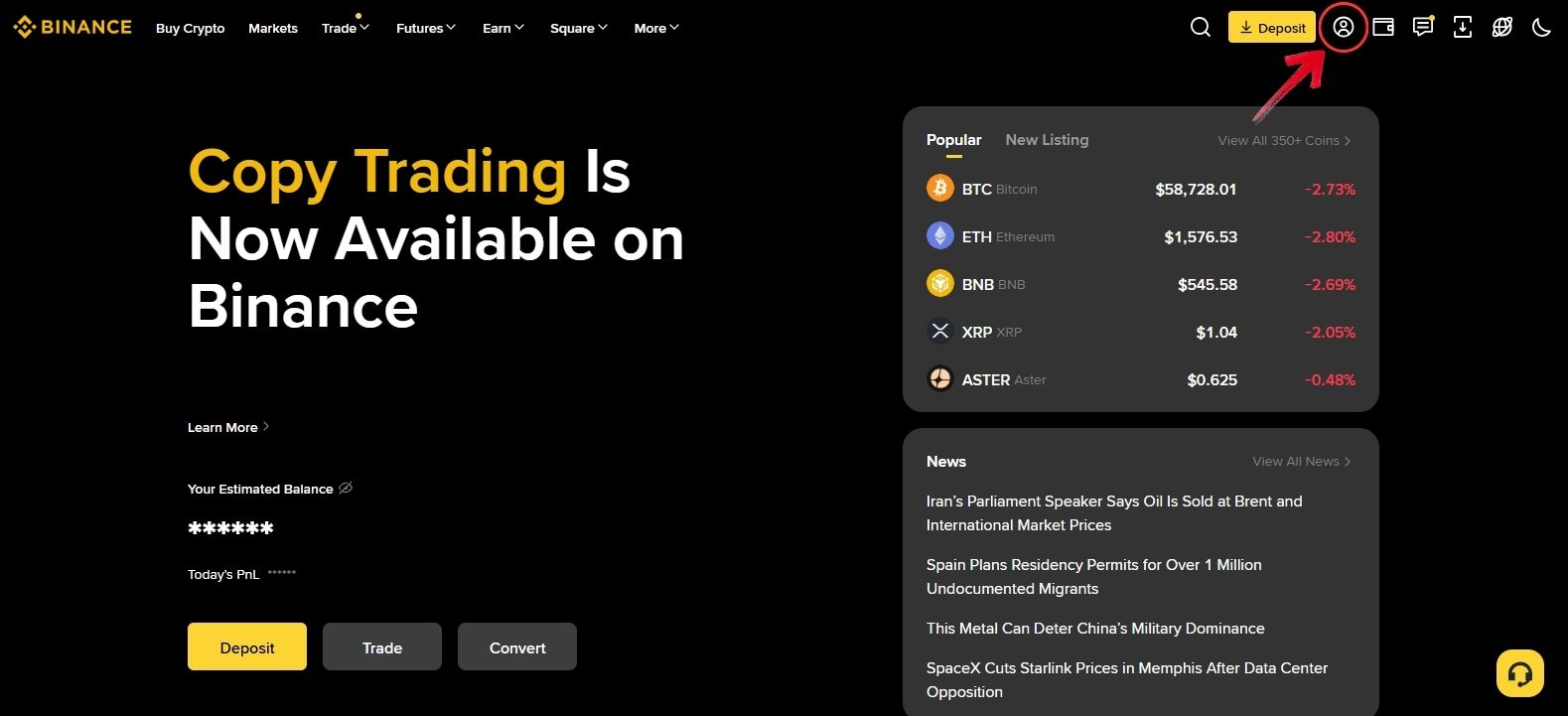
Step 1: Log in to your Binance account, and then click on the profile icon.
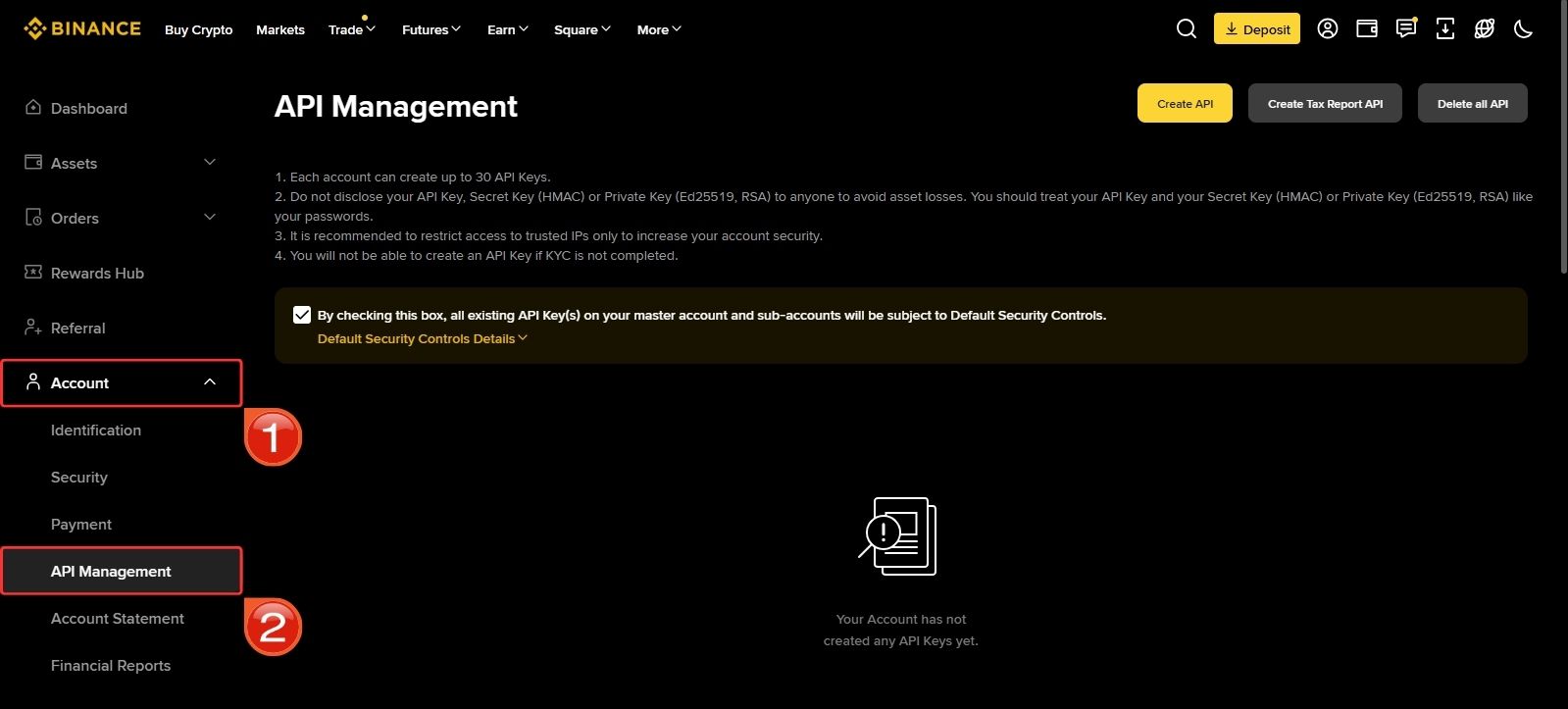
Step 2: In the left panel, click on the “Account” tab to expand it, and then select “API Management”.
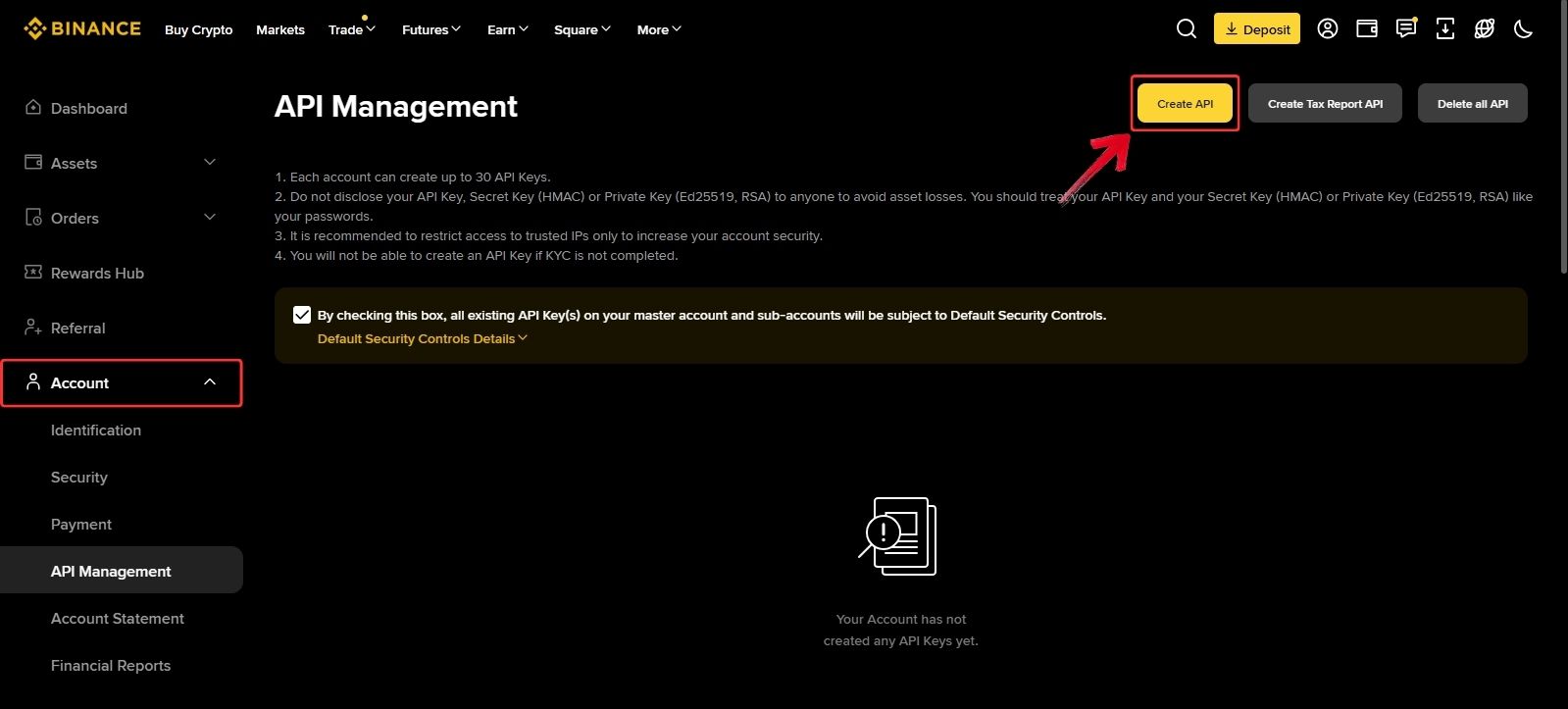
Step 3: Next, click on the “Create API” button on the right side.
Step 4: A pop-up menu will appear. Select the API key type you want to create, and then click on “Next”.
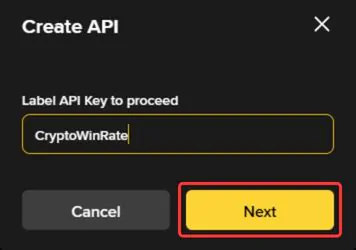
Step 5: You will now be asked to name your API key. Enter a name for your Binance API, and then click on “Next” to create it.
Step 6: Once your Binance API is created, you can view it inside the API Management window. From there, you can edit restrictions and manage permission controls.
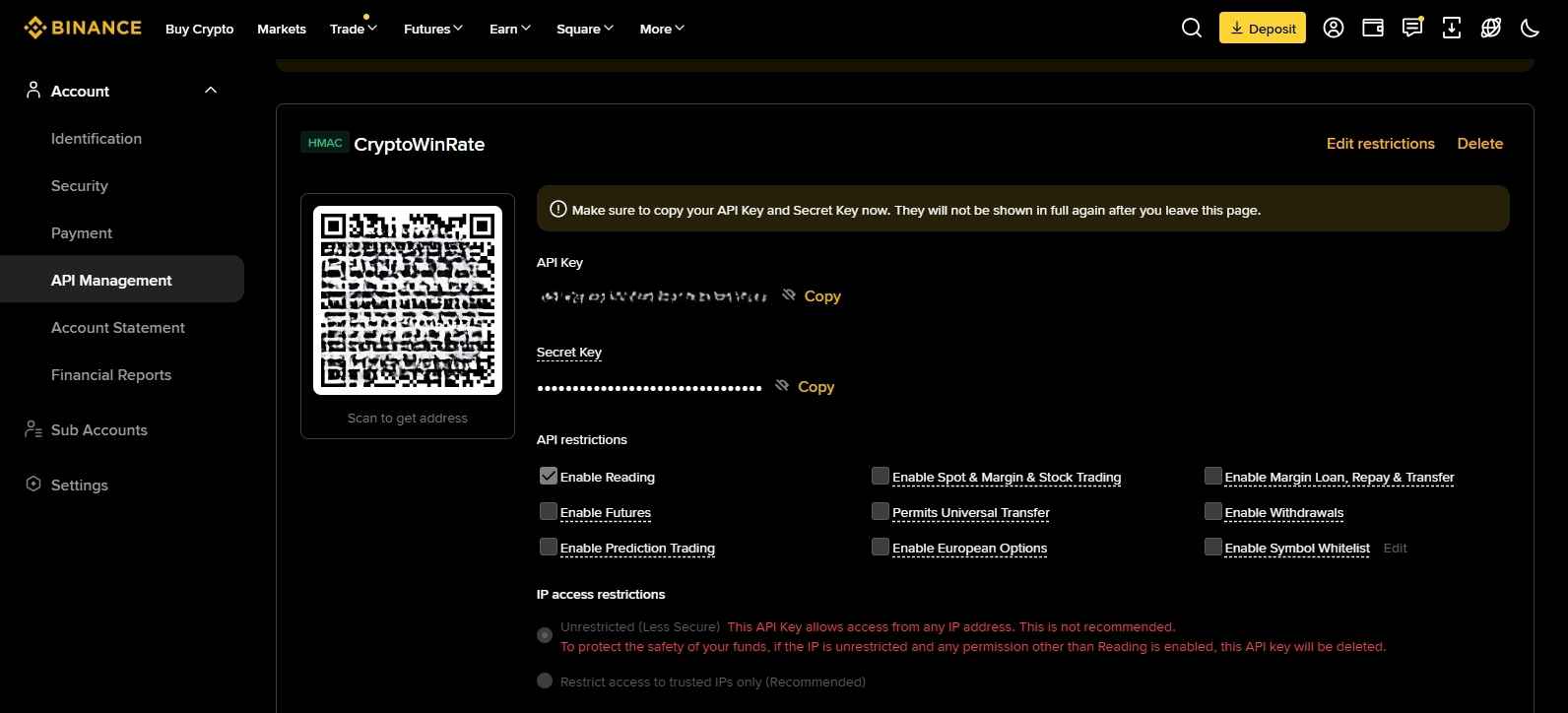
Remember, your Binance API key is highly sensitive. If someone gets access to it, they may be able to connect it with another tool or bot. Depending on your restrictions and permissions, this can lead to losses. If you ever feel that your Binance API key has been compromised, you can delete it from the Binance API Management screen.
How to Choose a Binance Trading Bot
While choosing a good crypto trading bot for Binance, you need to look at a few important factors. Some of these are related to security, especially because third-party bots connect through API keys. Others can affect the total cost, ease of use, strategy control, and overall trading experience. So, before picking a bot, here is what you need to check.
Binance Support
Start by checking what part of Binance the bot actually supports. Some bots work with Spot only, while others support Spot, Margin, and Futures. If you trade futures, do not just look for “Binance supported”. Check whether Binance Futures works properly and whether the setup is stable.
API Permissions
A Binance bot should not need withdrawal access. It only needs permission to read account data and place or manage trades. If a platform asks for more permissions than required, that is a serious red flag.
Bot Types
Look at the strategy you want to automate. Some bots are better for DCA, some for grid trading, some for signals, copy trading, arbitrage, trailing orders, or custom strategies. The right bot depends on the strategy first, not the brand name.
Ease of Use
A beginner should look for no-code setup, templates, and a clean dashboard. Advanced traders may prefer scripting, custom logic, and more control, even if the platform takes longer to learn.
Pricing
Do not judge pricing only by the monthly plan. Check whether signals, templates, marketplace strategies, or higher bot limits cost extra.
Testing and Risk Tools
Paper trading, backtesting, stop-loss, take-profit, trailing stops, safety orders, and position controls matter a lot. A bot without proper testing and risk tools can automate mistakes faster.
Popular Crypto Trading Bot Strategies Used on Binance
Many strategies can be used with crypto trading bots, but the following are among the most common ones traders use on Binance.
1. Arbitrage
Arbitrage bots look for price differences between Binance and other exchanges. The idea is simple: buy a crypto asset where it is cheaper and sell it where the price is higher. These price gaps can happen because exchanges do not always update at the exact same speed.
Arbitrage can work, but the profit per trade is usually small. To make meaningful returns, traders normally need strong execution, enough capital, and high trading volume.
2. Trend Trading
Trend trading bots follow the direction of the market. If the price is moving upward, the bot looks for buying opportunities. If the price is falling, it looks for selling or shorting opportunities, depending on the market being traded.
This strategy is popular because it is easy to understand and can perform well when a trend is identified early. The risk is that no trend lasts forever. If a trader enters late, the market can reverse and the bot may continue following a move that has already lost strength.
3. Market Making
Market-making bots place buy and sell orders around the current market price. They try to profit from the difference between the bid and ask price, also known as the spread.
This strategy usually depends on frequent trades rather than large profits from a single trade. The profit per trade can be small, so execution speed, fee structure, liquidity, and order placement matter a lot. On Binance, this strategy makes more sense on pairs with enough volume.
4. News Trading
News trading bots react to market-moving information. They can be set to track announcements, social media activity, exchange listings, regulatory updates, hacks, partnerships, or other events that may affect crypto prices.
The goal is to enter quickly before the rest of the market fully reacts. Positive news may trigger buy signals, while negative news may trigger sell signals. However, this strategy depends heavily on the quality of the news source and how accurately the bot interprets the signal.
5. Mean Reversion
Mean reversion is based on the idea that price often returns toward its average after moving too far above or below it. A mean reversion bot may buy when the price falls far below its average and sell when the price rises far above it.
This strategy can work well in sideways or range-bound markets, but it can struggle during strong trends. If the price keeps moving in one direction, the bot may enter too early and face losses before any rebound happens.
6. Other Crypto Trading Bot Strategies
Other common strategies include breakout bots, scalping bots, momentum trading bots, reversal trading bots, and Dollar-Cost Averaging bots. DCA bots are especially common on Binance because they allow traders to build positions gradually instead of entering all at once.
Are Binance Trading Bots Safe?
Binance trading bots can be safe if API permissions are managed properly, especially with withdrawal access disabled and IP restrictions enabled where possible. Still, a bot is only an assistant, not a professional trader. It follows the rules, strategy, and risk settings you give it. If the market changes, a crypto bot will not automatically rethink the setup unless it was programmed to do so. AI bots can execute and adjust some settings on their own, but they still need limits, testing, and careful risk control.
Final Thoughts
Binance is one of the better places to run a trading bot because of its deep liquidity, competitive fees, BNB fee discounts, fast execution, and security setup, including SAFU. But the bot you connect matters just as much as the exchange itself. A weak or unreliable third-party platform can create problems, especially if API permissions are not handled properly. Users should keep withdrawal access disabled, check bot credibility, understand pricing, and review risk tools before going live. The best crypto trading bots for Binance are the ones that fit your strategy while keeping control and security in your own hands.
FAQs
1. Is a trading bot profitable on Binance?
A trading bot can be profitable on Binance, but only when the strategy matches the market condition. For example, grid bots can work well in sideways markets, while DCA bots are more useful for gradual entries. Some bots are also built to trade both rising and falling markets, especially when connected to Binance Futures. Still, profit depends on the setup, timing, capital size, fees, and how well the bot is managed.
2. How do third-party bots connect to Binance?
Most third-party bots connect to Binance through API keys. These keys let the bot read account data and place trades based on the permissions selected by the user.
3. How to earn $10 daily on Binance without investment?
Earning $10 daily on Binance without investment is not a fixed or guaranteed option. Rewards, referrals, and Learn & Earn can help, but they depend on availability and eligibility. Binance native bots, third-party trading bots for Binance, and yield products like Simple Earn all require funds to trade or deposit. So, without capital, you can try reward-based options, but bots and yield products need investment.
4. Can bots trade Binance Spot and Futures?
Yes, many bots support Binance Spot and Futures, but support varies by platform. Some bots handle both well, while others work better for Spot trading.
5. Are Binance trading bots safe?
They can be safe if users choose credible platforms and manage API permissions properly. Withdrawal access should always stay disabled.
6. How much do Binance trading bots cost?
Some bots have free plans or trials, while others charge monthly fees. Users should also check extra costs for signals, templates, or marketplace strategies.
7. Do crypto trading bots for Binance need KYC?
Yes, crypto trading bots for Binance can require KYC, depending on the platform. Some bot platforms let users start with a basic account, while others apply identity checks, compliance rules, account limits, or country restrictions. For example, 3Commas may apply KYC policies in certain cases.