


- •Maker orders add liquidity by waiting until another trader fills them.
- •Taker orders remove liquidity by executing against orders already available.
- •Maker vs. taker fees depend on how each order is executed.
- •Limit orders can incur either maker or taker fees when filled.
- •Post Only prevents immediate execution and ensures the order remains maker.
The maker-taker model is not native to crypto. It has long been used in traditional markets to balance traders who provide liquidity with those who want immediate execution. Traditional exchanges commonly reward liquidity providers with rebates and charge traders who remove liquidity. Crypto exchanges have adapted this model differently, with many charging both sides while keeping maker fees lower than taker fees. Some platforms also offer zero or negative maker fees. In this article, we will not only explain maker vs. taker orders but also look at how market, limit, TP, SL, and other orders are executed, when they enter the order book, and which trading fees you may pay.
| 제품 특장점 | 메이커 주문 | 테이커 주문 |
|---|---|---|
| Order-book activity | Adds an order | Fills an existing order |
| 실행 시간 | Waits to be filled | 즉시 실행됩니다 |
| 가격 통제 | 더 많은 제어 | May face slippage |
| Fill guarantee | 보장되지 않음 | More likely to fill |
| 일반적인 예 | Post-only limit order | 시장 주문 |
| 가장 적합한 | Planned entries and exits | 빠른 진입 및 퇴장 |
What Is a Maker Order?
A maker order is an order that enters the order book and waits for another trader to fill it. It is called a maker order because it adds liquidity to the market.
Maker orders can be placed on either side of the order book. A trader offering to sell Bitcoin can be a maker, and a trader offering to buy Bitcoin can also be a maker. The maker is simply the trader whose order enters the book and remains available for someone else to accept.
Maker orders are commonly created using limit orders. However, a limit order only becomes a maker order if it does not execute immediately. If it matches an existing order as soon as it is placed, it becomes a taker order.
Maker fees are usually lower than taker fees because exchanges want traders to provide liquidity. Some exchanges even charge zero maker fees or offer maker rebates. The downside is that maker orders are not guaranteed to fill because another trader must accept the price.
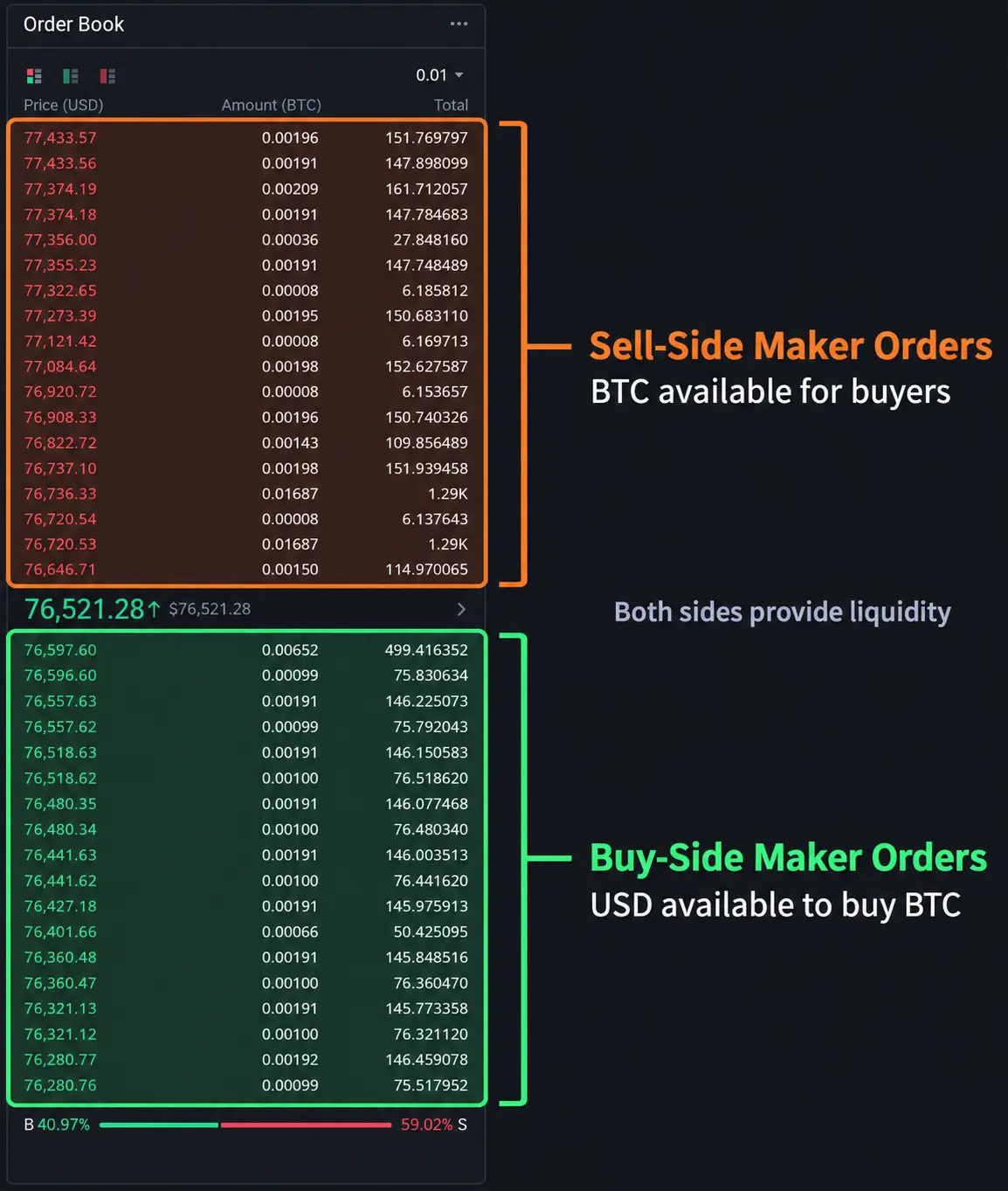
The image below shows the maker orders currently waiting in the Bitcoin order book. The upper section contains sell-side maker orders, where traders have made BTC available for buyers. The lower section contains buy-side maker orders, where traders have made USD available to purchase BTC. Both sides provide liquidity to the orderbook.
What Is a Taker Order?
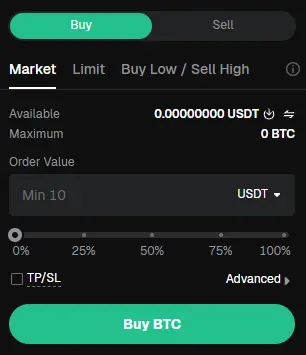
A taker order is an order that immediately matches liquidity already available in the order book. It is called a taker order because it takes an order placed by a maker out of the book.
Market orders are always taker orders because they are submitted for immediate execution at the best available prices. A limit order can also become a taker order if it immediately matches an existing buy or sell order.
Unlike maker orders, taker orders do not sit in the order book waiting for someone else. They use the buy or sell orders already available. This makes them useful when a trader wants to enter or exit a position quickly.
Taker fees are usually higher because the order removes liquidity. Taker orders may also experience slippage if there is not enough liquidity available at the first price.
A taker is therefore not represented by one particular side of the order book. A market buyer takes liquidity from the sell side, while a market seller takes liquidity from the buy side.
Maker and Taker Example
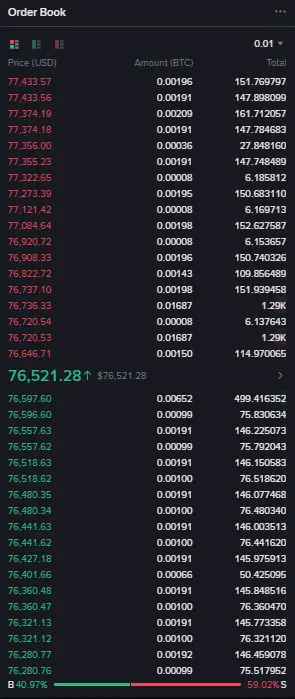
In the order book above, the lowest sell order offers approximately 115 달러 상당 Bitcoin $ 76,646.71에. The next sell order offers approximately 1,290 달러 상당 Bitcoin $ 76,720.53에.
Suppose you place a $1,000 market order 구매 Bitcoin. The exchange starts with the lowest available sell order, purchasing around $115 worth of Bitcoin $ 76,646.71에.
Approximately $885 of your order still needs to be filled, so the exchange moves to the next sell order at $76,720.53. Your remaining amount is purchased from the BTC available at that price.
The latest execution price has now moved from $ 76,646.71에 $ 76,720.53, a difference of $73.82.
Your complete order did not fill at one price. A small portion filled at $76,646.71, while most of it filled at $76,720.53. Your average purchase price will therefore fall between these two prices. The difference between the price you expected and the average price you received is known as 미끄럼.
The traders whose sell orders were already waiting in the order book were the makers. You were the taker because your market order used their liquidity.
메이커 vs. 테이커 수수료
Crypto exchanges charge maker and taker fees when an order is executed. Placing an order in the order book does not cost anything until another trader fills it.
Maker fees are generally lower because maker orders add liquidity to the order book. Taker fees are usually higher because taker orders use the liquidity already available. However, the exact rates depend on the exchange, market, and your trading-fee tier.
| 수수료 유형 | Charged When | Usual Cost |
|---|---|---|
| 메이커 수수료 | Your resting order is filled | 낮 춥니 다 |
| 테이커 수수료 | Your order fills immediately | 더 높은 |
| Maker rebate | Exchange rewards added liquidity | Fee may be negative |
Suppose an exchange charges a 0.02% 메이커 수수료 및 0.05 % 응시료. On a $10,000 trade:
- A maker would pay $2
- A taker would pay $5
This difference may appear small on one trade, but it can become significant for traders placing many orders every day.
Your fee is determined when each part of the order executes. If half of a limit order fills immediately while the other half waits in the order book, the exchange may charge:
- A taker fee on the immediately filled portion
- A maker fee on the portion filled later
Maker fees are not always lower. Some exchanges charge the same rate for both, while others offer zero or negative maker fees. Trading volume, VIP level, token discounts, market type, and promotional rates can also change the amount you pay.
Maker and taker fees are separate from funding fees, borrowing interest, withdrawal fees, and any spread or slippage included in your execution price.
Order Types and Fee Status
An order is not classified as maker or taker simply because you selected market, limit, stop-loss, or take-profit. Its fee status depends on how the order interacts with the order book when it is executed.
| 주문 유형 | Maker When | Taker When |
|---|---|---|
| 시장 | It immediately fills existing orders | |
| 한도 | It waits in the order book | It matches an existing order immediately |
| 시장 중단 | Never under normal execution | The trigger submits a market order |
| 제한 시간 | The triggered order waits in the book | The triggered order fills immediately |
| 이익실현 시장 | Never under normal execution | The trigger submits a market order |
| 이익실현 한도 | The triggered order waits in the book | The triggered order fills immediately |
| 중지 끝에 | Depends on the order submitted after triggering | Usually when it submits a market order |
| 트왑 | Its smaller orders wait in the book | Its smaller orders fill immediately |
A single limit order can receive both fee types. If one portion fills immediately while the remaining portion enters the order book, the exchange charges a taker fee on the first portion and a maker fee when the remaining portion is filled later.
Order Modifiers
Order modifiers are settings that control how an order is placed, filled, or cancelled. They are not separate order types, but some can affect whether you pay maker or taker fees.
| Order Modifier | 그것이하는 일 | Effect on Fee Status |
|---|---|---|
| 게시물만 | Allows the order to enter the book only | Ensures maker status |
| 줄이기만 | Only reduces an open position | 직접적인 영향 없음 |
| GTC | Remains open until filled or cancelled | Can be maker or taker |
| IOC | Fills immediately and cancels the remainder | Usually taker |
| FOK | Fills completely at once or gets cancelled | Taker if executed |
| GTD | Remains open until a selected date or time | Can be maker or taker |
| Close on Trigger | Uses the order only to close a position | 직접적인 영향 없음 |
게시물만 is the modifier that directly controls maker status. If your limit order would match an existing order immediately, the exchange cancels or rejects it instead of charging a taker fee.
줄이기만 Close on Trigger control what happens to your position, not how the order interacts with the order book. A Reduce Only order can still be either maker or taker.
Time-in-force settings such as GTC, IOC, FOK, and GTD control how long an order remains active and how much of it must be filled. They can influence fee status, but the final fee still depends on whether the order waits in the book or executes against existing liquidity.
Does Setting TP or SL Add Liquidity to the Order Book?
Not necessarily. When you set a take-profit or stop-loss on an open trade, it normally remains inactive until the selected trigger price is reached. Since the order is not yet active in the order book, it does not add liquidity at that stage.
Once triggered, its effect depends on the selected order type:
- A TP/SL market orderimmediately matches existing orders, so it removes liquidity and incurs taker fees.
- A TP/SL limit orderadds liquidity only if it enters the order book without filling immediately.
- If the triggered limit order immediately matches an existing order, it removes liquidity and incurs taker fees.
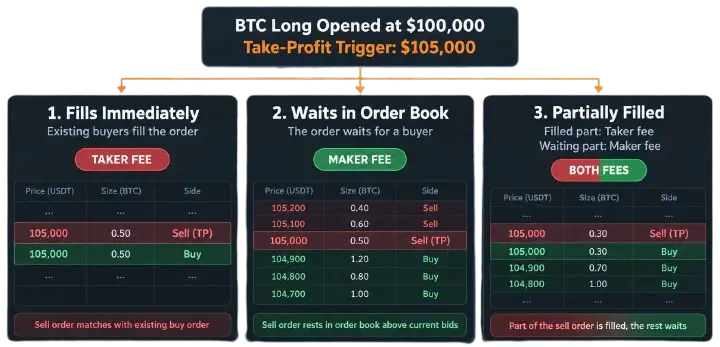
For example, suppose you open a Bitcoin long at $100,000 and set a take-profit trigger at $105,000. The trigger price only tells the exchange when to activate your exit order. It does not decide whether you will pay maker or taker fees.
일단 Bitcoin reaches $105,000, a few things can happen:
Scenario 1: The order fills immediately
If there are enough buyers willing to purchase Bitcoin at $105,000, your sell order matches their existing buy orders immediately. Your order removes liquidity from the order book, so you pay a taker fee.
Scenario 2: The order waits for a buyer
Bitcoin may reach $105,000, but there may not be enough buying interest at your limit price. Your sell order will then remain in the order book and wait for another trader to fill it. Since it is now adding liquidity, it becomes a maker order and receives the maker fee.
Scenario 3: The order is partially filled
Some buyers may be available at $105,000, but not enough to fill your entire order. The available portion executes immediately and incurs a taker fee. The unfilled portion remains in the order book and incurs a maker fee if another trader fills it later.
Most traders do not notice how this works. They set a TP or SL at a specific price and assume it will be treated as a maker order. However, setting a price does not guarantee maker fees. Your TP or SL remains a trigger until that price is reached, and the order submitted afterward can be a maker order, a taker order, or even a combination of both. You can check your trade history to see how each part of the order was executed and which fee was charged.
If you only want to pay maker fees, you can use 게시물만 when the exchange supports it for take-profit orders. However, the exchange may cancel or reject the order if it would execute immediately. This saves you from taker fees, but it also means your take-profit is not guaranteed to execute.
어느 것을 사용해야 합니까?
사이의 선택 maker vs. taker orders depends on execution priority. Maker orders suit traders who prefer a specific entry or exit price, lower fees, and can wait for their orders to fill. Our list of the best exchanges for limit orders covers platforms that support this type of price control.
Taker orders suit traders who prioritize immediate execution, including scalpers, day traders, and anyone closing a position quickly. They generally cost more and may experience slippage when liquidity is limited.
자주 묻는 질문
1. Can a Limit Order Be a Taker?
Yes. A limit order becomes a taker when it immediately matches an order already in the order book.
2. Does Setting TP or SL Add Liquidity?
Not immediately. It adds liquidity only if the triggered order enters the order book and waits to be filled.
3. Can One Order Pay Both Fees?
Yes. The immediately filled portion pays taker fees, while the remaining portion may later pay maker fees.