



- •Cambiar el nombre de su billetera Phantom es una actualización de personalización.
- •El ajuste no afecta sus fondos, direcciones, historial de transacciones u otros datos en la cadena.
- •Cambiar el nombre de las billeteras es ideal para la organización cuando se administran múltiples billeteras.
No reconocer tus cuentas a simple vista puede ser frustrante, especialmente si gestionas varias billeteras en diferentes cadenas en Phantom. Para solucionar este problema, puedes cambiar el nombre de la billetera Phantom para que el reconocimiento sea más fácil y rápido. Esta modificación es útil al separar cuentas, facilitando el acceso a la billetera correcta para ahorrar, realizar transacciones, enviar y recibir criptomonedas e interactuar con NFT. Esta guía explica cómo cambiar el nombre de la billetera en Phantom y ofrece consejos para gestionar varias billeteras en la plataforma.
Cosas que debes saber antes de cambiar el nombre de tu billetera fantasma
En primer lugar, tu nombre Phantom es una etiqueta local para cada cuenta de tu billetera, lo que facilita identificar su propósito, especialmente al administrar varias. Te ayuda a organizar y reconocer las cuentas de la billetera, pero no tiene ninguna función adicional.
Cambiar el nombre de la cuenta de tu billetera Phantom no afecta los fondos, el historial de transacciones, las claves privadas ni las direcciones de la billetera. Además, el cambio no es visible en la cadena y otros usuarios de Phantom no pueden verlo.
Los nombres de las billeteras Phantom se pueden cambiar en cualquier momento y tantas veces como desees. Phantom no limita la cantidad de veces que puedes cambiar el nombre de tu billetera ni los caracteres que puedes usar.
Es importante tener en cuenta que el cambio de nombre de la billetera Phantom depende del dispositivo. Si usa Phantom en varios dispositivos, el nombre de la billetera debe actualizarse por separado en cada uno. Por último, cambiar el nombre de una billetera es diferente a registrar un nombre de dominio de blockchain, como una dirección .sol o .eth.
Aprenda más: Revisión de la billetera fantasma
Cómo cambiar el nombre de la billetera fantasma en la extensión del navegador
Abra su navegador preferido y siga los pasos a continuación para cambiar el nombre de la billetera Phantom de forma segura:
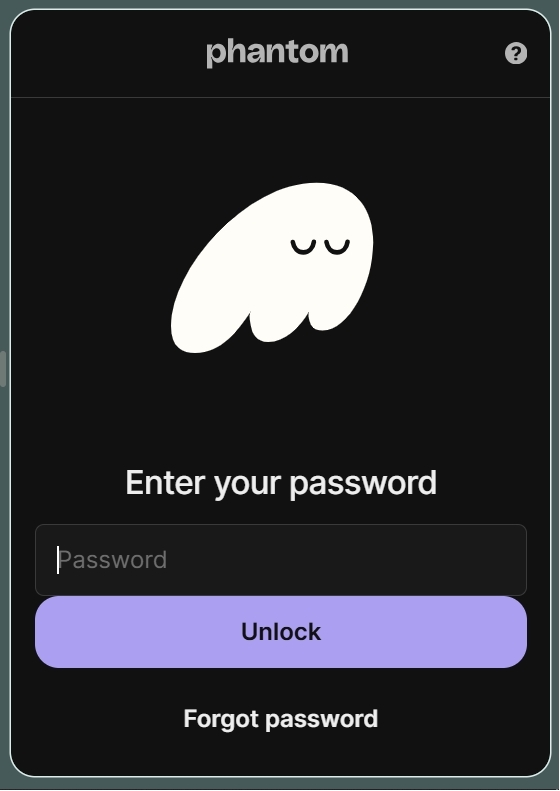
Paso 1: Inicie sesión en su billetera en la extensión del navegador Phantom.
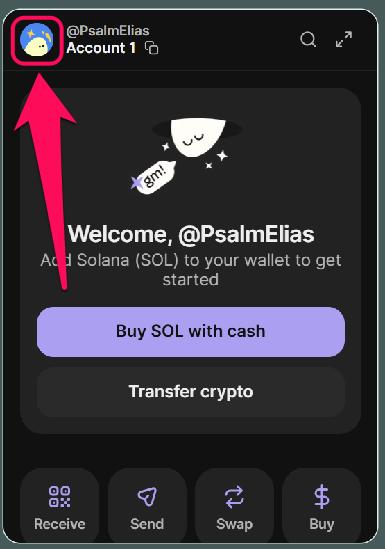
Paso 2: Haz clic en el avatar de tu perfil en la esquina superior izquierda.
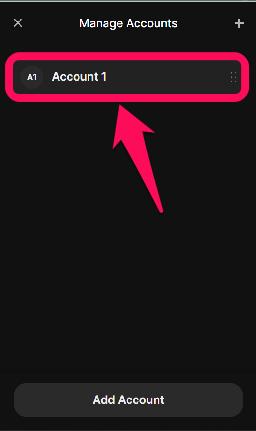
Paso 3: Haga clic en el elemento icono de lapiz para ver y administrar todas las cuentas vinculadas a la billetera.

Paso 4: Seleccione la cuenta que desea cambiar de nombre de la lista de cuentas que se muestra.
Paso 5: Haga clic en el botón Nombre de la cuenta .
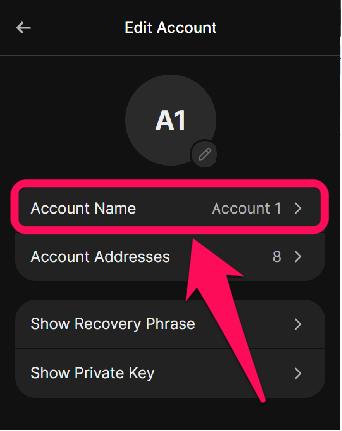
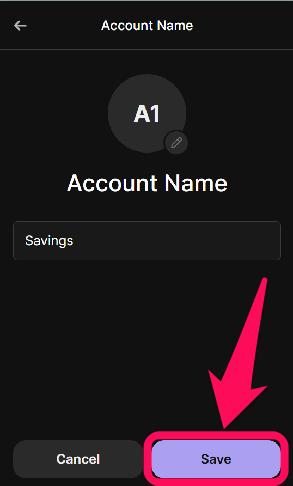
Paso 6: Introduzca un nuevo nombre y haga clic en Guardar para que la actualización aparezca automáticamente.
Cómo cambiar el nombre de la billetera fantasma en la aplicación móvil
Los pasos a continuación le mostrarán cómo editar el nombre de la billetera Phantom en su teléfono:
Paso 1: Abra la aplicación Phantom Wallet y desbloquee su cuenta.
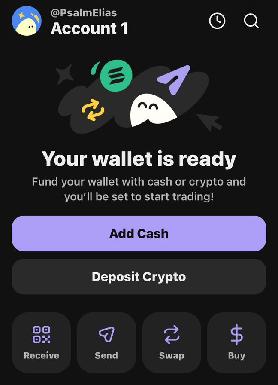
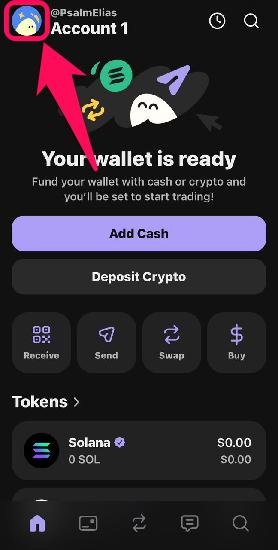
Paso 2: En la esquina superior izquierda de la aplicación, toca el avatar de tu perfil.
Paso 3: Explore la lista de cuentas que se muestran y haga clic en el Lápiz Icono junto a la cuenta que desea cambiar de nombre.

Paso 4: Luego, toque Nombre de la cuenta.
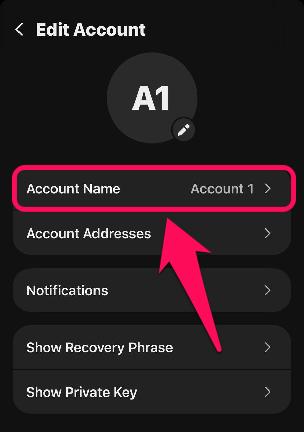
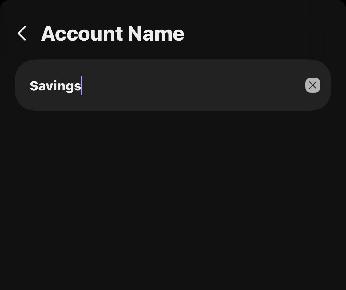
Paso 5: Introduce el nombre de tu nueva billetera fantasma en el campo correspondiente. La actualización se guardará automáticamente.
Administrar varios nombres de billetera en Phantom
Como se mencionó anteriormente, los nombres de billetera son útiles al usar varias cuentas en Phantom Wallet. Las etiquetas claras y únicas reducen la confusión y facilitan la selección de la billetera correcta al enviar y recibir monedas. La fórmula habitual para actualizar el nombre de la billetera Phantom es centrarse en la función de la cuenta.
Esto proporciona pistas visuales claras para identificar la cuenta más adecuada para transacciones específicas en cadenas específicas. A medida que aumente su experiencia con criptomonedas, probablemente creará más cuentas, y actualizaciones sencillas como el cambio de nombre son esenciales para mejorar la gestión de la billetera.
Resumen Final
La mejor manera de lograr el orden necesario para aprovechar las múltiples oportunidades de las criptomonedas es etiquetar sus billeteras adecuadamente. Siguiendo los pasos anteriores para cambiar el nombre de la billetera Phantom de forma segura, garantiza la organización de la billetera sin afectar sus fondos ni sus datos en cadena. Para los usuarios que desean mayor personalización, Phantom también permite la personalización visual, como cambiar su... Avatar de billetera fantasmaEsta personalización le da a tu billetera el aspecto exacto que necesitas para una experiencia criptográfica óptima.
Preguntas Frecuentes
1. ¿El nombre de Phantom Wallet también es el nombre de usuario Phantom?
No, son diferentes. Un nombre de billetera fantasma es un apodo local para tu organización. Solo tú lo puedes ver, a diferencia de cuando cambias el nombre de usuario de Phantom. Un nombre de usuario de Phantom es un identificador único en la cadena (como un @handle) que permite que otros te envíen fondos sin necesidad de tu dirección pública completa.
2. ¿Cambiar el nombre de mi Phantom Wallet tiene algún costo de gasolina?
No, actualizar el nombre de tu Monedero Fantasma es gratuito, ya que se trata de un cambio de visualización local, no de una transacción en cadena. No necesitas ningún SOL en tu monedero para actualizar el apodo de tus cuentas.
3. ¿Puedo cambiar el nombre de varias billeteras en Phantom?
Sí, cada billetera que posees puede ser renombrada de forma independiente dentro de la aplicación Phantom.




