



- •ZANO ist ein datenschutzorientierter Layer-1-Token, der für vertrauliche Transaktionen, private Vermögenswerte und On-Chain-Anwendungen verwendet wird.
- •Es ist an mehreren Börsen notiert, aber Gebühren, Liquidität und Plattformfunktionen beeinflussen den Gesamtkaufwert.
- •Ourbit bietet gebührenfreies Spot-Trading, einfache Registrierung und gute Liquidität für den Kauf von ZANO.
Datenschutzorientierte Assets gewinnen wieder an Bedeutung, da Nutzer nach Netzwerken suchen, die Guthaben und Transfers standardmäßig verbergen. Zano basiert auf diesem Prinzip und bietet nicht nachverfolgbare Transaktionen und vertrauliche Assets auf Protokollebene. Anstatt Sie auf eine bestimmte Börse zu verweisen, vergleicht dieser Leitfaden verschiedene Optionen anhand von Gebühren, Sicherheit und Funktionen. Wir erklären Ihnen in diesem Leitfaden Schritt für Schritt, wie Sie Zano-Token kaufen.
Wo kann man Zano kaufen?
Zano hat sich bei datenschutzorientierten Händlern zunehmend etabliert, insbesondere da der Markt wieder verstärkt auf Assets setzt, die nicht nachverfolgbare Transaktionen und vertrauliche Kontostände gewährleisten. Neben seinen zentralen Datenschutzfunktionen unterstützt das Netzwerk Tools wie private Token, Smart Contracts, atomare Swaps und für Menschen lesbare Wallet-Aliase, was ihm geholfen hat, über einfache Zahlungen hinaus an Bedeutung zu gewinnen.
Mit wachsendem Interesse ist Zano mittlerweile an mehreren Börsen gelistet. Allerdings bieten nicht alle Plattformen das gleiche Niveau an Wert, Liquidität, Sicherheit oder Zusatzfunktionen. Einige Börsen konzentrieren sich auf niedrige Gebühren, andere bieten einen stärkeren Schutz, und einige wenige ermöglichen auch den Handel mit Futures oder Optionen.
Anstatt also vorschnell auf den ersten Kaufbutton zu klicken, ist es sinnvoller, die verschiedenen Verfügbarkeiten von Zano zu vergleichen und die Börse mit den besten Kaufbedingungen auszuwählen. Nachfolgend finden Sie einige der wichtigsten Plattformen, auf denen Sie Zano erwerben können – jede mit ihren eigenen Stärken.
So kaufen Sie $ZANO auf Ourbit
Von den verfügbaren Börsen, Unserbit Aufgrund der guten Liquidität und der konstant niedrigen Handelsgebühren erschien uns diese Plattform die praktischste Option für den Kauf von ZANO. Sie bietet eine übersichtliche und intuitive Benutzeroberfläche, die den Kaufprozess auch für Erstnutzer unkompliziert gestaltet.
Die Registrierung ist unkompliziert, da die KYC-Prüfung optional ist und Spot-Trades gebührenfrei sind, was den Gesamtwert des Kaufs erhöht. Neukunden erhalten außerdem Anmeldeboni von bis zu 10,000 US-Dollar, wenn sie sich über einen bestimmten Link registrieren. Ourbit-Empfehlungscode, was einen zusätzlichen Anreiz für den Einstieg bietet.
Hier ist eine einfache Schritt-für-Schritt-Anleitung zum Kauf von ZANO-Token auf Ourbit.
Schritt 1: Öffnen Sie Ihren Browser und gehen Sie zum offiziellen Unserbit Website. Wenn Sie ein neuer Benutzer sind, erstellen Sie ein Konto und bestätigen Sie Ihre E-Mail-Adresse, um die Handelsfunktionen zu aktivieren.
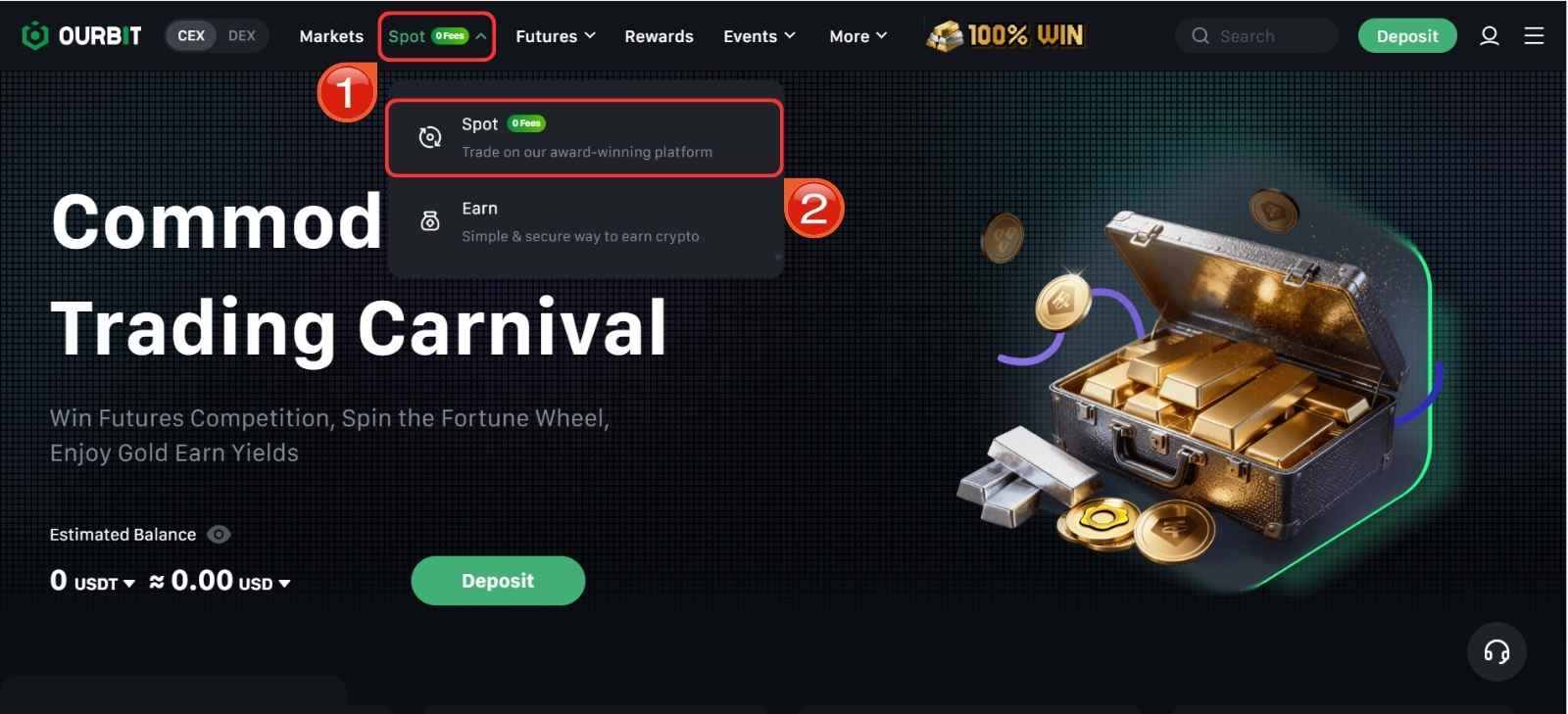
Schritt 2: Nach dem Einloggen gehen Sie zur Startseite und klicken Sie auf die Spot Über die Menüleiste oben gelangen Sie zum Bereich für den Spothandel.
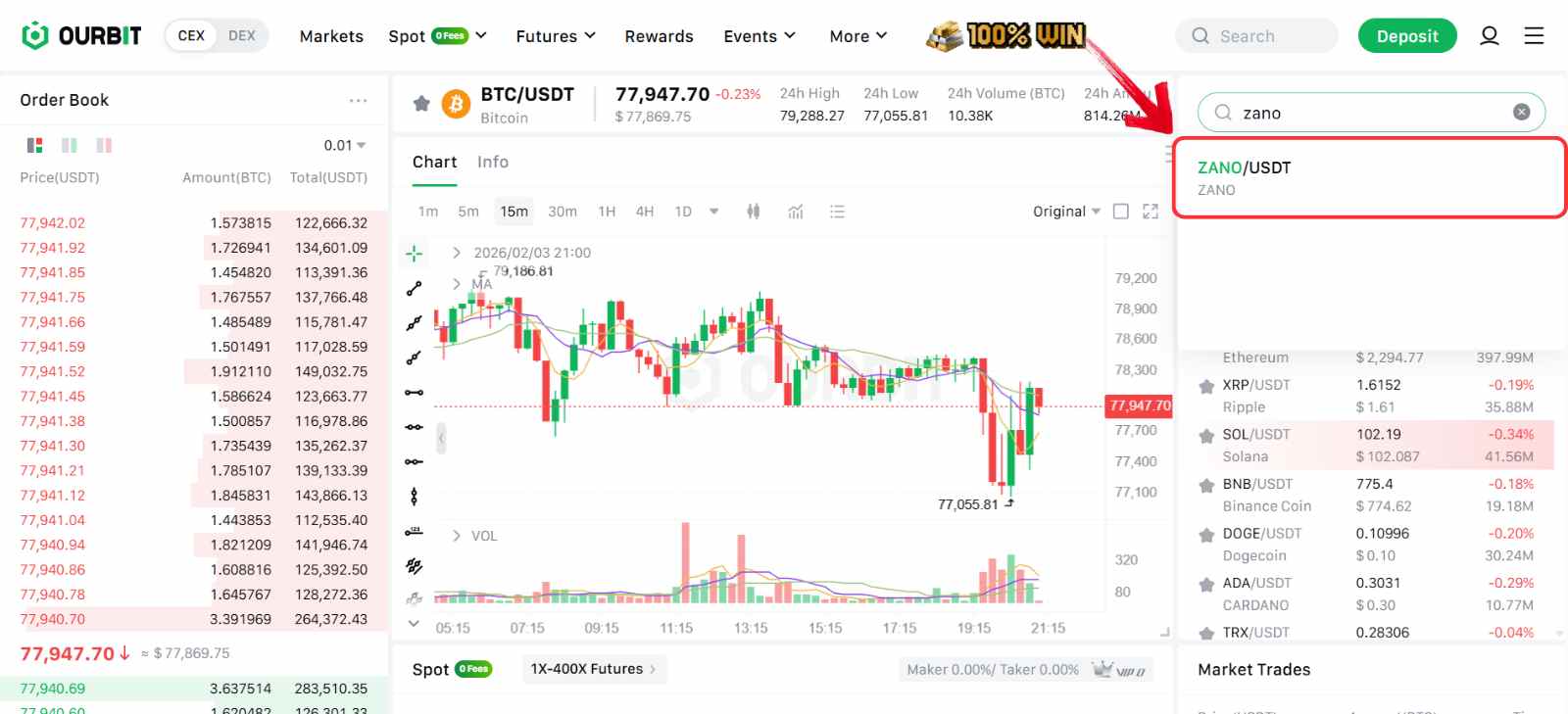
Schritt 3: Innerhalb der Spot-Oberfläche verwenden Sie die Suchleiste auf der rechten Seite. Geben Sie Folgendes ein: Zano und wählen Sie die ZANO/USDT Handelspaar.
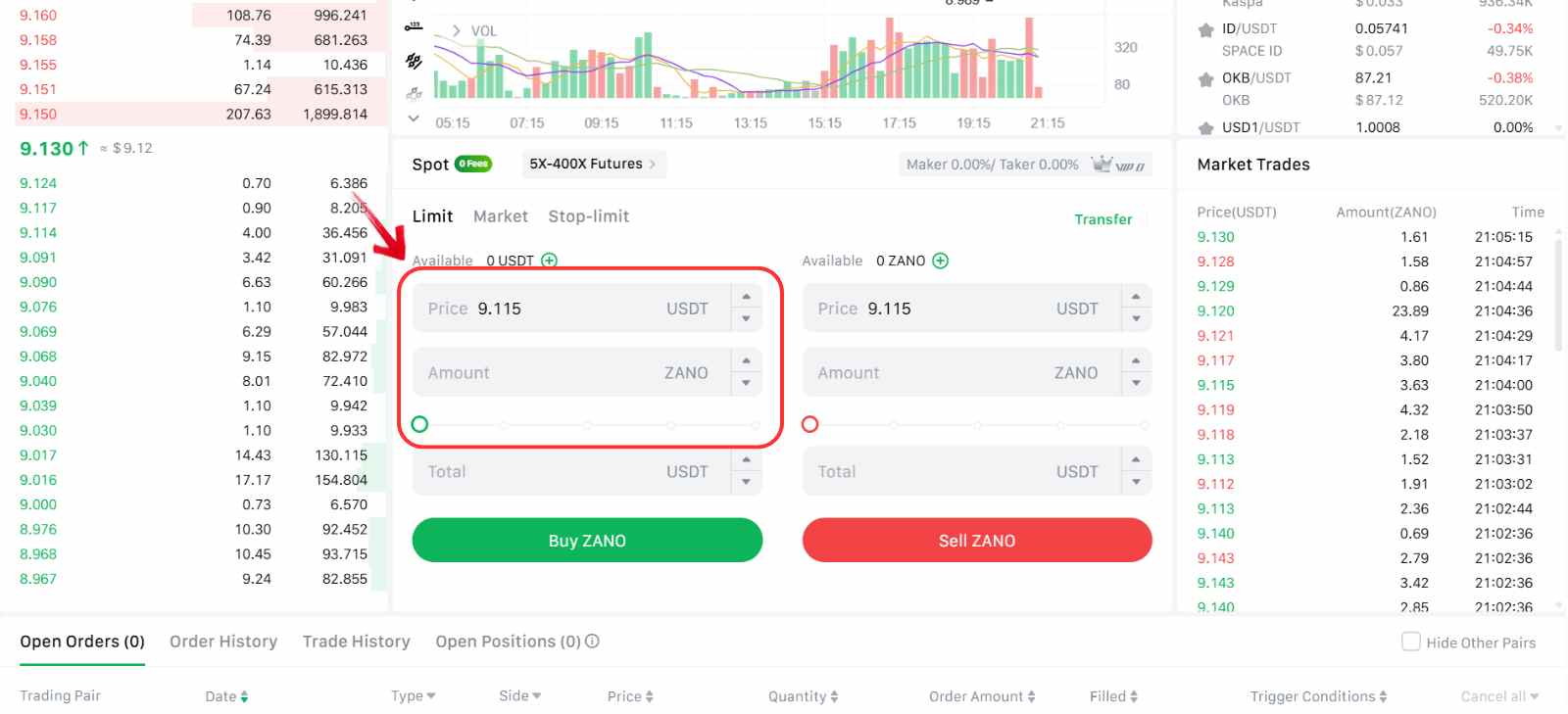
Schritt 4: Scrollen Sie nach unten zum Bestellbereich und wählen Sie die gewünschte Bestellart aus. Sie können eine Bestellung aufgeben. Markt Bestellung für einen Sofortkauf oder eine Einschränkung Bestellen Sie zum von Ihnen gewählten Preis.
Schritt 5: Geben Sie die Betrag Geben Sie den Betrag an, den Sie in USDT verwenden möchten, oder passen Sie den Prozentregler an, um einen Teil Ihres verfügbaren Guthabens zuzuweisen.
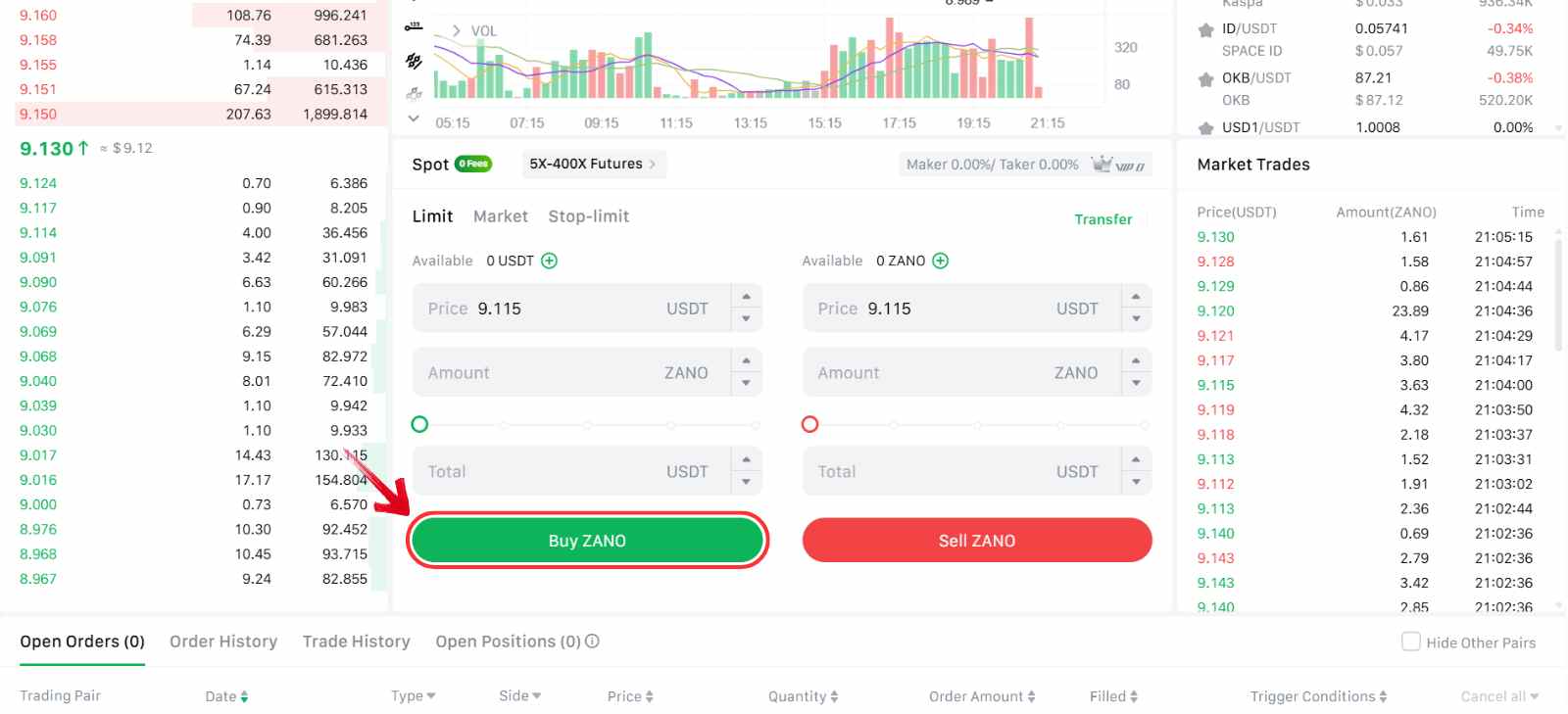
Schritt 6: Klicken Sie auf ZANO kaufen Um den Handel zu bestätigen, gehen Sie wie folgt vor: Sobald die Order ausgeführt wurde, erscheinen Ihre ZANO-Token in Ihrer Spot-Wallet.
Gebühren beim Kauf von Zano auf Ourbit
Ourbit wendet ein gebührenfreies Spot-Trading-Modell an, daher fallen beim Kauf von ZANO keine Maker- oder Taker-Gebühren an. Unabhängig davon, ob Sie eine Market- oder Limit-Order platzieren, fließt Ihr voller USDT-Betrag ohne Gebührenabzüge direkt in den Kauf.
So übertragen Sie $ZANO auf eine Web3-Wallet (Cake Wallet)
Um das Zano-Netzwerk zu nutzen, muss ZANO in einer kompatiblen Web3-Wallet gespeichert sein. Der Token wird für private Überweisungen, den Umgang mit vertraulichen Vermögenswerten und die Nutzung der Smart-Contract-Funktionen des Netzwerks benötigt.
Kuchen Brieftasche Cake Wallet ist eine der unterstützten Privacy Wallets für Zano und ermöglicht die direkte Interaktion mit dem Netzwerk. Nach der Übertragung Ihrer ZANO von der Börse zu Cake Wallet können Sie diese für private Transaktionen, Vermögensverwaltung und andere On-Chain-Aktivitäten innerhalb des Zano-Ökosystems nutzen.
Nachfolgend sind die Schritte zum Übertragen von ZANO von einer Börse in die Cake Wallet mithilfe des Zano-Netzwerks aufgeführt.
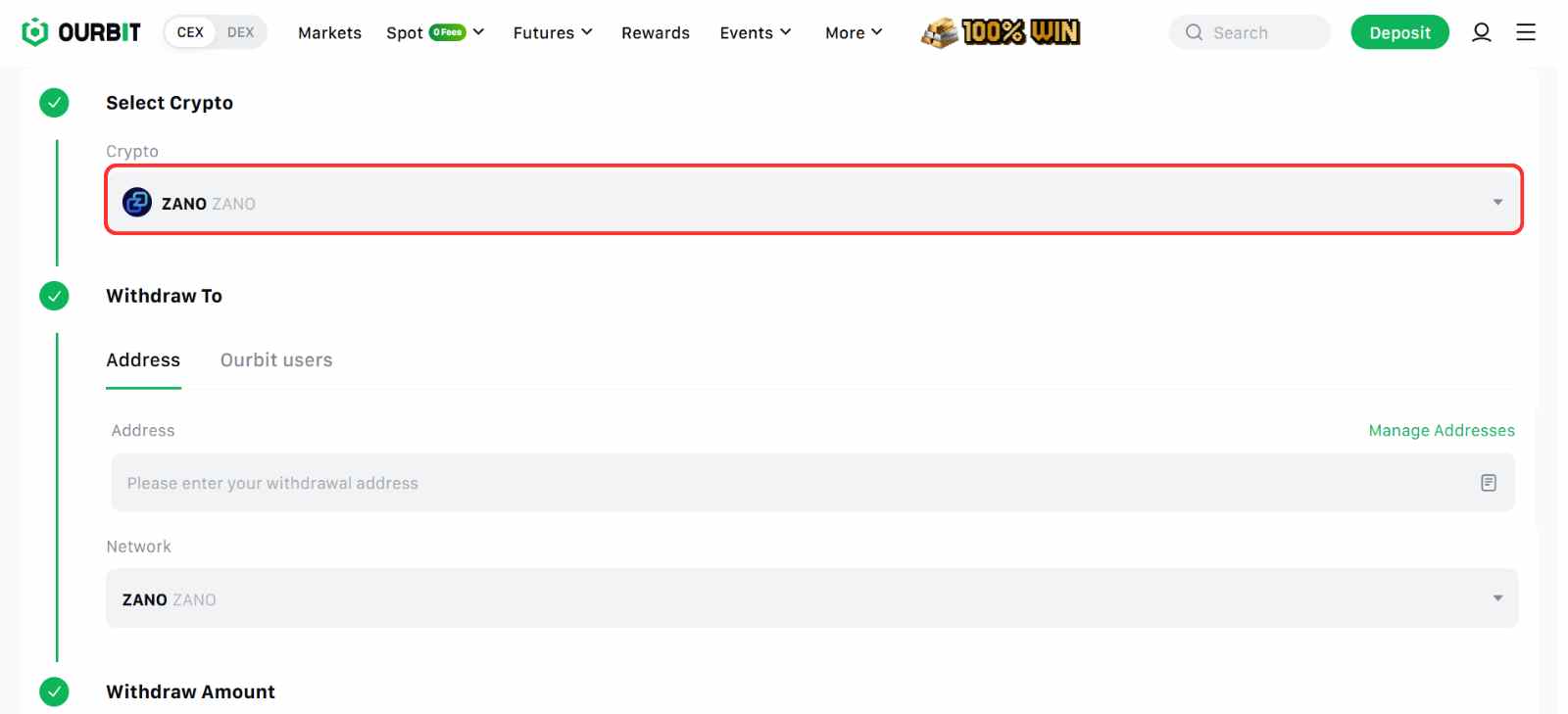
Schritt 1: Öffnen Sie in Ihrem Ourbit-Konto die Widerruf Abschnitt, und wählen Sie Zano als das abzuhebende Vermögen.
Schritt 2: Geben Sie Ihre Zano-Wallet-Adresse Kopieren Sie die Empfangsadresse aus Cake Wallet und fügen Sie sie in das entsprechende Feld ein. Entnahmefeld auf Ourbit.
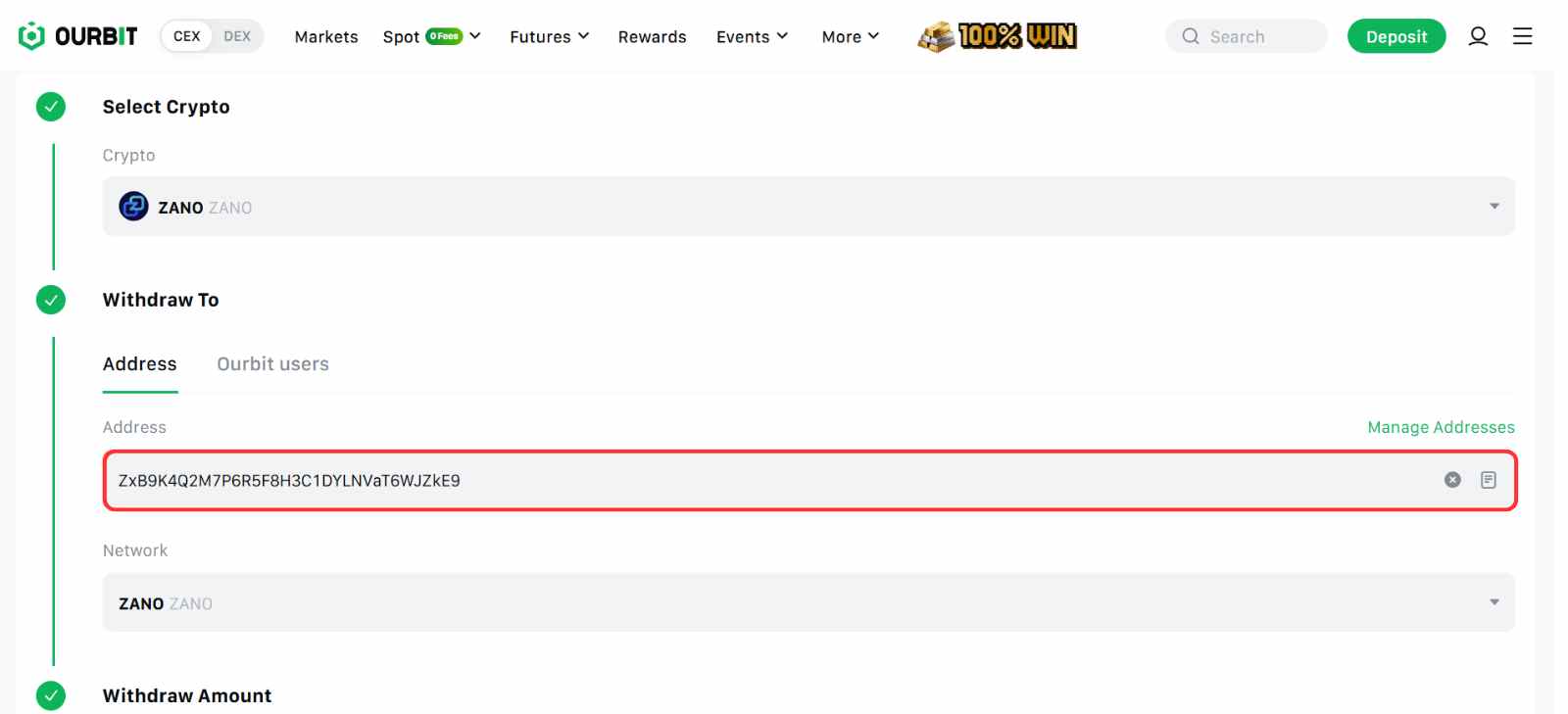
Schritt 3: Wähle aus Zano-Netzwerk um sicherzustellen, dass die Auszahlung korrekt abgewickelt wird.
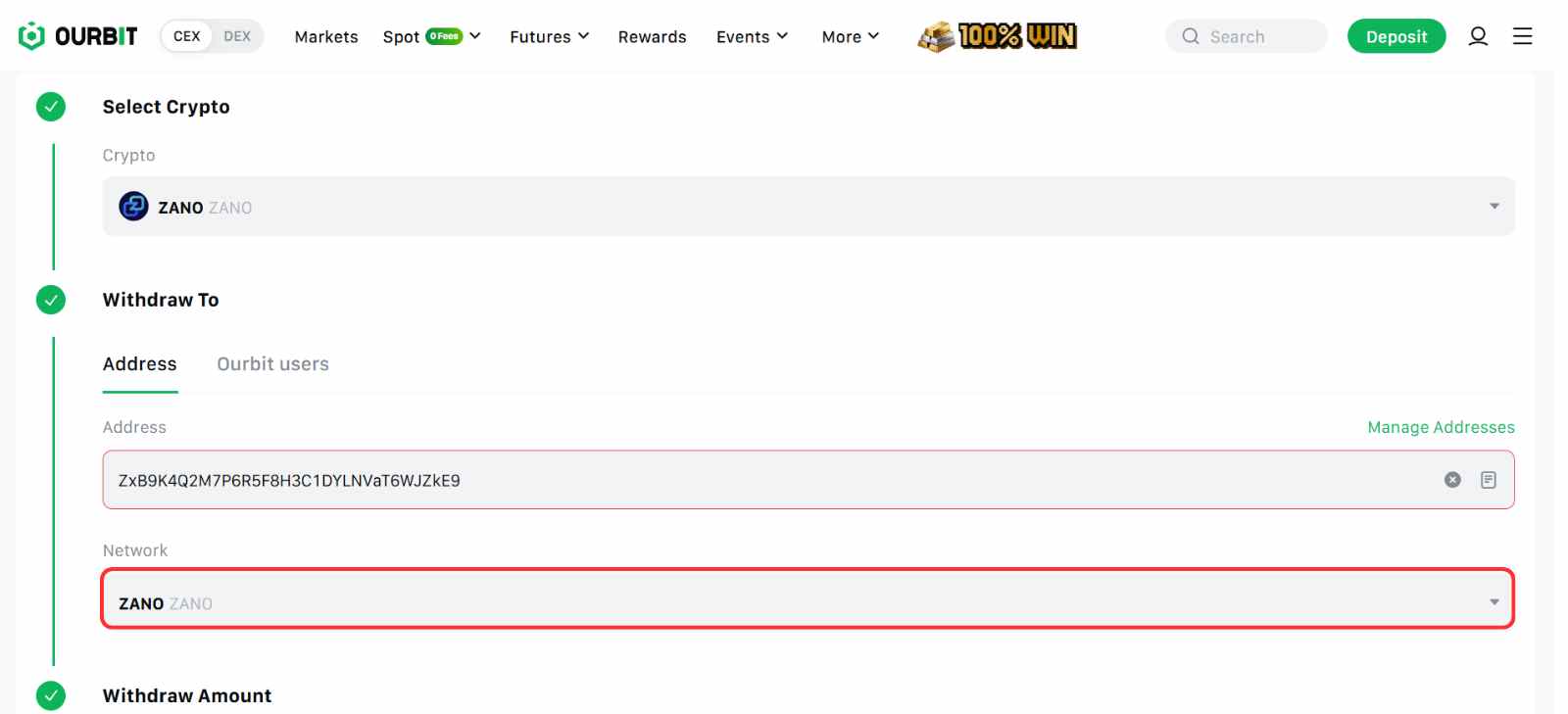
Schritt 4: Geben Sie den ZANO-Betrag ein, den Sie senden möchten, und klicken Sie dann auf Absenden um die Auszahlung auf Ihr Cake Wallet abzuschließen.
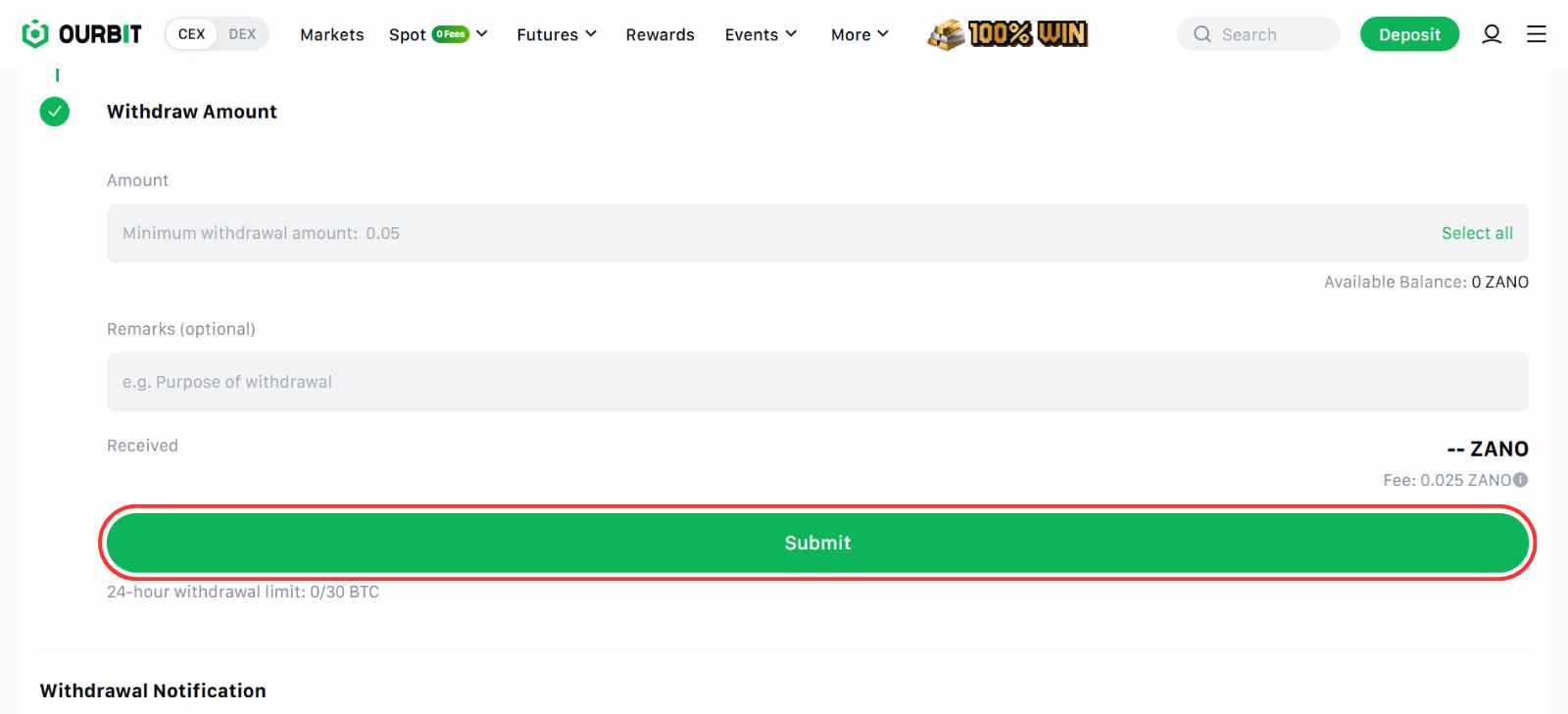
Nach der Auszahlung von ZANO können Sie die Transaktion über die offizielle Website überwachen. Zano Block-ExplorerDamit können Sie überprüfen, ob die Überweisung verarbeitet und Ihrem Wallet gutgeschrieben wurde.
Zano erklärt
Zano ist eine Blockchain, die um die Datenschutz-Erzählung Zano ist so konzipiert, dass Transaktionen und Kontostände standardmäßig verborgen bleiben. Im Gegensatz zu transparenten Blockchains, bei denen jeder die Wallet-Aktivitäten einsehen kann, zeigt Zano lediglich an, dass eine Transaktion stattgefunden hat, ohne Betrag, Absender, Empfänger oder gar die Art des Vermögenswerts preiszugeben.
Es fungiert als Layer-1-Blockchain, auf der Entwickler datenschutzorientierte Anwendungen, Token und Smart Contracts erstellen können. Funktionen wie vertrauliche Vermögenswerte, Treuhandverträge und lesbare Aliase machen es nicht nur für private Zahlungen, sondern auch für den täglichen Gebrauch geeignet.

Das Netzwerk kombiniert Proof-of-Work und Proof-of-Stake für hohe Sicherheit, während seine Kerntechnologie auf dem CryptoNote-Protokoll basiert – derselben Grundlage, die auch andere bedeutende Privacy Coins nutzen. Dadurch bietet Zano ein hohes Maß an Datenschutz und ein flexibles Ökosystem für Nutzer und Entwickler.
Fazit
Für die meisten Leser war die Wahl letztendlich eine Plattform, die niedrige Kosten bei gleichzeitig zuverlässiger Liquidität und einer einfachen Benutzeroberfläche bietet. Daher war Ourbit für den Kauf von ZANO die beste Option. Dennoch lohnt es sich, Börsen hinsichtlich Gebühren, Sicherheit und zusätzlichen Funktionen zu vergleichen. Wenn Sie planen, Token längerfristig zu halten, können Staking-Optionen im Laufe der Zeit ebenfalls einen Mehrwert bieten. Weitere Informationen finden Sie in unserem AZERO-Kaufberatung wenn Sie andere Small Caps im Kontext des Datenschutzes erkunden.
Häufig gestellte Fragen
1. Benötige ich KYC-Daten, um ZANO zu kaufen?
Das hängt von der jeweiligen Börse ab. Einige Plattformen verlangen eine vollständige Identitätsprüfung, während andere eine optionale KYC-Prüfung mit eingeschränkten Funktionen anbieten.
2. Wozu wird ZANO verwendet?
ZANO ist der native Token des Zano-Datenschutznetzwerks. Er wird verwendet, um Transaktionsgebühren zu bezahlen, Gelder privat zu überweisen und mit vertraulichen Vermögenswerten und Smart-Contract-Funktionen zu interagieren.
3. Welche Wallet unterstützt ZANO?
Cake Wallet ist eine der wichtigsten Wallets, die das Zano-Netzwerk unterstützen. Sie ermöglicht das Speichern, Senden und Empfangen von ZANO unter Nutzung der Datenschutzfunktionen.
4. Kann ich ZANO mit Fiatwährung kaufen?
Die meisten Börsen listen ZANO gegen USDT oder andere Kryptowährungspaare. Möglicherweise müssen Sie USDT zuerst mit Fiatgeld kaufen und es dann zum Kauf von ZANO verwenden.




