



- •Создание резервной копии вашего кошелька Rabby — лучший способ предотвратить потерю учетной записи в случае утери устройства.
- •Надежный пароль и биометрическая блокировка обеспечивают дополнительный уровень безопасности вашего кошелька.
- •Чтобы избежать мошенничества, всегда скачивайте Rabby с официального сайта.
Большинство взломов криптовалютных кошельков связаны с скомпрометированными сид-фразами или неправильным управлением ключами. Кошелек Rabby не является исключением: по мере роста его пользовательской базы увеличивается и количество подобных ошибок. Если ваш кошелек не защищен должным образом, одна ошибка, неправильная ссылка или потеря устройства могут стоить вам всего. Однако, следуя советам из этой статьи, вам не придется беспокоиться о взломе вашей учетной записи из-за нарушений безопасности. В этом руководстве простыми и понятными шагами объясняется, как защитить и создать резервную копию вашего кошелька Rabby.
Скачайте официальное приложение Rabby Wallet.
Ваш путь к безопасности начинается с момента загрузки кошелька. Для надлежащей защиты вашей учетной записи убедитесь, что вы загрузили приложение или расширение для браузера Rabby Wallet с официального сайта. Сайт кошелька Rabby.
Этот простой шаг защитит вас от поддельных приложений и вредоносных расширений, которые поджидают возможности украсть ваши средства или раскрыть вашу секретную фразу. Тщательно изучите процесс загрузки кошелька Rabby, чтобы избежать ошибок и сэкономить ценное время.
Как обезопасить свой кошелек Rabby
Rabby создан для обеспечения безопасности благодаря своей некастодиальной структуре и расширенным функциям, таким как пакетное аннулирование и предварительный просмотр транзакций. Однако вы также можете добавить дополнительные уровни защиты к своему кошельку Rabby, чтобы еще больше гарантировать его безопасность. Вот как защитить свой аккаунт в кошельке Rabby:
Установите надежный пароль
Ваш пароль защищает ваш кошелек на вашем текущем устройстве. Убедитесь, что ваш пароль трудно угадать и к нему невозможно получить доступ посторонним. Используйте не менее 8-12 символов, сочетая заглавные и строчные буквы, цифры и символы. Выполните следующие шаги, чтобы защитить свою учетную запись кошелька Rabby:
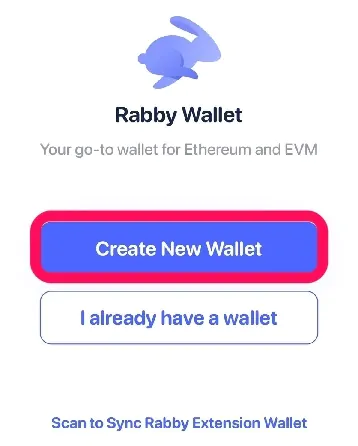
Шаг 1: После установки откройте приложение Rabby Wallet. Нажмите на Создать новый кошелек or у меня уже есть кошелек импортировать.
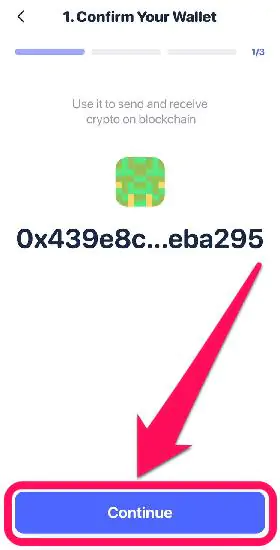
Шаг 2: Отобразится адрес кошелька, связанный с вашей сид-фразой. Нажмите Продолжить продолжать.
Шаг 3: Когда появится запрос, создайте уникальный пароль для своей учетной записи. Убедитесь, что его сложно угадать, но вы сможете его легко запомнить. Затем подтвердите пароль и нажмите кнопку. Продолжить.
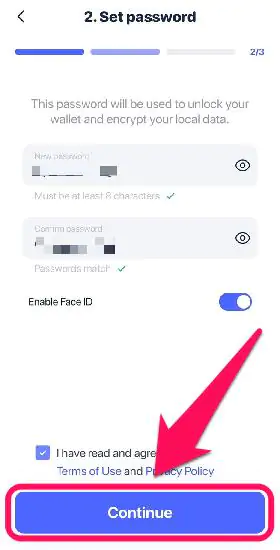
Шаг 4: Rabby автоматически сохраняет пароль, и он понадобится вам каждый раз, когда вы попытаетесь получить доступ к своей учетной записи на этом устройстве.
Добавьте дополнительную безопасность: пароль с Touch ID или Face ID или без них
Хотя это и необязательно, добавление биометрических ключей к вашей учетной записи — хороший способ предотвратить несанкционированный доступ. Мы рекомендуем выбрать пароль в сочетании с биометрической идентификацией/сенсорным считыванием для упрощения доступа и повышения безопасности. Для этого выполните следующие шаги:
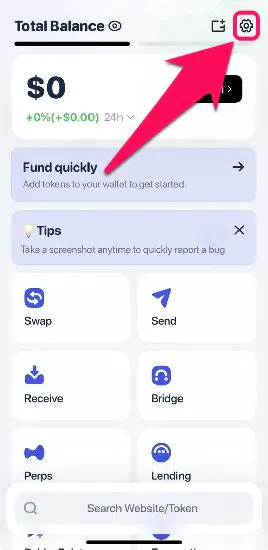
Шаг 1: Нажмите Настройки значок в правом верхнем углу мобильного приложения.
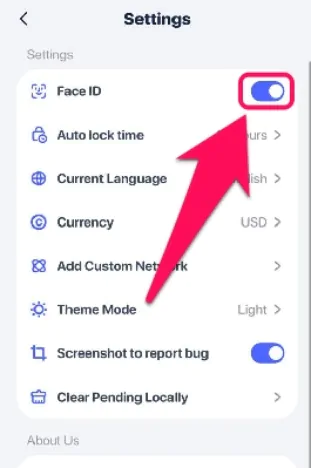
Шаг 2: Включите «Face ID или включить распознавание отпечатков пальцев функция для активации биометрического пароля.
Как сделать резервную копию своего кошелька Rabby
Как и во многих кошельках с самостоятельным хранением, пользователи Rabby имеют полный контроль над своими сид-фразами. Ваша сид-фраза или секретная фраза восстановления (SRP) — единственный способ получить доступ к кошельку, если вы потеряете устройство или забудете пароль. Поэтому резервное копирование сид-фразы вашего кошелька крайне важно.
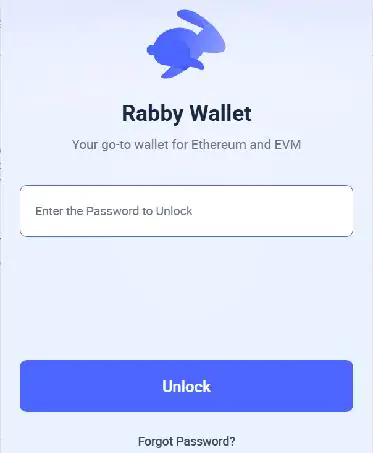
Шаг 1: Откройте приложение Rabby Wallet и войдите в свой аккаунт.
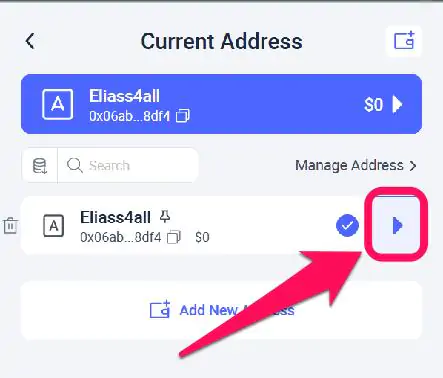
Шаг 2: Нажмите на значок выбора кошелька и выберите учетную запись, которую хотите скопировать.
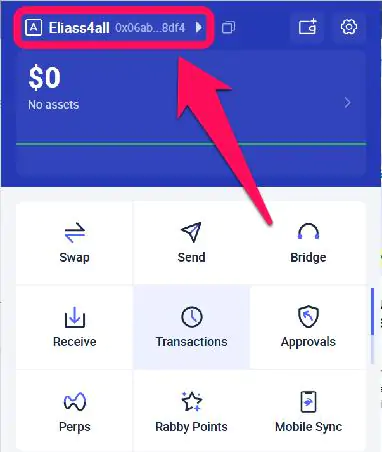
Шаг 3: Нажмите кнопку со стрелкой рядом с адресом счета, чтобы получить доступ к данным счета.
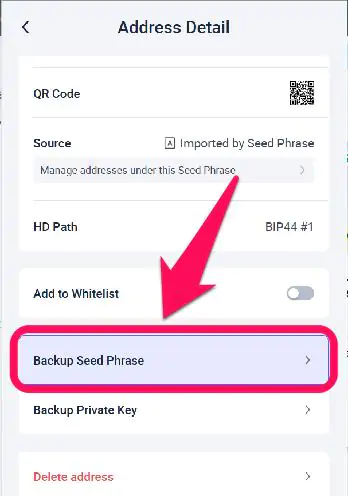
Шаг 4: Далее прокрутите вниз и выберите Резервная фраза-семя.
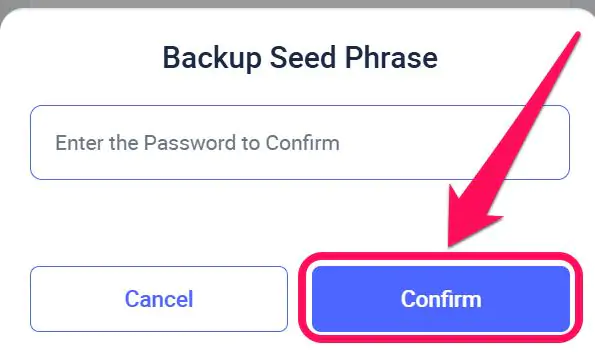
Шаг 4: Введите свой пароль/ключ доступа, чтобы получить доступ к своему SRP, затем запишите его в автономном режиме и надежно сохраните.
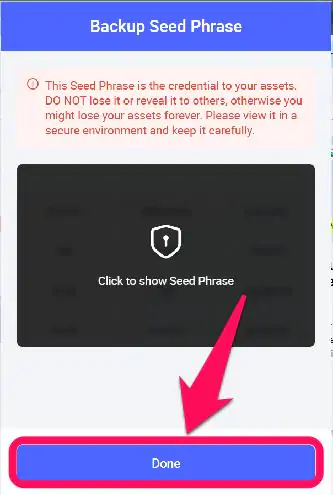
Шаг 5: Нажмите на размытую область, чтобы отобразить вашу сид-фразу, и нажмите «Готово» после того, как вы ее введете.
Советы и хитрости
Защитить и создать резервную копию своего кошелька очень просто, и это гарантирует максимальную защиту учетной записи. Однако вы можете пойти еще дальше, следуя этим профессиональным советам для кошелька Rabby:
Храните свою сид-фразу и закрытые ключи в безопасности.
Ваша сид-фраза и приватные ключи — это важнейшие элементы вашего кошелька Rabby. Никогда не делитесь ими ни с кем без причины. Доступ к вашей сид-фразе означает беспрепятственный доступ ко всем кошелькам, созданным с использованием этой фразы.
Избегайте перехода на ненадежные веб-сайты.
Чтобы предотвратить фишинг и другие виды атак Web3, будьте осторожны при подключении своего кошелька к ссылкам. Избегайте подключения к подозрительно выглядящим и неофициальным децентрализованным приложениям (dApps), которые Rabby уже пометил как подозрительные.
Резюме
Кошелек Rabby Wallet всегда возлагает на вас ответственность за безопасность вашей учетной записи. Для защиты и резервного копирования вашего кошелька Rabby установите запоминающийся пароль для защиты вашего устройства и храните ваши SRP в безопасном автономном режиме для быстрого восстановления учетной записи. Если вы забудете свой пароль и потеряете доступ, он будет потерян навсегда, если у вас нет фразы восстановления. Мы обсудили все необходимые меры безопасности, включая проверку ваших SRP на предмет автономного хранения, в нашем руководстве по этому вопросу. установка и настройка Rabby Wallet.
Часто задаваемые вопросы (FAQ)
1. Могу ли я восстановить свой кошелек Rabby Wallet без фразы восстановления?
Нет. Если вы потеряете устройство и у вас не будет фразы восстановления, ваш кошелек и средства будут безвозвратно утеряны.
2. Безопаснее ли кошелек Rabby Wallet, чем обычные мобильные кошельки?
Rabby уделяет большое внимание предупреждениям о рисках транзакций и безопасности децентрализованных приложений, что делает его более безопасным для взаимодействия в многоцепочечных DeFi-сетях при правильном использовании.
3. Как часто следует делать резервные копии своего кошелька?
Резервную копию вашего кошелька нужно создать всего один раз. Убедитесь, что резервная копия остается в безопасности, читаема и доступна при необходимости.




