



- •Изменение названия кошелька делает ваш криптовалютный портфель в кошельке Rabby более организованным и удобным в использовании.
- •В Rabby Wallet пользователи могут переименовывать кошельки без ограничения по количеству символов.
- •Переименование выполняется для каждого устройства отдельно и не синхронизируется автоматически между устройствами.
Пользователи Rabby Wallet часто сталкиваются с проблемой определения того, в каком кошельке хранится конкретная криптовалюта, поскольку их учетные записи не имеют уникальных названий. Чтобы предотвратить подобные проблемы, Rabby в последних обновлениях добавил функцию переименования учетных записей. С ее помощью вы можете присваивать своим учетным записям уникальные имена для более удобной навигации и организации вашего криптовалютного портфеля. Прочитайте эту статью до конца, чтобы узнать, как изменить название Rabby Wallet в расширении для браузера и мобильном приложении.
Можно ли изменить название своего кошелька в Rabby Wallet?
Да, вы можете изменить название кошелька в Rabby Wallet, используя функцию редактирования названия в приложении. Эта настройка улучшает работу с Rabby Wallet, делая все кошельки более удобными для распознавания и организации.
Самое главное, что изменение имени через настройки имени в Rabby Wallet не влияет на ваши приватные ключи, адреса или криптовалюту. Rabby Wallet даже позволяет дополнительно настраивать его, например, изменение языка если английский не является вашим предпочтительным языком.
Шаги по переименованию кошелька в Rabby Wallet
Изменить это легко. Рэбби кошелек Имя можно изменить как в расширении для браузера, так и в мобильном приложении. Кроме того, настройка переименования в Rabby Wallet зависит от устройства, поэтому, если вы хотите использовать одно и то же имя на нескольких устройствах, вам необходимо переименовать его на каждом устройстве, где подключен ваш кошелек.
Расширение браузера
Ниже описаны шаги по переименованию кошелька Rabby Wallet для пользователей, управляющих криптовалютой через расширение Rabby Wallet для браузера:
Шаг 1: Откройте и войдите в систему. Расширение Rabby Wallet В Вашем браузере.
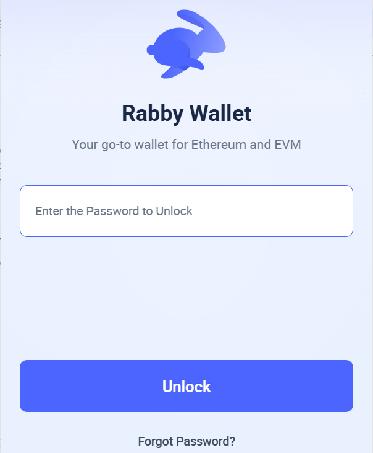
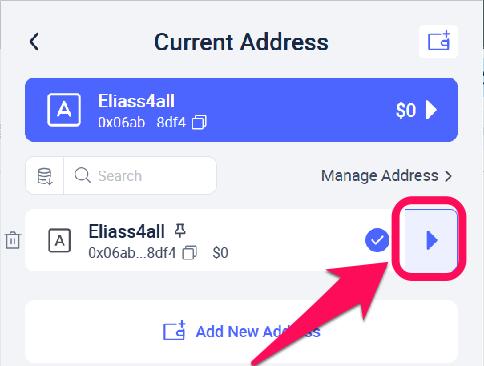
Шаг 2: Нажмите Выбор учетной записи Значок позволяет просмотреть все учетные записи, связанные с кошельком.

Шаг 3: Выберите учетную запись, которую хотите переименовать, нажав на стрелку рядом с ней.
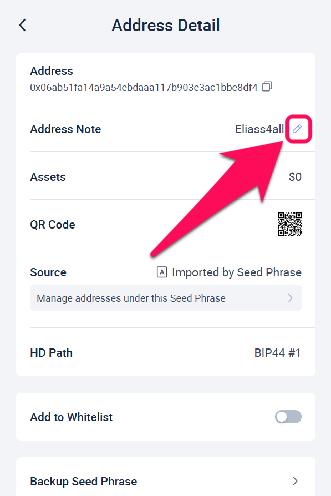
Шаг 4: Нажмите на значок карандаша рядом с пунктом «Адресная заметка», чтобы переименовать её.
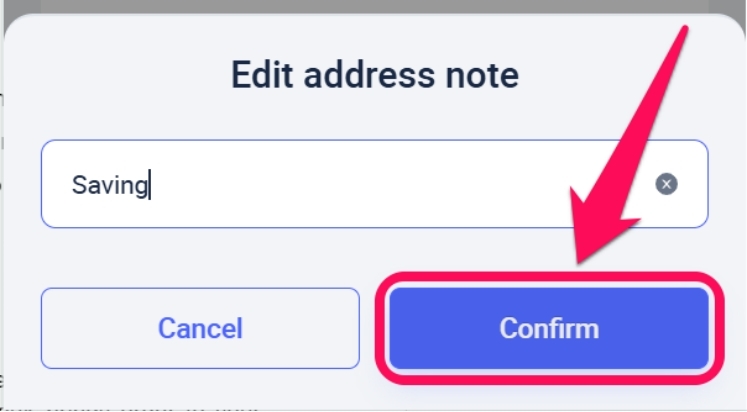
Шаг 5: Введите новое имя, которое вы хотите присвоить этому конкретному адресу. Наконец, нажмите на кнопку. подтвердить чтобы автоматически сохранять внесенные изменения.
Мобильное приложение
Выполните следующие шаги, чтобы переименовать кошелек Rabby Wallet в мобильном приложении.
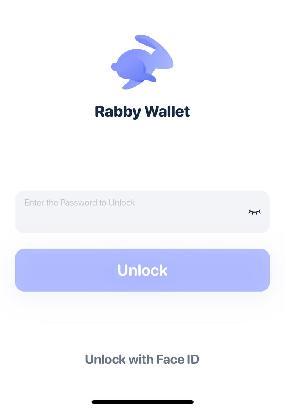
Шаг 1: Запустите мобильное приложение Rabby и войдите в свой кошелек.
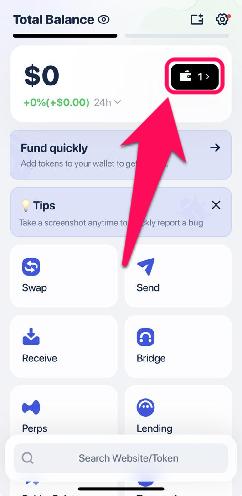
Шаг 2: Нажмите на значок кошелька, чтобы открыть поле выбора учетной записи.
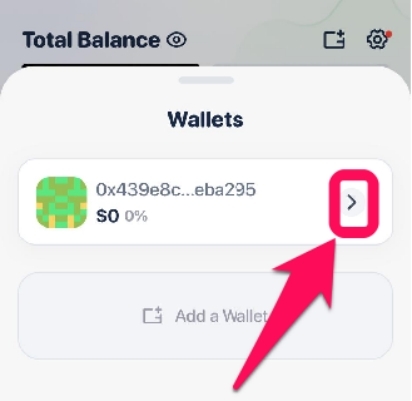
Шаг 3: Выберите учетную запись, которую хотите переименовать, затем нажмите на значок стрелки рядом с ней.
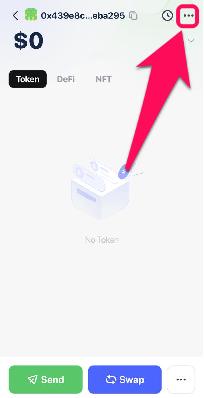
Шаг 4: На открывшейся странице нажмите на три точки или значок шестеренки в правом верхнем углу, чтобы просмотреть данные своей учетной записи.
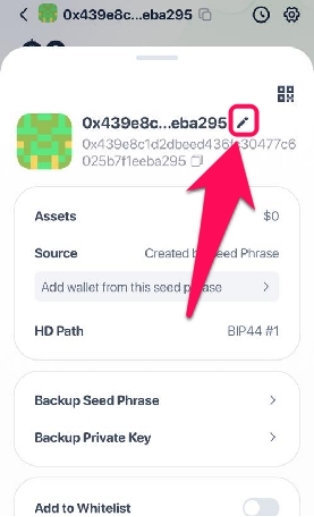
Шаг 5: Чтобы переименовать учетную запись, нажмите на значок карандаша рядом с ее адресом.
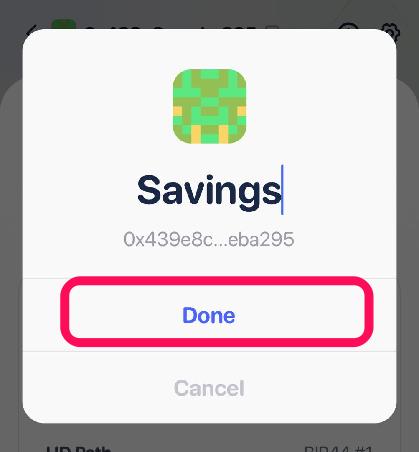
Шаг 6: Введите новое имя для учетной записи и вернитесь на главную страницу, чтобы сохранить изменения.
Резюме
Управление несколькими портфелями в Rabby становится более организованным, когда у каждого аккаунта есть уникальное название для удобства распознавания. Эта простая настройка персонализации вносит порядок и добавляет метки, такие как «сбережения», «расходы», «торговля» и другие, в ваш аккаунт, делая переключения плавными и безошибочными. После того, как вы успешно измените название кошелька Rabby, ознакомьтесь с дополнительными руководствами по персонализации, например, Изменение отображаемой фиатной валюты в кошельке Rabby. чтобы упростить расчет баланса ваших активов.
Часто задаваемые вопросы (FAQ)
1. Существует ли ограничение на количество символов в названиях кошельков в Rabby?
Нет, при переименовании учетной записи Rabby Wallet вы можете использовать неограниченное количество символов. Однако мы рекомендуем ограничиться 20 символами для удобства идентификации.
2. Могут ли другие люди видеть пользовательское имя, которое я дал своему кошельку?
Нет, другие люди не могут его увидеть, потому что имя, которое вы присваиваете своему кошельку, хранится локально в расширении вашего браузера или мобильном приложении. Когда вы отправляете транзакцию или взаимодействуете с децентрализованным приложением (DApp), имя не отображается в блокчейне. Для остального мира ваша учетная запись остается идентифицированной только по ее публичному адресу, если вы не связали ее с общедоступной службой именования, такой как ENS (.eth).
3. Может ли переименование моего кошелька Rabby Wallet решить распространенные проблемы с учетной записью?
Изменение имени учетной записи не влияет на какие-либо проблемы, возникающие в блокчейне, поскольку это всего лишь косметическая функция и возможность персонализации.




